FXS and FXO Ports in Analog Gateway Deployment for IP Voice Migration
FXS and FXO ports play different roles in analog gateways, helping enterprises connect analog phones, fax machines, PSTN lines and legacy PBX systems to modern IP PBX and SIP voice networks.
Becke Telcom
Enterprise voice systems rarely move from analog telephony to IP communication in one step. Many organizations still need to keep analog phones, fax machines, elevator phones, emergency phones, PSTN lines or older PBX equipment while introducing IP PBX, SIP trunks, cloud communication or unified voice platforms. In this type of hybrid deployment, FXS and FXO ports may look like small interfaces, but they decide whether calls can be made, calls can be received, phones can ring and backup routes can remain available.
FXS and FXO ports often use similar RJ11-style connectors, so they are easy to confuse during installation. The important difference is not the appearance of the connector, but the electrical role behind the port. One side provides line power, dial tone and ringing voltage. The other side receives those signals and behaves like a telephone terminal. If the two sides are connected incorrectly, the system may have no dial tone, failed inbound calls, unstable fax behavior, unavailable PSTN backup or even interface damage.
For system integrators, IT teams and telecom engineers, understanding FXS and FXO is the first step before configuring SIP registration, call routing or PBX dial plans. Correct port selection keeps analog resources usable while the organization gradually moves toward an IP-based voice network.
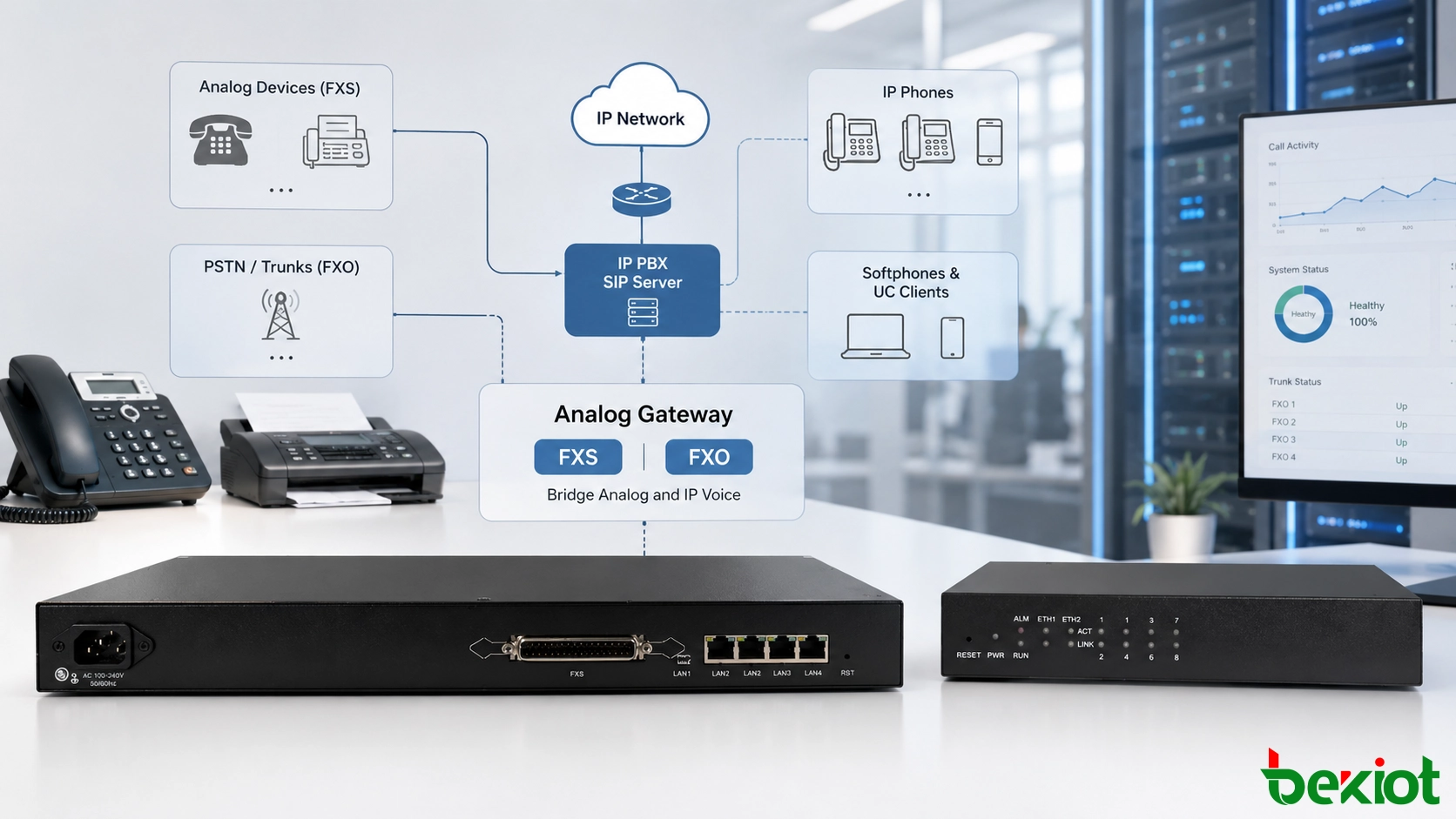
FXS and FXO interfaces help analog endpoints, PSTN lines and legacy PBX resources work with a modern IP PBX environment.
Start by Defining the Port Role
Many analog voice faults are not caused by SIP accounts, codecs, firewall rules or PBX routing. They begin with a basic wiring mistake: the wrong analog interface is connected to the wrong side of the circuit. Because FXS and FXO ports can look similar from the outside, every cable should be identified before it is plugged into the gateway.
The rule is simple. FXS is the service side. It provides the electrical conditions that an analog terminal needs. FXO is the terminal side. It receives those electrical signals from a line source. A correct connection always pairs a power-providing side with a power-receiving side. FXS-to-FXS and FXO-to-FXO connections are wrong because both ends are trying to perform the same role.
Before installation, the project team should classify each analog cable. Does it lead to an analog telephone, fax machine, alarm panel, elevator phone, door phone, PSTN line, carrier copper line or old PBX extension? This simple inventory can prevent repeated troubleshooting after cutover.
What an FXS Port Does
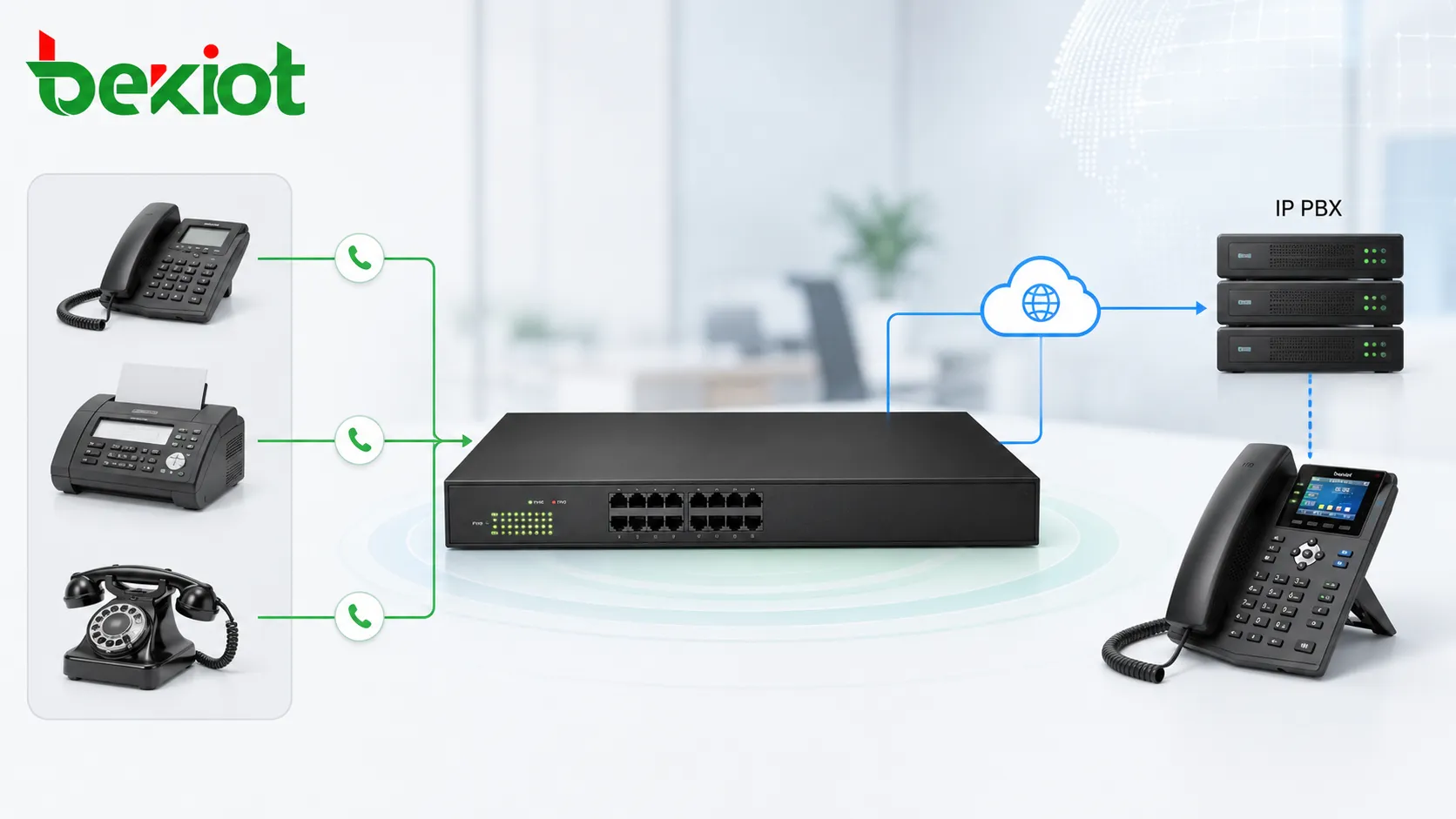
FXS stands for Foreign Exchange Station. In practical deployment, an FXS port behaves like a traditional telephone wall socket. It provides line current, dial tone and ringing voltage to an analog terminal. When an analog phone is connected to an FXS port, the phone can hear a dial tone, ring on incoming calls and work as an extension through the analog gateway.
FXS ports are used to connect ordinary analog telephones, fax machines, modems, elevator phones, emergency phones, door phones, alarm panels and other analog terminal devices. These devices do not provide line power by themselves. They expect the gateway or PBX side to supply the line condition required for operation.
In many enterprise environments, FXS ports help protect existing investment. A company may already have working analog devices installed in offices, warehouses, hotels, campuses, hospitals or industrial buildings. By using FXS gateways, these endpoints can remain in service while the main voice platform is upgraded to IP PBX or SIP-based communication.
What an FXO Port Does
FXO stands for Foreign Exchange Office. In real projects, an FXO port behaves like an analog telephone. It receives line power, dial tone and ringing signal from a PSTN line, carrier copper line or analog extension port from an older PBX. The FXO port can detect ringing, go off-hook, hang up and send dialing digits over the analog line.
FXO ports are used when a gateway needs to connect to an outside analog line or to an analog line source provided by another system. For example, if a company wants an IP PBX to use existing PSTN lines for inbound and outbound calls, those PSTN lines should be connected to FXO ports.
FXO is also useful during conservative migration. Some sites cannot remove copper lines immediately because public numbers are still in use, emergency call policies depend on traditional lines or local SIP trunk migration is not ready. FXO gateways allow these lines to be added to the new voice system without interrupting daily communication.
Related product: Analog Gateway — Becke Telcom analog gateways connect analog telephones, fax machines, PSTN trunks and legacy PBX ports to an IP voice system with flexible FXS and FXO deployment options.
Analog Gateway Architecture for IP Voice Migration
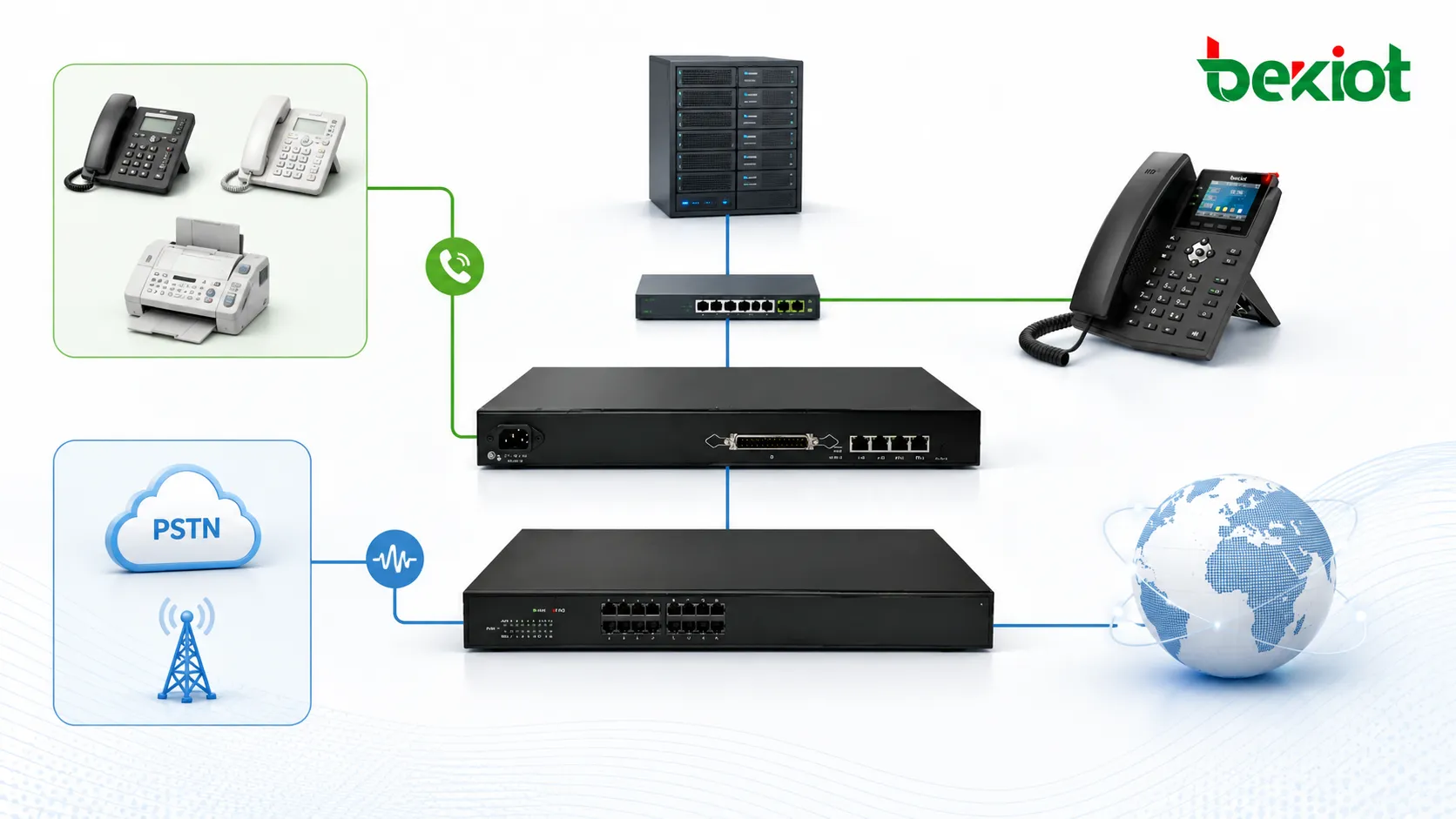
In a modern voice migration project, the analog gateway becomes the bridge between legacy analog resources and the new IP communication platform. FXS ports connect analog endpoints and convert them into IP extensions. FXO ports connect PSTN lines or old PBX ports and convert them into SIP-accessible call routes.
This architecture allows organizations to migrate step by step. Existing phones, fax machines, emergency lines, branch office wiring and analog carrier lines can continue to work while the main call control moves to an IP PBX or SIP platform. This reduces replacement cost and avoids forcing every endpoint to change at the same time.
A good design separates analog endpoint access, outside line access and PBX routing logic into clear layers. The analog gateway handles electrical conversion and SIP signaling. The IP PBX manages extension numbers, call permissions, routing plans, voicemail, recording, call queues and trunk policies. The network layer provides VLAN, QoS, security and stability for IP voice traffic.
FXS ports are used when the gateway needs to power analog endpoints and convert them into IP extensions.
Common Application Scenarios
Keeping analog phones during a PBX upgrade
When an organization upgrades from a traditional PBX to an IP PBX, it may still have many analog telephones in offices, hotel rooms, warehouses, security rooms or production areas. Replacing every device at once may be unnecessary or too disruptive. An analog gateway with FXS ports can connect these phones to the IP PBX and allow them to continue working as extensions.
This is useful where existing cabling is difficult to replace or where analog phones still meet the service requirement. The gateway provides the analog interface, while the IP PBX handles numbering, call routing, permissions and centralized voice services.
Connecting fax machines to an IP voice system
Many companies still use fax machines for contracts, invoices, logistics forms, medical documents or government-related communication. These devices usually need an analog line interface. FXS ports can provide that connection and allow fax machines to be integrated into the IP voice environment.
Fax migration should be tested carefully. The project team should check line quality, codec settings, T.38 support and real document transmission. Fax is often more sensitive than ordinary voice, so a system that sounds clear for calls may still need adjustment before fax is stable.
Using PSTN lines as call routes
If a site still has analog PSTN lines from a telecom operator, those lines should connect to FXO ports. The analog gateway converts the PSTN lines into routes that can be used by the IP PBX. The PBX can then manage inbound calls, outbound dialing, call permissions and fallback routing from one platform.
This design is common in branch offices, small business sites, temporary offices, remote facilities and locations where SIP trunk migration has not been completed. It also helps organizations keep existing public numbers during a phased migration.
Building a backup path for critical calls
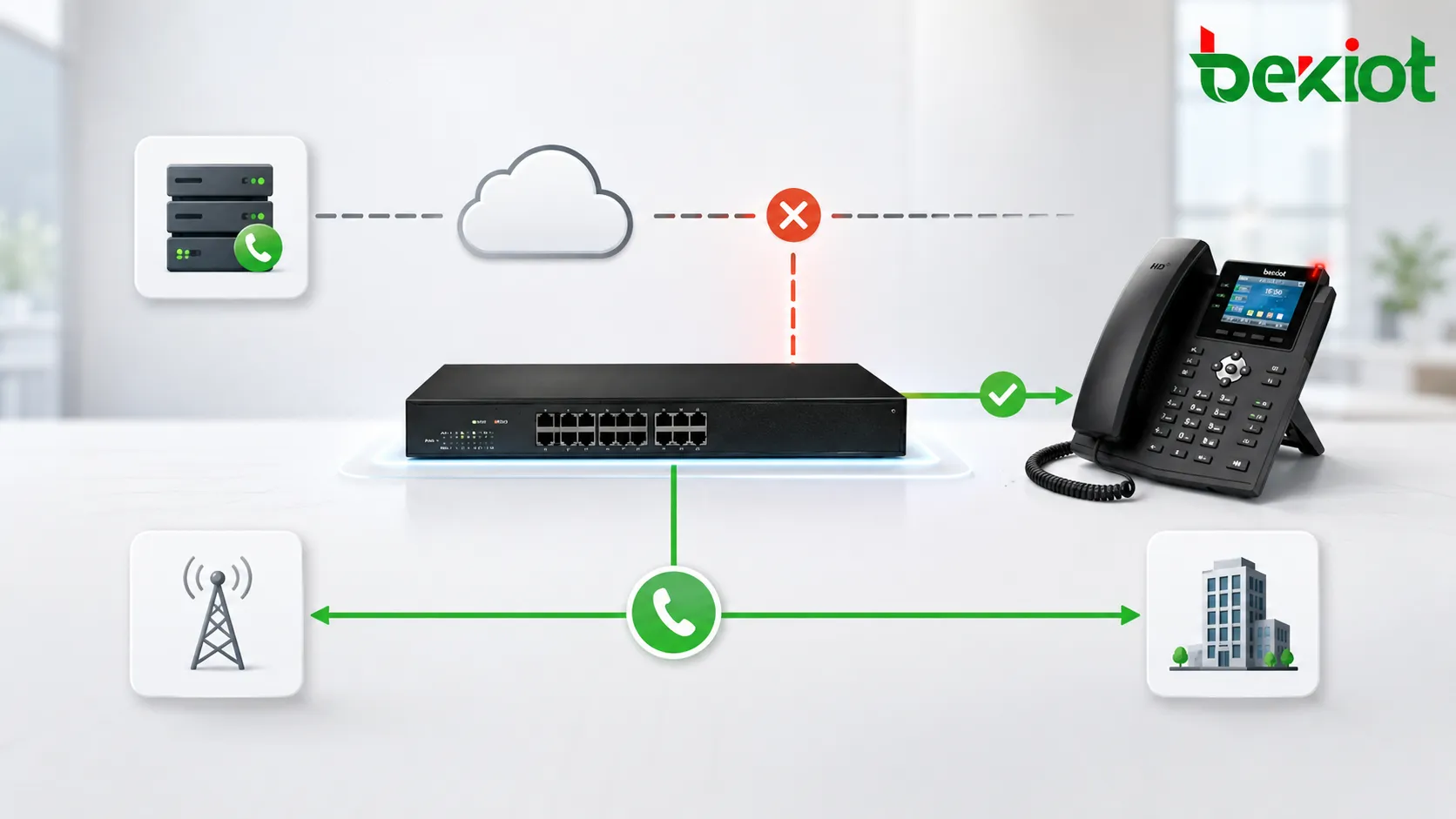
FXO ports can also provide backup call routes. Under normal conditions, calls may go through SIP trunks or the enterprise IP network. If the internet connection, SIP trunk, firewall or data link fails, selected calls can be routed through an FXO-connected PSTN line.
This backup design is valuable for hospitals, factories, campuses, public service sites, security centers and other environments where voice availability matters. Even one traditional analog line can provide an emergency path when IP connectivity is interrupted.
Interconnecting with an old PBX
During gradual migration, an older PBX may need to coexist with a new IP PBX. In many cases, the extension port of the old PBX behaves like an FXS source because it provides line power and dial tone to a telephone. To connect that old PBX extension into the new IP system, the gateway should use an FXO port.
This allows calls to be exchanged between old and new systems during the transition period. Organizations can preserve existing extensions, cabling and user habits while moving selected departments or sites to the new platform.
FXO ports can provide a traditional PSTN fallback route when IP trunks or internet links are unavailable.
Planning Port Capacity and Call Flow
Analog gateway planning should start with a real inventory. The project team should count how many analog phones, fax machines, alarm devices, elevator phones, door phones, PSTN lines and old PBX ports need to be retained. Each analog endpoint normally requires one FXS port. Each analog outside line or old PBX extension source normally requires one FXO port.
Capacity planning should also consider call concurrency. Eight analog phones do not always mean eight simultaneous calls are required, but each phone still needs its own FXS interface. Four PSTN lines connected through FXO ports normally allow up to four simultaneous outside calls. Understanding this difference helps avoid both under-provisioning and unnecessary hardware cost.
Call flow design is equally important. Inbound PSTN calls may need to ring an auto attendant, a reception extension, a queue or a group of phones. Outbound calls may need prefix rules, emergency call priority, least-cost routing or backup policies. These rules should be designed before installation so the analog gateway works as part of the whole communication system instead of becoming an isolated converter.
Wiring Mistakes to Avoid
Because FXS and FXO interfaces may look similar, installers should confirm the port label, gateway model, module type and cable destination before inserting the cable. A port marked as Phone, TEL or with a handset icon usually indicates FXS. A port marked as Line, CO or PSTN usually indicates FXO.
Wrong Connection
Typical Result
Reason
Correct Method
FXS to FXS
No normal line behavior; possible interface stress
Both sides try to provide power and signaling
Connect FXS to an analog phone, fax machine or terminal device
FXO to FXO
No dial tone and no usable call route
Both sides wait to receive line power
Connect FXO to a PSTN line, carrier analog line or old PBX extension port
FXS to digital system phone
The device may not work
Digital proprietary phones do not use standard analog FXS signaling
Confirm whether the endpoint is analog before connection
PSTN line to FXS
Abnormal line condition or failure
Both sides may provide line voltage
Connect PSTN lines to FXO ports
Port Selection Guide
The correct gateway is selected by counting what needs to be connected. A site with many analog phones needs enough FXS ports. A site with several PSTN lines needs enough FXO ports. A migration project may require a mixed gateway with both interface types.
Project Requirement
Recommended Port
Connected Object
Purpose
Connect analog telephones
FXS
Analog phone, fax machine, modem or emergency phone
Convert analog endpoints into IP extensions
Connect telecom operator analog lines
FXO
PSTN wall socket or carrier copper line
Use analog outside lines through the IP PBX
Connect an old PBX extension
FXO
Legacy PBX analog extension port
Create a route between old and new systems
Provide emergency call backup
FXO
Traditional analog PSTN line
Maintain calling during IP network failure
Commissioning Checklist
Before the system goes live, every analog port should be tested according to its real purpose. The project team should verify port type, cable label, connected endpoint, line source, extension number, trunk route, caller ID behavior, ringing behavior, inbound routing, outbound routing, DTMF dialing and call release status.
If FXO lines are used as backup routes, failover should be tested under simulated network failure conditions. The test should confirm that emergency or priority calls can still be placed when SIP trunks or internet connectivity are unavailable. For FXS endpoints, installers should confirm that analog phones ring correctly and that fax machines or special terminals behave as expected.
After commissioning, the final configuration should be documented. The records should include gateway IP address, SIP server address, authentication method, port mapping, number plan, routing table, failover policy, firmware version and physical cable labels. Good documentation makes future maintenance easier and reduces accidental changes during expansion.
Operational Management After Deployment
Analog gateways should be monitored like other network voice devices. Administrators should check registration status, line status, call logs, abnormal disconnects, port usage and alarm events. If a PSTN backup line is rarely used, it should still be tested regularly. A backup route that is never tested may fail exactly when it is needed most.
Firmware updates, configuration backups, password policies and network access control should also be included in the maintenance plan. Since analog gateways often connect old physical lines to modern IP systems, they sit at an important boundary between legacy infrastructure and digital communication services. Stable operation depends on both correct wiring and disciplined management.
Business Value for Enterprise Communication
A well-planned FXS and FXO solution helps organizations protect existing investment while modernizing the voice system. Instead of replacing every analog device immediately, companies can reuse working phones, fax machines, PSTN lines and old PBX connections through a controlled analog gateway architecture.
This approach is valuable for call centers, branch offices, hotels, factories, schools, hospitals, logistics sites, public service buildings and industrial facilities. It reduces migration risk, keeps essential services online and provides a practical bridge between legacy voice infrastructure and IP-based communication platforms.
For decision makers, the value is not only technical compatibility. A good analog gateway solution can reduce project cost, shorten migration time, protect existing numbers, support emergency fallback and simplify staged upgrades. For IT and telecom teams, it creates a manageable path from fragmented analog systems to centralized IP communication.
Final Notes
FXS and FXO ports are easy to overlook, but they are critical in analog gateway deployment. FXS powers analog endpoints and turns them into IP extensions. FXO receives analog line signals from PSTN lines or old PBX ports and turns them into routes for the IP PBX.
The best project result comes from clear port identification, realistic capacity planning, correct wiring, proper call flow design and careful commissioning. When these details are handled well, analog gateways allow enterprises to modernize voice communication without losing the value of existing analog devices and telephone lines.
FAQ
Can an analog gateway solve all problems on old copper lines?
No. An analog gateway can convert and manage the connection, but it cannot fully repair poor carrier line quality, water-damaged cables, grounding problems or unstable old wiring. Physical line testing is still necessary.
Why does a fax machine need special testing after migration?
Fax transmission is more sensitive than normal voice. Even if voice calls sound clear, fax may still fail because of codec settings, packet loss, delay or lack of proper fax support. Real fax testing should be included before project acceptance.
Should every branch office use the same number of FXS and FXO ports?
No. Port quantity should be based on actual devices and lines. A branch with many analog phones may need more FXS ports, while a branch that mainly keeps PSTN backup lines may need more FXO ports.
How can maintenance teams avoid future confusion?
Each port should be documented with its interface type, gateway port number, connected device or line, extension or trunk number, cable route and service purpose. Clear labeling reduces troubleshooting time.
When is a mixed FXS and FXO gateway suitable?
A mixed gateway is suitable when one site needs both analog endpoint access and PSTN line access. For larger systems, separate FXS and FXO gateways may be easier to expand, maintain and isolate during troubleshooting.