Paging System Buyer Guide for Clear Announcements, Emergency Alerts, and SIP Integration
A practical paging system buyer guide covering site requirements, zone design, STIPA intelligibility, IP and SIP architecture, emergency workflows, device selection, standards, integration, and long-term cost.
Becke Telcom
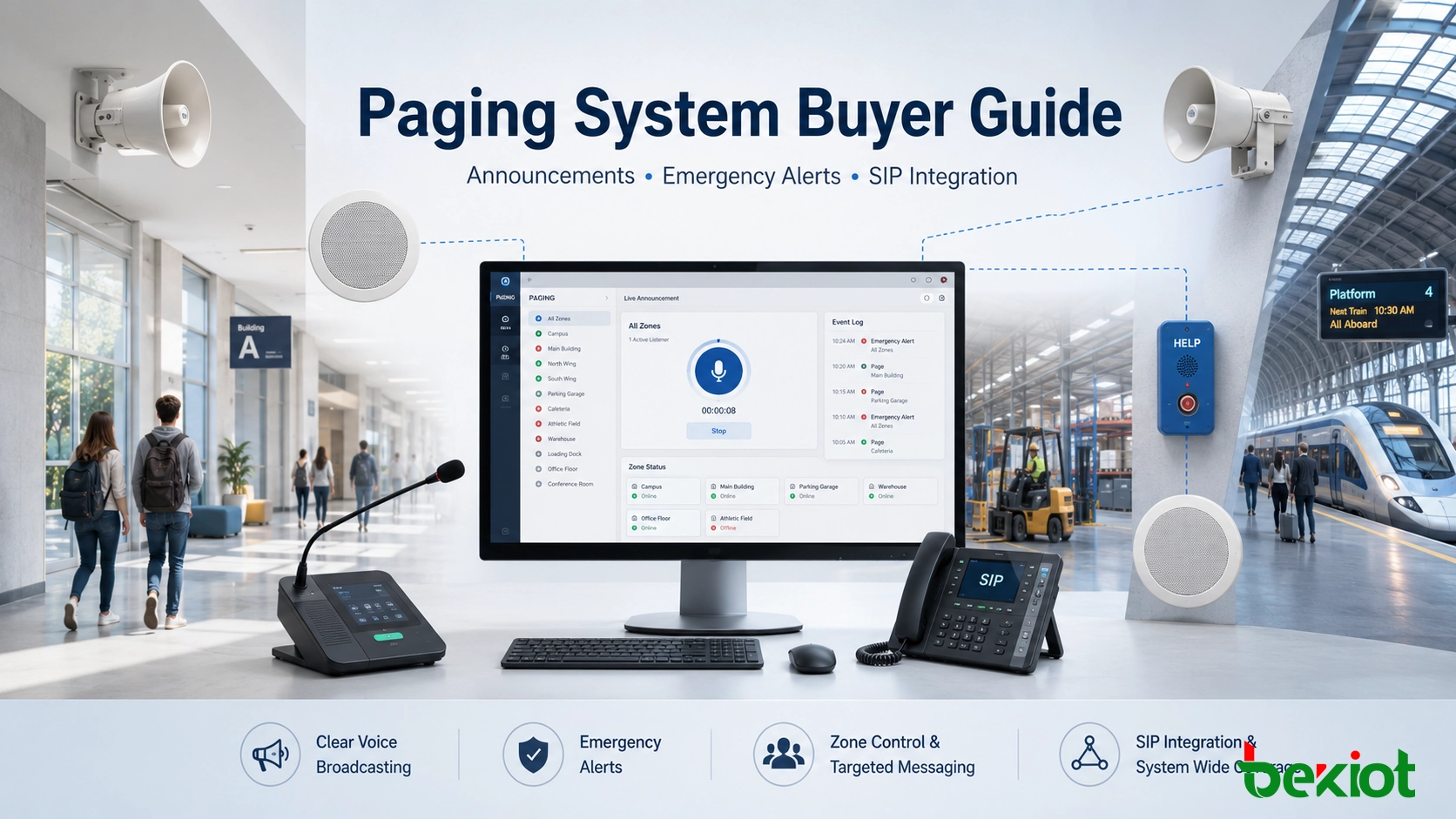
A paging system is the voice communication layer used to deliver announcements, operational instructions, safety alerts, and emergency messages across buildings, campuses, factories, tunnels, transportation facilities, public areas, and industrial sites. For buyers, the real question is not simply which speaker to buy. The right decision depends on the site environment, paging zones, voice clarity, emergency workflow, system integration, and future expansion plan.
A basic paging solution may only send live announcements through ceiling speakers. A more complete IP or SIP paging system can support zone paging, multicast audio, pre-recorded emergency messages, alarm-triggered broadcasts, visual alerts, two-way intercom points, emergency phones, CCTV linkage, and dispatch center operation.
This guide explains how to evaluate a paging system from real project requirements to architecture, devices, network reliability, emergency response, standards compliance, maintenance, and total cost. It is written for buyers, system integrators, facility managers, contractors, and project teams who need a practical selection path instead of a simple product list.
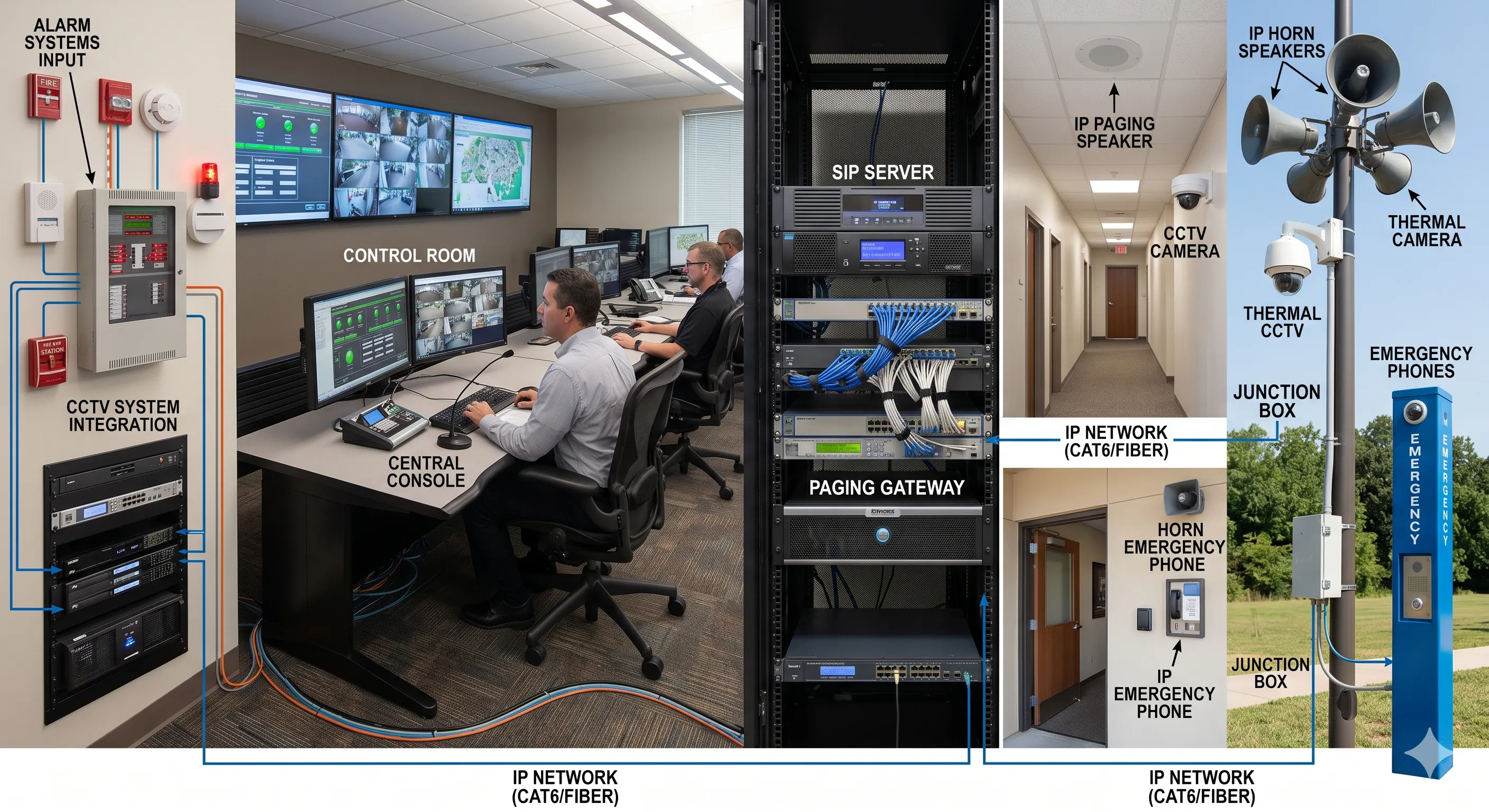
A modern paging system can connect announcements, SIP endpoints, emergency phones, CCTV, alarms, and control room workflows into one coordinated communication architecture.
Start with the Real Use Case
The first step is to define how the paging system will be used. A school, hospital, office building, factory, tunnel, railway station, logistics park, petrochemical site, and outdoor industrial area will not have the same requirements. The system should be selected according to the communication purpose, not only according to speaker power or product price.
Buyers should confirm whether the main purpose is daily announcement, emergency notification, production coordination, passenger guidance, security response, visitor service, or multi-purpose communication. This decision will influence speaker type, system architecture, zone layout, priority rules, integration methods, and long-term maintenance.
Daily Announcements
Offices, schools, hotels, hospitals, retail stores, service centers, and public buildings often use paging for routine announcements, shift notices, visitor guidance, service reminders, and general information broadcasts. In these sites, clean installation, simple operation, zone control, and comfortable voice quality are usually more important than extreme output power.
Emergency Notification
Safety-sensitive sites require more than routine paging. They need emergency priority, reliable message delivery, pre-recorded emergency messages, manual live paging, alarm linkage, event logs, and clear operating procedures. The paging system should become part of the emergency communication workflow instead of remaining a separate audio device.
Harsh and Industrial Environments
Factories, tunnels, mines, substations, ports, petrochemical plants, utility corridors, and outdoor infrastructure projects may require rugged speakers, horn speakers, visual alarms, industrial telephones, emergency phones, corrosion-resistant housings, weather protection, and stable performance under noise, dust, humidity, vibration, or temperature variation.
Plan Coverage, Zones, and Voice Clarity
After the use case is clear, the next step is to decide where announcements must be heard and how the site should be divided into paging zones. Zone planning affects speaker quantity, cabling, user permissions, emergency override rules, network design, and future operating efficiency.
A good paging system should not simply be loud. It should deliver understandable voice messages to the correct area. Loud but unclear audio can still fail during emergency communication because people may hear noise without understanding the instruction.
Zone Paging
Zone paging allows operators to send messages to selected areas instead of the whole facility. A school may divide zones into classroom buildings, playgrounds, dormitories, gymnasiums, and administration areas. A factory may divide zones into production lines, warehouses, loading docks, control rooms, hazardous areas, and outdoor yards.
Good zone design reduces unnecessary noise and prevents message fatigue. People should hear messages that are relevant to their location, while emergency messages should still be able to override normal zoning when full-site notification is required.
Speech Intelligibility and STIPA
Voice intelligibility should be treated as a design target. Background noise, reverberation, ceiling height, speaker placement, echo, and poor audio tuning can make announcements difficult to understand even when the volume is high.
For objective verification, many projects use STIPA, or Speech Transmission Index for Public Address Systems, based on IEC 60268-16. STIPA gives a numeric score between 0 and 1, where a higher value indicates better speech intelligibility. For emergency sound systems, standards and local codes often set minimum intelligibility requirements in critical zones. Buyers should request STIPA planning, post-installation testing, or verification reports when emergency communication is part of the project.
Indoor and Outdoor Coverage
Indoor areas usually require balanced sound coverage, comfortable volume, and clean installation. Outdoor areas may require longer projection distance, higher sound pressure, waterproof design, anti-corrosion protection, lightning or surge protection, and stronger mounting structures.
Choose the Right Architecture
Once the requirements and zone plan are defined, buyers can choose the system architecture. Common options include analog paging, IP paging, SIP-based paging, and hybrid paging. Each architecture has advantages and limitations.
Analog Paging
Analog paging systems use traditional amplifiers, audio cables, microphones, and speakers. They are still practical for small sites that only need basic announcements and do not require complex integration.
The limitation is flexibility. Analog paging usually depends on dedicated wiring, hardware-based zoning, manual maintenance, and limited integration with modern communication platforms. If the site may expand or require SIP, alarm linkage, remote management, or multi-building control, analog-only design may become restrictive.
IP Paging
IP paging systems use the data network to transmit audio to IP speakers, SIP speakers, paging gateways, amplifiers, and management software. They support Ethernet cabling, PoE power, network configuration, centralized management, software-defined zones, and easier expansion.
IP paging is suitable for campuses, hospitals, industrial parks, transport sites, logistics centers, and multi-building projects because new areas can often be added through network infrastructure rather than a complete rewiring plan.
SIP-Based Paging
SIP paging uses the same communication protocol as IP phones, SIP intercoms, IP PBX systems, and VoIP platforms. Authorized staff can dial a paging extension from an IP phone, dispatch console, emergency phone, or communication platform and speak directly to a selected zone.
For projects that already use SIP phones, IP PBX, dispatch systems, emergency call stations, or industrial telephones, SIP paging can reduce system silos and unify voice communication with public address functions.
Hybrid Paging
Hybrid paging combines existing analog infrastructure with new IP or SIP components. It is often suitable for upgrade projects where amplifiers, speaker lines, or ceiling speakers are still usable.
By adding IP paging adapters, SIP gateways, or network audio interfaces, buyers can modernize control, add SIP access, improve zone management, and integrate emergency workflows without replacing every speaker immediately.
Standards for Emergency Paging and Voice Alarm Projects
When a paging system is used for emergency notification or life safety purposes, it should be reviewed against applicable international and local standards. These standards may define equipment requirements, system performance, monitoring functions, backup power, voice alarm control, loudspeaker certification, installation practices, and testing procedures.
Buyers should confirm which standards apply before finalizing the specification. This is especially important for public buildings, transportation facilities, tunnels, hospitals, campuses, industrial sites, and any project where emergency instructions must be accepted by authorities or safety consultants.
IEC 60849 and EN 50849
IEC 60849 and EN 50849 are related to sound systems used for emergency purposes. They address requirements such as emergency message delivery, intelligibility, fault monitoring, power backup, and system reliability during critical events.
EN 54-16 and ISO 7240-16
EN 54-16 and ISO 7240-16 focus on voice alarm control and indicating equipment used with fire detection and alarm systems. They cover controller functions, monitoring, fault reporting, fire alarm interface behavior, and fail-safe operation.
EN 54-24 and ISO 7240-24
EN 54-24 and ISO 7240-24 define requirements for loudspeakers used in voice alarm systems. Certified loudspeakers must meet performance and durability requirements for emergency audio applications.
Local Codes and Acceptance Requirements
National and regional regulations may add additional requirements. In China, standards such as GB 16851 and related fire alarm or public address rules may affect system design, equipment selection, emergency power, priority logic, and acceptance testing. Buyers should confirm local code requirements early to avoid redesign or failed project acceptance later.
Select Suitable Paging Devices
Device selection should be based on acoustic conditions, mounting position, coverage distance, environmental protection, system protocol, installation method, maintenance access, and the type of message being delivered. A quiet office, hospital corridor, warehouse, noisy factory floor, outdoor parking area, and tunnel should not use the same device layout.
Ceiling Speakers
Ceiling speakers are suitable for offices, schools, hospitals, hotels, retail stores, corridors, and indoor public areas. They provide a clean appearance and even sound distribution in finished interiors.
Wall-Mounted Speakers
Wall-mounted speakers are useful in corridors, stairways, service rooms, workshops, warehouses, and retrofit projects where ceiling installation is not practical.
Horn Speakers
Horn speakers are designed for longer-distance voice coverage and higher-noise environments. They are commonly used in factories, parking lots, outdoor yards, tunnels, ports, mines, utility sites, and industrial areas.
Talk-Back Devices and Intercom Points
Talk-back speakers, SIP intercoms, emergency phones, and industrial telephones allow users to contact the control room. These devices are important when the project requires two-way communication instead of one-way broadcasting only.
Visual Alert Devices
Strobe lights, beacons, LED signs, and multi-color indicators help people notice emergency messages in noisy areas, hearing-protection zones, machine rooms, tunnels, warehouses, and public spaces. Visual alerts should be considered when audio alone may not be enough.
Paging Adapters and Gateways
IP paging adapters and SIP gateways can connect existing analog amplifiers or speaker lines to an IP or SIP-based platform. They are useful for upgrade projects that need modern control while preserving part of the original infrastructure.
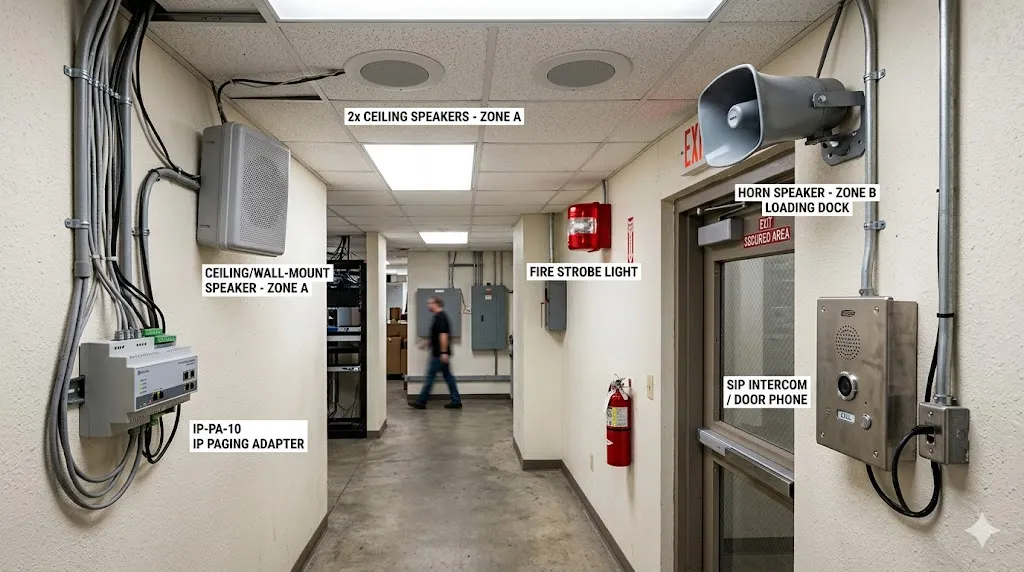
Speaker type should match the site environment, background noise, mounting position, coverage distance, and emergency notification requirements.
Design Network, Power, and Reliability
For IP and SIP paging systems, network and power design directly affect reliability. Buyers should check PoE capacity, switch performance, VLAN planning, QoS, multicast support, cable distance, outdoor network protection, surge protection, UPS backup, and redundancy requirements.
In emergency communication projects, backup power and network resilience should be planned early. A paging system used for safety notification should not fail because one switch, one cable route, or one power source was overlooked.
Multicast Paging
Multicast paging allows one audio stream to be delivered to multiple endpoints at the same time. It can reduce server load and improve efficiency in large IP paging deployments. Buyers should confirm that switches, VLANs, and network policies can support multicast audio before deployment.
Unicast Paging
Unicast sends audio from one source to one destination or one controlled endpoint path. It can be easier to manage in smaller systems or cloud-connected scenarios, but it may consume more resources when many endpoints need to receive the same message.
PoE and Backup Power
Many IP speakers and SIP paging devices support Power over Ethernet. PoE simplifies installation because one cable can provide both network and power. Buyers should still calculate switch capacity, PoE budget, UPS backup, and redundancy requirements before installation.
Plan Integration and Emergency Workflows
A paging system becomes more valuable when it connects with existing communication, security, and safety systems. Buyers should evaluate integration with IP PBX, SIP servers, emergency phones, industrial telephones, dispatch platforms, CCTV, fire alarms, access control, sensors, SCADA systems, and building management systems.
Emergency Priority
Emergency announcements should override background music, scheduled messages, routine paging, and lower-priority calls. Priority control helps prevent important instructions from being blocked by normal traffic.
Pre-Recorded Messages
Pre-recorded messages help deliver consistent instructions during stressful events such as evacuation, shelter-in-place, fire alarm response, security alerts, gas warnings, severe weather notices, or equipment shutdown procedures.
Alarm-Triggered Broadcasting
Fire alarm panels, access control systems, emergency buttons, sensor alarms, SCADA platforms, and building management systems may trigger automatic voice messages or operator review workflows. This reduces delay when the event requires immediate attention.
CCTV and Dispatch Linkage
When an alarm occurs, the control room may need to view CCTV, answer an emergency phone, speak to a local zone, notify security staff, and record the event. A paging system connected with dispatch and monitoring systems can support faster situational awareness.
SIP Platform Integration
If the organization uses an IP PBX or SIP server, paging zones can often be assigned as dialable extensions. Authorized users can call a paging group from an office phone, control room phone, SIP terminal, emergency phone, or dispatch console.
For emergency use, the best paging system is not the loudest one. It is the system that delivers the right instruction to the right zone with the right priority while helping operators coordinate the next action.
Evaluate Maintenance, Expansion, and Total Cost
Buyers should compare long-term value, not only the initial quotation. Total cost includes equipment, cabling, installation, configuration, software, commissioning, training, maintenance, spare parts, future expansion, and upgrade work.
Analog systems may look cheaper at the device level but can require more cabling and may become expensive when zones need to change. IP systems may require better network planning but often reduce future expansion cost. Hybrid systems can protect existing investment, but they must be designed carefully to avoid becoming a patchwork system that is hard to maintain.
Maintenance and Device Management
Buyers should ask how devices are configured, monitored, updated, and replaced. For larger sites, centralized device management and clear maintenance procedures can reduce long-term operating cost.
Expansion Planning
A paging system should leave room for future buildings, additional zones, new SIP endpoints, emergency phones, visual alerts, and integration with new safety or communication platforms.
Total Cost of Ownership
The cheapest quotation may not be the lowest-cost solution over five or ten years. Buyers should compare installation difficulty, future modification cost, maintenance workload, software licensing, spare parts, downtime risk, and upgrade flexibility before making a final decision.
Buyer Checklist Before Approval
Before approving a paging system proposal, buyers should check whether the solution matches the real site conditions instead of only comparing product names and prices.
Checklist Area
What to Confirm
Coverage and Acoustics
Coverage area, background noise, ceiling height, wall materials, outdoor exposure, speaker placement, and STIPA verification for critical zones.
Zones and Permissions
Number of zones, authorized users, emergency override zones, future zone changes, and daily paging permissions.
Emergency Workflow
Priority broadcast, pre-recorded messages, alarm input, manual live paging, visual alerts, event logs, and control room operation.
Standards and Certification
Applicable international or local standards, required equipment certification, acceptance testing, and commissioning documents.
SIP and Platform Compatibility
IP PBX, SIP server, dispatch platform, emergency phones, industrial telephones, paging gateways, and unified communication platform compatibility.
Many paging problems are caused before installation because buyers focus on hardware price instead of system design. Avoiding common mistakes can reduce later maintenance problems, redesign work, and operational risk.
Using the Same Speaker Everywhere
Different areas need different devices. A horn speaker that works outdoors may be too harsh for an office. A ceiling speaker that sounds clean in a corridor may not cover a noisy workshop. Speaker selection should follow the acoustic environment.
Ignoring Emergency Priority
A system that works for daily announcements may fail during a critical event if emergency messages cannot override background audio or normal paging. Priority logic should be defined before installation.
Treating Paging as an Isolated System
In many projects, paging should connect with SIP phones, emergency phones, CCTV, alarms, dispatch platforms, and control room workflows. Isolated paging may be cheaper at first, but it often limits emergency response and future integration.
Underestimating Network and Power Design
IP paging performance depends on stable switches, PoE capacity, VLAN planning, multicast support, backup power, and protected cable routes. These design details are just as important as speaker selection.
Skipping Testing and Certification Review
A commercial audio system may not meet life safety requirements. For emergency paging, buyers should confirm standards, certification, STIPA measurement, power backup, and commissioning reports before project handover.
Common Application Environments
Industrial Facilities
Factories, power plants, petrochemical sites, warehouses, and mining facilities use paging for production coordination, maintenance calls, safety reminders, emergency evacuation, and alarm notification.
Schools and Campuses
Campuses use paging for class schedules, public announcements, security alerts, emergency instructions, and coordination with help points or emergency phones.
Hospitals and Healthcare Facilities
Hospitals need clear announcements, controlled zones, staff coordination, emergency alerts, and reliable communication in public areas, nurse stations, corridors, and service rooms.
Transportation and Public Areas
Airports, railway stations, metro systems, bus terminals, ports, parking facilities, and public buildings use paging for passenger information, safety announcements, crowd guidance, service updates, and emergency response.
Tunnels and Utility Sites
Tunnels, utility corridors, substations, pump stations, and outdoor infrastructure sites require durable communication devices, clear voice coverage, emergency phone integration, and alarm linkage.
Becke Telcom Paging System Solutions
For projects that need SIP paging, IP speakers, paging gateways, emergency phones, industrial telephones, visual alerts, or control room dispatch integration, Becke Telcom can provide suitable device options for commercial, industrial, transportation, campus, and public safety environments.
Becke Telcom solutions can support paging and intercom broadcasting system design for factories, tunnels, industrial parks, campuses, hospitals, transportation facilities, ports, utility sites, and public safety projects. The goal is to connect daily announcements, emergency communication, field endpoints, and control room workflows into one reliable voice communication system.
Choosing the right paging system is not only about buying speakers, amplifiers, or endpoints. It is about designing a communication path that can deliver clear voice messages during daily operations and critical events.
For simple buildings, an analog or small IP paging system may be enough. For larger, multi-zone, safety-sensitive, or fast-growing projects, an IP or SIP-based paging system usually provides better flexibility, integration, and long-term value. For upgrade projects, a hybrid system can modernize control while protecting existing speaker infrastructure.
The best result comes from matching technology to the site: coverage, acoustics, zones, emergency priority, integration needs, maintenance capability, and future expansion. A well-designed paging system should be easy to use on a normal day and dependable when the situation becomes urgent.
FAQ
Can existing analog speakers be reused in a new paging system?
In many upgrade projects, existing analog speakers or amplifier lines can be reused through IP paging adapters, SIP gateways, or network audio interfaces. The final decision depends on speaker condition, cable quality, zoning needs, and required system control.
When should a project choose SIP paging instead of basic PA equipment?
SIP paging is more suitable when the project needs IP PBX integration, dialable paging extensions, emergency phone linkage, dispatch console operation, multi-site management, or unified communication with SIP phones and industrial telephones.
What should be tested before handing over a paging system?
The handover test should include zone paging, full-site paging, emergency priority override, alarm-triggered messages, microphone paging, recorded messages, speaker audibility, visual alerts, network stability, power backup, and operator permissions. For emergency sound systems, STIPA measurement and verification against applicable standards should also be included.
How can paging systems avoid unnecessary disturbance?
Proper zone planning, user permission control, scheduled message rules, volume adjustment, and emergency priority settings can reduce unnecessary noise while still ensuring that important messages reach the right area.
What is the most important factor when buying a paging system?
The most important factor is matching the system to the real site. Coverage, acoustics, zones, emergency priority, integration, network reliability, power backup, maintenance, and future expansion should all be evaluated before purchase.