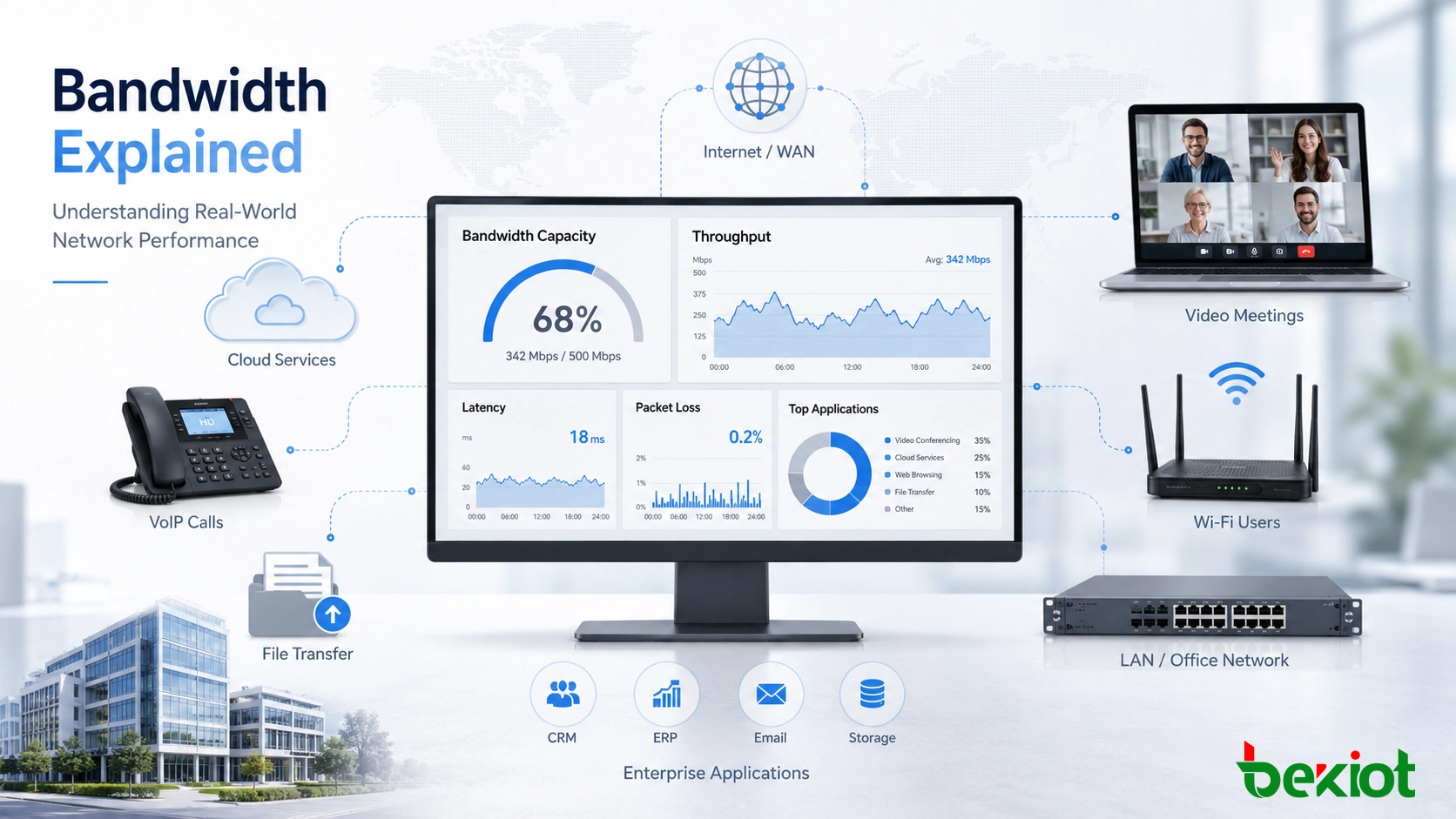
Bandwidth Explained: Network Capacity, Real Performance, and Planning for Modern Digital Systems
Bandwidth is network data capacity, but real performance also depends on throughput, latency, packet loss, Wi-Fi quality, upload speed, congestion, QoS, monitoring, and network design.
Becke Telcom
Bandwidth is the data-carrying capacity of a network connection, communication link, wireless channel, or digital system path. It is usually measured in bits per second, such as Kbps, Mbps, Gbps, or Tbps. In practical networking, bandwidth shows how much information can move through a connection at the same time.
However, bandwidth alone does not fully describe how fast a network feels. A high-bandwidth connection can support more users, more applications, larger files, higher-quality video, and more simultaneous traffic, but real performance also depends on latency, throughput, packet loss, congestion, Wi-Fi quality, device performance, routing, server response, and traffic management.
This is why bandwidth should be understood as capacity, not as a simple promise that every online task will be fast. A network with enough bandwidth still needs good design, stable equipment, proper traffic priority, and regular monitoring to deliver a reliable experience.
Bandwidth is the available data capacity shared by users, devices, cloud services, and digital applications.
Bandwidth as Network Capacity
Bandwidth describes the maximum amount of data that can theoretically pass through a connection during a given period of time. A 1 Gbps network link has more capacity than a 100 Mbps link, just as a wider road can carry more vehicles than a narrow road. The larger the bandwidth, the more data the link can support at once.
In everyday language, people often call bandwidth “internet speed.” This is understandable, but technically incomplete. If a website loads slowly, the reason may be limited bandwidth, but it may also be high latency, poor Wi-Fi, overloaded servers, DNS delay, security inspection, or application design.
For network planning, the goal should not be only to buy the highest advertised number. A better approach is to review the applications being used, the number of active users, upload and download requirements, peak traffic periods, and whether critical services such as VoIP, video meetings, remote desktop, surveillance, or industrial control need priority.
Bandwidth, Throughput, and Latency Are Not the Same
Bandwidth Versus Throughput
Throughput is the actual amount of data successfully transferred over a network during a specific period of time. Bandwidth is the theoretical or provisioned capacity of the connection. Throughput is usually lower than bandwidth because real networks include protocol overhead, congestion, packet loss, device limitations, routing changes, encryption, and security inspection.
For example, a network port may be rated at 1 Gbps, but the actual file transfer rate may be lower because the storage server, firewall, client device, or Wi-Fi access point cannot process data at the full rate. A speed test may also show different results at different times of day because network demand changes.
Bandwidth defines the upper limit. Throughput shows what users are actually receiving.
Bandwidth Versus Latency
Latency is delay. It describes how long data takes to travel from one point to another. A connection can have high bandwidth but still feel slow if latency is high. This is common in long-distance, satellite, congested, poorly routed, or unstable connections.
Real-time applications such as VoIP, video conferencing, online gaming, remote desktop, and industrial remote control may not require very large bandwidth, but they require stable and low-delay delivery. Large file downloads, cloud backup, and video streaming rely more heavily on bandwidth and throughput.
A practical network design should look at bandwidth, throughput, latency, jitter, and packet loss together. Focusing on only one number can lead to the wrong solution.
How Network Capacity Is Shared
Network data is divided into packets. These packets move through switches, routers, access points, service provider links, firewalls, servers, and cloud systems before reaching their destination. Bandwidth defines how much packet traffic a link can carry within a given period.
When available capacity is enough, packets flow smoothly. When too many packets compete for the same link, congestion occurs. Congestion can cause delay, buffering, retransmission, lower throughput, voice breakup, video freezing, and application timeout.
Shared Links and Peak Demand
Most bandwidth is shared. A home internet connection may be used by phones, laptops, smart TVs, cameras, game consoles, and work devices. An enterprise link may carry email, SaaS access, VoIP, video meetings, backups, surveillance, guest Wi-Fi, security updates, and file transfers at the same time.
Peak demand is often more important than average usage. A network may look healthy during quiet hours but struggle when many users join video meetings, IP cameras upload video, or backup jobs start. If total demand exceeds available capacity, critical applications can suffer.
Good network design identifies busy periods and protects important traffic instead of relying only on average daily statistics.
Upload and Download Capacity
Download bandwidth controls how much data a network can receive. Upload bandwidth controls how much data it can send. Many broadband plans offer higher download capacity than upload capacity because ordinary consumers often receive more data than they send.
In business and professional environments, upload capacity can be just as important. Video meetings, IP cameras, cloud backup, file sharing, online teaching, remote work, hosted services, and live streaming all depend on upload bandwidth.
A connection may feel fast for watching videos but perform poorly for video conferencing or cloud backup if upload capacity is limited.
Main Types of Bandwidth
Internet Access Bandwidth
Internet bandwidth is the capacity between a home, office, campus, factory, or data center and the internet service provider. It affects access to websites, cloud platforms, email, streaming services, remote work tools, SaaS applications, and external communication.
Internet access can be delivered through fiber, cable, DSL, fixed wireless, cellular, satellite, leased lines, or dedicated enterprise circuits. Each option has different performance, reliability, latency, upload capacity, and service guarantees.
For business networks, internet bandwidth should be selected together with redundancy, service-level agreement, firewall capacity, security inspection performance, and cloud dependency.
LAN and Internal Network Bandwidth
LAN bandwidth refers to capacity inside a local network, such as an office, building, factory, campus, or data center. It includes Ethernet ports, switch uplinks, Wi-Fi connections, internal server links, storage networks, and backbone connections.
Internal bandwidth is important even when internet bandwidth is sufficient. Users may access local file servers, IP cameras, printers, storage systems, VoIP systems, internal applications, or industrial platforms. If switch uplinks or Wi-Fi capacity are limited, users may experience poor performance even with a fast internet line.
Large networks should plan access layer, aggregation layer, core layer, and uplink capacity together.
WAN and Branch Connectivity
WAN bandwidth connects different locations, such as headquarters, branch offices, cloud regions, factories, warehouses, utility sites, and data centers. WAN links may use MPLS, Ethernet services, internet VPN, SD-WAN, private circuits, microwave, or wireless backhaul.
WAN capacity affects inter-site applications, centralized databases, remote desktop, voice traffic, video meetings, file synchronization, backup, security monitoring, and control room communication. WAN links are often more expensive or more limited than LAN links, so careful planning is important.
Modern WAN design should consider bandwidth, latency, failover, encryption overhead, application priority, and cloud access paths.
Wireless Channel Bandwidth
Wireless bandwidth is affected by radio conditions. Wi-Fi, 4G, 5G, microwave, and private wireless systems may advertise high theoretical rates, but real performance depends on signal strength, interference, channel width, distance, walls, antenna design, spectrum sharing, and user density.
A Wi-Fi access point with many users will not deliver the full advertised bandwidth to each device. Weak signal or interference can also reduce throughput even when the internet connection is fast.
Wireless capacity planning should include site surveys, access point placement, channel planning, roaming behavior, device density, and application priority.
Why Sufficient Bandwidth Matters
Better User Experience
Sufficient bandwidth improves daily user experience. Websites load more quickly, cloud applications respond more smoothly, files transfer faster, video streams buffer less, and online meetings become more stable.
In shared networks, enough capacity also reduces conflict between users. One user downloading a large file or running a cloud backup is less likely to disturb other users if the network has enough capacity and proper traffic control.
Stable Voice and Video Communication
VoIP and video conferencing require stable bandwidth, but they also require low jitter, low latency, and low packet loss. If a network becomes congested, voice may break up and video may freeze even if the call does not disconnect.
Bandwidth planning for real-time communication should consider concurrent calls, video resolution, codec settings, upload direction, remote workers, conference rooms, and guest network separation. Quality of Service can help prioritize voice and video traffic when the network is busy.
Cloud and SaaS Performance
As organizations move to cloud platforms, bandwidth becomes a key part of application performance. CRM, ERP, collaboration suites, file storage, virtual desktop, cloud backup, hosted contact centers, and security platforms all rely on stable connectivity.
A cloud-first organization may need stronger internet and WAN capacity than an organization that still runs most systems locally. Bandwidth, latency, redundancy, and security inspection capacity should be planned together.
Scalability for More Devices
Networks continue to add devices. Laptops, phones, cameras, access control terminals, sensors, VoIP phones, tablets, digital signage, IoT gateways, and automation systems all consume bandwidth. Some devices use only small amounts, while others generate continuous traffic.
Scalability requires planning for future users, higher-resolution media, more cloud services, more security tools, and more remote access. A network that barely meets today’s demand may quickly become a bottleneck.
Sufficient bandwidth supports smoother voice, video, cloud access, file transfer, and scalable digital operations.
Common Application Scenarios
Home and Small Office Networks
Homes and small offices use bandwidth for browsing, streaming, gaming, video calls, cloud storage, smart devices, software updates, and remote work. The required capacity depends on the number of users, number of devices, video quality, and whether multiple activities happen at the same time.
A small office may need stronger upload bandwidth than a home user because it may send files, run video meetings, use cloud backup, or host remote access sessions. Wi-Fi quality should also be checked because poor wireless performance can make a good internet connection feel slow.
Enterprise IT and Collaboration
Enterprises need bandwidth for email, file sharing, SaaS tools, VoIP, video meetings, CRM, ERP, cybersecurity tools, software deployment, monitoring, and remote work. Bandwidth directly affects employee productivity and service continuity.
A growing enterprise should monitor usage by application and department. Some traffic should be prioritized, some should be scheduled, and some may need to be limited. Capacity management becomes more important as organizations rely more heavily on cloud platforms and hybrid work.
Video Surveillance and Monitoring
IP cameras can consume significant bandwidth, especially when resolution, frame rate, bitrate, and camera count are high. Local recording may reduce internet upload demand, while cloud recording or remote viewing increases it.
Surveillance bandwidth depends on camera settings, compression codec, scene complexity, continuous recording, motion recording, and live monitoring habits. Large video systems should be designed with dedicated VLANs, proper switch uplinks, recording server capacity, storage planning, and controlled remote access.
Industrial and IoT Systems
Industrial networks use bandwidth for controllers, sensors, SCADA systems, edge gateways, remote monitoring, video inspection, alarms, maintenance access, and machine data collection. Many industrial signals require small bandwidth, but applications such as video analytics, data replication, and remote diagnostics may require much more.
Industrial networks should not only focus on bandwidth volume. Predictable latency, segmentation, cybersecurity, redundancy, and environmental reliability may be equally important. Critical control traffic should be separated from ordinary IT, guest, or video traffic where needed.
Planning Bandwidth Requirements
Identify Traffic Sources
The first step is to list all applications and devices that use the network. This may include web traffic, cloud services, VoIP, video meetings, surveillance cameras, guest Wi-Fi, backups, file transfers, remote desktop, payment systems, software updates, access control, and industrial systems.
Each application behaves differently. Some use steady bandwidth, some use short bursts, some are sensitive to delay, and others can run in the background. Grouping applications by behavior helps create a realistic plan.
Estimate Concurrent Usage
Total capacity depends on how many users and applications are active at the same time. A building with 200 users does not necessarily need 200 users multiplied by the maximum demand of every application, but peak periods must be considered.
Video meetings, online classes, shift changes, visitor Wi-Fi peaks, backup windows, and software updates can create temporary but serious pressure. Peak-hour analysis often reveals more than daily averages.
Calculate Upload and Download Separately
Upload bandwidth is often underestimated. Video calls, surveillance upload, cloud backup, file sharing, live streaming, remote support, and hosted services can all depend on upload capacity.
If upload bandwidth is too low, users may experience unstable meetings, slow cloud synchronization, poor video upload, or delayed remote collaboration even when download speed looks sufficient.
Add Headroom for Growth
Headroom means extra capacity beyond the calculated current requirement. It allows the network to handle traffic bursts, new users, temporary events, application growth, and unexpected demand.
Without headroom, a network may operate near its limit all the time. This increases the chance of congestion and makes troubleshooting more difficult. The right amount of headroom depends on business growth, application criticality, service cost, and upgrade difficulty.
Common Bandwidth Problems
Congestion
Congestion occurs when traffic demand exceeds available capacity. Users may experience slow websites, buffering video, unstable meetings, delayed cloud applications, and file transfer slowdown.
The solution may be more bandwidth, better traffic prioritization, scheduled backups, blocked non-business traffic, upgraded Wi-Fi, or improved network segmentation. Congestion should be diagnosed with monitoring data rather than assumptions.
Wi-Fi Bottlenecks
Sometimes the internet service is not the problem. The real bottleneck may be the wireless network. Weak signal, overloaded access points, channel interference, old Wi-Fi standards, and poor placement can all reduce effective bandwidth.
Testing a wired connection and a wireless connection separately can help identify whether the bottleneck is the internet link or the local Wi-Fi design.
Background Traffic
Background traffic can quietly consume capacity. Examples include cloud backup, operating system updates, file synchronization, antivirus updates, large downloads, database replication, and video upload.
These tasks may be necessary, but they should be scheduled or limited so they do not interfere with real-time communication or business-critical systems.
Misleading Advertised Rates
Advertised bandwidth often represents a maximum access rate, not a guaranteed speed at all times. Shared broadband, wireless access, and public internet routes may perform differently during peak periods.
Businesses that need predictable service may need dedicated circuits, SLA-backed services, redundant providers, or managed WAN solutions. Understanding the service contract is as important as reading the bandwidth number.
Management and Optimization
Use Quality of Service
Quality of Service helps prioritize important traffic such as VoIP, video meetings, payment systems, remote desktop, and critical cloud applications. It does not create more bandwidth, but it controls how traffic is treated during congestion.
QoS works best when configured across switches, routers, Wi-Fi systems, WAN devices, and service provider links where supported. For real-time communication, QoS can make the difference between a usable call and an unstable one during busy periods.
Segment the Network
Network segmentation separates different types of traffic. Guest Wi-Fi, office users, IP cameras, VoIP phones, IoT devices, servers, and industrial systems can be placed in separate VLANs or policy zones.
Segmentation improves security and makes bandwidth control easier. It also prevents one group of devices from overwhelming the entire network.
Monitor Regularly
Monitoring shows how bandwidth is actually used. Administrators should review utilization, peak periods, top applications, top users, interface errors, packet loss, latency, and Wi-Fi performance.
Monitoring helps identify whether the real issue is insufficient bandwidth, poor Wi-Fi, overloaded equipment, background traffic, server delay, or external routing. Long-term monitoring supports better upgrade decisions and prevents unnecessary spending.
Plan Redundancy
For critical networks, bandwidth planning should include redundancy. A second internet link, backup WAN path, failover router, LTE or 5G backup, or SD-WAN design can maintain service when the primary link fails.
Redundancy can also support load sharing, but failover behavior should be tested. A backup connection that has never been tested may fail during a real outage.
Bandwidth is the capacity of a network connection or communication channel to carry data over time. It affects browsing, cloud applications, VoIP, video meetings, streaming, file transfer, surveillance, enterprise systems, and industrial communication.
Higher bandwidth can improve performance, but it is not the same as actual speed, throughput, latency, or data usage. Real user experience depends on the complete path, including devices, Wi-Fi, routing, servers, congestion, packet loss, and traffic management.
The best bandwidth strategy is based on real application needs, concurrent usage, upload and download demand, growth margin, monitoring data, and priority rules for critical traffic. With proper planning and optimization, bandwidth becomes a reliable foundation for digital operations rather than a recurring bottleneck.
FAQ
What is bandwidth in simple terms?
Bandwidth is the data capacity of a network connection. It shows how much information can move through the connection during a specific amount of time.
Is bandwidth the same as speed?
Not exactly. Bandwidth is capacity, while speed usually describes how fast a task feels to the user. A higher-bandwidth connection can help when capacity is the bottleneck, but it may not solve high latency, slow servers, poor Wi-Fi, or overloaded devices.
What is the difference between bandwidth and throughput?
Bandwidth is the maximum possible capacity of a connection. Throughput is the actual amount of data successfully transferred. Throughput is often lower because of overhead, congestion, packet loss, routing, and hardware limitations.
Why is upload bandwidth important?
Upload bandwidth is important for video meetings, cloud backup, live streaming, file sharing, IP cameras, VoIP calls, and remote work. A connection can have strong download capacity but still perform poorly if upload bandwidth is limited.
How can bandwidth problems be fixed?
Possible solutions include upgrading the link, improving Wi-Fi, using Quality of Service, scheduling backups, limiting background traffic, segmenting the network, upgrading equipment, or adding redundancy. The right solution depends on the actual bottleneck.