Video Access Gateway for Converged Communication and Dispatch Platforms
A video access gateway helps converged communication platforms connect cameras, drones, body-worn recorders, GB/T28181 systems, RTSP streams, SIP video, WebRTC playback and dispatch workflows through one manageable media access layer.
Becke Telcom
Video integration in a converged communication project is rarely as simple as connecting a camera to a platform. Cameras, drones, body-worn recorders, NVR systems, encoder devices, surveillance platforms and mobile video terminals may all use different protocols, codecs, resolutions and network access methods. If the communication platform cannot adapt to these differences, the project may face black screens, unstable playback, delayed video, codec mismatch, repeated debugging and extra custom development.
Many converged communication platforms already support basic video access, including GB/T28181-to-SIP or SIP video functions. These functions are useful, but real deployment is often more complicated. Some cameras cannot be pulled smoothly. Some video streams fail to play on dispatch terminals. Some field devices are not fully standard. Some video sources, such as drones, body-worn cameras and third-party video platforms, need an additional media layer before they can become usable resources in a command workflow.
A video access gateway is designed for this situation. It sits between scattered video sources and the communication platform, handling protocol adaptation, stream receiving, stream pulling, transcoding, SIP mapping, web playback and API integration. Its value is not only “making video visible.” Its real value is making video easier to access, manage, call, share and use inside dispatch and emergency communication workflows.
A video access gateway helps converged communication systems unify cameras, drones, recorders, video platforms and dispatch terminals through a manageable media access layer.
Why Video Integration Becomes Difficult
Voice platforms and video systems are built differently
A converged communication platform usually focuses on SIP calling, voice dispatch, intercom, conferencing, paging, alarm linkage and command coordination. Video systems often come from a different technical background. They may be built around surveillance platforms, NVRs, drone controllers, encoders, body-worn camera platforms, browser players or mobile apps.
This means the video side may use GB/T28181, RTSP, RTMP, FLV, HLS, WebRTC, SIP or private platform interfaces. If the communication platform only supports one or two access methods, integrators may need several converters, separate software modules or custom development work. The result is a system that works in a demo but becomes difficult to maintain in real projects.
Codec and playback compatibility are common failure points
Video access is not only about obtaining a stream URL. The terminal must also be able to decode and display the stream. In many projects, surveillance cameras already output 4K or H.265 video, while dispatch consoles, SIP video phones, embedded terminals or browser clients may work better with H.264, 1080p resolution or a lower bitrate.
When these parameters do not match, the result may be slow loading, black screen, high delay, unstable playback or complete playback failure. A video access gateway can normalize media streams before they reach the final communication terminal, making the video resource more practical for dispatch and command use.
GB/T28181 Access for Unified Video Resources
More than ordinary surveillance cameras
GB/T28181 is widely used in video surveillance and public security video access. In real projects, GB/T28181 resources are not limited to fixed IP cameras. They may include PTZ cameras, portable monitoring devices, NVR systems, encoder and decoder equipment, drones, body-worn recorders, lower-level platforms and upper-level video platforms.
A video access gateway can connect these resources through GB/T28181 and make them available to the converged communication system. Whether the source is a single device or a platform-level resource, the gateway can simplify access through a more standardized configuration process.
Better adaptation for mixed-brand projects
GB/T28181 compatibility can still vary between brands and device models. Some devices follow the standard closely, while others may behave differently in registration, catalog reporting, keepalive handling, stream negotiation or media transmission. These differences can consume a large amount of project delivery time.
A mature video access gateway provides a stronger adaptation layer. It helps locate compatibility problems faster, reduce repeated debugging and make multi-brand video resources easier to manage. This is especially important for industrial parks, public safety projects, transportation systems, campuses and emergency command platforms where video sources often come from different manufacturers.
GB/T28181 access allows cameras, NVR systems, mobile video devices, drones and recorder platforms to be managed as unified video resources.
Drone Video as a Dispatch Resource
Turning aerial footage into operational video
Drone video is increasingly used in emergency response, fire rescue, traffic inspection, power patrol, water conservancy monitoring, industrial supervision and large event security. However, drone footage is often isolated inside a controller, mobile app, drone dock platform or manufacturer cloud service.
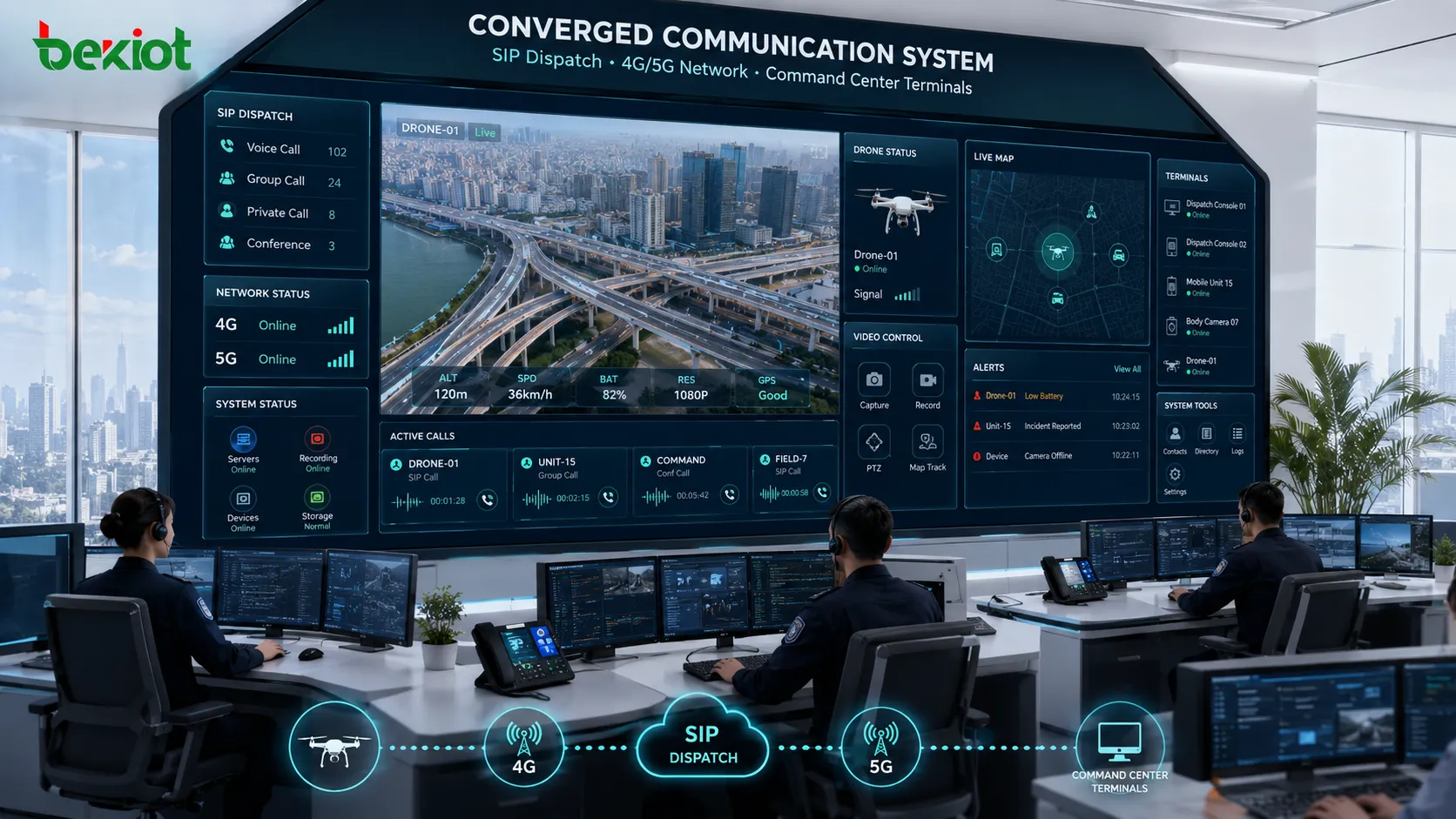
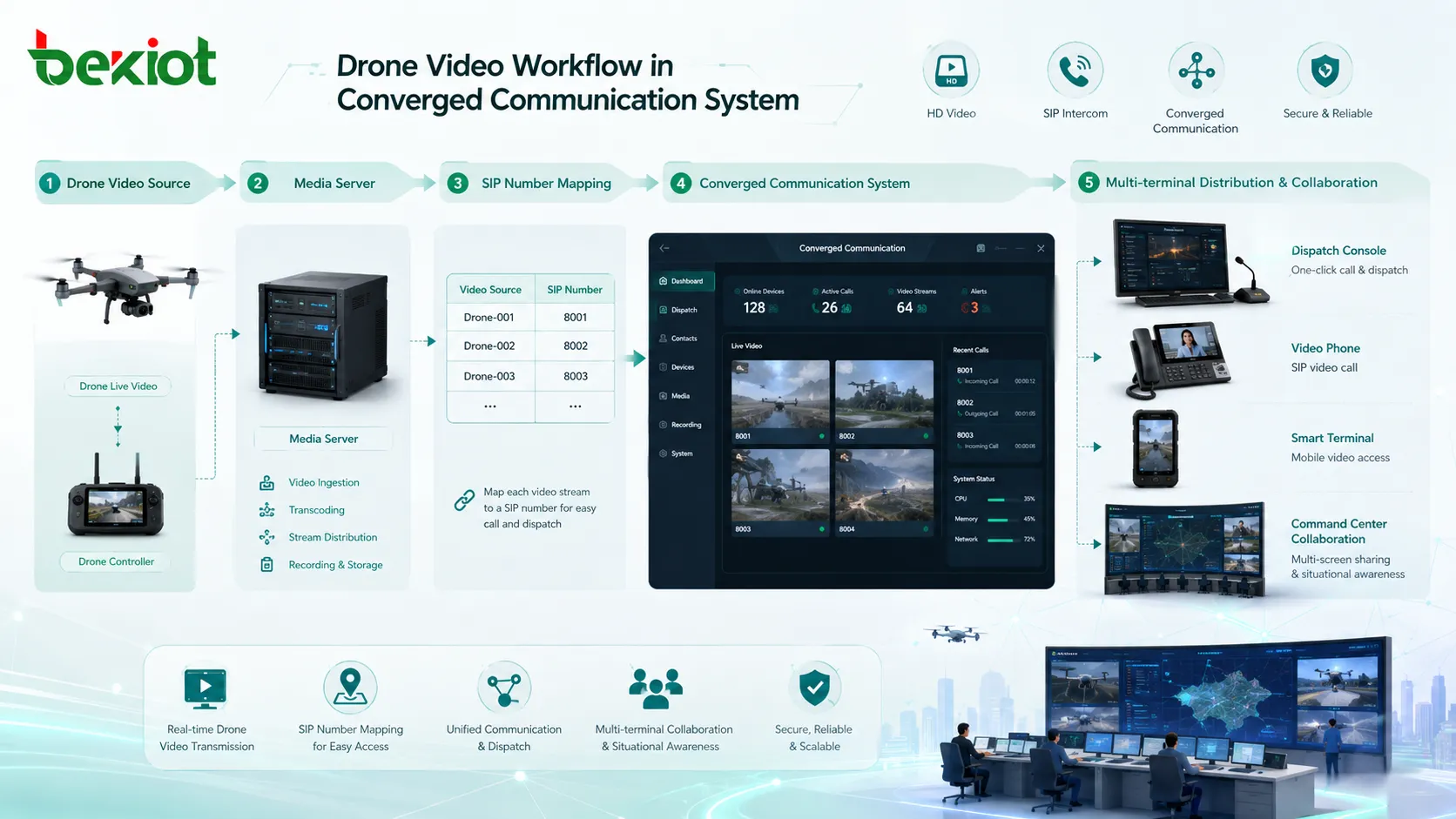
A video access gateway can receive or pull drone video and convert it into a usable resource for the communication platform. After integration, the video can be displayed on dispatch consoles, command center screens, SIP video terminals, smart devices or browser-based workstations. This allows operators to view aerial footage while making voice calls, coordinating groups or managing an emergency event.
Supporting different drone systems
Advanced projects may involve drone docks, airport platforms, fixed-wing drones, multi-rotor drones, hybrid-wing drones and third-party drone management systems. Without a gateway layer, the communication platform may need separate integration work for each vendor or application.
By using the gateway as a media access layer, drone video becomes easier to name, call, view, distribute, record and share. Instead of treating drones as isolated video tools, the system can turn them into dispatch resources with permissions, workflows and platform-level management.
Multiple Protocols in One Access Layer
Handling push and pull streaming environments
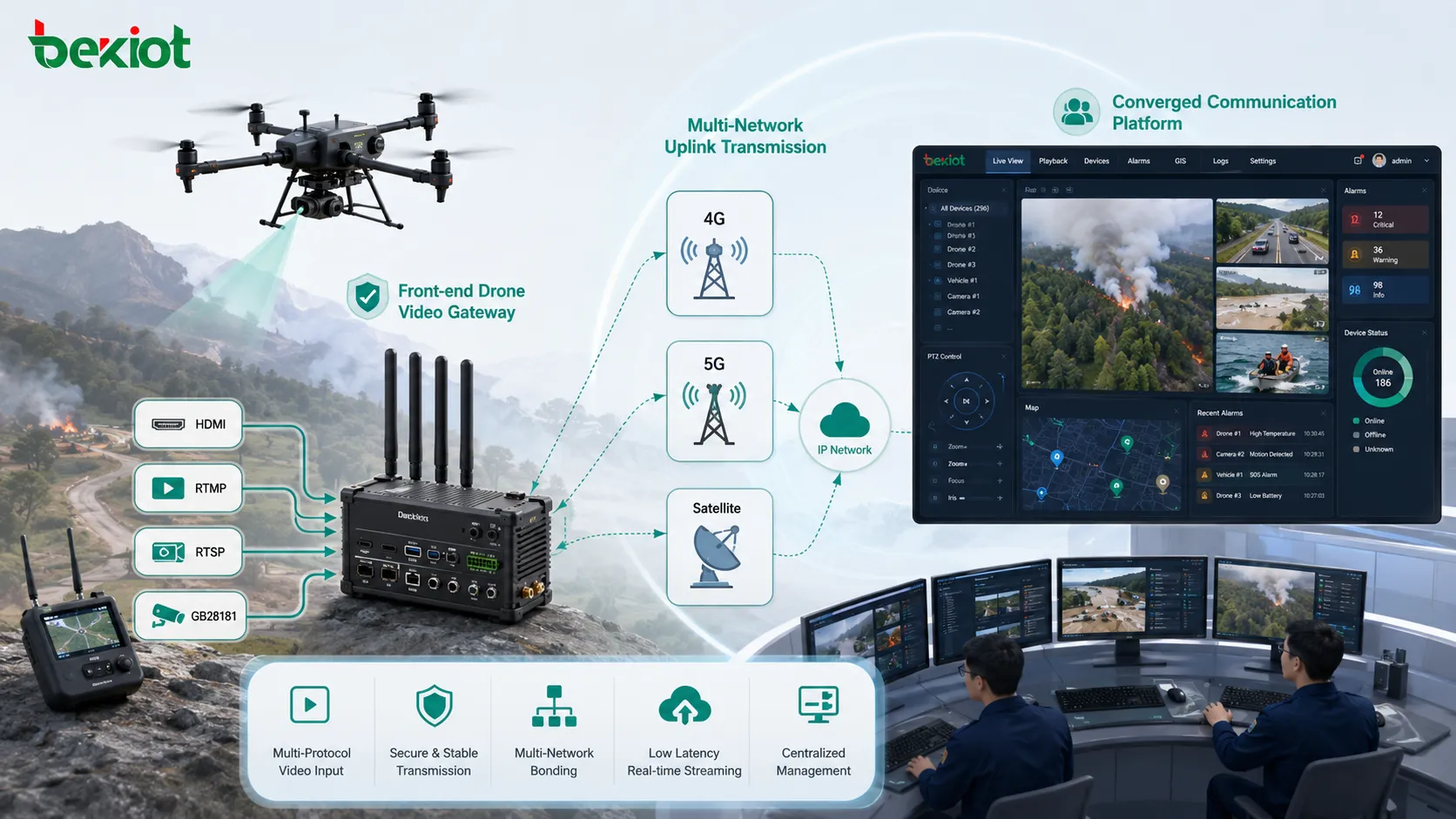
A practical video access gateway should not depend on only one protocol. Different field devices and video platforms may use different transmission methods. Cameras and NVRs may provide RTSP streams. Drone systems may push RTMP. Surveillance platforms may provide GB/T28181 resources. Browser-based command platforms may prefer FLV, HLS or WebRTC playback.
The gateway acts as the media conversion and distribution layer between these sources and the final communication terminals. It can receive streams, pull streams, forward streams, map video resources to SIP numbers or prepare web-friendly video output for browser clients.
Reducing scattered software deployment
Without a unified gateway, a project may require separate modules for GB/T28181 access, RTMP receiving, RTSP pulling, WebRTC playback, SIP video interconnection and stream forwarding. Each additional module adds another point of failure, another configuration interface and another maintenance task.
A centralized video access gateway makes the architecture clearer. Video sources enter through a controlled media layer, are processed according to project rules, and are then delivered to dispatch consoles, SIP video phones, monitoring workstations, command screens, mobile terminals or recording systems.
Transcoding for Codec and Resolution Mismatch
Why high-definition video can create compatibility issues
H.265, 4K video and high-bitrate streams are useful for storage efficiency and image detail, but not every communication terminal can handle them well. A SIP video phone may require H.264. A dispatch console may need a lower bitrate. A browser client may need a web playback format. A mobile terminal may need reduced resolution to maintain smooth viewing.
This is why some cameras work while others fail in the same project. The stream may be valid, but the receiving terminal cannot decode it correctly. If the system only forwards the original stream, it may not solve the actual compatibility problem.
Transcoding makes video easier to deliver
A video access gateway with transcoding capability can adjust codec, resolution, frame rate and bitrate. For example, it can convert H.265 to H.264, reduce 4K video to 1080p, lower the bitrate for mobile viewing or adapt a stream for a SIP terminal.
In larger systems, a dedicated video transcoding server may be needed for multiple concurrent streams. This is useful in command centers, transportation control rooms, industrial parks, emergency platforms and multi-site projects where different terminals need different versions of the same video resource.
Transcoding helps convert high-resolution or H.265 video into formats suitable for SIP dispatch consoles, video phones, browser clients and mobile terminals.
SIP Networking for Converged Communication
Peer-to-peer mode for controlled networks
To bring video into a communication platform, the video access gateway often needs to work with the SIP system. In peer-to-peer mode, the gateway and the communication platform communicate through direct IP reachability. This requires proper network routing, firewall rules and bidirectional access between both systems.
This mode is suitable for projects where the gateway and the communication server are deployed in the same data center, enterprise network, equipment room or controlled private network. It provides a clear path for SIP signaling, media negotiation and video delivery.
Registration mode for distributed or private video networks
In some projects, video sources are inside a private LAN, while the communication platform is in another network environment. Registration-based SIP networking can be more practical in this situation. The video access gateway can be installed inside the video network and register to the communication platform as a SIP device or media node.
This reduces the need for direct inbound access to the gateway and helps solve network traversal problems. It is suitable for distributed sites, remote facilities, temporary command points, private camera networks and projects where the gateway must be close to the video source.
API Integration for Deeper Dispatch Applications
When SIP video alone is not enough
In simple scenarios, a dispatcher only needs to call or open a video resource. Standard SIP video may be enough. In more advanced scenarios, the dispatch platform may need to browse camera catalogs, display device groups, control PTZ movement, check stream status, retrieve recording information or show web video inside a browser-based console.
These functions often require API integration in addition to media transmission. The gateway should not only deliver video; it should also expose useful resource information and control interfaces to the communication platform when the project requires deeper integration.
Extending command workflow capability
A video access gateway with API capability allows the dispatch system to manage video resources more effectively. Operators can call cameras, control PTZ, open web playback, view stream status and link video actions with emergency workflows.
For Becke Telcom communication solutions, a video access gateway can serve as a practical media access layer when SIP dispatch, emergency calls, drone footage, browser-based command functions and video viewing need to work together. The gateway does not replace the communication platform; it strengthens the platform’s video-side integration capability.
Practical Deployment Architecture
Field access layer
The field access layer includes IP cameras, NVRs, encoders, drones, portable monitoring devices, body-worn recorders and existing video platforms. These resources may provide video through GB/T28181, RTSP, RTMP, HDMI conversion, platform APIs or other supported methods.
Media processing layer
The media processing layer is the video access gateway or transcoding server. It handles protocol adaptation, stream receiving, stream pulling, transcoding, forwarding, SIP mapping and API services. This layer turns scattered video sources into manageable resources.
Communication delivery layer
The communication delivery layer includes the converged communication platform, dispatch console, SIP video phone, command center screen, browser client, mobile device and recording system. These terminals use the processed video for live viewing, dispatch collaboration, conference sharing, event handling and evidence review.
Layer
Typical Resources
Main Purpose
Field access
Cameras, NVRs, drones, encoders, body-worn recorders, video platforms
Collect live video from different field sources
Media processing
Video access gateway, transcoding server, stream forwarding service
Adapt protocols, normalize streams and prepare video for delivery
Communication delivery
Dispatch platform, SIP video phone, command screen, browser client, mobile terminal
Use video for command, viewing, sharing, recording and response
Project Delivery and Selection Notes
Confirm protocols and terminal capability early
Before selecting a video access gateway, the project team should list all video source types, protocols, codecs, resolutions, target terminals, network segments and security rules. It is important to confirm whether each source uses GB/T28181, RTSP, RTMP, FLV, HLS, WebRTC, SIP or another access method.
The team should also confirm the decoding capability of dispatch consoles, video phones, browser clients and mobile terminals. If terminal capability is limited, transcoding should be planned from the beginning instead of being added only after playback problems appear.
Design for operation and future expansion
A video access gateway should be stable, easy to configure and suitable for future expansion. For multi-site projects, administrators should plan stream naming, permission control, device grouping, network routes, recording rules, maintenance access and fault monitoring.
A successful project is not only one where video can be opened during acceptance testing. The better result is a gateway layer that reduces integration workload, improves stability, simplifies troubleshooting and allows the communication platform to support more video-based command scenarios over time.
Acceptance Testing Checklist
Video integration should be tested with real devices, real networks and real terminals. A single successful stream does not prove that the system is ready for operation. The project team should test registration, stream pulling, stream receiving, transcoding, browser playback, SIP video calling, multi-terminal viewing, PTZ control, network recovery and long-time stability.
Test Item
What to Check
Expected Result
Protocol access
GB/T28181 registration, RTSP pulling, RTMP receiving, SIP video access
Video sources can enter the gateway correctly
Transcoding
H.265 to H.264, 4K to 1080p, bitrate and frame-rate adaptation
Streams match terminal playback capability
Terminal playback
Dispatch console, video phone, browser client, mobile terminal, command screen
Video can be viewed smoothly on target terminals
Control functions
Catalog browsing, PTZ control, stream selection, device status and permissions
Video resources can be managed in dispatch workflows
Stability
Concurrent viewing, network interruption recovery and long-time operation
System remains usable under real project conditions
Final Notes
A video access gateway can solve many practical problems in converged communication projects. It can connect GB/T28181 devices, integrate drone video, support multiple streaming protocols, adapt push and pull environments, transcode H.265 and 4K streams, provide SIP networking and expose APIs for deeper platform integration.
For emergency command, industrial dispatch, transportation control, smart campus operation, public safety coordination and multi-site video access, the gateway becomes an important media bridge. It helps transform scattered video sources into usable communication resources that can be viewed, called, shared, routed, recorded and managed through a unified platform.
FAQ
Can a video access gateway replace a video management platform?
Not completely. A gateway focuses on access, protocol conversion, transcoding, SIP mapping, stream distribution and integration. A full video management platform may also include long-term storage, alarm rules, GIS maps, AI analysis and large-scale camera operations.
Does the gateway need to be installed near the cameras?
It depends on the network architecture. If cameras are inside a private LAN, installing the gateway near the source can simplify access. If all sources can be reached from the data center, the gateway can be deployed centrally.
How should video resources be named in a dispatch system?
Resource names should include site, building, area, device type, camera direction or drone team information. Clear naming helps dispatchers quickly select the correct video during an event.
What should be tested before project acceptance?
Acceptance testing should include GB/T28181 registration, RTSP pulling, RTMP receiving, SIP video calling, transcoding output, browser playback, PTZ control, multi-terminal viewing, network recovery and concurrent stream load.
Can the gateway support both live video and recorded video?
Many gateways focus mainly on live video access and real-time media conversion. Recorded video usually depends on the connected NVR, video platform or storage server. If recording retrieval is required, API and platform compatibility should be confirmed during the design stage.