CSTA Integration for Contact Center Call Control and CTI Modernization
CSTA helps contact centers connect PBX systems, CTI middleware, CRM platforms, agent desktops, recording tools and routing engines through a standardized call control and event integration model.
Becke Telcom
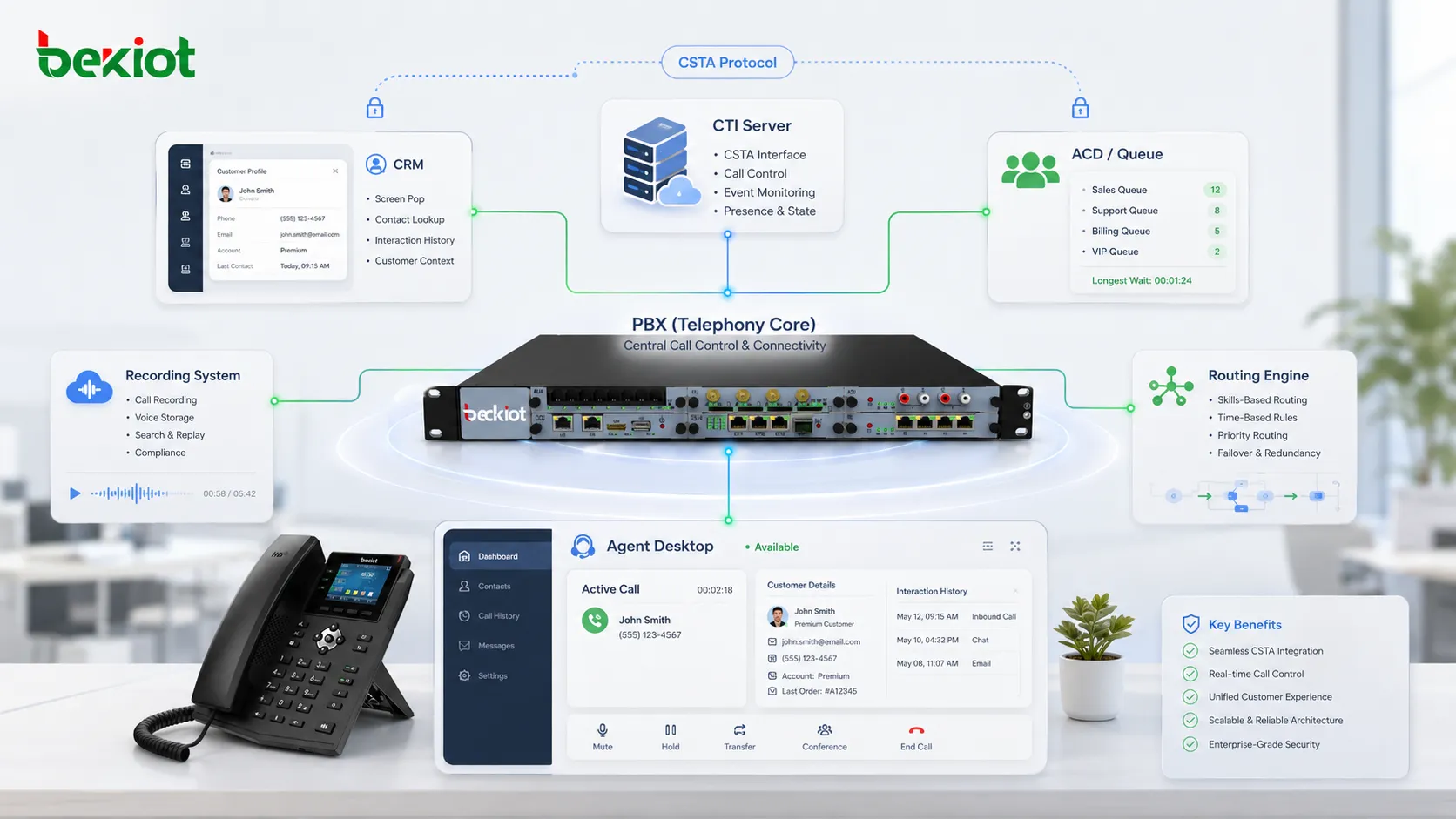
Modern contact centers are no longer simple rooms filled with telephones. They connect PBX systems, CTI middleware, agent desktops, CRM platforms, ACD queues, recording servers, routing engines, quality monitoring tools, SIP trunks, cloud applications and remote service teams. When these systems cannot exchange call events and control instructions in a consistent way, integration becomes expensive, fragile and difficult to maintain.
CSTA, short for Computer Supported Telecommunications Applications, provides a standardized way for business software to monitor, control and route telephone calls. Even as SIP, WebRTC, RESTful APIs and cloud-native platforms become more common, CSTA still matters in many financial, government, enterprise and hybrid contact center environments.
Its value is not limited to legacy PBX integration. CSTA gives developers, system integrators and communication architects a structured model for call states, device monitoring, routing requests, service responses and agent desktop interaction. For organizations modernizing contact center systems step by step, this model can reduce integration risk and protect existing telephony investment.
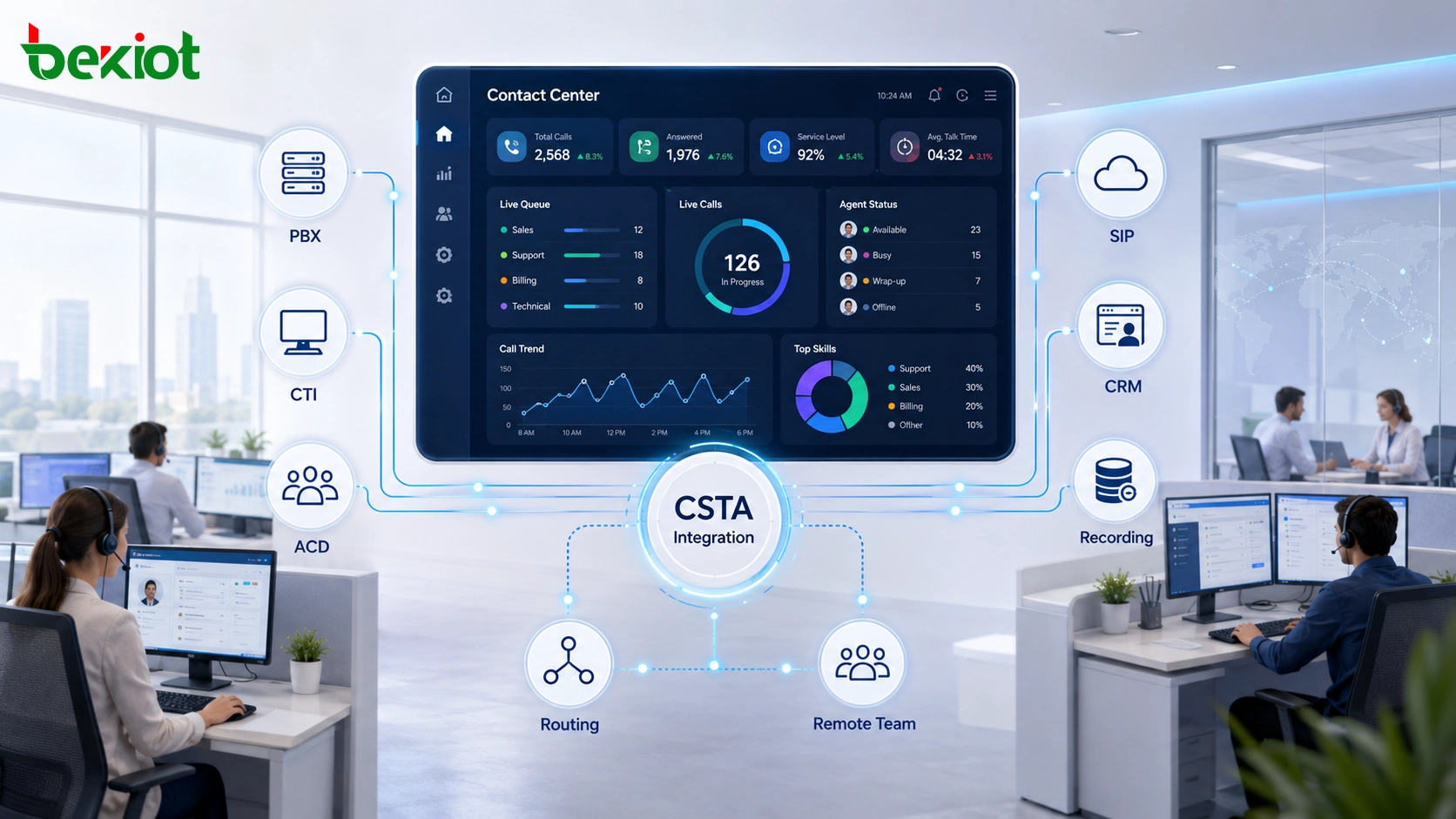
CSTA helps contact center platforms connect PBX call control, CTI middleware, agent applications, CRM data, ACD queues, recording systems and intelligent routing engines.
Why a Standard Telephony Interface Still Matters
In earlier enterprise communication systems, telephone networks and computer networks were usually separate. PBX vendors, application developers and enterprise users faced the same problem: every business application needed a different driver or private connector for each PBX platform.
CSTA was created to reduce that dependency. It defines a device-independent interface so upper-layer applications can interact with telephony systems without being tightly bound to one PBX hardware vendor. For contact centers, this means CRM systems, ACD platforms, recording software, reporting tools and agent desktops can communicate with the call control layer through standardized services and events.
The business value is practical. A company can introduce smarter routing, screen pop, recording triggers, supervisor tools or service automation without rebuilding every telephony integration from the beginning. It can also keep an existing PBX platform while gradually upgrading the contact center application layer.
The Standards Behind CSTA
CSTA is not just a general CTI idea. It is supported by formal ECMA standards that define service functions, protocol behavior and commercial implementation models. In real contact center projects, three standards are especially important.
Standard
Main Purpose
Practical Meaning for Contact Centers
ECMA-217
Defines service functions
Describes what applications can do, such as monitoring, making calls, answering, transferring, conferencing and controlling devices.
ECMA-218
Defines protocol specifications
Describes how messages, call states and protocol behavior are exchanged between telephony systems and applications.
ECMA-269
Defines CSTA Phase III
Provides the widely used commercial version for large-scale contact center and CTI deployments.
These standards help integrators avoid overdependence on private interfaces. The goal is not only to make a call from software. The deeper goal is to create a stable interaction model for events, device states, call identifiers, routing decisions and service responses.
How CSTA Evolved with Contact Center Needs
Phase I: basic visibility
CSTA Phase I focused mainly on call monitoring. Applications could observe call status, but call control capability was limited. For example, a business application might know that an extension was ringing or in a call, but it could not easily manage advanced transfer, routing or agent workflow.
This phase was useful for early CTI visibility, but it was not enough for modern contact centers that need queue logic, agent desktop control, call recording triggers and customer service automation.
Phase II: practical call control
CSTA Phase II added more active call control functions. Applications could make calls, answer calls, clear calls and transfer calls. This moved CTI from passive status monitoring toward real operational control.
However, more complex scenarios such as consultation, conference handling, multi-device collaboration and complete session management still needed stronger support. As enterprise service processes became more sophisticated, these limitations became more visible.
Phase III: commercial contact center foundation
CSTA Phase III became the version most widely used in commercial call center environments. It introduced a more complete call model, logical device concepts, event-driven behavior and advanced service extensions.
Phase III can support consultation, conferencing, single-step transfer, multi-step transfer, route requests, device capability exchange and more complete call lifecycle reporting. This made CSTA more suitable for large contact centers where PBX control, agent state, recording, routing and business software must work together.
How the Architecture Works in Real Projects
A CSTA-based solution usually follows a client/server model. The CSTA server is often built into the PBX, ACD platform or CTI Link server. It receives standard requests, converts them into telephony actions and reports call events back to business applications.
The CSTA client is usually the contact center middleware, CRM connector, agent desktop, recording service or routing application. It communicates with the telephony layer through TCP/IP, using XML messages or binary ASN.1 messages depending on the vendor implementation.
This separation keeps the business platform focused on customer data, service rules, agent workflow and reporting, while the PBX or CTI server handles the actual call execution. It also makes the system easier to maintain because business logic and telephony control do not need to be mixed into one fragile integration.
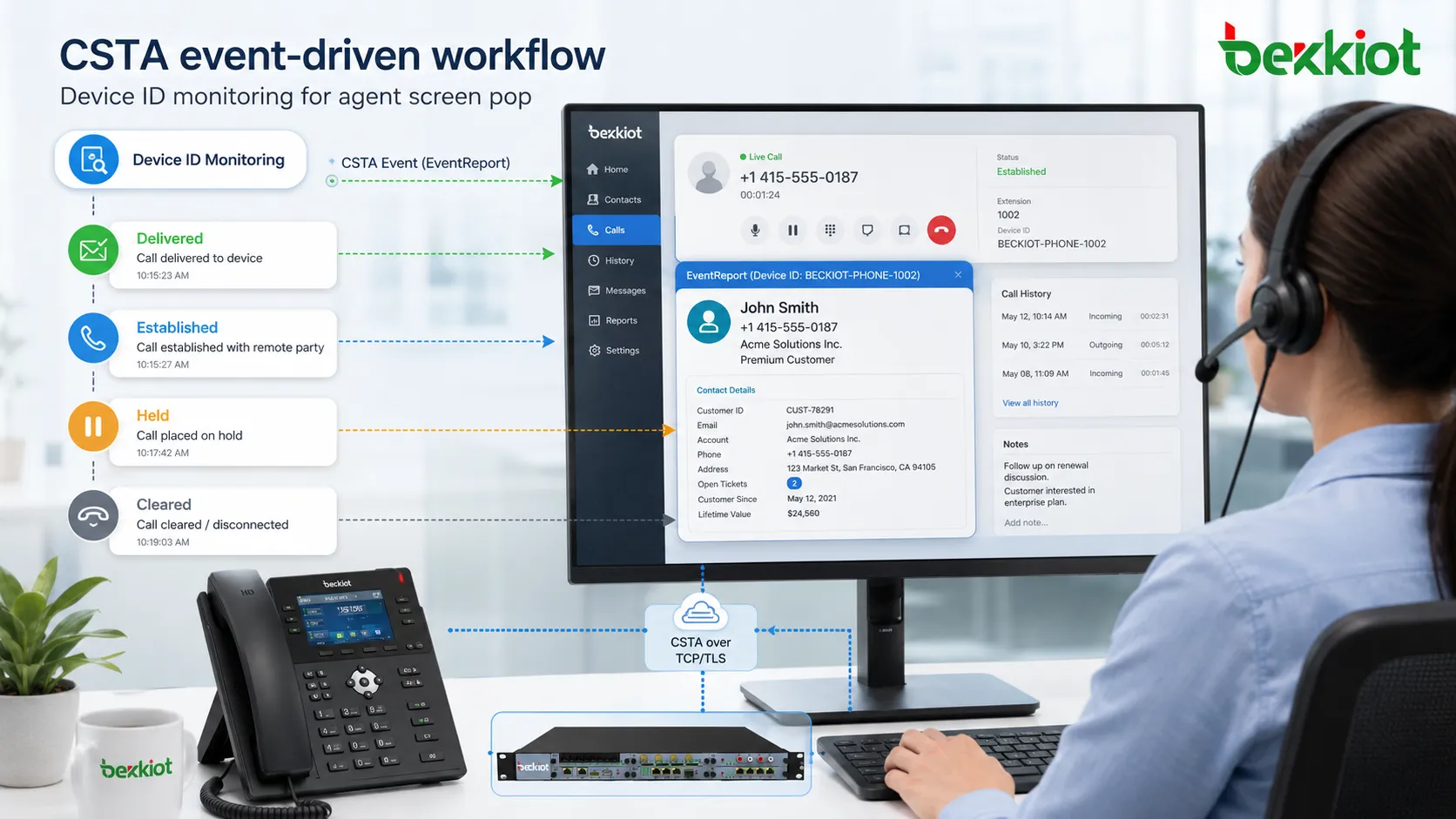
Event-driven CSTA interaction allows agent desktops and business systems to receive real-time call state changes such as ringing, connected, held and cleared.
Three Interaction Patterns That Matter Most
Monitoring for real-time status
Monitoring is one of the most common CSTA use cases. An application subscribes to a specific extension, agent device, queue or monitored object through a Device ID. When the device status changes, the PBX or CTI server sends an event report to the application.
Typical call states include Delivered for ringing, Established for connected calls, Held for call hold and Cleared or Released for call completion. This mechanism supports agent softphone synchronization, screen pop, real-time dashboards, recording triggers and supervisor monitoring.
Call control for agent desktop operation
Call control allows business software to perform telephony actions directly. Common service requests include click-to-dial, answer, hang up, hold, retrieve and transfer. After the PBX executes the action, it returns a service response to confirm the result.
This is the foundation for agent desktop call bars, CRM dialing buttons, supervisor intervention, consultation, mute, whisper, transfer and other daily contact center actions. The agent does not need to operate a separate phone interface for every task because the desktop application can control the telephony layer.
Routing control for smarter customer handling
Routing control is one of the strongest CSTA capabilities in advanced contact centers. When an incoming call reaches a routing point or queue, the PBX can pause the routing decision and send a route request to the application.
The routing application can check CRM data, customer history, VIP level, service language, region, product type, agent skill and queue load. It then returns a route response telling the PBX where the call should go. This enables skill-based routing, VIP priority, customer segmentation and personalized service handling.
Where CSTA Fits in Enterprise Environments
CSTA is especially useful when contact center operations depend on multiple systems. A bank may need PBX control, CRM screen pop, compliance recording, quality monitoring, supervisor functions and secure branch access. A government hotline may need queue management, agent status synchronization, case system integration and detailed call records.
For large enterprises, the value is not only call control. The deeper value is operational consistency. CSTA provides a structured model for device monitoring, route requests, call state events and telephony actions, reducing confusion when multiple applications must react to the same call.
In heterogeneous environments, one organization may use a PBX from one vendor, a queue platform from another vendor and a self-developed CRM. A CSTA-based CTI layer can act as a common language between these systems, which is why it remains relevant in hybrid contact center modernization projects.
Deployment Differences Across Vendor Ecosystems
Traditional PBX and CTI platforms
Some enterprise PBX vendors provide CSTA through dedicated application enablement services or CTI Link servers. These deployments are often stable and powerful, especially for complex transfer, consultation, conference and supervisor scenarios.
The trade-off is that configuration may be more complex, and licensing should be reviewed carefully. Before deployment, the project team should verify supported events, control services, SDK documentation, failover behavior and concurrent monitoring limits.
UCCE, CUCM and JTAPI-based environments
In some ecosystems, CSTA logic is not exposed directly. It may be wrapped through Java Telephony API or other vendor-specific APIs. Even then, the underlying concepts are still similar: device monitoring, call control, event subscription and service response.
In environments that include session border controllers, call managers, recording systems and quality monitoring platforms, CSTA-style interaction remains important for capturing call events and keeping business applications synchronized.
Domestic and hybrid contact center platforms
Some telecom and enterprise platforms support CSTA II or CSTA III through CTI Link interfaces and SDKs such as C++ or Java. These implementations may also be optimized for local carrier signaling environments, including PRI, SS7 or legacy trunk access.
For government hotlines, public service centers and enterprise replacement projects, CSTA compatibility can preserve existing telephony workflows while new CRM, case handling or reporting applications are introduced gradually.
Cloud platforms and modern API wrappers
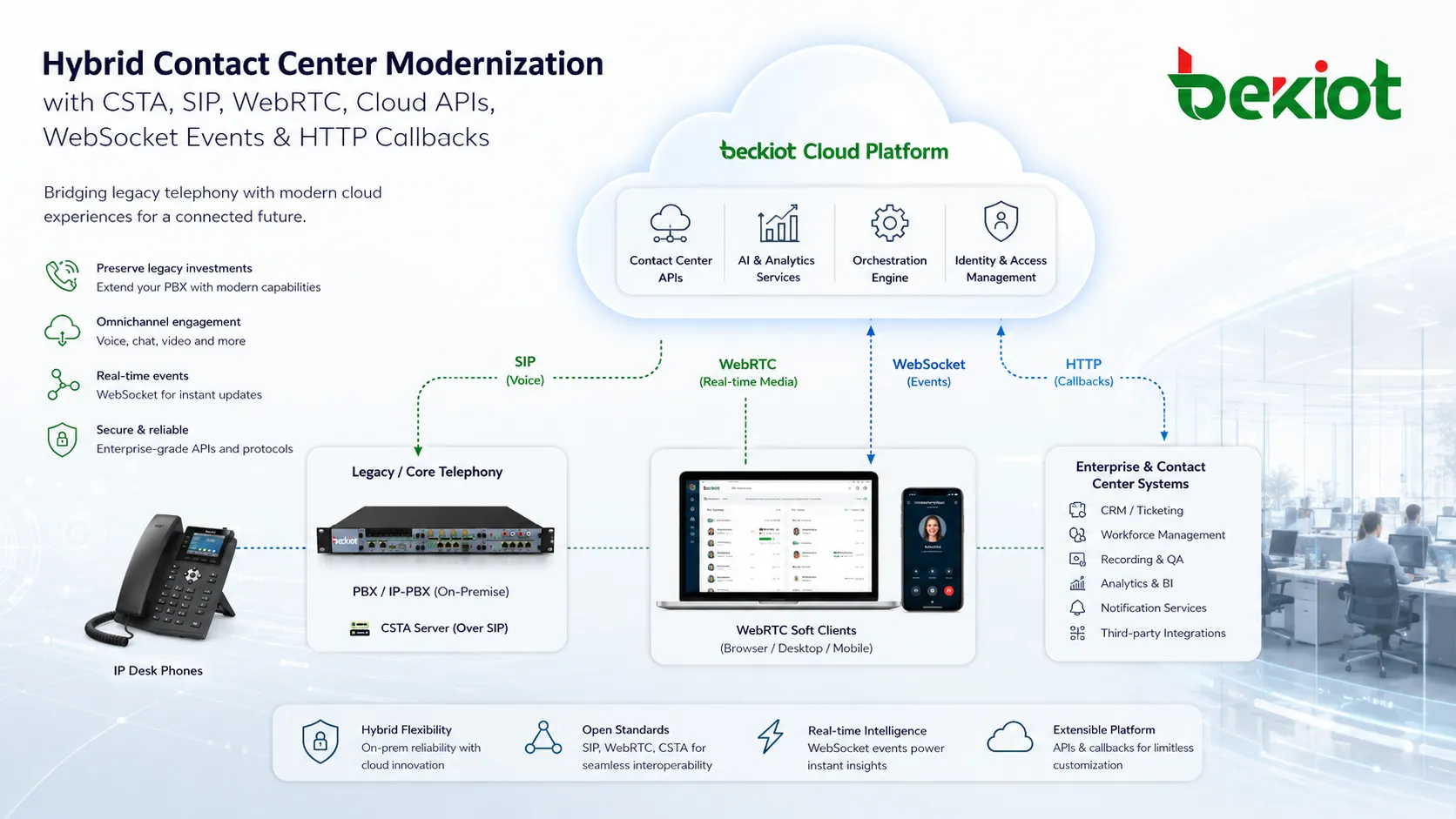
Many cloud-native contact center platforms no longer expose a raw CSTA TCP interface to developers. Instead, they present similar call events and control actions through WebSocket event streams, HTTP callbacks, REST APIs or platform SDKs.
This does not mean the CSTA model has disappeared. Its core ideas are still visible in modern API design: event subscription, route requests, state machines, device control, service responses and call lifecycle modeling remain central to reliable contact center architecture.
CSTA concepts continue to support hybrid modernization where legacy PBX systems, SIP platforms, WebRTC clients, cloud APIs and business applications must work together.
Why CSTA Knowledge Still Matters
Many new developers ask whether CSTA is outdated in a world of SIP, WebRTC, REST APIs and cloud contact centers. The practical answer is that it may not always be the interface developers use directly, but it remains a model worth understanding.
The installed base is still large in enterprise voice environments. Banks, insurance companies, public service organizations, aviation companies, energy enterprises and large customer service centers often operate hybrid voice systems for many years. Replacing the entire voice foundation in one step is rarely realistic.
CSTA also defines ideas that modern APIs still use. State machines, route requests, event subscriptions, service responses, device monitoring and call lifecycle modeling are not outdated concepts. They are still the backbone of dependable contact center integration.
Interoperability is also still a real challenge. When legacy PBX systems, SIP platforms, CRM software, recording systems and cloud applications coexist, a standard call-control model helps reduce development risk and makes troubleshooting easier.
Recommended Solution Design
Build a CTI middleware layer
Instead of connecting every business application directly to the PBX, enterprises should place a CTI middleware layer between the telephony system and upper business platforms. This middleware can normalize CSTA events, convert them into internal APIs and provide a stable interface for CRM, agent desktop, reporting and recording services.
This design reduces dependence on a single PBX vendor and makes future platform replacement easier. If the PBX changes later, the middleware can absorb part of the impact instead of forcing every business application to be rewritten.
Map events before development
Before writing code, the project team should map key call states such as ringing, connected, held, transferred, conferenced, released and failed. Each event should be connected to a business action, such as screen pop, recording start, CRM record creation, supervisor alert, missed-call workflow or quality monitoring tag.
Good event mapping prevents common problems such as repeated screen pop, missing call records, incorrect agent status, incomplete recording metadata and inconsistent customer history.
Separate routing logic from telephony execution
The PBX should execute the call movement, but the business system should decide advanced routing logic when customer handling depends on business data. CRM information, customer priority, skill group, region, working hours and agent workload should be evaluated by the routing application.
This separation allows the enterprise to improve service rules without constantly changing PBX configuration. It also gives business teams more flexibility to adjust routing strategies as customer service processes evolve.
Plan for cloud and legacy coexistence
Many organizations will operate in a hybrid state for years. A practical architecture should support traditional PBX integration, SIP trunking, cloud APIs, WebSocket events and future WebRTC clients. CSTA can remain part of the integration layer while newer APIs support digital channels and cloud-native services.
Prevents hidden integration limits during delivery
Event mapping
Ringing, connected, held, transferred, conferenced, released and failed events
Keeps CRM, recording and agent status synchronized
Agent desktop actions
Click-to-dial, answer, hangup, hold, retrieve, transfer, consultation and conference
Improves agent efficiency and reduces tool switching
Routing logic
CRM data, VIP level, language, region, product type, queue load and skill group
Supports smarter and more personalized customer routing
Hybrid architecture
Legacy PBX, SIP, WebRTC, cloud APIs, WebSocket events and recording systems
Supports gradual modernization instead of risky full replacement
Business Value for Contact Center Modernization
A CSTA-based integration solution can improve contact center operations in several practical ways. It gives agents a synchronized desktop experience, helps supervisors monitor call status in real time, enables smarter routing decisions, improves recording accuracy and allows CRM systems to react immediately when calls arrive.
For enterprise IT teams, the value is also technical. A standardized call-control layer reduces custom development, simplifies troubleshooting and protects existing PBX investment. For management teams, it supports better service quality, faster customer handling and more consistent reporting.
The best approach is not to treat CSTA as an isolated protocol. It should be treated as a contact center integration model that connects legacy telephony, modern business software and cloud communication services into one manageable solution.
Final Notes
CSTA remains relevant because contact center modernization is rarely a clean replacement project. Many enterprises must connect existing PBX systems, SIP platforms, CRM software, recording systems, cloud tools and remote service teams at the same time.
By using a structured CTI layer, mapping events clearly and separating routing logic from call execution, organizations can make telephony systems and business applications work together more reliably. Whether CSTA is exposed directly or hidden behind modern APIs, its integration model still helps contact centers build stable, event-driven and business-aware communication workflows.
FAQ
Is CSTA suitable for a new cloud-only contact center?
It depends on the platform architecture. A pure cloud contact center may expose REST APIs, WebSocket events or SDKs instead of native CSTA. However, understanding CSTA still helps architects evaluate call states, routing events and CTI behavior inside the cloud platform.
What should be tested before connecting CRM with a PBX through CSTA?
Key tests should include inbound screen pop timing, outbound click-to-call, transfer behavior, call release events, agent status synchronization, recording trigger accuracy, failover handling and duplicate event filtering.
Can CSTA work together with SIP?
Yes. SIP usually handles session signaling and media setup, while CSTA or a CTI interface handles application-level monitoring, call control and business workflow interaction. In many hybrid systems, both are used together.
Why do some modern platforms hide CSTA behind other APIs?
Cloud platforms often simplify developer access by exposing HTTP callbacks, REST APIs or WebSocket events. These interfaces are easier for web developers, but many of the underlying event and call-control ideas are still similar to CSTA.
What is the biggest deployment risk in CSTA projects?
The biggest risk is assuming that all vendors implement the standard in exactly the same way. Event names, device models, transfer behavior, licensing, SDK support and failover behavior should always be verified in a test environment before production deployment.