Audio Conferencing in Modern Voice and Video Collaboration
Audio conferencing remains essential in modern communication because it offers fast access, lower bandwidth needs, cross-network participation and reliable backup for video meetings, emergency response and enterprise collaboration.
Becke Telcom
Video conferencing has become a normal part of remote work, digital government, emergency coordination and cross-regional collaboration. Online meeting platforms, enterprise video rooms and MCU-based systems make visual communication easier than before. Teams can share screens, review documents, see participants and organize formal meetings across different locations.
However, the growth of video conferencing does not mean audio conferencing has lost its value. In many real working environments, voice is still the fastest, simplest and most reliable way to connect people. A practical communication system should not choose between video and telephone conferencing. It should combine video meetings, audio conferencing, SIP platforms, mobile phones, fixed lines, private networks, satellite phones and dispatch systems into one flexible architecture.
This is especially important for organizations that work across offices, field sites, vehicles, emergency command centers, industrial areas and remote locations. Video is useful when visual information is needed. Audio conferencing is more suitable when speed, reachability, privacy, bandwidth and operational simplicity matter more.
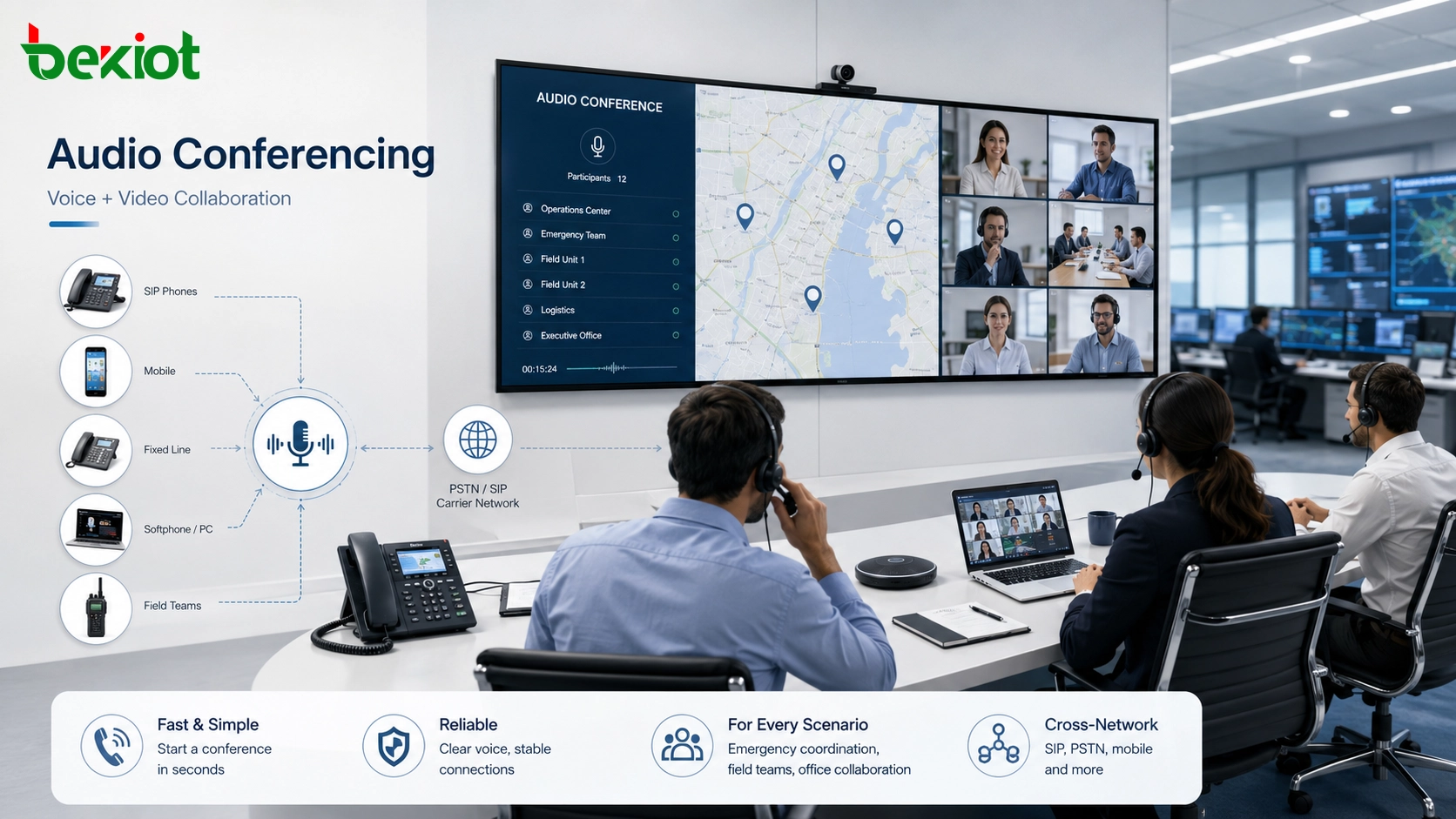
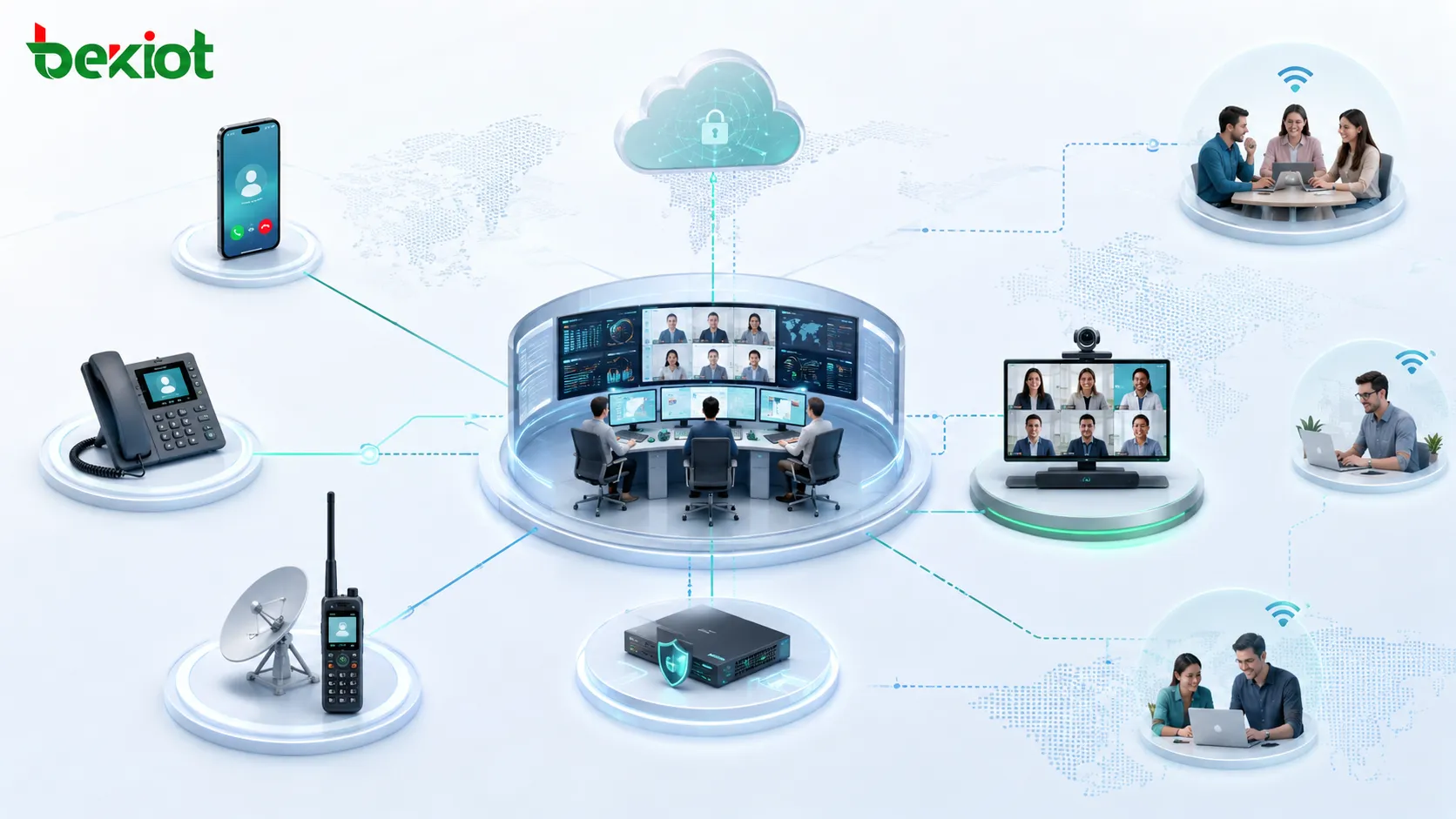
Audio conferencing and video meetings can work together to support office collaboration, emergency response, remote users and multi-network access.
Why Voice Still Matters in a Video-First Environment
Video meetings are powerful. They support visual reporting, screen presentation, document sharing, face-to-face discussion and structured multi-party collaboration. For office meetings, management reviews, project discussions, training sessions and formal coordination, video conferencing is often the preferred format.
Real communication, however, does not always happen in a quiet office or a prepared meeting room. Field workers may be wearing protective equipment. Emergency responders may be moving between sites. Maintenance teams may be working in noisy areas. Managers may need to join from a vehicle or airport. External partners may not have access to the same video platform.
In these situations, voice is often more practical. Audio conferencing allows users to join by dialing a number, answering a call or using a simple voice terminal. Participants do not need to prepare a camera, install a meeting application, adjust lighting, share video or expose their surroundings. This makes audio conferencing a strong tool for fast coordination and operational communication.
Real Environments Do Not Always Support Video
Video conferencing depends on stable bandwidth, low latency, usable cameras, suitable terminals and a network environment that can support continuous media transmission. In many field scenarios, these conditions cannot be guaranteed.
Mountain areas, outdoor rescue sites, construction zones, industrial plants, transportation corridors, remote substations, maritime operations and cross-border calls may all face unstable networks or limited bandwidth. A video session may freeze, disconnect or become difficult to use. A voice conference usually has lower bandwidth requirements and can often remain usable under weaker conditions.
Audio conferencing also works better in privacy-sensitive or restricted environments. Police enforcement, medical procedures, production safety operations, emergency rescue and confidential coordination may not be suitable for video exposure. Voice allows participants to exchange instructions and decisions without creating unnecessary visual or privacy risks.
Lower Access Barriers for Distributed Teams
A modern organization may include office employees, managers, field workers, partner companies, contractors, emergency teams and remote users. Not everyone uses the same application, network or device. Some people may have a video terminal. Others may only have a mobile phone, fixed phone, IP phone, satellite phone or softphone.
Audio conferencing has a lower access threshold because it can support many terminal types. Users can join from mobile networks, PSTN lines, SIP extensions, operator networks, private networks or satellite communication systems. For government agencies, airports, rail transit operators, utilities, emergency teams and industrial organizations, this broad accessibility is a major advantage.
Compared with video platforms that often require accounts, meeting links, application installation, permission management and meeting-room scheduling, audio conferencing supports quick dial-in, one-key access and immediate participation. It is useful for temporary meetings, urgent discussions, duty handovers, field coordination and incident response.
Audio conferencing gives office users, managers, field teams, emergency responders and external participants a simple way to join communication sessions.
From Basic Calling to Modern Collaboration
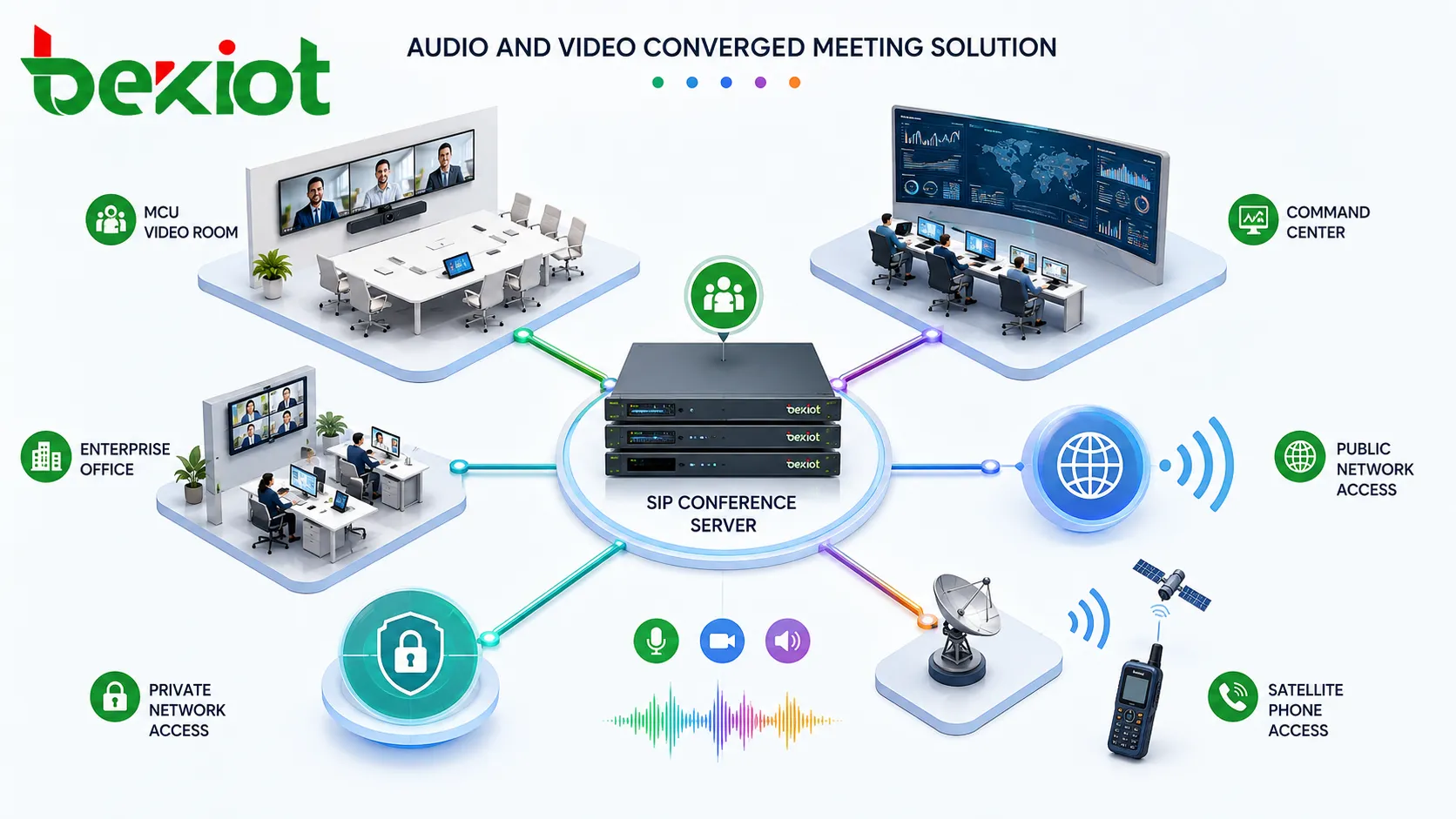
Audio conferencing is no longer only a simple telephone bridge. A well-designed system can support SIP access, PBX integration, PSTN access, mobile phone participation, private network access, public network access, satellite phone access and interconnection with MCU or video conferencing platforms.
Modern systems may also provide automatic audio mixing, mute control, meeting lock, host permissions, identity verification, participant management and recording. These functions make audio conferencing part of a wider communication platform instead of a separate legacy tool.
In practical deployment, this creates a more inclusive meeting environment. Users with video terminals can join by video. Field staff can join by phone. Command centers can organize voice sessions across public networks, private networks, satellite networks and fixed-line telephone systems. The system can connect different users into one coordinated session without forcing everyone to use the same device.
Local Deployment for Sensitive Industries
For government, emergency services, energy, power, finance, transportation and public-sector organizations, communication security is often as important as convenience. Public cloud meeting services may be easy to use, but they may not always meet internal requirements for data control, auditability, network isolation and system availability.
A locally deployed audio conferencing system gives the organization stronger control over access, user identity, meeting permissions, call records, voice data and system operation. It can be installed inside a private network, connected with existing SIP platforms and integrated with dispatch or video conferencing systems according to project needs.
This is valuable for emergency command, production scheduling, cross-department coordination and sensitive operational meetings. The organization can manage the system under its own security policy instead of depending entirely on external public services.
Complementing Video Instead of Replacing It
The future of enterprise communication is not “video replaces voice.” A better direction is voice and video convergence. Video makes communication more visual. Audio makes communication more reachable and resilient.
When bandwidth is sufficient and participants are prepared, video meetings can provide rich interaction. When users are mobile, networks are unstable, privacy is sensitive or response speed is more important than visual presentation, audio conferencing becomes the better option.
The two systems should support each other. Audio conferencing can reduce pressure on video meeting resources, provide backup when video fails and allow phone users to join important video sessions. This creates a more complete communication environment for daily work, emergency response and cross-network collaboration.
Recommended System Architecture
Layer
Recommended Capability
Operational Value
Conference core
Multi-party audio conferencing with automatic mixing and host control
Supports fast voice collaboration for daily meetings and urgent coordination
Network access
SIP, PSTN, mobile phone, fixed phone, private network, public network and satellite phone access
Allows participants to join from different terminals and network environments
Video integration
Interconnection with MCU or video conferencing platforms
Enables phone users and video rooms to participate in the same collaboration workflow
Security control
Local deployment, identity verification, meeting lock, permission control and recording
Improves security and compliance for sensitive industries
Management
Mute control, meeting hosting, participant management, recording and access policy
Helps operators manage large or urgent meetings more efficiently
Deployment Scenarios That Benefit Most
Emergency command and rescue
Emergency teams often work under pressure, with participants distributed across command centers, field sites, vehicles, public networks and mobile communication environments. Audio conferencing can connect people quickly even when video access is not available.
Government and public service coordination
Government departments may need fast communication across agencies, offices and regions. Audio conferencing supports simple access, permission control, local deployment and integration with existing communication platforms.
Industrial and utility operations
Factories, power facilities, transportation systems, energy sites and maintenance departments may work in noisy areas or restricted environments. Voice-based conferences allow staff to coordinate without requiring cameras, video terminals or application access.
Enterprise headquarters and cross-region teams
Large enterprises and multinational groups often need flexible communication across offices, mobile users and external partners. Audio conferencing can act as a lightweight coordination tool and a stable backup alongside video meetings.
A converged meeting architecture allows SIP audio conferencing, video rooms, command centers, enterprise offices and satellite phone users to stay connected.
Suggested Implementation Path
Review existing meeting resources
The project should begin by reviewing current video conferencing systems, SIP platforms, PBX resources, PSTN access, mobile user requirements, private network conditions, satellite phone needs and existing office or command collaboration workflows.
This review helps the project team decide where audio conferencing should be used as the main collaboration layer, where it should support video meetings and where it should provide backup access during network or platform issues.
Define user groups and access methods
Different users may require different access modes. Office users may join through IP phones or softphones. Managers may join through mobile phones. Field teams may use fixed phones or satellite phones. Conference rooms may connect through video MCU or room audio systems.
Clear user grouping makes deployment easier. It also helps administrators define dial plans, permissions, recording rules, meeting templates and emergency contact groups before the system goes live.
Plan security and control policies
For sensitive industries, the deployment should define host permissions, identity verification, meeting lock policies, recording rules, participant access restrictions, administrator roles and log retention policies before production use.
These rules are not only technical settings. They define who can create meetings, who can invite external participants, which meetings should be recorded and how communication records should be managed.
Test hybrid voice and video workflows
Testing should cover SIP access, mobile phone access, fixed-line access, satellite phone access, MCU interconnection, video room bridging, mute control, recording, meeting lock, public-private network access and failure recovery.
The test should include real operating scenarios instead of only basic connection checks. For example, the team should test how a phone participant joins a video meeting, how a video room joins an audio conference and how the system behaves when one access path fails.
Business Value for Modern Communication
A well-planned audio conferencing solution improves communication resilience. It helps organizations maintain voice coordination when video meetings are inconvenient, unavailable or unnecessary. It also expands participation by allowing users to join through familiar and widely available phone networks.
For daily business, audio conferencing reduces scheduling pressure and simplifies quick communication. For emergency response, it provides a dependable voice layer. For sensitive industries, local deployment and controlled access improve security and operational confidence.
Becke Telcom can be considered for projects that require SIP endpoint adaptation, industrial communication access, emergency voice integration or converged communication planning. The final design should be based on user scale, network conditions, security policy and existing video conferencing resources.
Final Notes
Audio conferencing remains important because communication is not always visual, scheduled or bandwidth-rich. In real enterprise, government, industrial and emergency environments, people often need a fast voice channel that works across devices, networks and organizations.
The best architecture combines audio and video instead of forcing one to replace the other. Video conferencing delivers rich visual collaboration, while audio conferencing provides fast access, wide compatibility and reliable backup. Together, they create a more resilient communication system for daily work and critical operations.
FAQ
Can audio conferencing support users outside the organization?
Yes. External participants can join through mobile phones, fixed lines or controlled dial-in access if the organization allows it. Permission rules and identity checks should be configured before use.
Is satellite phone access necessary for every project?
No. It is mainly useful for remote areas, disaster response, maritime operations, field rescue and locations where mobile or broadband networks may be unavailable.
Should meeting recordings be enabled by default?
Not always. Recording policies should follow internal compliance rules, privacy requirements and meeting sensitivity. Some emergency or command meetings may require recording, while routine discussions may not.
How can voice quality be improved in large audio conferences?
Good results depend on echo control, proper audio mixing, stable network access, suitable microphones, participant mute rules and avoiding noisy endpoints. Host control is important in large meetings.
What should be prepared before linking audio conferencing with video platforms?
The project team should confirm protocol compatibility, MCU access method, dial plan, audio routing, participant identity handling, meeting control logic and failover behavior before production deployment.