Enterprise IP PBX Solutions for Modern Office Communication
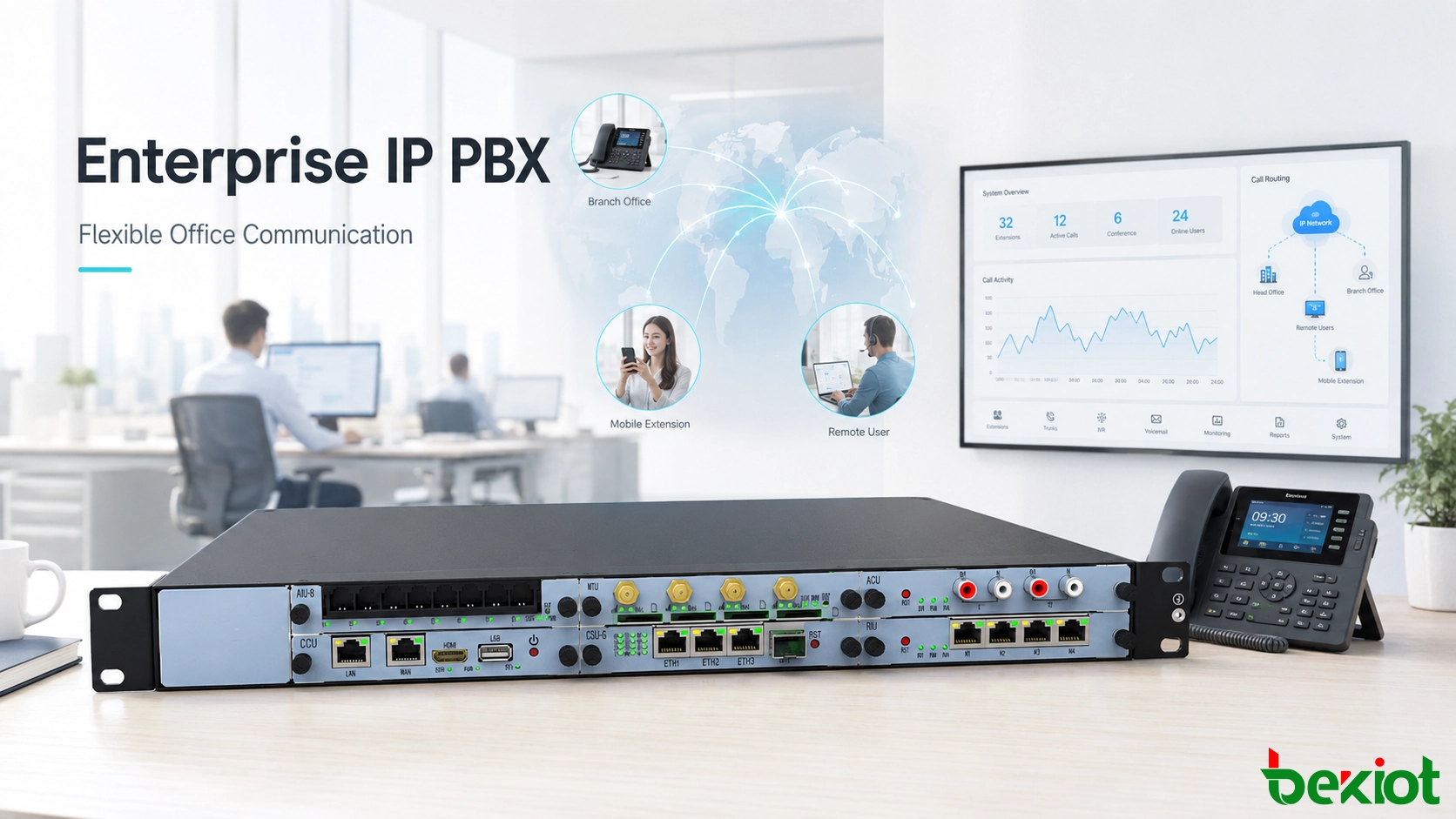
An enterprise IP PBX helps businesses replace legacy office telephony with a flexible VoIP platform for SIP phones, branches, remote users, gateways, call routing, recording and centralized communication management.
Becke Telcom
Office communication has changed from fixed telephone wiring to IP-based voice networks. Many companies that once relied on traditional PBX systems are now moving toward IP PBX platforms because they need easier deployment, simpler management, more flexible extension planning and better support for branch offices, remote users and SIP endpoints.
An IP PBX is not only a replacement for an old telephone exchange. It works as a unified voice communication platform that connects employees, departments, reception desks, service teams, operator consoles, gateways, SIP trunks and remote users through the data network. For growing organizations, this makes daily calling more manageable and gives the phone system room to expand with the business.
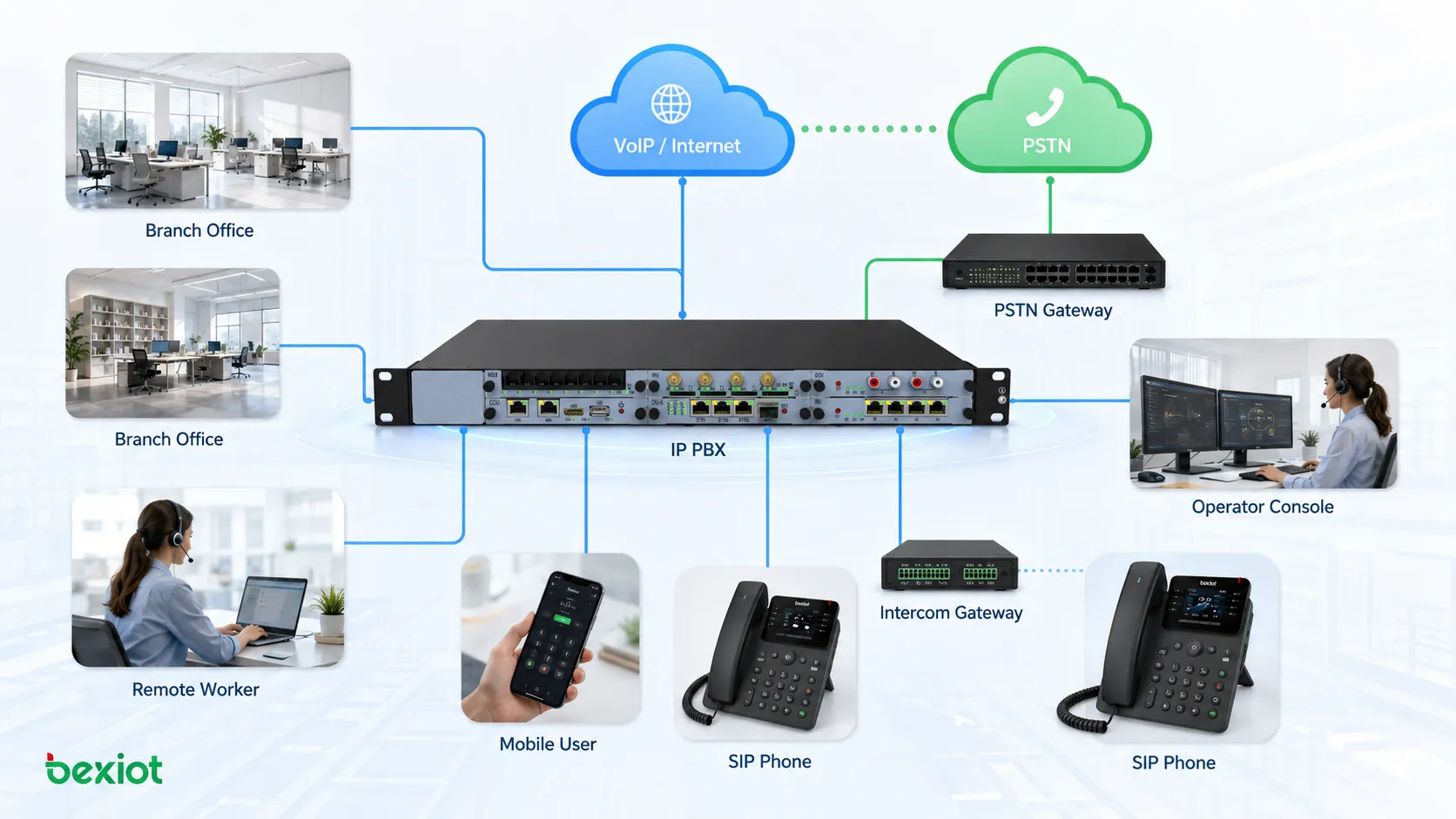
Enterprise IP PBX architecture connects SIP phones, branch offices, remote workers, VoIP networks, PSTN gateways and operator consoles into one communication system.
A Practical Upgrade from Traditional Office Telephony
Traditional office phone systems usually depend on dedicated telephone cables, physical extension lines, patch panels and hardware-based switching equipment. This structure can still support basic calling, but it becomes less convenient when the company needs office relocation, remote extension access, call recording, conferencing, voicemail, call queues or centralized control.
An IP PBX changes the structure by running voice communication over the IP network. Instead of building a separate telephone cabling system, an enterprise can use its LAN or WAN to connect IP phones, softphones, SIP gateways and communication applications. This makes deployment more flexible and reduces the amount of dedicated phone-line engineering.
In everyday office use, an IP PBX can support internal extension dialing, outbound calling, inbound routing, voicemail, IVR menus, call forwarding, call pickup, call transfer, simultaneous ringing, recording, operator handling and multi-party conferencing. These functions turn the system into a practical communication layer rather than a simple extension switch.
Faster Deployment Through IP Networking
One of the biggest advantages of an IP PBX is deployment flexibility. The system may be installed as an integrated hardware appliance, a standard server, a virtualized platform or a private cloud resource, depending on the project scale and management requirements.
For small and medium-sized offices, deployment can be straightforward. Administrators configure network parameters, create extensions, register IP phones and set basic call routes. For larger organizations, the same architecture can be expanded to support multiple departments, branch sites, remote users, SIP trunks and gateway interconnection.
This network-based model is especially useful when companies want to reduce traditional telephone wiring work. As long as the data network is planned properly, IP phones can be installed, moved and managed more efficiently than analog extension lines.
Less Cabling and Easier Office Movement
In a traditional phone system, moving an employee to another desk may require line changes, patch panel adjustment or technician support. This becomes a burden for IT and facilities teams when seating arrangements change frequently.
With an IP PBX, most endpoints work through the data network. In many cases, an employee can move an IP phone to another network port, reconnect it and continue using the same extension after registration and policy verification. This reduces the work involved in office relocation and makes department adjustment easier.
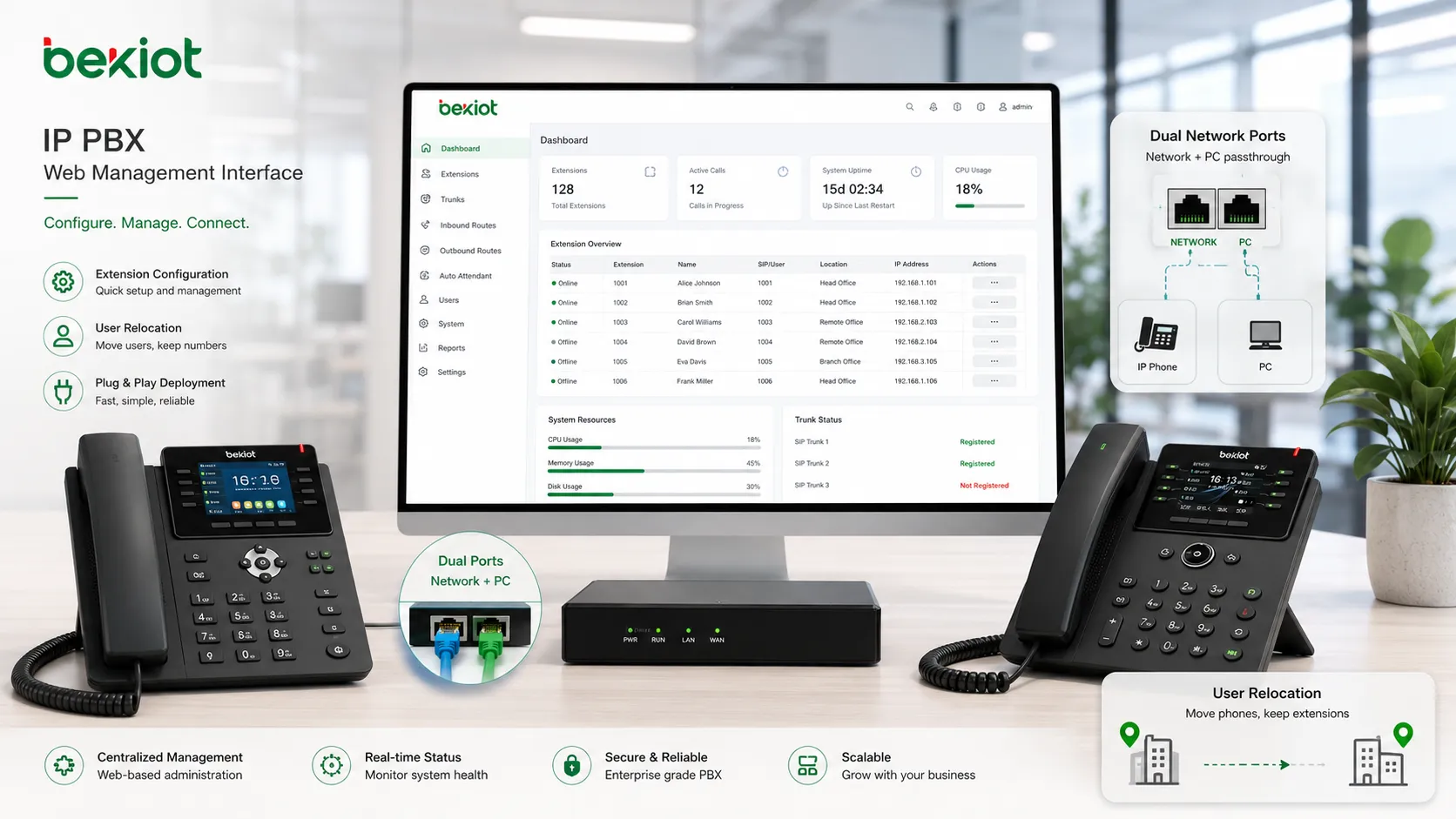
Many IP phones also include two network ports. If a desk has only one wall network outlet, the IP phone can connect to the wall port and the computer can connect through the phone’s additional network interface. This practical design helps simplify desk wiring without affecting normal office use.
Becke Telcom provides SIP phones and industrial communication terminals that can work with IP PBX platforms and gateways. These endpoints can support daily office functions such as extension dialing, call forwarding, teleconferencing and department communication.
Web-Based Management Makes Administration Easier
Many legacy telephone exchanges require command-line configuration, vendor-specific software or specialist technicians. This can slow down routine work such as adding extensions, modifying call rules, changing passwords, checking registration status or adjusting outbound permissions.
Modern IP PBX systems usually provide browser-based management. Administrators can configure extensions, trunks, call routes, IVR menus, voicemail, recording, queues, user permissions and system status from a graphical interface. This makes daily operation easier for IT teams that already understand basic computer networking.
Web management also helps standardize communication maintenance. Adding a new employee, deleting an unused extension, changing a department name or checking whether a phone is registered can usually be handled directly from the administrator interface without waiting for on-site manufacturer support.
Web-based IP PBX management helps IT teams configure extensions, manage users, deploy IP phones and support office relocation more efficiently.
Integrated Functions for Daily Business Communication
Function integration is another important reason companies choose IP PBX systems. In older telephone systems, functions such as IVR, recording, auto attendant, music on hold, billing, conferencing and operator console services often require separate modules or additional devices.
In a modern IP PBX environment, many of these functions can be integrated into one platform. This reduces the number of independent systems, simplifies maintenance and helps the enterprise build a more complete communication solution with fewer separate components.
Typical IP PBX functions may include internal extension dialing, outbound call routing, inbound call distribution, voicemail, call forwarding, call pickup, call transfer, simultaneous ringing, multi-party audio conferencing, video calls, call queues, auto attendant, music on hold, call recording, billing integration and operator console management.
Requirement
Traditional Phone System Challenge
IP PBX Solution Value
Deployment
Dedicated telephone wiring and hardware planning
Network-based deployment using IP infrastructure
Desk movement
Line changes and patch panel adjustment
Move the IP phone and keep the extension active after registration
Configuration
Complex commands or vendor-specific tools
Browser-based graphical management
Functions
Separate modules for IVR, recording, billing and conferencing
Integrated voice functions in one communication platform
Expansion
Limited by physical lines and proprietary architecture
SIP-based connection with phones, gateways, branches and applications
Better Cost Efficiency for Growing Organizations
IP PBX systems often use standardized server architecture or compact integrated appliances. Compared with traditional dedicated telephone exchange hardware, this can reduce system cost, improve hardware flexibility and make later expansion easier.
Because many voice functions are built into the IP PBX platform, enterprises can avoid buying multiple separate systems for basic office communication. Features that once required several devices may now be delivered through one server-based or appliance-based system.
Endpoint selection is also more flexible. Basic SIP phones, advanced business phones, video phones, operator consoles, softphones and specialized terminals can be selected according to user role and budget. A front desk may need a multi-line phone, while an ordinary office user may only need a basic SIP phone or softphone client.
Open SIP Compatibility for Expansion
Most IP PBX systems are based on SIP, which is one of the main reasons they are widely used in enterprise communication. SIP compatibility allows the platform to connect with SIP phones, SIP trunks, SIP gateways, intercom systems, conference endpoints, softphones, branch PBX systems and third-party communication devices.
For multi-site organizations, SIP can be used to interconnect branch offices with headquarters. Branch extensions can call headquarters extensions, and call routing can be managed centrally or regionally according to the organization’s operating model.
SIP also makes gateway integration more practical. Enterprises can connect FXO gateways, FXS gateways, LTE wireless gateways, intercom gateways and other access devices according to real requirements. This allows the IP PBX to support communication between IP phones, analog phones, mobile phones, intercom terminals and external telephone networks.
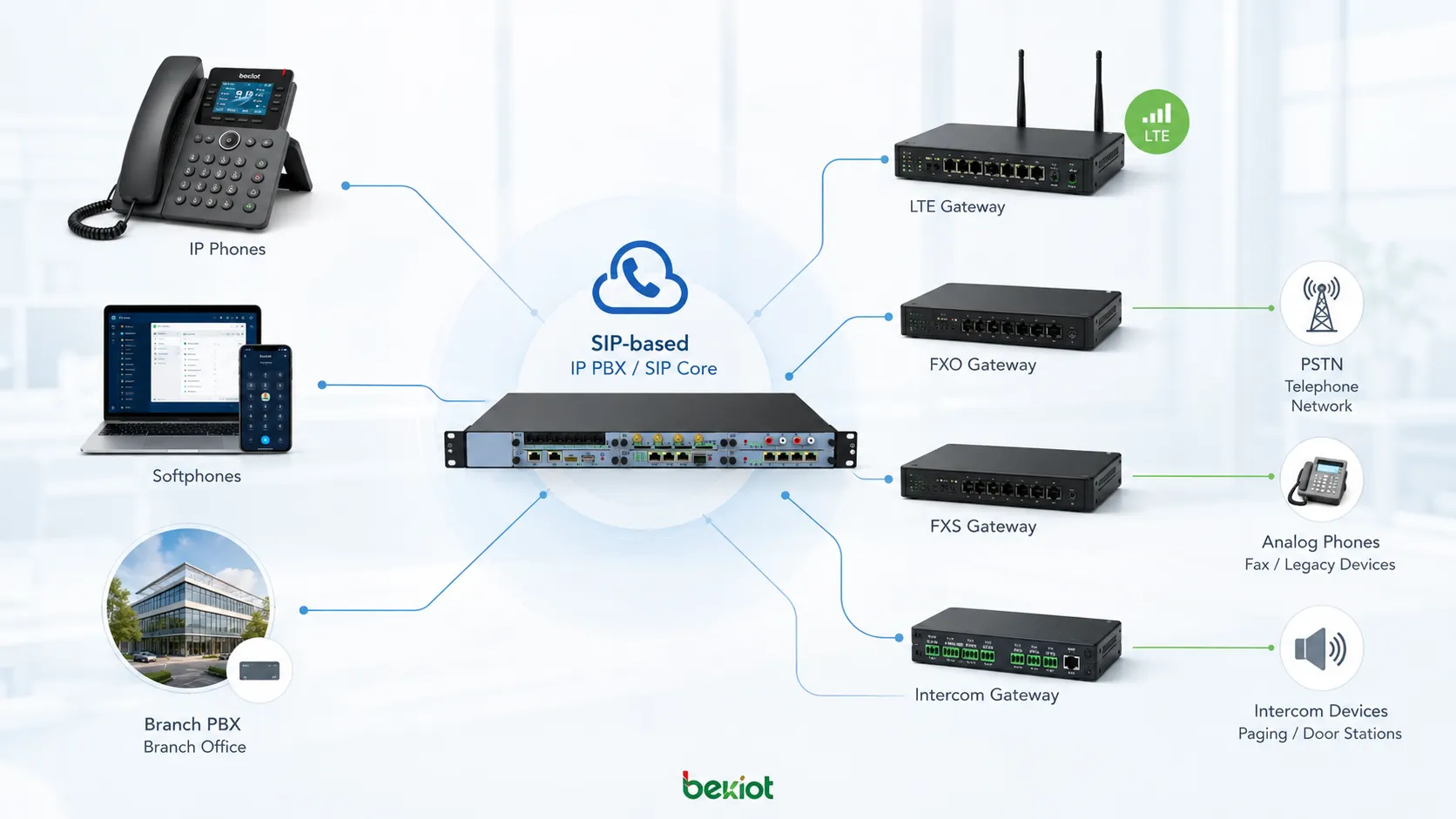
SIP compatibility allows IP PBX systems to connect IP phones, softphones, branch platforms, FXO and FXS gateways, LTE gateways, intercom gateways and external telephone networks.
Security and User Control in IP Voice Networks
IP-based voice communication can support stronger security control than traditional analog systems when it is properly planned. Voice traffic can be protected through secure registration, encrypted transmission, access policies and network-level protection.
Administrators can improve account security through strong extension passwords, user identity binding, device registration control, call permission settings and access restrictions. These measures help reduce unauthorized calling, extension abuse and information leakage.
Security planning should not stop at the PBX interface. The full design should also consider VLAN separation, firewall rules, SIP trunk protection, remote extension access, password policy, call permission control, log auditing, backup strategy and administrator account management.
Recommended Deployment Path
Assess existing communication needs
The project should begin with a review of current phone lines, extension quantity, departments, user roles, branch locations, existing analog phones, SIP phones, operator requirements, recording needs and external trunk resources. This assessment helps define the correct IP PBX capacity and deployment model.
Plan the network before registering endpoints
Since the system runs on the IP network, network stability is essential. Enterprises should check switch capacity, PoE availability, VLAN planning, QoS policy, IP addressing, firewall rules, remote access requirements and backup power before large-scale endpoint registration.
Standardize extensions and call routing
Extension numbers, department groups, call permissions, inbound routes, outbound routes, IVR menus, ring groups and voicemail policies should be planned before users go live. A clean numbering and routing plan makes future maintenance much easier.
Choose endpoints by user role
Not every employee needs the same phone. Front desks may need multi-line phones, managers may need advanced business phones, meeting rooms may need conference terminals, mobile staff may use softphones, and production areas may require more durable communication endpoints.
Business Value for Enterprise Communication
An IP PBX helps enterprises modernize office communication without treating the phone system as an isolated tool. It becomes a central voice layer that supports employees, departments, branches, service teams, reception desks, meeting rooms, remote users and external networks.
The main value is flexibility. Companies can deploy faster, reduce dedicated phone cabling, manage users through a web interface, expand through SIP standards, integrate more calling functions and select endpoints according to real needs and budgets.
For organizations moving from traditional office telephony to IP-based communication, gradual planning is usually the best approach. By combining IP PBX, SIP phones, gateways, trunk resources and proper network design, companies can build a scalable and manageable communication system for daily business operation.
Final Notes
IP PBX is a practical upgrade path for enterprises that want a more flexible and manageable office phone system. It reduces dependence on dedicated telephone wiring, supports web-based administration, integrates more voice functions and connects different branches, users and gateways through SIP.
A successful deployment should start with real communication needs, not only equipment selection. When extension planning, network design, endpoint choice, security control and routing rules are handled properly, an IP PBX can become a stable foundation for long-term enterprise communication.
FAQ
Can an IP PBX keep existing office phone numbers?
In many projects, existing numbers can be retained through SIP trunks, operator coordination or gateway connection. The exact method depends on the current carrier service, trunk type and migration plan.
Does every desk need a physical IP phone?
No. Some users may use softphones on computers or mobile devices. Physical IP phones are still useful for reception desks, managers, meeting rooms, service teams and users who need stable desk-based communication.
What network conditions should be checked before deployment?
Important checks include LAN stability, PoE switch capacity, VLAN design, QoS policy, firewall rules, IP address planning, bandwidth for remote users and backup power for core network equipment.
Can IP PBX work with analog phones?
Yes. Analog phones can often be connected through FXS gateways, while traditional outside lines can be connected through FXO gateways. This allows gradual migration instead of replacing every endpoint at once.
What is the main risk of weak extension passwords?
Weak passwords may allow unauthorized registration or illegal outbound calls. Enterprises should enforce strong passwords, limit permissions, monitor call logs and restrict remote access where necessary.