Mass Notification System and Emergency Notification Software for Enterprise Safety Communication
Modern mass notification systems combine emergency notification software, multichannel alerts, automation, contact data, two-way response, and system integration to protect people and operations during critical events.
Becke Telcom
When every second matters, communication infrastructure becomes one of the most important parts of an organization’s safety and continuity strategy. A Mass Notification System, often shortened to MNS, helps organizations send urgent information to the right people through the right channels at the right time. When it works together with Emergency Notification Software, the system becomes more than an alert tool. It becomes a coordinated communication platform for emergencies, operational disruptions, safety incidents, and business continuity events.
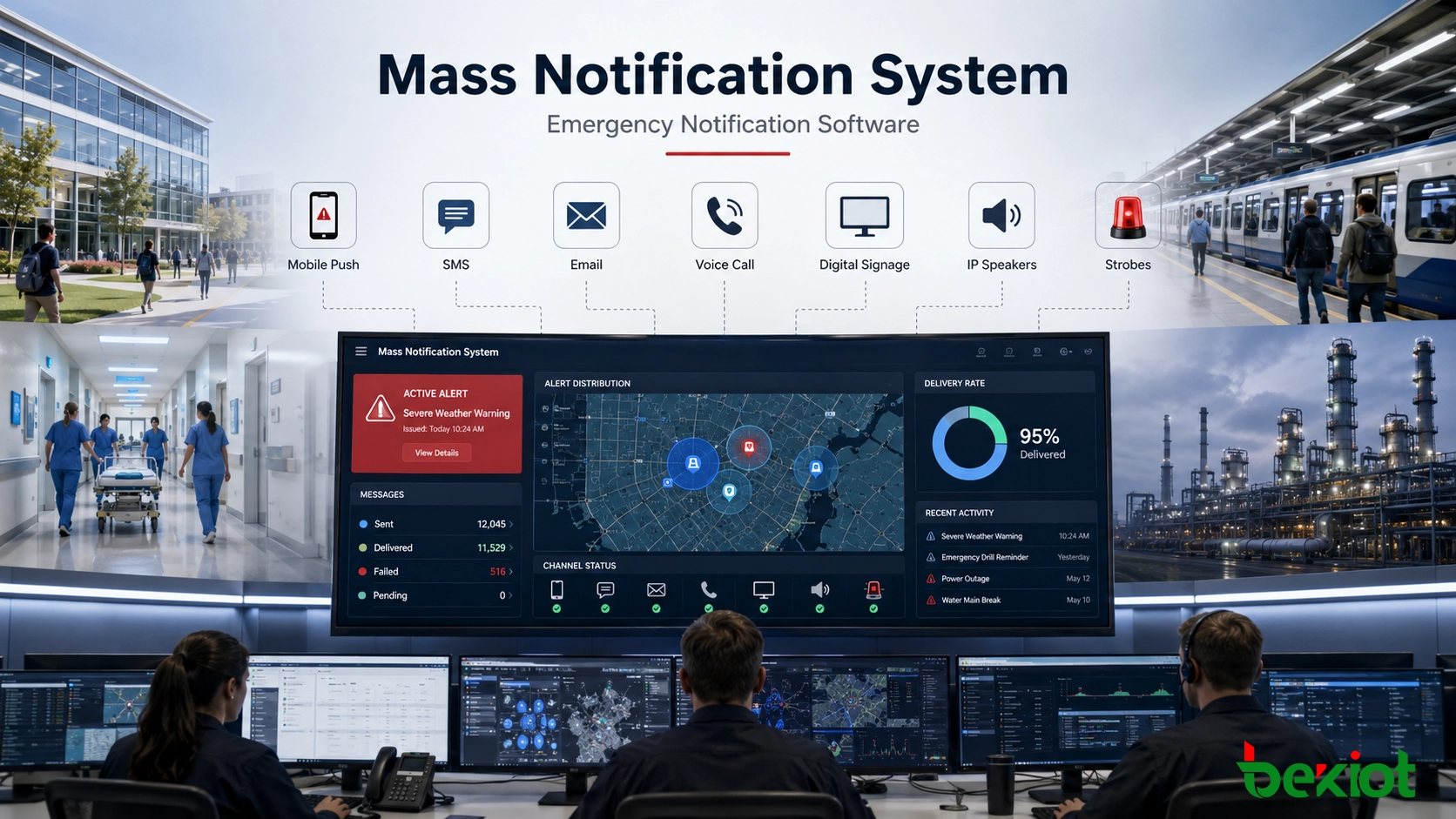
Modern notification platforms are used in campuses, hospitals, factories, chemical plants, airports, railways, corporate offices, government facilities, public safety agencies, and critical infrastructure sites. They can send alerts through SMS, voice calls, email, mobile push notifications, desktop pop-ups, digital signage, IP speakers, sirens, strobes, radios, collaboration apps, and public warning channels.
The real value of a modern notification system is not only speed. It also depends on accuracy, delivery reliability, contact data quality, automation, two-way response, integration with other systems, and clear audit records after the event. A strong platform helps organizations move from manual phone trees and scattered messages to a structured, measurable, and repeatable emergency communication workflow.
Understanding the Core Layers
The terms mass notification system and emergency notification software are often used together, but they do not always mean exactly the same thing. The difference is easier to understand when the system is viewed as a full communication stack.
A Mass Notification System refers to the complete end-to-end alerting environment. It may include software, servers, cloud services, IP speakers, sirens, strobes, paging equipment, digital signage controllers, mobile applications, desktop agents, telephony interfaces, and local notification gateways. Its purpose is to deliver alerts to large groups across many channels.
Emergency Notification Software is the application layer that controls the process. It manages message templates, contact databases, recipient groups, user permissions, alert workflows, delivery logic, automation triggers, response tracking, reports, and audit logs. In many modern deployments, the software becomes the intelligence hub that coordinates all connected devices and communication channels.
Together, these two layers create a notification fabric that connects people, sensors, facilities, response teams, and safety procedures. The system can support both life-safety alerts and routine operational communication, depending on how it is configured.
Architecture of a Modern Alerting Platform
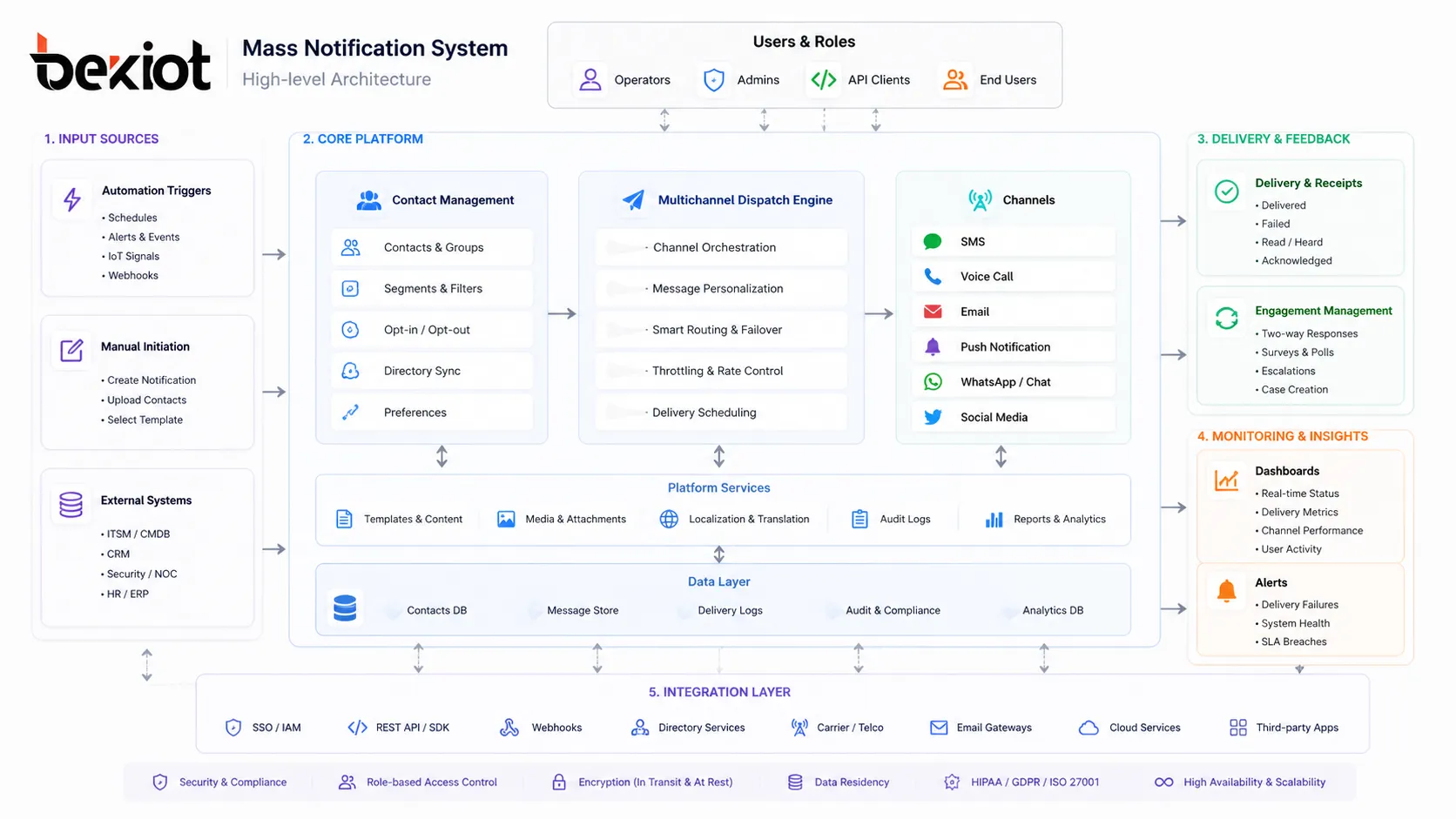
A professional notification platform is usually built around a distributed architecture. Cloud systems may use scalable microservices and multiple availability zones. Hybrid systems may combine cloud orchestration with local site controllers. On-premises systems may use physical or virtual appliances for isolated networks and facilities with strict data control requirements.
A layered notification architecture includes dispatch logic, contact data, automation triggers, delivery channels, and integration interfaces.
Multichannel Dispatch Engine
The dispatch engine is responsible for sending alerts through multiple communication paths at the same time. A basic system may support SMS, email, and voice calls. A more advanced platform may also support mobile push notifications, desktop alerts, digital signage, IPTV, IP speakers, sirens, strobes, collaboration tools, social media, RSS feeds, radio gateways, and public alerting systems.
Each channel has its own delivery behavior. SMS may use carrier links or SMPP connections. Voice calls may use SIP trunks and text-to-speech engines. Email requires deliverability controls such as SPF, DKIM, and sender reputation. Mobile push depends on services such as Apple Push Notification service and Firebase Cloud Messaging. On-site speakers, sirens, and strobes may be triggered through local controllers, TCP/IP commands, APIs, or relay interfaces.
A strong dispatch engine should support priority queuing, provider failover, delivery receipts, retry logic, throttling control, and channel fallback. Life-safety alerts should take priority over routine messages, and the system should continue trying alternate channels when a primary path fails.
Contact Management and Dynamic Grouping
Emergency communication depends on accurate recipient data. Static contact lists quickly become outdated when employees change roles, shift schedules, locations, departments, or phone numbers. Modern software solves this by synchronizing with identity and HR systems.
Common integration methods include SCIM 2.0, LDAP, REST APIs, and directory synchronization with platforms such as Active Directory, Azure AD, Okta, Workday, or other HR systems. The software can use attributes such as department, job role, building, shift, manager, certification, response team, and site assignment to build dynamic groups automatically.
Geospatial grouping is also important. The system may select recipients based on GPS location, building floor plans, access control data, IP subnet mapping, or a polygon drawn on a map. This allows an alert to reach only the people inside an affected building, campus zone, factory area, or weather impact region instead of notifying everyone unnecessarily.
Automation and Triggered Workflows
Human-initiated alerts remain important, but some incidents require faster response than a person can provide manually. Modern emergency notification software can listen to external systems and launch predefined workflows automatically.
Weather feeds, earthquake alerts, fire panels, gas detectors, panic buttons, access control systems, video platforms, cybersecurity monitoring tools, industrial sensors, building automation systems, and IT monitoring platforms can all serve as triggers. The system may receive data through CAP feeds, MQTT, Modbus, OPC-UA, REST APIs, webhooks, ONVIF, vendor SDKs, or local relay inputs.
For example, an H2S gas alarm in a refinery can trigger a shelter-in-place message to a specific zone. A forced-door alarm can notify security staff and include a nearby camera link. A critical IT outage can alert the network operations team through SMS, email, Teams, Slack, and voice call escalation.
Two-Way Response and Accountability
Sending an alert is only the first part of emergency communication. Organizations also need to know who received the message, who acknowledged it, and who still needs assistance. This is why two-way response and accountability tracking are central features in modern platforms.
Recipients may reply with predefined codes, tap buttons in a mobile app, answer a voice prompt, or complete a short status form. Common response options include “safe,” “need help,” “not on site,” or “unable to evacuate.” These responses can update live dashboards, personnel accountability reports, escalation rules, and incident records.
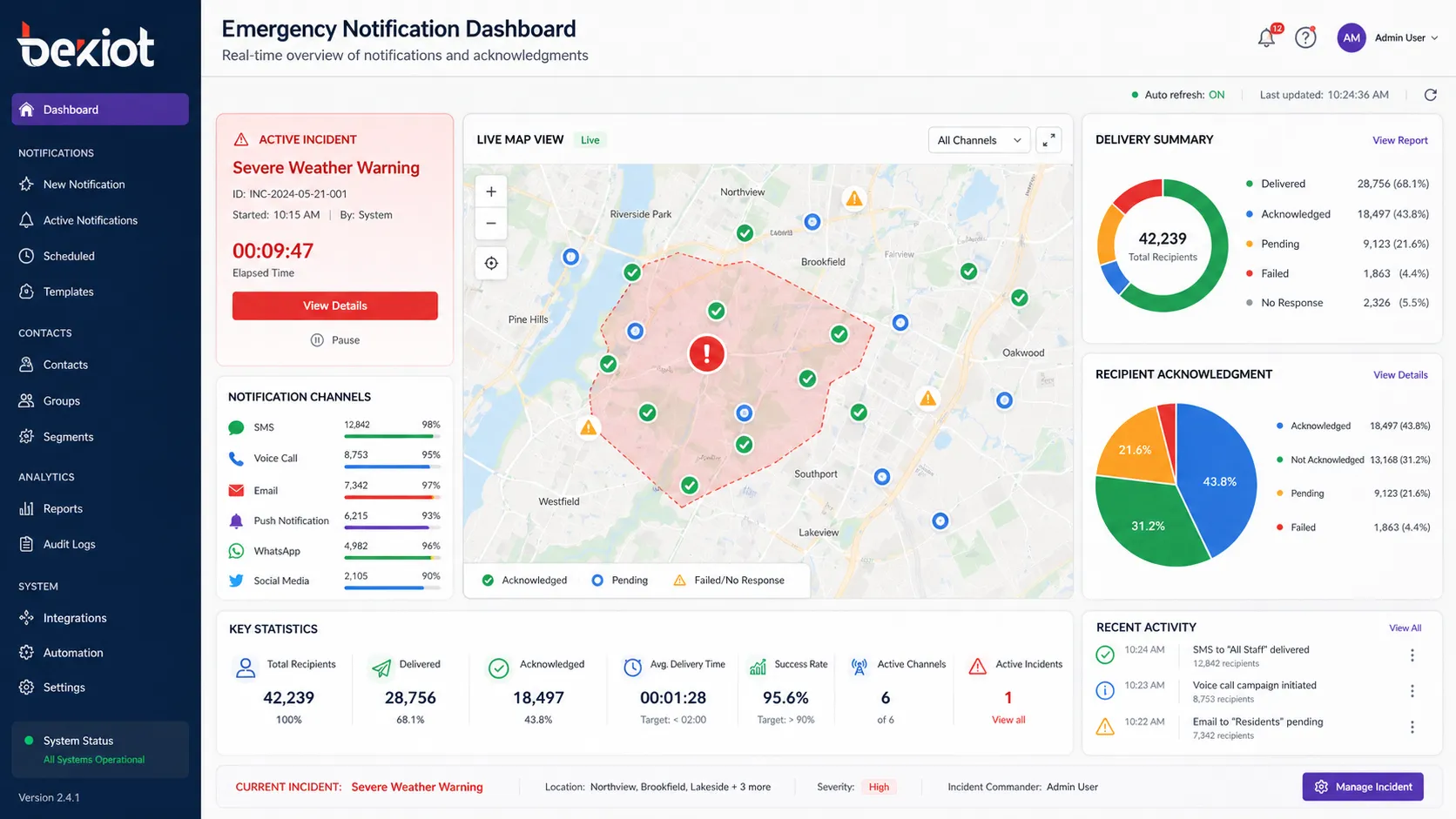
Delivery tracking may include SMS delivery reports, email opens, voice call answer detection, push notification interactions, desktop alert confirmations, and response timestamps. During an emergency, this information helps incident commanders understand who has been reached and where additional action is needed.
Emergency notification software can show alert status, geolocation mapping, delivery statistics, and accountability results in real time.
Technical Features That Separate Strong Systems from Basic Alert Tools
Low-Latency High-Volume Delivery
In a real emergency, a notification platform must deliver many messages quickly without collapsing under load. Enterprise-grade systems are designed for high throughput, auto-scaling, provider failover, and priority message handling. The goal is to reach large populations within minutes, not after a long manual cascade.
Performance should be evaluated by more than marketing claims. Buyers should ask about messages per second, voice call capacity, SMS carrier relationships, push notification latency, email throughput, queue design, and performance under peak emergency load.
Redundancy and Local Continuity
A notification system should not fail when the organization needs it most. Cloud platforms should support regional redundancy and failover. Local facilities may need notification gateway appliances, cached contact lists, local speaker activation, LTE backup, satellite backup, or isolated mode operation when the WAN connection is unavailable.
Hybrid design is especially useful for industrial sites, campuses, hospitals, transportation hubs, and government facilities. The cloud can manage global contacts and workflows, while local controllers can still activate sirens, speakers, signage, or strobes during network disruption.
Rich Message Templates
Emergency messages must be clear, actionable, and easy to understand. Modern templates can include plain text, maps, evacuation routes, voice scripts, pre-recorded audio, images, short videos, links, response buttons, and multilingual content.
In high-stress environments, pre-approved templates reduce hesitation and mistakes. A good template library should include the most likely scenarios, such as fire, severe weather, active threat, hazardous material release, medical emergency, IT outage, facility closure, evacuation, lockdown, and all-clear messages.
Security and Compliance Controls
Emergency notification software handles sensitive contact information and can activate powerful communication channels. Security must therefore be part of the system design. Important controls include SAML or OIDC authentication, MFA, role-based or attribute-based permissions, encryption at rest, TLS in transit, audit logs, and restricted sender permissions.
Auditability matters because emergency alerts may be reviewed after an incident. The platform should record who launched the alert, what message was sent, which channels were used, when each recipient was reached, what responses were received, and what actions operators took. This supports compliance, investigation, training, and continuous improvement.
How Different Industries Use Notification Platforms
Campuses and Higher Education
Universities need to reach students, faculty, staff, visitors, campus police, residence halls, classrooms, sports facilities, libraries, parking areas, and outdoor spaces. A complete system may connect blue light phones, campus police dispatch, mobile alerts, outdoor speakers, access control, digital signage, and email or SMS channels.
When an emergency call point is activated, the platform can display the location, notify officers, activate nearby speakers, send push alerts, and trigger a response workflow. For large campuses, zone-based alerting prevents unnecessary panic while still reaching the affected area quickly.
Hospitals and Healthcare Facilities
Healthcare environments need fast and controlled communication for code blue, trauma response, security events, facility emergencies, patient safety, and staff coordination. Notification software can alert role-based teams such as on-call surgeons, nurses, security staff, facility engineers, or emergency managers.
Integration with nurse call, staff assignment, mobile handsets, paging, and facility systems can help alerts reach the correct people without exposing unnecessary patient information. In regulated environments, message content and audit records must be designed carefully.
Manufacturing and Chemical Plants
Industrial sites may use notification systems for gas alarms, fire events, equipment failures, evacuation, shelter-in-place instructions, maintenance coordination, and production disruption. These environments often require integration with OT systems such as PLCs, SCADA platforms, gas detectors, public address systems, strobes, and radio communication.
A hazardous material event may require different instructions for different zones. The system can combine sensor input, wind direction, zone mapping, and pre-approved instructions to deliver targeted messages through speakers, mobile alerts, radios, and visual devices.
Corporate and Financial Enterprises
Large enterprises use notification platforms for office closures, cybersecurity incidents, travel risk, executive alerts, IT outages, business continuity, and employee accountability. Contact data often comes from HR systems and identity platforms, allowing messages to target employees by site, department, job role, or risk group.
In cybersecurity events, the platform may receive triggers from SOC tools, ITSM platforms, or proxy logs. It can then notify affected users, security teams, executives, and regional managers with consistent instructions and traceable delivery records.
Government and Municipal Alerts
Government agencies and municipalities may use mass notification for weather emergencies, evacuation orders, flood warnings, infrastructure failures, public safety incidents, and community alerts. Public warning may require integration with CAP-based systems, local sirens, websites, social media, radio, television, and other public communication paths.
For public agencies, chain-of-custody logging and operator permission control are especially important. A single alert can affect thousands or millions of people, so review, approval, and audit processes must be clearly defined.
Integration with the Enterprise IT and Safety Ecosystem
A notification platform should not exist as a separate island. Its value increases when it connects with the systems that already hold user data, detect risks, manage incidents, or control physical safety devices.
Critical IT incidents can create tickets and notify the correct response teams automatically
Physical Security
Access control SDKs, ONVIF, BACnet, Modbus, VMS APIs
Door alarms, fire events, camera alerts, and environmental thresholds can trigger targeted notifications
Public Safety Channels
CAP, IPAWS, EAS, WEA, local siren interfaces
Approved authorities can deliver public warnings through multiple official communication paths
Deployment Models for Different Risk Profiles
Cloud-Native SaaS
Cloud-native deployment is common for distributed organizations that need fast rollout, elastic scale, simplified maintenance, and access from many locations. It reduces on-premises infrastructure requirements and is suitable when reliable internet connectivity is available.
Buyers should review uptime commitments, redundancy design, data residency, security certifications, API maturity, and how the provider handles carrier or cloud-region disruptions.
On-Premises Appliance
On-premises deployment may be required in air-gapped networks, industrial sites with limited internet access, government environments, or facilities with strict data sovereignty requirements. The appliance can operate locally and may directly control sirens, speakers, signage, or other on-site devices.
This model gives more local control, but it also requires careful planning for hardware maintenance, backup power, software updates, redundancy, and local operator training.
Hybrid Architecture
A hybrid model combines cloud orchestration with local survivability. The cloud layer manages contact data, workflows, templates, reporting, and remote access. Local notification gateways activate on-site devices and may continue operating during WAN failure.
For many campuses, hospitals, factories, transport hubs, and industrial parks, hybrid deployment provides the best balance between modern software management and local emergency readiness.
Implementation Best Practices
A successful notification project starts with a clear inventory. Organizations should map every alerting device, contact path, building zone, department, response team, existing public address system, digital signage system, sensor input, and integration requirement. This prevents gaps between the software workflow and the real facility environment.
Message templates should be prepared before they are needed. Teams should define the most likely incident scenarios, write clear instructions, create multilingual versions where necessary, and test them with authorized senders. A good template should answer what happened, where it happened, who is affected, what action to take, and where to get updates.
Testing is also essential. IT teams should evaluate network impact, voice call volume, SMS throughput, speaker activation, signage override, mobile push delivery, user acknowledgment, failover behavior, and operator procedures. Routine drills help turn software capability into real operational readiness.
Training should include dispatchers, security teams, executives, floor wardens, emergency managers, IT administrators, and local site contacts. The system is only useful if authorized users know when to launch alerts, which templates to choose, how to confirm delivery, and how to close an incident properly.
ROI and Vendor Evaluation
The value of a notification system is often discussed in safety terms, but there are also measurable business benefits. Faster notification can reduce downtime, shorten emergency response, improve compliance, protect reputation, and reduce manual labor during incidents.
Useful evaluation metrics include time-to-notification, acknowledgment rate, delivery success rate, incident response time, number of manual calls eliminated, audit readiness, and downtime reduction. For IT outages, even a small reduction in response time can create measurable financial value.
Vendor selection should include security, scale, reliability, integration depth, support quality, references, product roadmap, compliance documentation, and real-world performance evidence. Buyers should ask for penetration test summaries, SOC 2 Type II reports where relevant, API documentation, reference projects, and failover architecture details.
The Next Stage: AI-Assisted Preventive Alerting
Notification systems are moving from reactive alerts toward predictive and preventive communication. AI-assisted systems may use weather feeds, sensor data, video analytics, social signals, IT telemetry, and operational history to identify risk earlier and recommend response actions.
In the future, an alert platform may warn a depot before floodwater reaches the site, guide employees to the safest shelter based on indoor location, recommend escalation steps based on incident type, or generate multilingual instructions automatically from an approved response template.
AI should not replace emergency managers or safety procedures, but it can help reduce delay, interpret complex data faster, and support more personalized guidance. The strongest systems will combine automation with human approval, clear governance, and controlled message templates.
Becke Telcom Mass Notification and Emergency Communication Solutions
Becke Telcom provides emergency communication and industrial notification solutions for public safety, transportation, energy, tunnel, campus, hospital, and industrial environments. These solutions can include IP speakers, paging systems, SIP emergency phones, dispatch platforms, alarm linkage, public address equipment, intercom terminals, and integration with control room workflows.
For projects that require both on-site audio notification and centralized emergency communication, Becke Telcom can support system planning around SIP, IP PBX, public address, alarm inputs, CCTV linkage, paging zones, emergency phones, and dispatch coordination. This is especially useful in harsh or safety-critical environments where ordinary notification channels are not enough.
A practical mass notification design should not depend on one channel. It should combine mobile alerts, fixed audio systems, visual signals, control room operation, system integration, and local backup paths so that critical instructions can still reach people when conditions are difficult.
Conclusion
A modern mass notification system with emergency notification software is a foundation for organizational resilience. It helps send urgent messages quickly, target the right people accurately, confirm responses, integrate with safety systems, and maintain records for review and compliance.
The best systems are not defined only by the number of channels they support. They are defined by how well they combine reliable delivery, accurate data, automation, local survivability, operator control, security, and real emergency workflows.
For schools, hospitals, industrial sites, transportation facilities, government agencies, corporate campuses, and critical infrastructure, mass notification is no longer just a compliance checkbox. It is an operational communication layer that protects people, assets, and continuity when every second counts.
FAQ
What is the difference between a mass notification system and emergency notification software?
A mass notification system is the full alerting environment, including software, speakers, sirens, signage, mobile alerts, voice calls, and other delivery channels. Emergency notification software is the application layer that manages contacts, templates, workflows, message delivery, responses, and audit logs.
How does a notification system keep working during network problems?
A resilient system may use redundant cloud regions, local notification gateway appliances, cached contact lists, LTE or satellite backup, alternate message channels, and on-site speakers or sirens. Hybrid systems are often used when local activation must continue during WAN failure.
Can emergency notification software integrate with HR and directory systems?
Yes. Modern platforms can synchronize with HR and identity systems through SCIM, LDAP, and APIs. This keeps contact information current and allows dynamic grouping by department, location, shift, role, or response responsibility.
What communication channels can a mass notification system use?
Common channels include SMS, voice calls, email, mobile push, desktop alerts, digital signage, IPTV, IP speakers, sirens, strobes, collaboration platforms, social media, RSS feeds, radio gateways, and public warning systems where supported.
Is cloud deployment enough for emergency notification?
Cloud deployment can work well for many organizations, especially distributed enterprises with reliable connectivity. Facilities that require local survivability, industrial activation, air-gapped operation, or strict data control may prefer on-premises or hybrid deployment.