IP PBX Video Applications for Enterprise Communication and Visual Collaboration
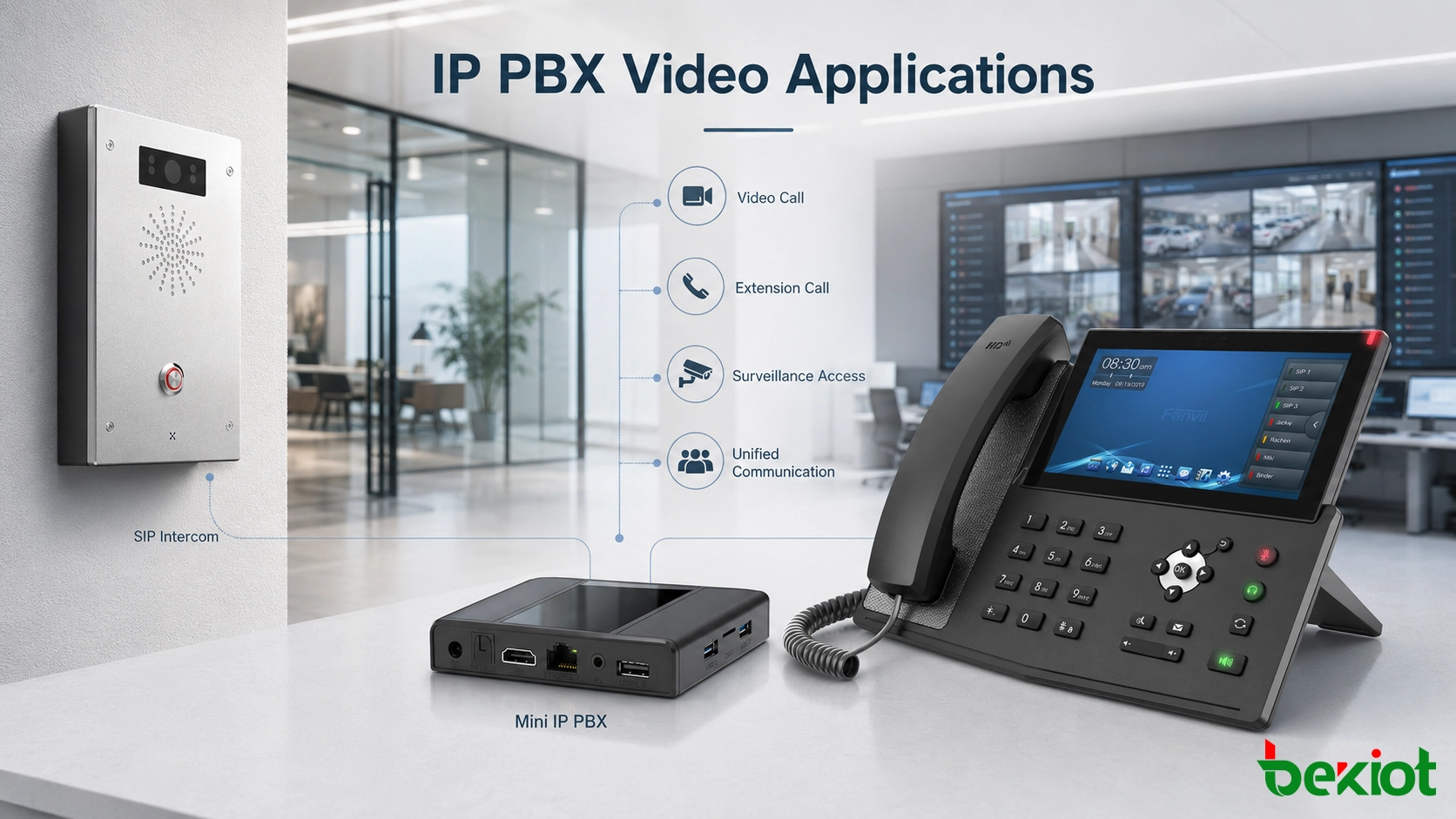
IP PBX video applications extend enterprise calling beyond voice by connecting video phones, SIP video intercoms, surveillance gateways, conferencing systems, and control room workflows.
Becke Telcom
IP PBX systems have long been used as the communication center of enterprises, campuses, industrial parks, property management sites, and multi-branch organizations. In the early stage of VoIP deployment, most IP PBX projects focused on voice calling, extension management, call routing, and lower internal communication costs. That foundation is still important, but enterprise communication is no longer limited to audio.
As video phones, SIP video intercom terminals, video gateways, surveillance systems, and video conferencing platforms become easier to connect, IP PBX can support more visual communication scenarios. A modern system can handle not only extension calls, but also video calls, video meetings, visitor verification, emergency help-point communication, camera viewing, and video linkage during call events.
The value of these video applications is not simply “seeing the other person.” In many real projects, video helps users verify identity, confirm site conditions, check equipment status, observe a help-point area, support remote coordination, and improve control room response. When designed properly, IP PBX can become a practical entry point for both voice communication and visual collaboration.
Modern IP PBX systems can support video calls, conferencing, SIP video intercom, surveillance access, and command center linkage through IP-based communication.
Why video is becoming part of enterprise calling
Traditional telephone systems were built around voice. They helped employees call each other, contact customers, connect branch offices, and manage internal extensions. For many daily office tasks, voice calling is still fast and effective. However, more business and industrial scenarios now require visual confirmation.
A front desk may need to see a visitor before opening a door. A duty room may need to confirm who pressed a help button. A security team may need to check a camera view before sending patrol staff. A control room may need to talk with a field point while watching the surrounding scene. These requirements are difficult to satisfy with a voice-only telephone system.
Because an IP PBX already manages SIP extensions, call permissions, user numbers, and routing rules, it can naturally become part of the video communication architecture. Engineers can register video phones, SIP intercom terminals, video gateways, and related endpoints into the same communication environment instead of building a completely isolated system for every visual application.
Basic video calls between SIP extensions
The simplest video application is a one-to-one video call between two video-capable SIP endpoints. If two video IP phones are registered to the IP PBX as extensions, users can dial each other almost the same way they make a normal voice call. Once the call is connected, both sides can communicate with audio and video.
This is easy for users to understand because the calling habit is familiar. They do not need to open a meeting application or enter a complicated room number. They only select a contact or dial an extension. For managers, reception desks, branch offices, duty rooms, and technical support teams, this can provide a simple visual communication option.
At the same time, desk-to-desk video calling should be planned realistically. In many offices, users still prefer voice for short daily conversations because it is faster and less intrusive. Video calling is useful, but it should not be treated as the only reason to deploy video phones. Its value becomes stronger when it connects with meetings, access control, surveillance, or emergency response workflows.
Video phones as small conferencing terminals
Video conferencing is often more practical than ordinary desk-to-desk video calls. Many SIP video phones can join video meetings when the conferencing platform, MCU, or communication system supports SIP access. In this setup, the desk phone becomes a compact video conference terminal.
This is useful for managers, branch offices, engineering teams, duty desks, service centers, temporary command points, and distributed operation teams. Users can join a meeting from their own desk without walking to a conference room or setting up a separate device. For multi-site organizations, this improves meeting convenience and reduces coordination time.
Good conferencing experience depends on more than the IP PBX itself. Engineers should check codec compatibility, resolution support, microphone pickup, speaker quality, echo cancellation, network bandwidth, screen size, and the conferencing platform’s SIP access method. A video phone can join a meeting only when the endpoint, PBX, network, and conference platform work together smoothly.
SIP video intercom for entrances and help points
One of the most valuable IP PBX video applications is SIP video intercom. A video intercom terminal can be installed at a company entrance, factory gate, equipment room, parking area, campus building, transport station, platform, park, square, or public help point. After registration, the intercom works like an IP PBX extension and can call a front desk, duty phone, dispatch console, or control room.
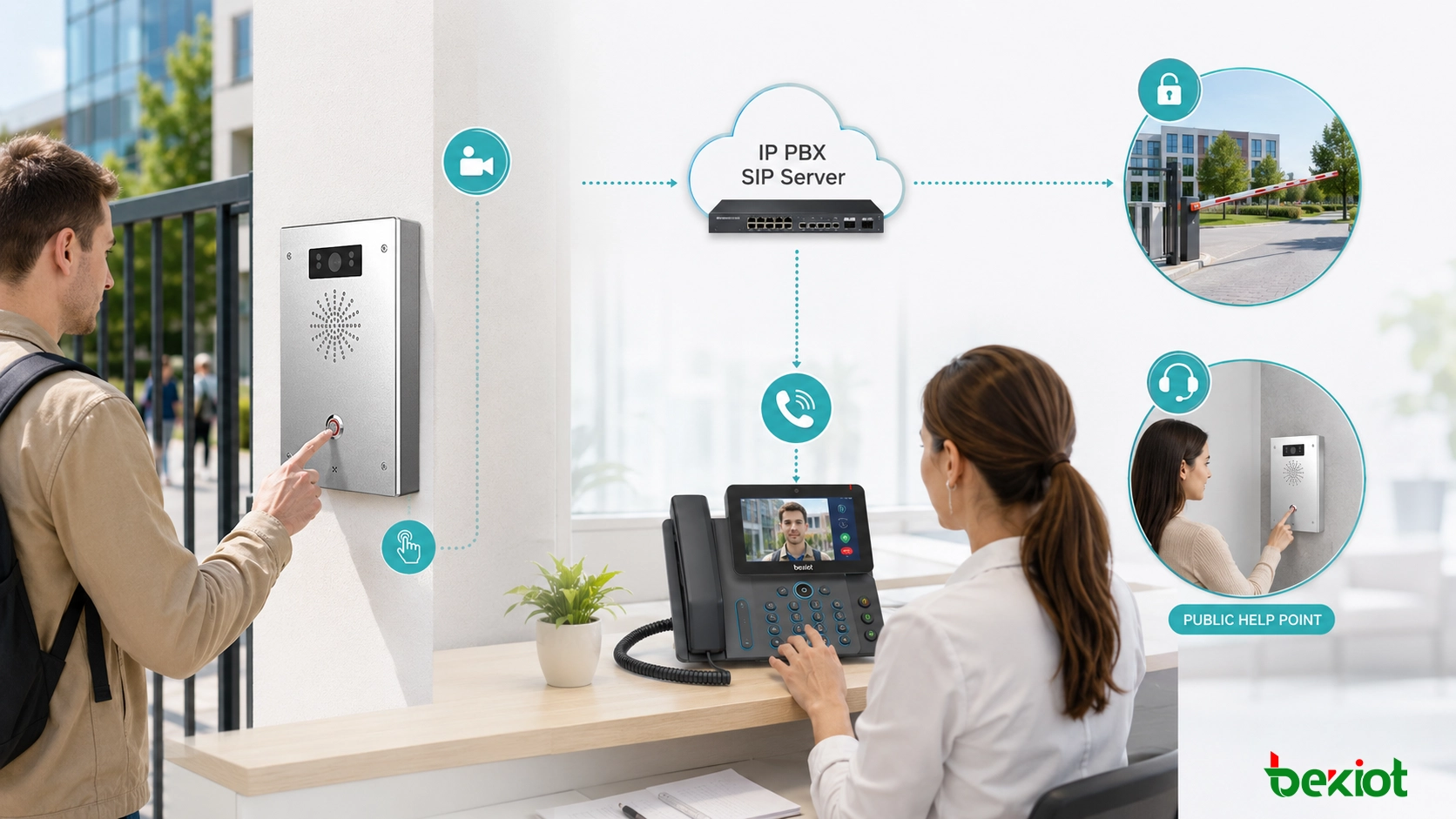
In an access control scenario, a visitor presses the call button on the SIP video intercom. The terminal calls the front desk video phone, and the visitor’s live image appears on the screen. After confirming identity and purpose, the operator can open the door remotely if relay control is configured.
The same model also works for emergency help. A person at a transport hub, industrial site, public service area, or parking facility can press a help button and reach the duty center immediately. If the terminal has a camera, the control room can see the caller and surrounding environment, which helps staff judge whether the situation is a normal inquiry, a safety issue, or an emergency event.
For projects that require industrial SIP endpoints, dispatch integration, video help points, and unified communication design, Becke Telcom / 贝克通信 can be considered as a practical solution reference during planning.
SIP video intercom can work as an IP PBX extension for visitor calling, remote door opening, emergency help, and control room communication.
Calling surveillance cameras from video phones
Another useful application is camera viewing through video phones. In most projects, the IP PBX does not directly manage surveillance cameras. Instead, a video gateway is added between the phone system and the existing NVR, VMS, or video surveillance platform.
A common method is to convert surveillance video resources into SIP-accessible channels. For example, a video gateway may receive video from an existing GB/T28181 platform, NVR, or camera system and map selected camera channels to SIP numbers. A video phone user can then dial a camera number and view the live image on the phone screen.
This is useful in duty rooms, security posts, industrial control rooms, property management centers, campuses, transport facilities, warehouses, and building operation centers. Staff do not always need a full monitoring workstation for a quick check. A video phone can provide lightweight camera access when the user only needs to view one selected point.
Remote audio and camera control
If the surveillance system supports audio, a video phone may also be used for remote voice interaction. For example, a security operator can call a camera position and speak through the camera’s audio output or an associated speaker. This can support warning, guidance, visitor communication, queue management, or remote site coordination.
Some camera systems also support PTZ and lens control. In this case, users may adjust pan, tilt, zoom, or focus from the phone interface or through integrated control commands. This gives duty staff a simple way to observe a scene without switching to a full video management client.
These functions require careful configuration. The project team should verify video gateway capability, SIP signaling compatibility, codec support, camera protocol support, control command mapping, and permission rules. Camera access should never be opened to all extensions without control, especially when the video covers sensitive areas such as entrances, production spaces, control rooms, warehouses, or public service locations.
Video linkage during voice calls
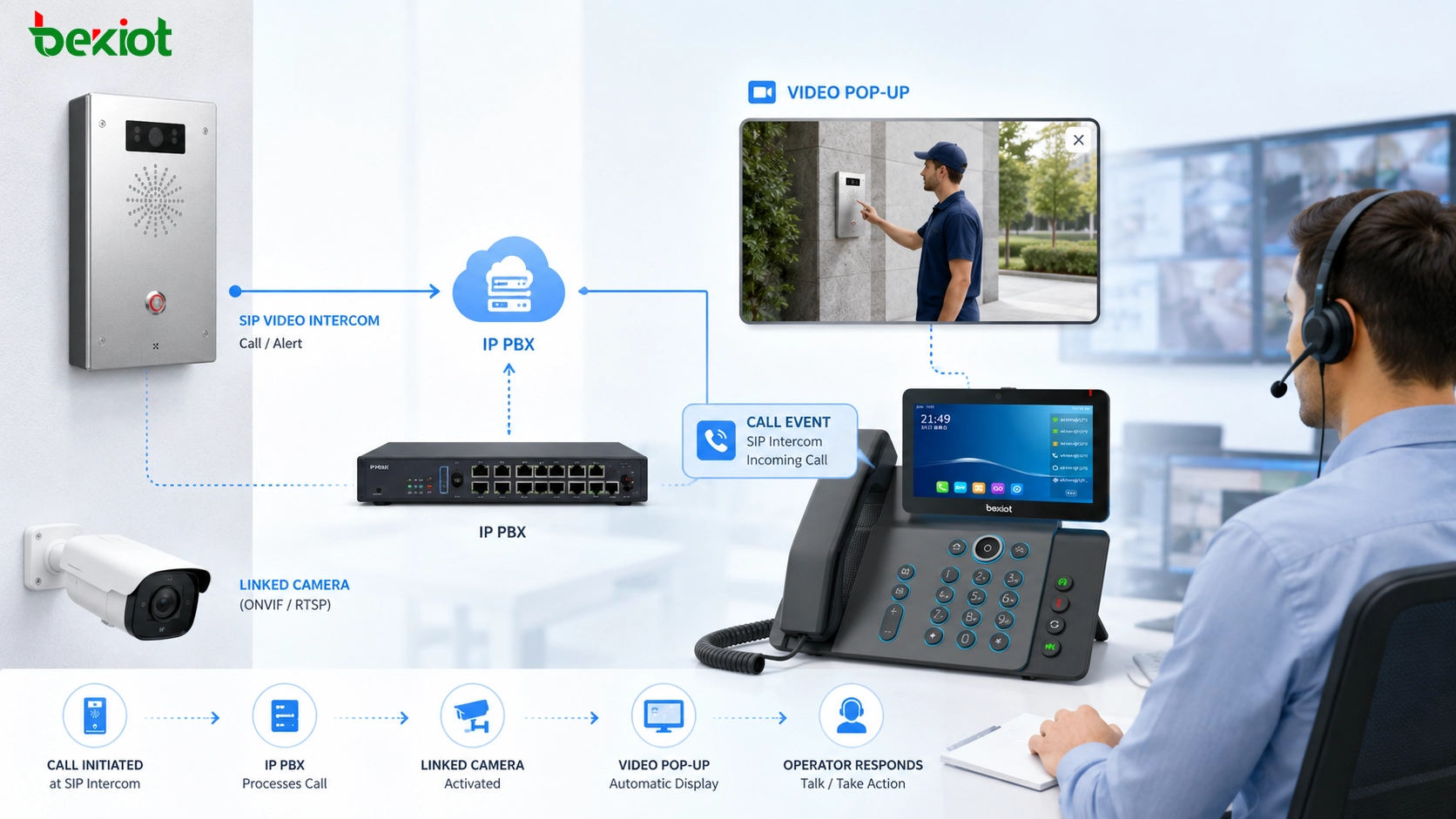
Video linkage is especially valuable when a normal call needs visual context. The idea is to bind a phone, intercom terminal, emergency call point, or non-video device with a nearby surveillance camera. When a call occurs, the system automatically pushes the related camera view to a video phone, dispatch screen, or monitoring interface.
This allows the operator to talk and observe at the same time. For example, when an outdoor help phone calls the control room, the operator can hear the caller and immediately see the surrounding area through the linked camera. This improves situational awareness and makes the response more accurate.
Video linkage can be used in factories, campuses, transport hubs, parking areas, emergency help points, property management sites, building entrances, and command centers. It turns a simple call event into a richer response workflow. The operator can decide whether to dispatch personnel, open an incident record, start recording, trigger a broadcast, or escalate the event to another team.
Video linkage can automatically display a related camera view when a call occurs, helping operators communicate while observing the on-site environment.
Common system architecture
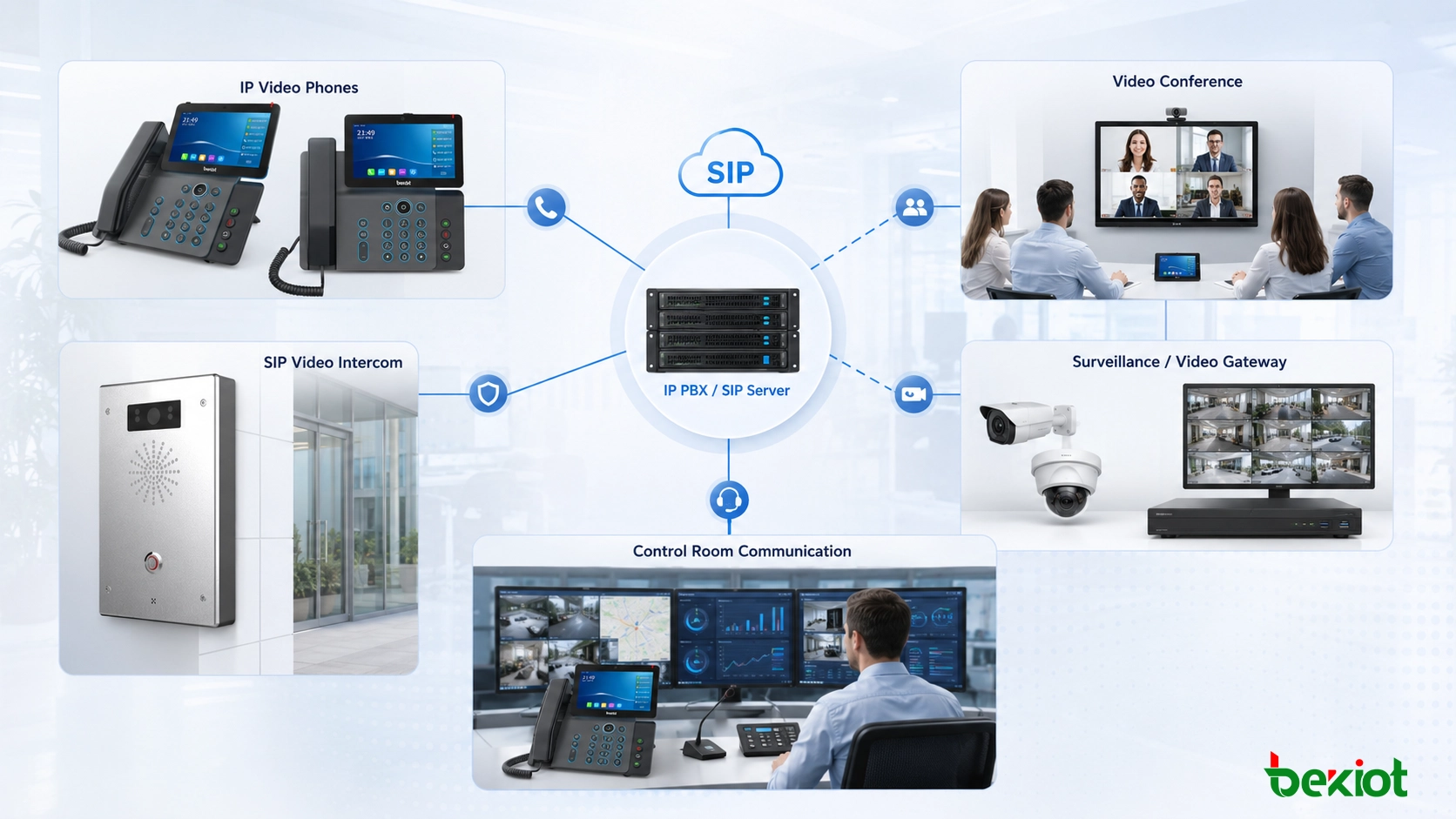
A practical IP PBX video application system usually includes an IP PBX or SIP server, video-capable IP phones, SIP video intercom terminals, IP network switches, surveillance cameras, NVR or VMS platforms, a video gateway, and sometimes a dispatch or management platform.
The IP PBX manages extensions and call routing. Video phones provide user-side video communication. SIP intercom terminals handle fixed call points such as gates, entrances, and help stations. The video gateway connects surveillance resources to SIP communication. A dispatch or management platform can add event handling, recording, linkage rules, operation logs, and response workflows.
Application
Main Devices
Typical Value
Video calling
Video IP phones, IP PBX, SIP extensions
One-to-one audio and video communication between users
Video conferencing
SIP video phones, MCU, conference platform
Allows desk phones to join meetings as video endpoints
SIP video intercom
Video intercom terminal, IP PBX, front desk phone
Supports visitor calling, remote opening, and emergency help
Surveillance viewing
Video gateway, cameras, NVR/VMS, video phone
Allows users to call camera channels from a phone
Video linkage
IP phone, linked camera, platform, video display endpoint
Pushes camera video automatically during a call event
Planning considerations before deployment
Before adding video applications to an IP PBX system, engineers should confirm whether the existing network can carry video traffic reliably. Video calls, camera streams, and conference sessions require more bandwidth than voice calls. If the LAN is congested or poorly planned, users may experience delay, frozen images, frame loss, or unstable call quality.
Codec compatibility is also important. SIP endpoints, video gateways, conferencing systems, and surveillance platforms should support compatible audio and video codecs. Resolution, frame rate, bit rate, and transcoding requirements should be evaluated in advance, especially when connecting older camera systems or third-party video platforms.
Security should be planned from the beginning. Video resources may include sensitive areas such as entrances, production lines, control rooms, warehouses, equipment rooms, parking areas, or public service points. The project team should configure extension permissions, access rules, account security, network isolation, recording policies, and operation logs according to actual project requirements.
Where IP PBX video applications are most useful
IP PBX video applications are suitable for enterprise offices, industrial parks, transportation hubs, schools, hospitals, property management centers, factories, security control rooms, emergency help points, and multi-branch organizations. These sites often need both communication and visual verification.
For office users, video conferencing and video calls may be the most visible functions. For security and access control, SIP video intercom and remote door opening usually bring more direct value. For industrial sites, transport facilities, and public safety projects, surveillance viewing and video linkage can help operators understand field conditions faster.
The best deployment does not need to enable every video function at once. A project can start with the most valuable scenario, such as front desk video intercom, help-point calling, or control room camera access. Later, the system can expand to video conferencing, video linkage, dispatch integration, recording, and emergency response workflows.
From voice platform to visual communication entry point
A well-planned IP PBX video solution should connect people, terminals, cameras, doors, duty desks, and control rooms in a logical workflow. If video functions are added only as isolated features, the project may become difficult to use. If they are designed around real tasks, they can improve daily operation and emergency response.
For example, a visitor call can become a video verification and door-opening workflow. A help-point call can become a visual emergency response workflow. A camera channel can become a callable SIP video resource. A normal phone call can trigger a related camera pop-up. These are practical changes that make the IP PBX more useful than a voice-only platform.
For organizations planning SIP telephony, SIP video intercom, camera access, video gateway integration, paging, dispatch consoles, and emergency communication, Becke Telcom / 贝克通信 can be considered as a practical integration partner for building a unified communication and visual response architecture.
Summary
Video applications under IP PBX are becoming more practical as video phones, SIP intercom terminals, video gateways, and surveillance systems become easier to integrate. Basic video calls are simple to use, but their daily frequency may be limited. Video conferencing, SIP video intercom, surveillance viewing, and video linkage often provide stronger project value because they solve real operational problems.
When designed around actual scenarios, IP PBX can become more than an internal voice platform. It can provide a unified communication entry point for video collaboration, access communication, monitoring interaction, emergency help, and event response. The key is to match the video function with the workflow, network condition, terminal capability, and security requirement of the project.
FAQ
Can an existing IP PBX support video applications without replacement?
It depends on the platform. If the IP PBX supports SIP video signaling, compatible codecs, extension routing, and endpoint registration, it may support video phones or video intercom terminals. If not, a gateway or platform upgrade may be required.
Does camera calling require every camera to support SIP directly?
No. Many cameras do not need to support SIP by themselves. A video gateway can convert surveillance resources from a video platform or NVR into SIP-accessible channels, allowing video phones to call selected camera views.
What is the main risk when adding video to a voice network?
The main risk is network load. Video traffic consumes more bandwidth and may affect voice quality if QoS, VLAN planning, switching capacity, and uplink bandwidth are not properly designed.
Can video intercom be used outdoors?
Yes, but the terminal should match the installation environment. Outdoor projects should consider waterproof rating, vandal resistance, temperature range, microphone pickup, speaker volume, PoE power, surge protection, and mounting structure.
Is video linkage suitable for emergency response?
Yes. Video linkage is useful when operators need visual confirmation during a call event. It helps duty staff understand the on-site situation faster and decide whether to dispatch personnel, trigger an alarm, start recording, or escalate the incident.