Video Access Gateway for SIP-Based Audio and Video Convergence
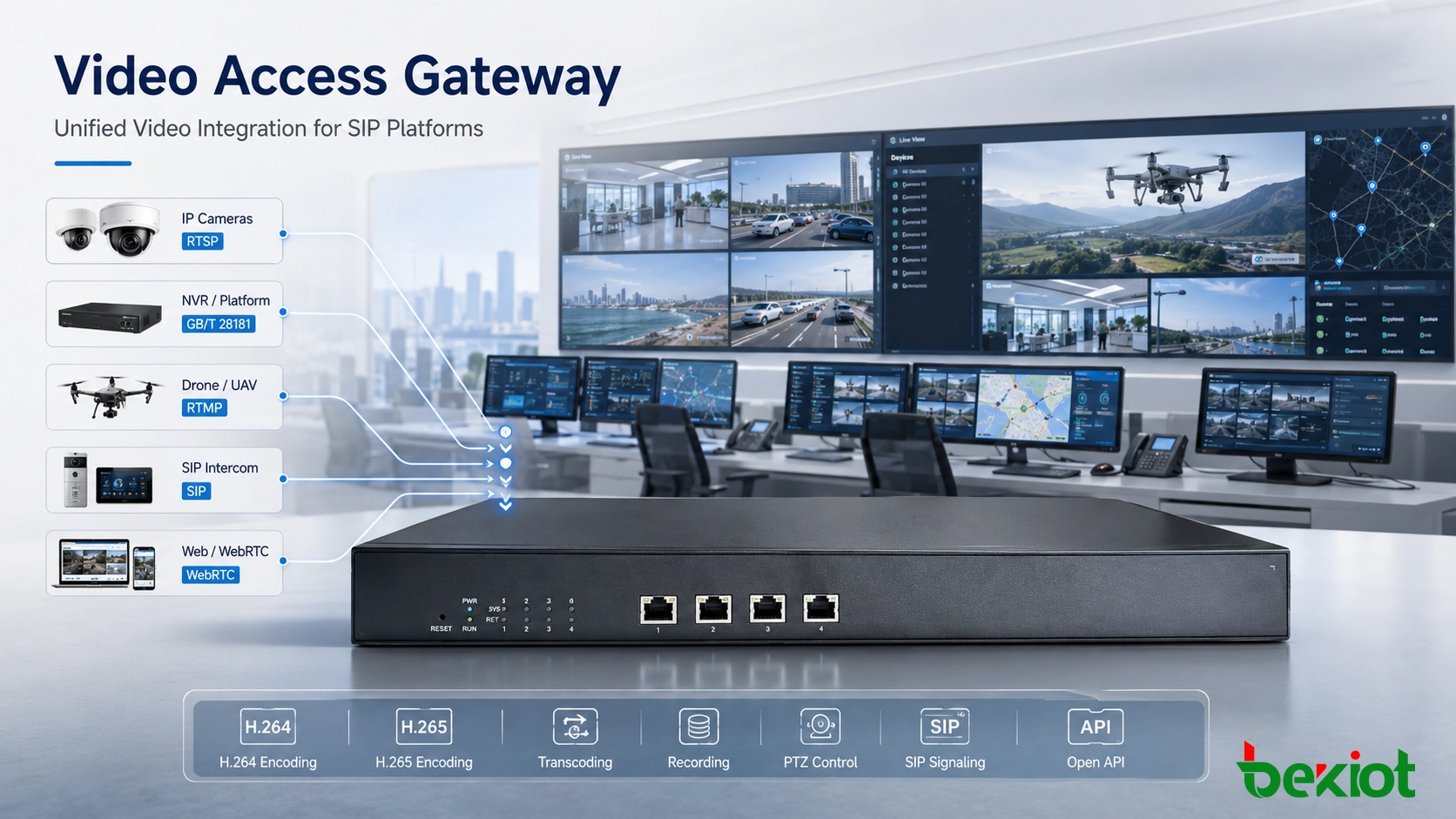
A video access gateway connects cameras, NVRs, drone streams, SIP systems, WebRTC clients, dispatch platforms, and command centers through protocol conversion, transcoding, recording, APIs, and unified media control.
Becke Telcom
A video access gateway plays an important role in audio-video convergence projects. Its main purpose is to bring different video resources into a unified communication, dispatch, or command platform. In real projects, those resources may include surveillance cameras, NVR systems, GB/T 28181 platforms, drone video, video conferencing systems, live streams, web clients, and SIP-based communication terminals.
However, a practical video access gateway should not be understood as a simple camera-to-SIP converter. Modern projects usually require protocol adaptation, media forwarding, real transcoding, SIP session processing, recording, preview, PTZ control, two-way audio, API integration, and stable operation under continuous video workloads. If the gateway only completes one basic conversion path, the system may soon face compatibility and expansion limits.
For emergency command, industrial dispatch, smart security, campus management, transportation monitoring, and integrated communication platforms, the gateway acts as a media access layer. It allows video resources from different systems to become usable, controllable, and shareable inside one operational environment.
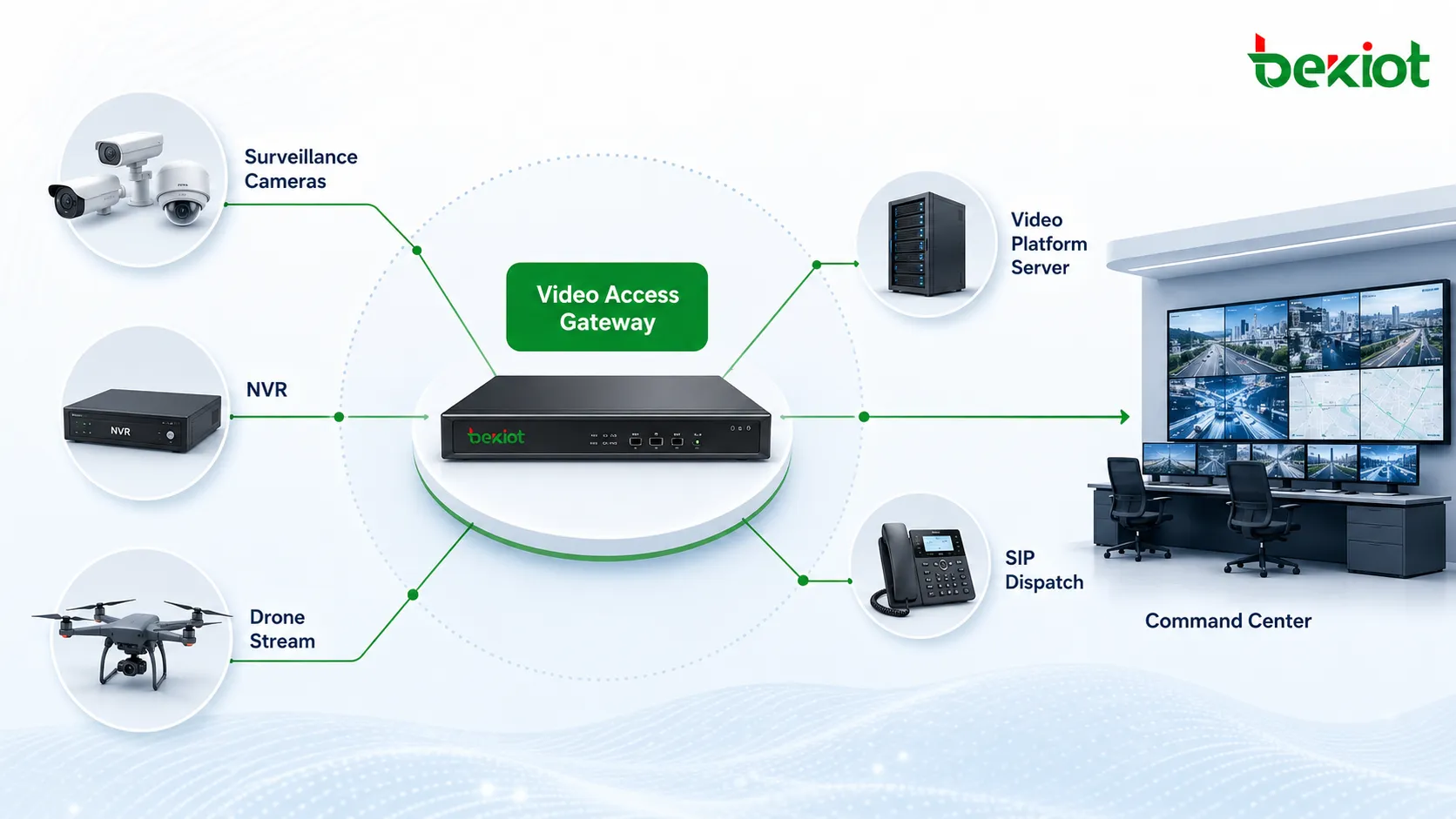
A video access gateway should connect cameras, recorders, drone streams, video platforms, SIP dispatch systems, and command centers through a unified media access layer.
Camera-to-SIP Conversion Is Only the Starting Point
Many projects begin with a simple question: can the gateway convert camera video into SIP? This is a reasonable requirement because SIP dispatch platforms, video phones, emergency communication systems, video intercom platforms, and unified communication systems often need to receive video through SIP sessions.
The problem is that most project sites are not limited to one camera type or one transmission protocol. A site may already have RTSP cameras, NVR systems, GB/T 28181 surveillance platforms, RTMP live streams, WebRTC sources, HLS or FLV playback links, drone video feeds, and third-party video platforms. If the gateway only supports one-way GB/T 28181-to-SIP or camera-to-SIP conversion, it may work in a narrow scenario but fail when more systems need to be integrated.
A better way to view the gateway is as a video media access and conversion platform. Its value is not only to “bring in a camera,” but to normalize different video resources so that dispatch consoles, SIP terminals, web clients, command platforms, and business applications can use the same media resources in a controlled workflow.
Real Projects Need Multi-Protocol Support
A complete video access gateway should support more than one protocol path. In many audio-video convergence projects, the gateway may need to process GB/T 28181, RTSP, RTMP, RTP, FLV, HLS, SIP, and WebRTC at the same time. Each protocol has its own role in the system.
RTSP is common in surveillance cameras and NVR devices. GB/T 28181 is widely used in video surveillance platform access. RTMP is often used for live streaming and media publishing. HLS and FLV are common in web playback. WebRTC is useful for browser-based real-time interaction. SIP is important for video calls, dispatch, video intercom, IP PBX systems, and unified communication platforms.
In a practical deployment, video may need to move in several directions. A drone RTMP stream may need to enter a SIP dispatch system. A SIP video call may need to be displayed in a browser through WebRTC or FLV. A conference stream may need to be pushed to a live platform through RTMP. A surveillance camera may need to be displayed on a dispatch console and recorded at the same time. These scenarios require flexible media conversion instead of a fixed single-purpose bridge.
Transcoding Is Not the Same as Protocol Conversion
Transcoding is often confused with protocol conversion. Protocol conversion changes how a stream is packaged, signaled, or transmitted. Real transcoding goes deeper: it decodes the original video and encodes it again with new parameters.
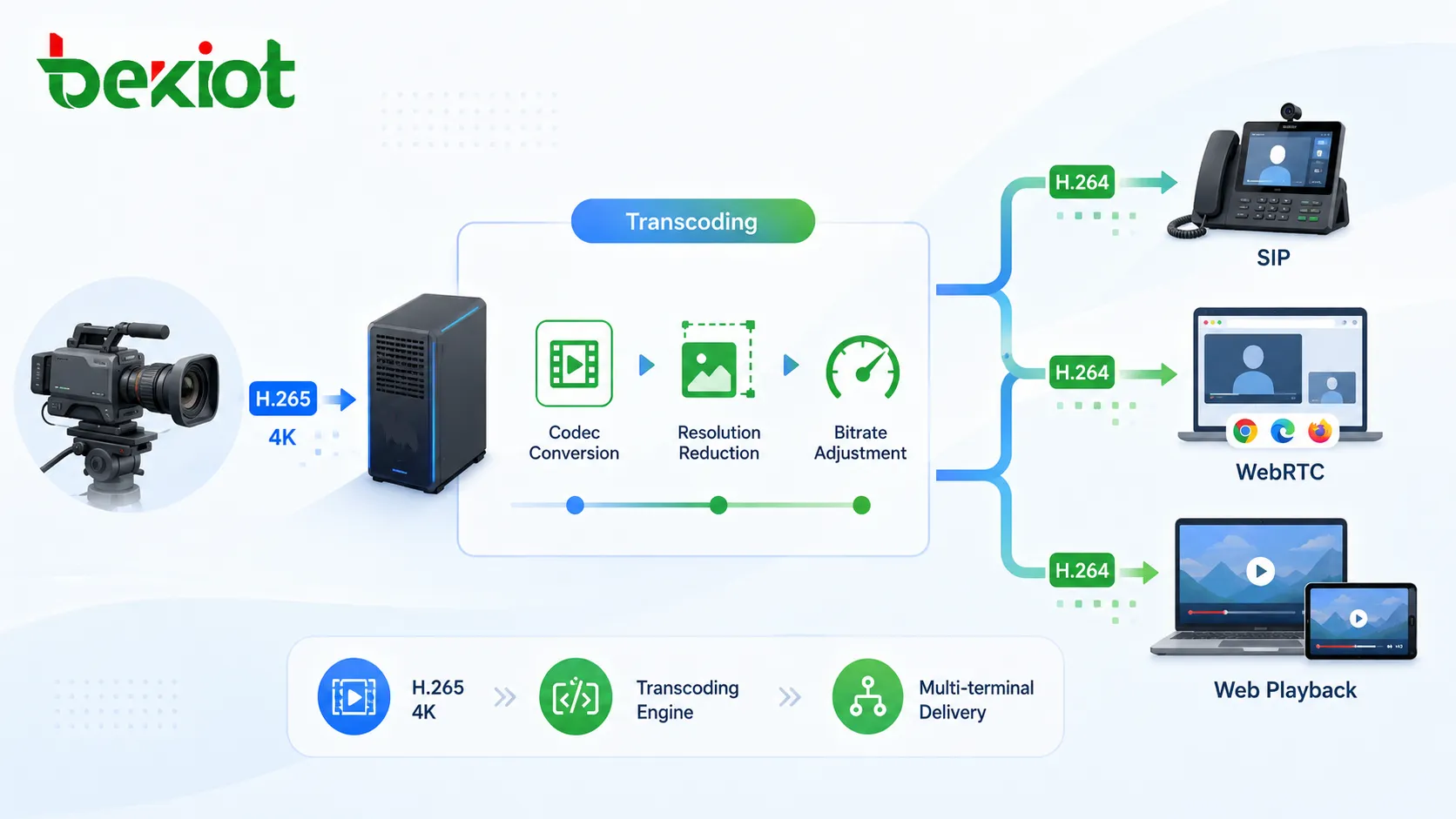
This matters because many video sources cannot be used directly by all receiving systems. A camera may output H.265 video at 4K resolution, which is efficient for storage but difficult for some SIP terminals, browser clients, dispatch consoles, or low-bandwidth emergency networks. In other cases, the stream may need a lower bitrate, lower resolution, different frame rate, or more compatible codec.
A capable video access gateway should support CPU or GPU-based transcoding. It should be able to convert H.265 to H.264, reduce 4K video to 1080p or lower resolution, control bitrate, adjust frame rate, and generate different output streams for different terminals. Without real transcoding, a gateway may connect the stream successfully but still fail to provide a smooth and usable video experience.
Real video transcoding adjusts codec, resolution, bitrate, and frame rate so that different platforms and terminals can use the same video source.
Stable SIP Processing Is Critical for Communication Platforms
SIP is widely used in video intercom, IP PBX, video dispatch, emergency communication, conferencing, and unified communication systems. For a video access gateway, SIP support is not only about registering a camera as an endpoint. The system must also handle signaling, media negotiation, call control, session management, NAT traversal, and compatibility with different SIP platforms.
A unified SIP processing architecture is usually more stable than a loose combination of separate modules. In some gateway designs, GB/T 28181 access, SIP calling, streaming conversion, and WebRTC access are handled by different software components. This may be acceptable in a small test, but it can become difficult to manage when the project requires high concurrency, multiple conversion paths, or complex media routing.
A more reliable design keeps SIP signaling and media adaptation under consistent system logic. This helps the gateway convert between GB/T 28181 and SIP, connect SIP video terminals, support SIP trunking, manage video sessions, and troubleshoot compatibility problems more efficiently. It also makes future upgrades easier when new protocols or new project requirements appear.
Performance Determines Whether the Gateway Can Run Continuously
A video access gateway carries much heavier workloads than an ordinary signaling gateway. Video streams consume bandwidth, CPU, memory, storage, and sometimes GPU resources. When the system needs to forward, transcode, preview, record, and distribute video at the same time, performance becomes a key selection factor.
In a small demonstration, one or two video streams may run smoothly. In a real command center or security platform, the gateway may need to handle dozens or hundreds of cameras, multiple preview windows, simultaneous SIP video calls, recording tasks, web playback requests, and video distribution to remote clients. Weak hardware or poorly designed software can cause delay, playback failure, stream interruption, high resource usage, or system instability.
Before choosing a gateway, the project team should evaluate the number of video sources, codec type, resolution, bitrate, concurrency, transcoding demand, recording requirement, and terminal compatibility. A device that works in a demo environment may not be suitable for continuous use in emergency command, industrial safety, transportation management, campus security, or smart city projects.
Monitoring and Control Functions Should Be Included
A video access gateway should not only hide behind the system as a protocol converter. In many projects, operators also need monitoring and control functions. These may include live preview, multi-screen layout, camera grouping, NVR access, recording, playback, alarm reception, PTZ control, and two-way audio.
These functions are important because operators do not just need to receive video. They need to view, search, control, record, share, and interact with video resources during daily operation or emergency response. If the gateway lacks these basic functions, the project may need extra software modules, which increases cost and system complexity.
PTZ control is a common example. When an alarm is triggered, the operator may need to adjust the camera angle immediately. Two-way audio is another practical requirement. A video intercom device or field terminal may require both visual confirmation and voice communication. A useful gateway should support these operational needs instead of only forwarding passive streams.
API Capability Makes the Gateway Easier to Integrate
Many video convergence projects are not standalone systems. They need to connect with emergency command platforms, public safety systems, smart campus platforms, industrial control rooms, transportation platforms, or city-level monitoring centers. In these cases, the gateway must allow business systems to call video resources from their own interfaces.
API capability becomes important here. Through APIs, a third-party platform can request video streams, control PTZ cameras, start or stop recording, manage devices, create sessions, receive alarm events, or trigger media conversion based on the business workflow.
For example, when an alarm occurs, the business platform can automatically open the related camera, establish a SIP video session, push the stream to a web dispatch console, and record the event. Without API integration, operators may need to complete these steps manually across several separate systems.
Emergency Dispatch Requires Two-Way Media Flow
Video access gateways are especially valuable in emergency command and dispatch systems. These platforms often need to combine surveillance cameras, drone video, body cameras, mobile video terminals, SIP video intercoms, command vehicle feeds, and remote meeting video into one operational view.
In this type of environment, the gateway should support two-way media flow. It should bring external video sources into the SIP dispatch system, and it should also push SIP video, conference video, or command center video out to web platforms, live platforms, recording systems, or other command centers when required.
This two-way capability is useful for multi-agency cooperation. A local command center may need to share a drone feed with a remote headquarters. A SIP video intercom call may need to be displayed in a browser. A command vehicle feed may need to be recorded and sent to a dispatch platform. The gateway should make these operations easier instead of forcing each system to work separately.
For projects that combine SIP communication, video dispatch, industrial intercom, emergency notification, and command-center workflows, Becke Telcom can be considered as a lightweight reference for gateway access, communication endpoints, and emergency communication integration.
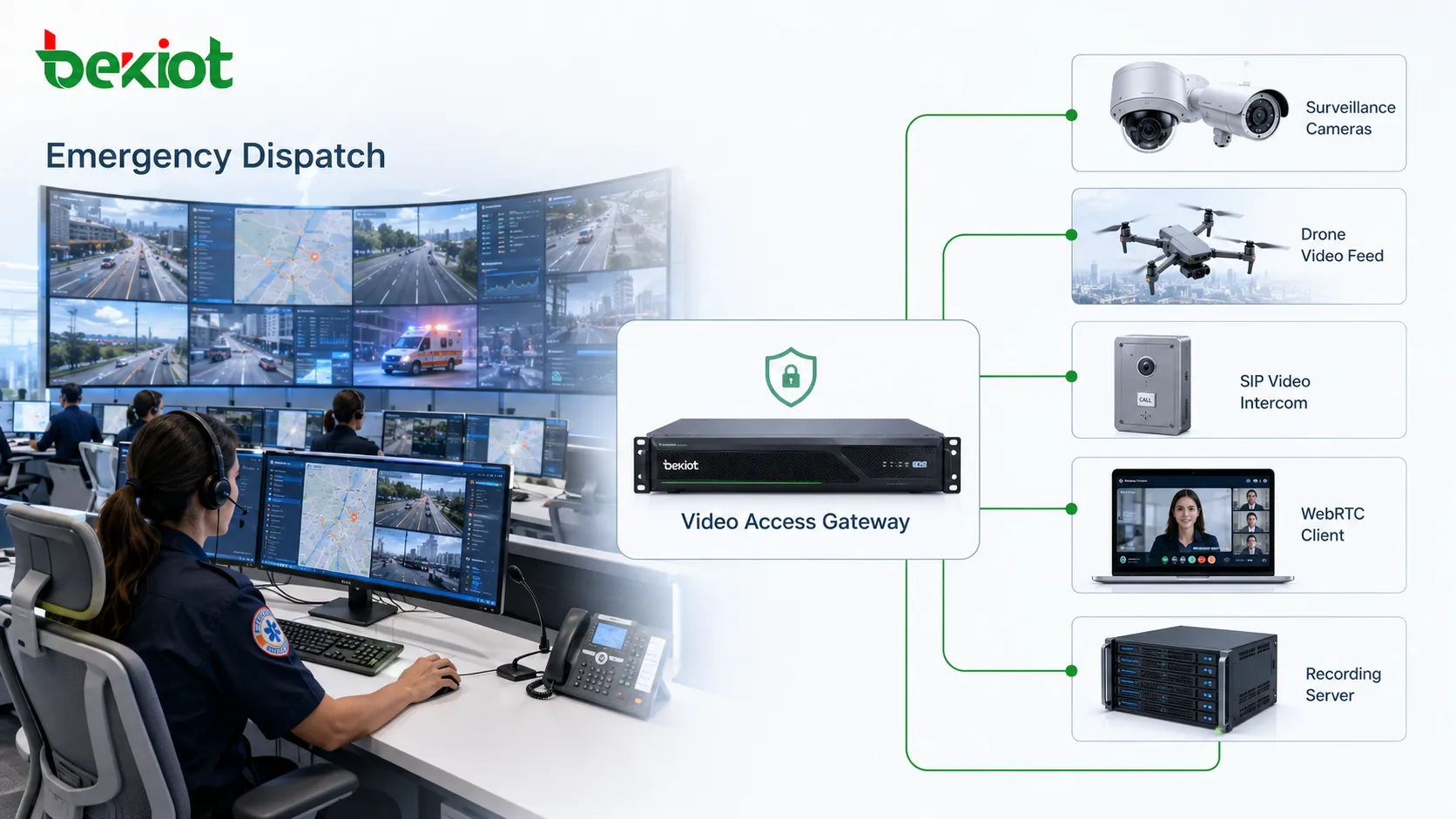
In emergency dispatch systems, the gateway should connect surveillance video, drone streams, SIP video intercoms, WebRTC clients, and recording systems.
When a Basic Gateway Is No Longer Enough
A simple camera-to-SIP gateway may be enough for a small project with fixed cameras, one SIP platform, no web playback, no recording linkage, and no transcoding requirement. But this type of gateway becomes risky when the project includes different protocols, H.265 streams, 4K cameras, live streaming, browser access, alarm linkage, two-way audio, or API-based business integration.
As the project becomes more complex, the gateway must provide broader protocol support and stronger media processing capability. Otherwise, the system may require extra streaming servers, separate transcoding servers, custom development, manual configuration, and repeated troubleshooting.
A complete video access gateway should reduce system complexity. It should unify media access, simplify protocol adaptation, provide stable SIP interconnection, and create a practical bridge between video systems and communication systems.
Typical Deployment Architecture
A typical deployment includes front-end cameras, NVR devices, GB/T 28181 platforms, drone or mobile video sources, a video access gateway, transcoding resources, a SIP server, a dispatch platform, a recording server, a web playback service, and a business application platform.
On the access side, the gateway receives media from RTSP, GB/T 28181, RTMP, WebRTC, FLV, HLS, RTP, or SIP sources. In the processing layer, it handles protocol conversion, stream forwarding, transcoding, bitrate adaptation, recording, and session control. On the service side, it delivers video to SIP terminals, dispatch consoles, web clients, recording systems, or third-party applications.
With this structure, cameras are no longer limited to traditional surveillance use. A camera can be called from a SIP terminal, displayed on a dispatch screen, shared with a remote command center, converted for browser playback, recorded as part of an incident workflow, or linked with alarms and business events.
Selection Criteria for Project Teams
When selecting a video access gateway, the first thing to check is protocol compatibility. The device should support the required combinations instead of only one conversion path. The project team should also confirm codec support, especially H.264 and H.265, as well as resolution handling for 1080p, 4K, and low-bandwidth output streams.
The second factor is transcoding performance. The team should calculate how many streams need to be transcoded at the same time and whether the gateway uses CPU, GPU, or external transcoding resources. The third factor is SIP compatibility, including registration, trunking, session negotiation, video call behavior, and interworking with the target dispatch platform.
The fourth factor is business capability. Monitoring, recording, alarm reception, PTZ control, two-way audio, WebRTC access, softphone functions, and API support can reduce the need for additional components. The fifth factor is maintainability, including logs, diagnostics, stream status, resource usage, upgrade method, and remote management.
Conclusion
A video access gateway should not be evaluated only by whether it can convert a camera into SIP. Camera-to-SIP conversion is only an entry-level requirement. A modern gateway should support multiple protocols, real transcoding, stable SIP processing, video monitoring, recording, PTZ control, two-way audio, API integration, and reliable media performance.
For audio-video convergence, emergency command, smart security, drone video access, and unified dispatch projects, the gateway is a media integration platform rather than a simple adapter. Choosing the right gateway can reduce custom development, improve compatibility, simplify deployment, and make the entire video communication system easier to operate and expand.
FAQ
Can a video access gateway replace an NVR?
Not always. An NVR is mainly used for camera recording and surveillance management, while a video access gateway focuses on protocol conversion, media access, SIP integration, and platform interconnection. Some gateways include recording functions, but replacement depends on storage capacity, playback workflow, and project requirements.
Why do some SIP systems fail to display camera video?
Common reasons include unsupported codec, excessive resolution, incompatible SDP negotiation, incorrect packetization, NAT traversal problems, missing transcoding, or a mismatch between the camera stream format and the SIP terminal capability.
Is WebRTC necessary for every video gateway project?
WebRTC is not required in every project, but it is useful when users need browser-based real-time viewing, web dispatch consoles, remote collaboration, or softphone functions without installing dedicated client software.
What should be tested before deployment?
Project teams should test protocol access, SIP calling, codec compatibility, transcoding load, stream delay, multi-channel preview, recording, PTZ control, alarm linkage, API calls, failover behavior, and long-duration stability under realistic network conditions.