What Are Paging Systems in Wireless Communication and Why Are They Still Used?
A practical guide to wireless paging systems, explaining how they work, common types, key components, application scenarios, reliability factors, integration options, and how to choose the right paging solution.
Becke Telcom
Paging systems in wireless communication are designed for one clear purpose: getting important messages to the right people quickly. While smartphones, chat tools, and unified communication platforms are now common, paging still holds an important place in hospitals, factories, warehouses, campuses, transportation facilities, and critical industrial sites.
The reason is simple. Paging is direct, attention-grabbing, and usually easier to act on than a message buried inside an app. In busy or time-sensitive environments, people may not be sitting at a desk or watching a screen. A wireless paging alert can reach mobile staff, field teams, operators, maintenance workers, nurses, security personnel, or emergency responders at the moment they need to respond.
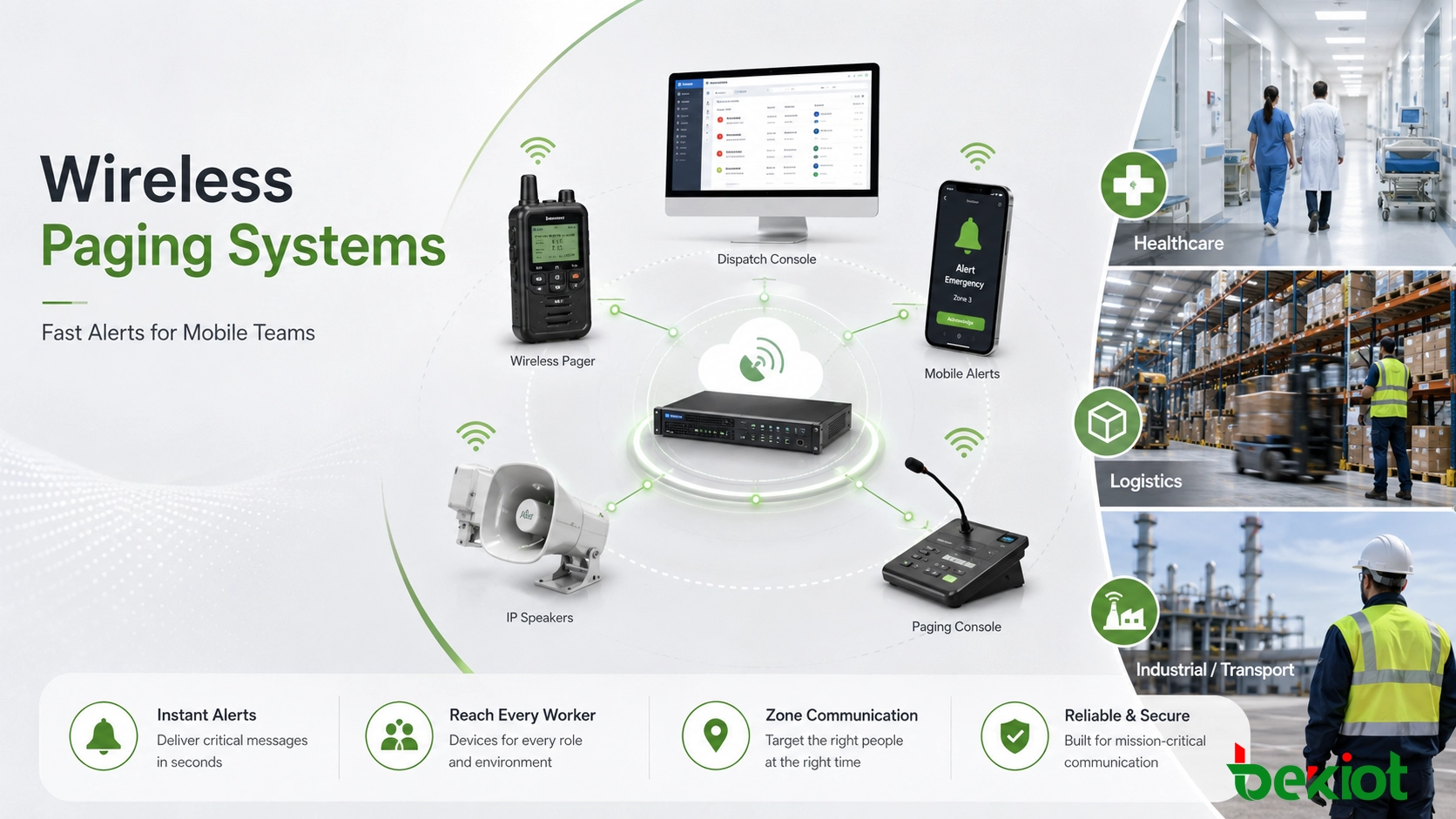
Modern wireless paging is no longer limited to old-style beepers. It may involve radio pagers, Wi-Fi devices, DECT handsets, IP speakers, SIP paging gateways, mobile clients, alarm triggers, and dispatch platforms. In many projects, paging becomes part of a larger communication system that connects people, alerts, voice, public address, and emergency response workflows.
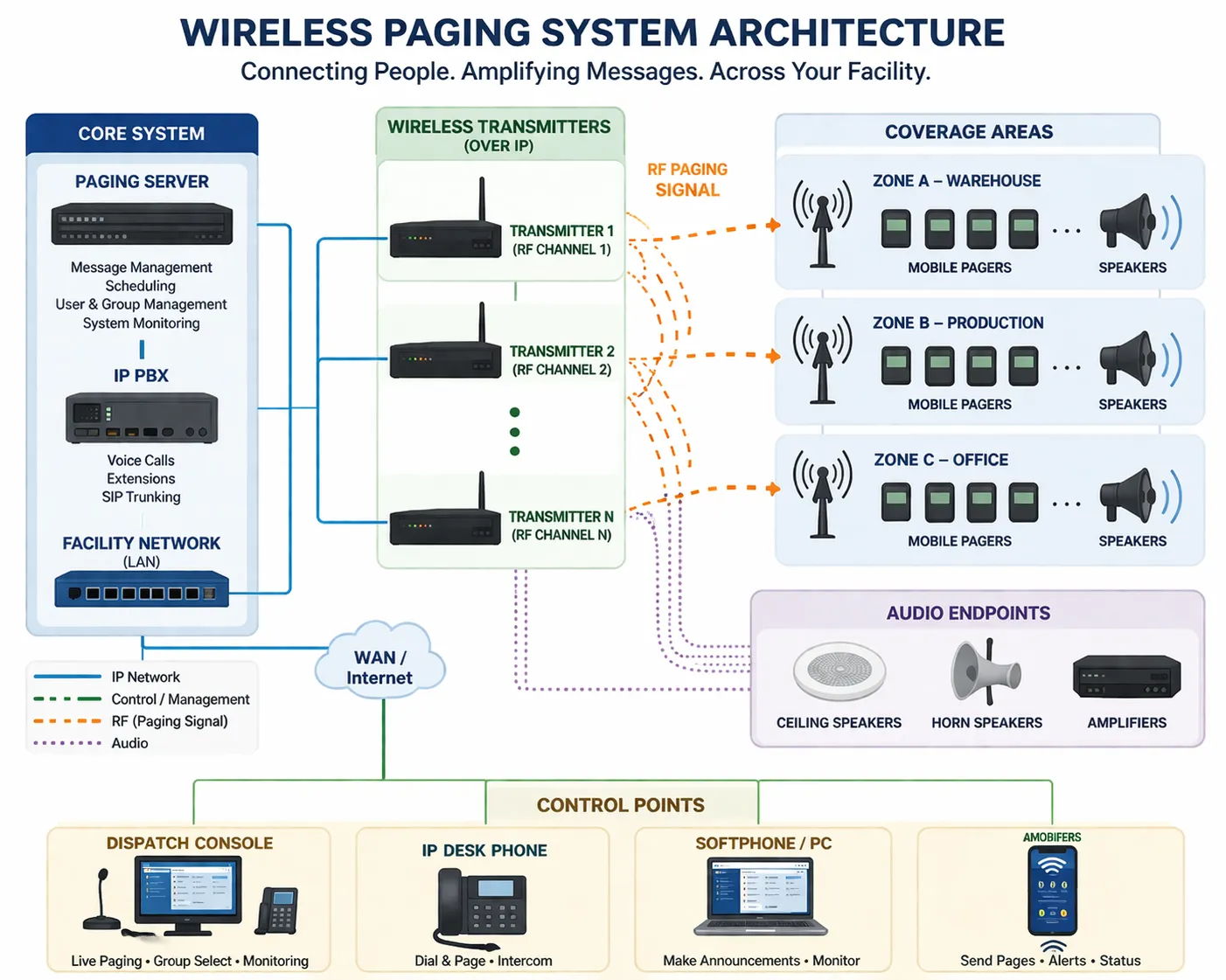
A wireless paging system can combine paging servers, IP communication platforms, wireless transmitters, pagers, speakers, and control points into one alerting workflow.
What a Wireless Paging System Means
A wireless paging system is a communication platform that sends alerts, short messages, tones, or voice announcements to designated users, teams, or zones through wireless transmission. Depending on the project, the wireless path may use radio frequency, Wi-Fi, DECT, private wireless coverage, cellular connectivity, or an IP network connected to wireless endpoints.
The term “paging” can describe several use models. In a hospital, it may mean sending a silent or vibrating alert to a nurse or technician. In a factory, it may mean sending a voice announcement to a maintenance team. In a campus or transport facility, it may mean broadcasting a message to selected buildings, platforms, outdoor zones, or mobile responders.
What separates paging from ordinary messaging is its operational focus. Paging is usually not designed for long conversation. It is built to notify, direct, escalate, and trigger action. That is why it remains valuable in environments where delayed communication can affect safety, service quality, or response time.
A good paging system does not simply send a message. It helps make sure the message reaches the right person, at the right priority level, through a path that can still work under pressure.
Paging, Intercom, and Public Address: How They Differ
Paging, intercom, and public address systems are closely related, but they solve different communication problems. A paging system is mainly used to send alerts or announcements to individuals, groups, or zones. It is often event-driven and action-oriented.
An intercom system is usually built around two-way communication. A person at a help point, gate, entrance, or field station can call a control room, and the operator can respond. A public address system focuses more on broadcasting voice or audio to a wider listening area, such as a building, workshop, station, or campus.
In modern facilities, these functions often overlap. A single platform may send wireless alerts to staff, open a SIP intercom call, play emergency audio through IP speakers, and notify a dispatch operator at the same time. This convergence is especially useful for large sites that want routine communication and emergency coordination to share the same operational backbone.
How Wireless Paging Works
Message Trigger
A paging workflow begins with a trigger. The trigger may come from a paging console, IP phone, IP PBX extension, nurse call system, alarm panel, fire system, building management platform, dispatch workstation, mobile app, or automated workflow.
After the trigger is received, the system decides who should be notified, which zone should receive the announcement, and what delivery method should be used. A single event may create several actions at once, such as sending a pager alert, playing a voice message through speakers, and displaying the event on a control room screen.
Control and Routing Layer
The control layer is where paging logic is handled. This may include a paging server, alerting software, SIP platform, dispatch system, or integration engine. It manages users, groups, zones, priorities, message types, escalation rules, and sometimes delivery confirmation.
In a simple system, the control layer may only send a message to one pager group. In a more advanced system, it may decide whether the alert should go to a person, a role, a department, a building zone, a backup team, or all available responders.
Wireless Delivery Path
Once the message is routed, it travels through the wireless delivery path. This may involve radio transmitters, repeaters, Wi-Fi access points, DECT base stations, cellular links, private wireless infrastructure, or IP-connected wireless gateways.
The best delivery method depends on the site. A hospital may prioritize indoor coverage and acknowledgment. A factory may need strong signal penetration and noise-resistant alerting. A transport site may need coverage across platforms, tunnels, service areas, and outdoor sections.
Endpoint Response
At the endpoint level, the message reaches the user or zone. The endpoint may be a dedicated pager, wireless handset, smartphone app, IP speaker, visual indicator, strobe light, intercom terminal, or hybrid paging device.
Some systems only deliver the alert. Others allow acknowledgment, short replies, or escalation. In critical workflows, acknowledgment is valuable because supervisors can confirm whether the right person received the message and acted on it.
Common Components in a Wireless Paging System
Wireless paging systems vary by industry, but most designs include several common parts. Understanding these components helps project teams evaluate coverage, reliability, integration, and future expansion.
Message source: paging console, SIP phone, PBX extension, dispatch software, alarm input, mobile app, or automation platform.
Control platform: paging server, alerting software, workflow engine, SIP platform, or communication management system.
Wireless transport: radio network, Wi-Fi, DECT, cellular connection, private wireless system, or IP network with wireless edge devices.
Endpoints: pagers, wireless handsets, mobile clients, IP speakers, strobes, zone controllers, intercom terminals, or notification devices.
Integration layer: gateways for alarms, PBX systems, intercoms, PA systems, legacy amplifiers, building systems, or command platforms.
In routine environments, a basic structure may be enough. In hospitals, factories, tunnels, utilities, and other critical sites, the design should also consider backup power, redundant paths, local survivability, monitoring, and emergency priority handling.
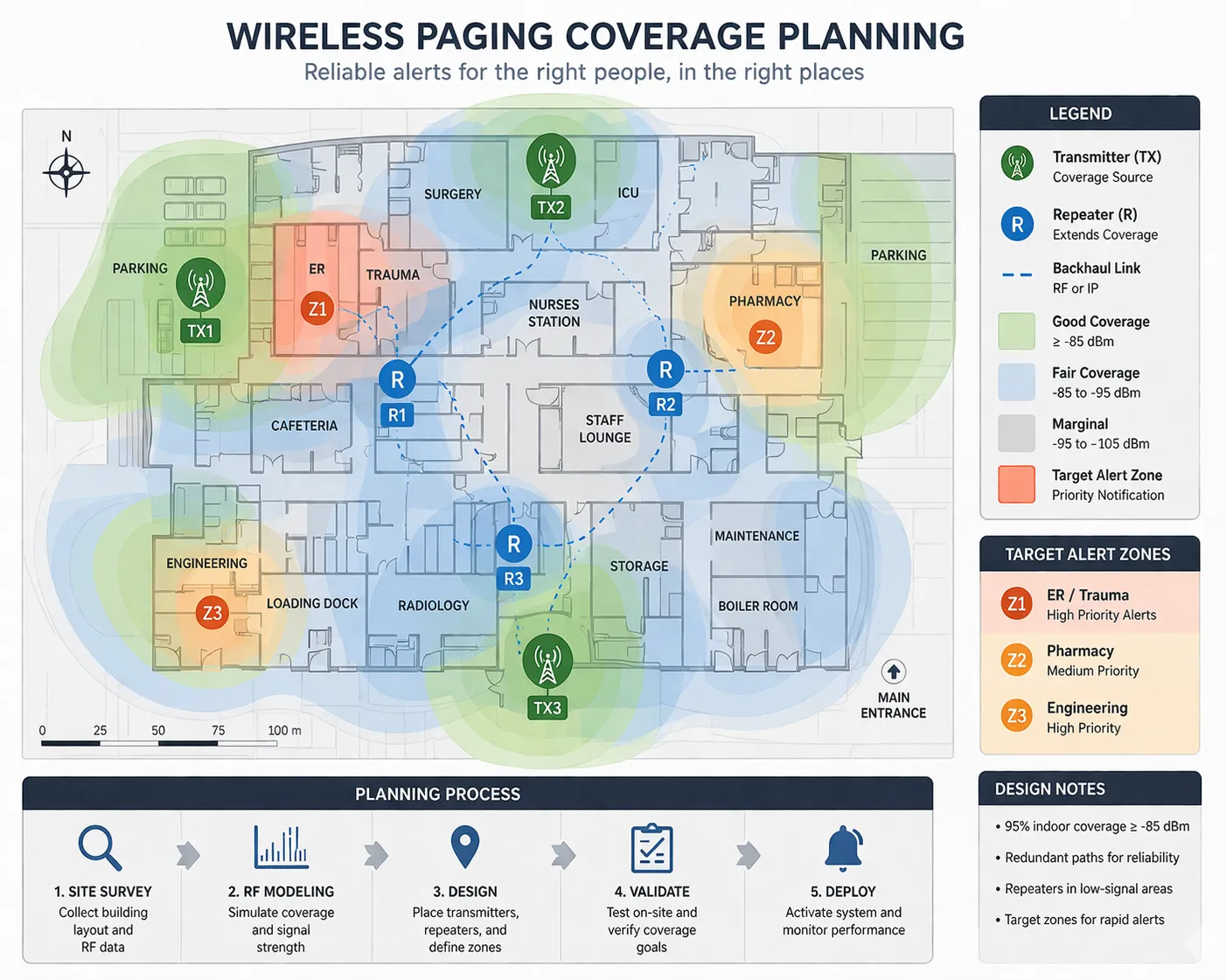
Wireless paging reliability depends on coverage design, signal planning, endpoint placement, and testing under real site conditions.
Main Types of Wireless Paging Systems
One-Way Paging
One-way paging is the traditional model. A sender transmits a message, and the recipient receives it without replying through the same device. This structure is still widely used because it is simple, fast, and effective for many operational workflows.
For example, a warehouse supervisor may need to call a technician to a loading area. A school office may need to notify staff in a specific building. A factory control room may need to broadcast a short instruction to a maintenance group. In these cases, confirmation may not always be necessary.
Two-Way Paging
Two-way paging allows the recipient to acknowledge, respond, or trigger a follow-up action. This is useful when accountability matters. Hospitals, security teams, utilities, and industrial maintenance departments often need to know whether an alert was received by the right person.
Acknowledgment also supports escalation. If the first recipient does not respond within a set time, the system can notify another person, a backup group, or a control room. This turns paging into part of a managed response process rather than a simple broadcast.
Voice Paging
Voice paging sends spoken announcements to wireless-connected speakers, handsets, intercom endpoints, or paging receivers. It is useful when the message needs to be immediately understood without requiring the recipient to read a screen.
Voice paging is common in schools, warehouses, factories, transport facilities, public buildings, and emergency communication systems. It may be used for daily announcements, operational coordination, safety reminders, and urgent instructions.
IP-Based Paging
IP-based paging uses network infrastructure to connect paging servers, SIP devices, IP speakers, gateways, wireless endpoints, and dispatch systems. In this model, wireless paging becomes one part of a broader communication architecture.
This design is useful for large facilities and multi-building sites. It can connect wireless staff alerts with IP PBX platforms, SIP intercoms, PA speakers, alarm systems, and centralized management. It also makes phased expansion easier than isolated legacy paging systems.
Where Wireless Paging Systems Are Used
Hospitals and Healthcare Facilities
Healthcare is one of the strongest use cases for wireless paging. Nurses, doctors, technicians, cleaning teams, security staff, and support personnel often move between departments and cannot rely only on desk phones or computer screens.
Paging can support patient care workflows, emergency response, equipment support, staff coordination, and department-level escalation. In many hospitals, paging remains useful because alerts can be clear, fast, and less distracting than long-form communication.
Schools and Campuses
Schools and campuses use wireless paging for staff coordination, daily operations, safety notifications, emergency messages, and zone-based communication. A campus may need to reach one building, one floor, one outdoor area, or selected staff groups.
Wireless paging is especially useful when teachers, security staff, maintenance teams, and administrators move across the site. When integrated with IP speakers, intercoms, and public address systems, it can support both daily announcements and urgent response.
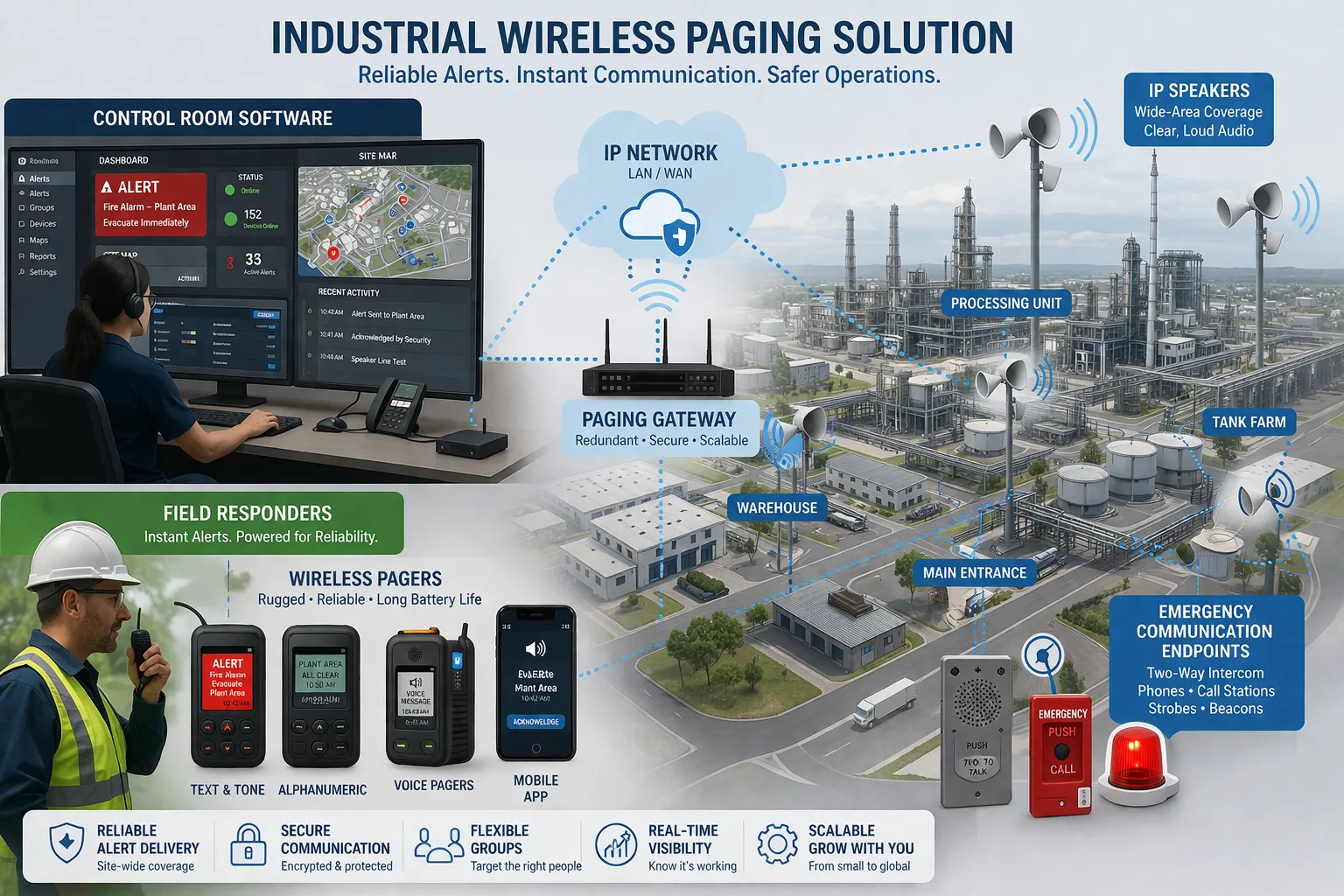
Factories and Industrial Sites
Factories need communication tools that work in noisy, complex, and mobile environments. Workers may be located in production zones, machine rooms, warehouses, loading areas, control rooms, or outdoor yards.
Wireless paging can help notify maintenance staff, production teams, safety officers, and field operators. It can also connect with alarm events, emergency procedures, dispatch workflows, and voice broadcast systems.
Warehouses and Logistics Centers
Warehouses rely on fast movement. Staff may be picking, packing, loading, driving forklifts, managing docks, or handling inventory. In these conditions, email or chat messages may not be noticed quickly enough.
Paging can support dock coordination, urgent staff calls, equipment alerts, supervisor instructions, and safety messages. A short audible, visual, or vibration-based alert can be more effective than a general notification.
Transport, Tunnels, Ports, and Utilities
Transportation hubs, tunnels, ports, rail sites, utilities, and public infrastructure facilities often require communication across wide or difficult environments. Fixed telephones and office systems alone cannot reach mobile field teams effectively.
Wireless paging helps contact maintenance teams, security staff, operators, emergency responders, and support personnel. In these sites, paging is often combined with emergency telephones, SIP intercoms, PA speakers, radio systems, and dispatch consoles.
Wireless paging becomes more effective when it is connected with dispatch, intercom, PA, alarm, and emergency communication systems.
Why Paging Still Matters
Paging remains valuable because it is focused. A paging alert is usually designed to stand out from ordinary communication. It can be audible, visual, vibration-based, or voice-driven, and it can be directed to a person, role, team, or zone.
This makes paging useful in environments where staff cannot constantly check apps or email. In a warehouse, factory, hospital, tunnel, or transport facility, the best notification method is often the one that gets attention quickly and requires minimal user effort.
Paging is also adaptable. It can support routine operations, emergency alerts, staff escalation, public announcements, and safety workflows. When integrated with other communication systems, it becomes a practical first layer of response.
Limitations to Consider
Paging is powerful, but it should not be treated as a complete communication strategy by itself. It is excellent for alerting, but many incidents still require follow-up communication through voice calls, intercom, radio, dispatch software, or field coordination.
Wireless paging also has technical limits. Coverage can be affected by building structure, metal equipment, tunnels, interference, signal shadows, battery status, endpoint durability, and network congestion. A system that works in a drawing may still perform poorly if it is not tested in the real site environment.
Security and management should also be considered. Critical systems may need user permissions, message logs, priority control, encrypted paths, role-based routing, and failover planning. The more important the workflow, the more carefully the paging system should be designed and maintained.
The real test of a paging system is not whether it can send an alert. It is whether that alert leads to a dependable response under real operating conditions.
How to Choose the Right Wireless Paging System
Define the Communication Goal
Start by asking what problem the paging system must solve. Does the site need to notify mobile staff, broadcast voice to zones, support emergency escalation, connect to an IP PBX, or integrate with alarm and dispatch systems?
A hospital, warehouse, school, tunnel, and industrial plant may all need paging, but their requirements are not the same. The communication goal should shape the architecture, endpoint type, coverage plan, and integration depth.
Check Coverage Conditions
Wireless coverage should be evaluated before deployment. Building materials, underground areas, machinery, vehicle movement, thick walls, metal shelves, and outdoor spaces can all affect signal behavior.
Site surveys and practical tests are important. They help confirm where transmitters, repeaters, access points, or wireless gateways should be placed. They also reveal dead zones before the system becomes operationally critical.
Decide Whether Acknowledgment Is Needed
Some workflows only need one-way notification. Others require proof that the message was received. If the site needs accountability, escalation, or incident tracking, two-way paging or acknowledgment-based paging may be the better choice.
This is especially important in healthcare, security, utilities, and industrial emergency response. A sent message is not always the same as a handled message.
Plan Integration with Existing Systems
Paging should not be selected in isolation if the facility already uses IP PBX, SIP phones, radio systems, PA speakers, intercom terminals, alarm panels, or dispatch software. Integration can reduce operator workload and make response workflows more consistent.
For example, an alarm event may trigger a pager alert, a voice broadcast, an intercom call, and a dispatch notification. When these actions are connected, the site can respond faster and with less manual coordination.
Consider Redundancy and Maintenance
In critical environments, paging availability matters. Designers should consider backup power, server redundancy, alternate network paths, local survivability, device monitoring, and clear maintenance procedures.
Endpoint management is also important. Batteries, device assignment, user roles, message groups, firmware updates, logs, and spare units should be part of the long-term operating plan.
Solution Planning for Modern Facilities
Many organizations now treat paging as one part of a larger communication environment. A modern system may combine wireless paging, IP PBX, SIP intercom, IP speakers, PA systems, emergency telephones, alarm inputs, dispatch platforms, and centralized management.
This integrated approach is more useful than operating each communication tool separately. It helps operators send the right message through the right channel and allows urgent events to trigger multiple response actions automatically.
Becke Telcom can support paging and communication solution planning for hospitals, schools, factories, warehouses, transport facilities, utilities, tunnels, industrial sites, and public service environments. The solution can combine wireless alerting, SIP communication, intercom, public address, dispatch, and emergency response workflows according to the site requirements.
The goal is not only to send alerts. The goal is to build a reliable communication chain that helps people notice, understand, confirm, and respond.
Conclusion
Paging systems in wireless communication remain relevant because they solve a practical problem: reaching mobile people quickly when timing matters. They are simple in concept, but they can be highly effective when designed around the real environment, response process, and integration needs of the site.
A good wireless paging system should consider message priority, endpoint type, coverage, latency, acknowledgment, redundancy, and connection with other communication tools. One-way paging, two-way paging, voice paging, and IP-based paging each have suitable use cases.
For organizations planning a new deployment or upgrading an existing paging system, the best starting point is to define who must be reached, where they are located, how urgent the message is, and what should happen after the alert is received. From there, the paging system can become a dependable part of daily operation and emergency response.
FAQ
What is a paging system in wireless communication?
A paging system in wireless communication sends alerts, short messages, tones, or voice announcements to selected people, teams, or zones through wireless methods such as radio, Wi-Fi, DECT, cellular links, or IP-connected wireless infrastructure.
Are paging systems still used today?
Yes. Paging systems are still used in healthcare, manufacturing, logistics, education, transportation, utilities, and critical infrastructure because they provide fast and focused notification for mobile staff and urgent workflows.
What is the difference between one-way and two-way paging?
One-way paging sends a message without requiring a reply from the recipient. Two-way paging allows the recipient to acknowledge, respond, or trigger a follow-up action, which is useful when accountability and escalation are required.
Can wireless paging work with IP PBX and SIP systems?
Yes. Many modern paging systems can integrate with IP PBX platforms, SIP phones, IP speakers, paging gateways, intercom terminals, alarm systems, and dispatch software.
Where are wireless paging systems most useful?
Wireless paging systems are most useful in environments where staff are mobile or where screen-based communication is not reliable enough. Common examples include hospitals, campuses, warehouses, factories, tunnels, transport hubs, ports, utilities, and industrial sites.
How do you choose the right wireless paging system?
Start by defining who needs to be reached, how quickly the alert must arrive, whether acknowledgment is required, what wireless coverage is needed, and how the system should connect with existing PBX, PA, intercom, alarm, or dispatch platforms.