PABX System for Business Telephone Communication, Call Routing, and SIP Integration
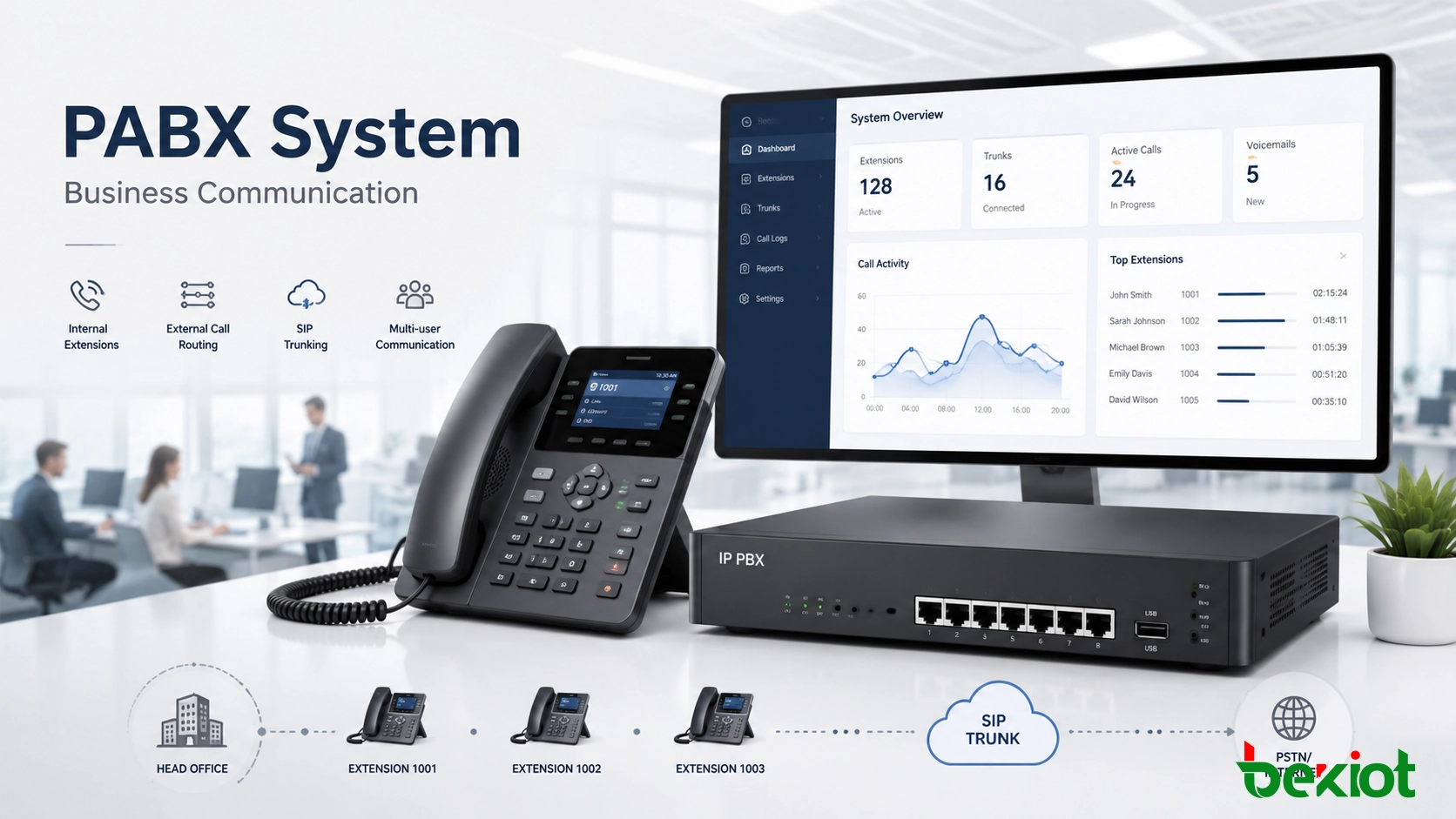
A PABX system manages internal extensions, external call routing, voicemail, auto attendant, SIP trunks, call recording, and centralized business voice communication for offices, hotels, hospitals, campuses, and industrial sites.
Becke Telcom
A PABX system, short for Private Automatic Branch Exchange, is a private telephone system used by organizations to manage internal and external voice communication. It allows employees, departments, rooms, service desks, control rooms, and remote branches to communicate through internal extensions while sharing external telephone lines or SIP trunks for outside calls.
For many businesses, a PABX system is the center of daily voice communication. It helps route calls, reduce line costs, improve customer response, organize extension dialing, and support useful features such as auto attendant, voicemail, call transfer, call queue, call recording, conference calling, and centralized extension management.
Traditional PABX systems were mainly based on analog or digital telephone lines. Modern systems increasingly use IP networks, SIP trunks, VoIP endpoints, cloud platforms, and hybrid architectures. This makes PABX suitable for offices, hotels, hospitals, factories, campuses, government facilities, transportation sites, and multi-branch enterprises that need reliable and manageable voice communication.
A PABX system connects internal extensions, external lines, SIP trunks, and business users through one managed call routing platform.
What Is a PABX System?
A PABX system is a private telephone switching system installed or hosted for one organization. Instead of assigning a separate public telephone line to every employee, the organization can create many internal extensions and allow them to share outside calling resources.
The word “automatic” is important. Older telephone systems often required a manual operator to connect calls. A PABX system performs this switching automatically. When a user dials an internal extension, the system identifies the destination and connects the call. When a user dials an outside number, the system selects the correct trunk or external line according to routing rules.
In simple terms, a PABX system works like a private call control center. It decides where calls should go, which users should receive them, what permissions should apply, and which features should be activated during the call.
A PABX system helps organizations manage voice communication by connecting internal extensions, routing external calls, and automating call handling from one central platform.
PABX vs PBX: The Practical Difference
PBX means Private Branch Exchange, while PABX means Private Automatic Branch Exchange. Historically, PBX could refer to private telephone exchanges that required manual operation, while PABX emphasized automatic call switching.
In modern usage, the two terms are often used almost interchangeably because nearly all business phone systems now support automatic switching. Some regions and industries still prefer the term PABX, especially when referring to office telephone systems, hotel phone systems, enterprise telephony, and business communication platforms.
For practical project selection, the more important question is not whether the system is called PBX or PABX. The key is whether it supports the required extensions, trunks, call routing, SIP compatibility, security, recording, management, and future expansion.
How a PABX System Works
Internal Extension Calling
Internal call switching is one of the most basic functions of a PABX system. Each employee, department, room, service counter, or control point can be assigned an extension number. When one user calls another extension, the PABX connects the call inside the organization without using a public telephone line.
This makes internal communication faster and more cost-effective. Reception, sales, finance, warehouse staff, security rooms, nurse stations, engineering teams, and control centers can call each other using short extension numbers instead of full public numbers.
External Call Routing
When users need to call outside the organization, the PABX routes the call through analog lines, ISDN lines, E1 or T1 trunks, GSM gateways, SIP trunks, or other carrier connections. The routing rule can be based on number prefix, department, cost, user permission, time schedule, or destination type.
For incoming calls, the system can route callers to a receptionist, auto attendant, call queue, department group, mobile extension, or specific user. This helps businesses avoid missed calls and deliver a more professional calling experience.
Call Control and Feature Management
A PABX system does more than connect calls. It can manage call forwarding, call transfer, caller ID, call waiting, call hold, music on hold, voicemail, conference calls, call recording, call permissions, and call detail records.
Administrators can configure extensions, users, departments, trunk lines, ring groups, working hours, call queues, IVR menus, and security policies from a management interface. This gives the organization better control over daily communication and long-term maintenance.
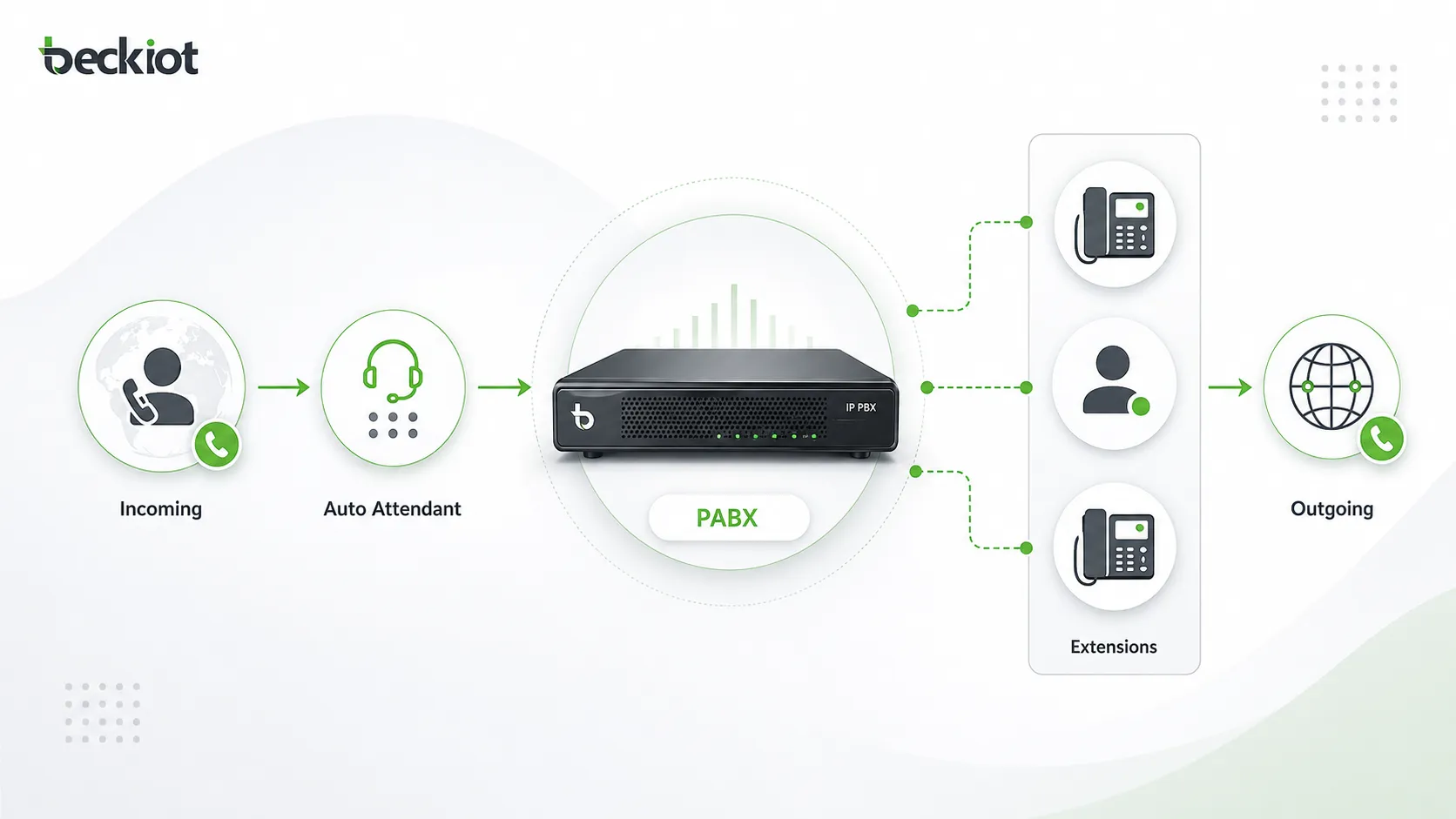
A PABX system handles internal calls, outgoing calls, incoming call routing, auto attendant menus, and extension management.
Main Types of PABX Systems
Analog PABX
An analog PABX connects traditional telephone lines with analog desk phones. It is simple, familiar, and suitable for small offices or sites that still rely on legacy telephone wiring. However, analog systems usually have limited scalability and fewer advanced features.
This type may still be useful where basic voice calling is enough, but it is less flexible when businesses need SIP trunking, remote extensions, software management, mobile apps, or integration with modern communication platforms.
Digital PABX
A digital PABX uses digital signaling and digital telephone terminals. Compared with analog systems, it usually provides better call quality, more call control features, and stronger management capability.
Digital systems are common in hotels, office buildings, and medium-sized organizations. The limitation is that many digital PABX platforms depend on proprietary phones, cards, and expansion modules, which can make future upgrades more restricted.
IP PABX
An IP PABX, also called an IP PBX, uses IP networks to transmit voice calls. It supports SIP phones, softphones, VoIP gateways, SIP trunks, remote extensions, call recording, and integration with business applications.
IP PABX systems are widely used in modern business communication because they can operate over LAN, WAN, VPN, or cloud-connected networks. They are suitable for multi-site offices, remote users, centralized management, SIP trunking, and unified communication planning.
Cloud PABX
A cloud PABX is hosted by a service provider instead of being installed on the customer’s premises. Users connect through IP phones, mobile apps, desktop softphones, or web interfaces.
This model reduces local hardware investment and simplifies maintenance. It is suitable for small and medium-sized businesses that prefer subscription-based services and do not want to manage their own phone server.
Hybrid PABX
A hybrid PABX combines traditional telephone infrastructure with IP-based communication. It can connect analog phones, digital phones, SIP phones, PSTN lines, SIP trunks, gateways, and VoIP endpoints in one system.
Hybrid systems are useful for organizations that want to modernize gradually. Existing devices can continue operating while new IP extensions, SIP trunks, remote users, and advanced call management features are added step by step.
Key Features of a PABX System
Extension Management
A PABX system allows businesses to create and manage internal extensions for employees, departments, rooms, service desks, guard rooms, warehouses, control rooms, and branch offices. Each extension can have its own number, permission level, voicemail box, call forwarding rule, and ring strategy.
Auto Attendant and IVR
Auto attendant helps answer incoming calls automatically and guide callers to the right department. A caller may hear options such as “Press 1 for sales, press 2 for technical support, press 3 for after-sales service.”
This improves the company’s professional image and reduces the workload of reception staff, especially during busy hours.
Call Transfer and Forwarding
Call transfer allows a user to move an active call to another extension, department, or operator. Call forwarding sends incoming calls to another destination when the user is busy, unavailable, out of office, or working remotely.
These features are important for customer service, internal collaboration, and smooth call handling between teams.
Voicemail and Missed Call Handling
Voicemail helps users receive messages when they cannot answer. Some PABX systems can send voicemail notifications by email or provide missed call records through a management platform.
This reduces the risk of losing customer inquiries, supplier calls, emergency messages, or internal coordination requests.
Call Queue and Ring Group
A call queue holds incoming calls until an available agent answers. A ring group allows multiple phones to ring together or in sequence. These functions are useful for reception desks, sales teams, service departments, help desks, maintenance teams, and control rooms.
Call Recording and Reports
Many modern PABX systems support call recording and call detail records. These tools help businesses review service quality, resolve disputes, train staff, analyze call volume, and understand communication patterns.
Reports can show call duration, missed calls, trunk usage, extension activity, department performance, and peak-time traffic.
SIP Trunk Support
Modern IP PABX systems often support SIP trunks, allowing businesses to make and receive calls over IP networks instead of relying only on traditional telephone lines. SIP trunking can reduce costs, simplify number management, and support flexible expansion.
For multi-branch enterprises, SIP trunks can also centralize external call access and make telecom management easier.
Benefits of Using a PABX System
Lower Communication Costs
A PABX system helps reduce costs by keeping internal calls inside the private system. Businesses do not need a separate public telephone line for every user. With SIP trunking and VoIP routing, long-distance and inter-branch calls can also become more cost-effective.
Professional Call Handling
Features such as auto attendant, call queue, voicemail, ring group, call transfer, and working-hour routing help businesses handle calls more professionally. Customers can reach the correct department faster, and internal teams can respond more efficiently.
Better Internal Collaboration
Extension dialing, conference calling, call transfer, and department groups make internal communication smoother. Teams in different offices, floors, buildings, branches, or remote locations can be connected through one managed voice system.
In industrial and campus environments, a PABX can also connect office phones, control room phones, emergency phones, SIP intercoms, paging systems, and dispatch platforms.
Scalability for Growth
As an organization grows, a PABX system can add more extensions, trunks, devices, users, and routing rules. IP-based systems are especially scalable because many changes can be made through software configuration rather than major rewiring.
Centralized Management
A PABX system gives administrators a central place to manage users, numbers, permissions, call routing, voicemail, recordings, and system settings. This reduces disorder and makes communication easier to maintain.
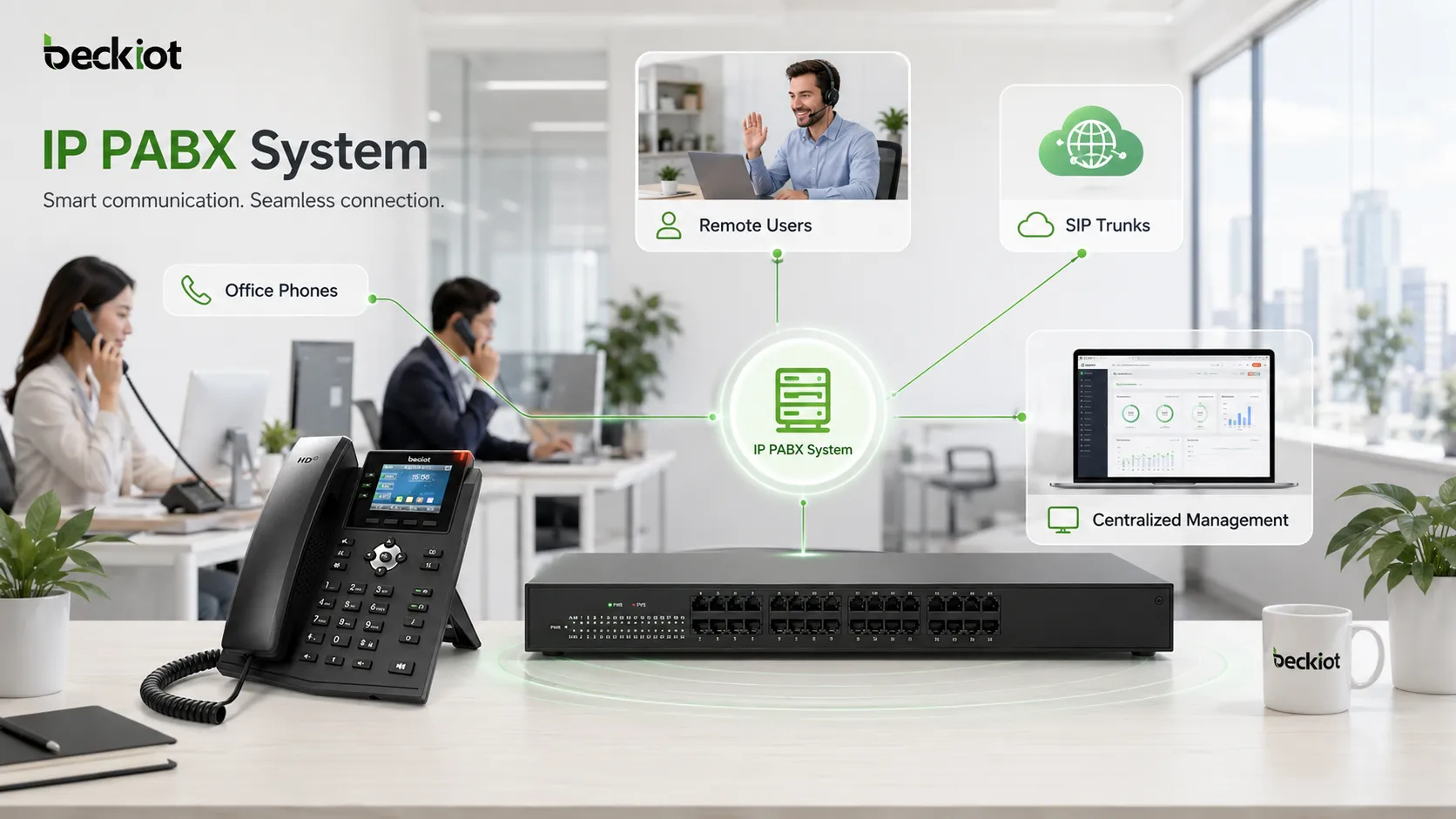
Modern IP PABX systems support office users, remote extensions, SIP trunks, VoIP endpoints, and centralized communication management.
Common Applications of PABX Systems
Office Business Communication
In office environments, a PABX system connects reception, sales, customer service, finance, management, and back-office teams. It gives employees short extension dialing and gives external callers a more structured calling experience.
Small businesses may use a basic cloud or IP PABX, while larger companies may require advanced routing, call recording, multi-site networking, CRM integration, and call center functions.
Hotels and Hospitality
Hotels use PABX systems to connect guest rooms, front desk, housekeeping, restaurants, security, engineering, and administration offices. The system can support room-to-room calling, wake-up calls, billing records, front desk routing, and service coordination.
In hospitality, stability and simple operation are important because phone service directly affects guest experience.
Hospitals and Healthcare Facilities
Hospitals and clinics use PABX systems for communication between nurse stations, wards, laboratories, emergency departments, pharmacies, administration offices, and service teams. The system can also work with paging, intercom, and emergency notification systems.
Reliable voice communication is essential in healthcare because delays can affect patient service, staff coordination, and emergency response.
Industrial and Security Communication
Factories, warehouses, energy sites, tunnels, transportation hubs, logistics parks, and security centers need reliable voice systems for daily coordination and emergency communication. A PABX or IP PBX can connect office phones, industrial telephones, SIP intercoms, emergency call stations, dispatch consoles, paging gateways, and public address systems.
In these environments, voice communication is not only for office calls. It supports maintenance response, safety reporting, control room coordination, visitor access, emergency alerts, and field communication.
How to Choose the Right PABX System
Review Current and Future Needs
Before selecting a PABX system, businesses should review the number of users, extensions, departments, branches, external lines, and call groups required. It is also important to consider peak call volume, remote users, recording needs, reporting needs, and future expansion plans.
A small office may only need basic calling, voicemail, and auto attendant. A larger organization may need call queue, multi-level IVR, SIP trunking, redundancy, recording, permission control, and integration with business platforms.
Choose On-Premise, Cloud, or Hybrid Deployment
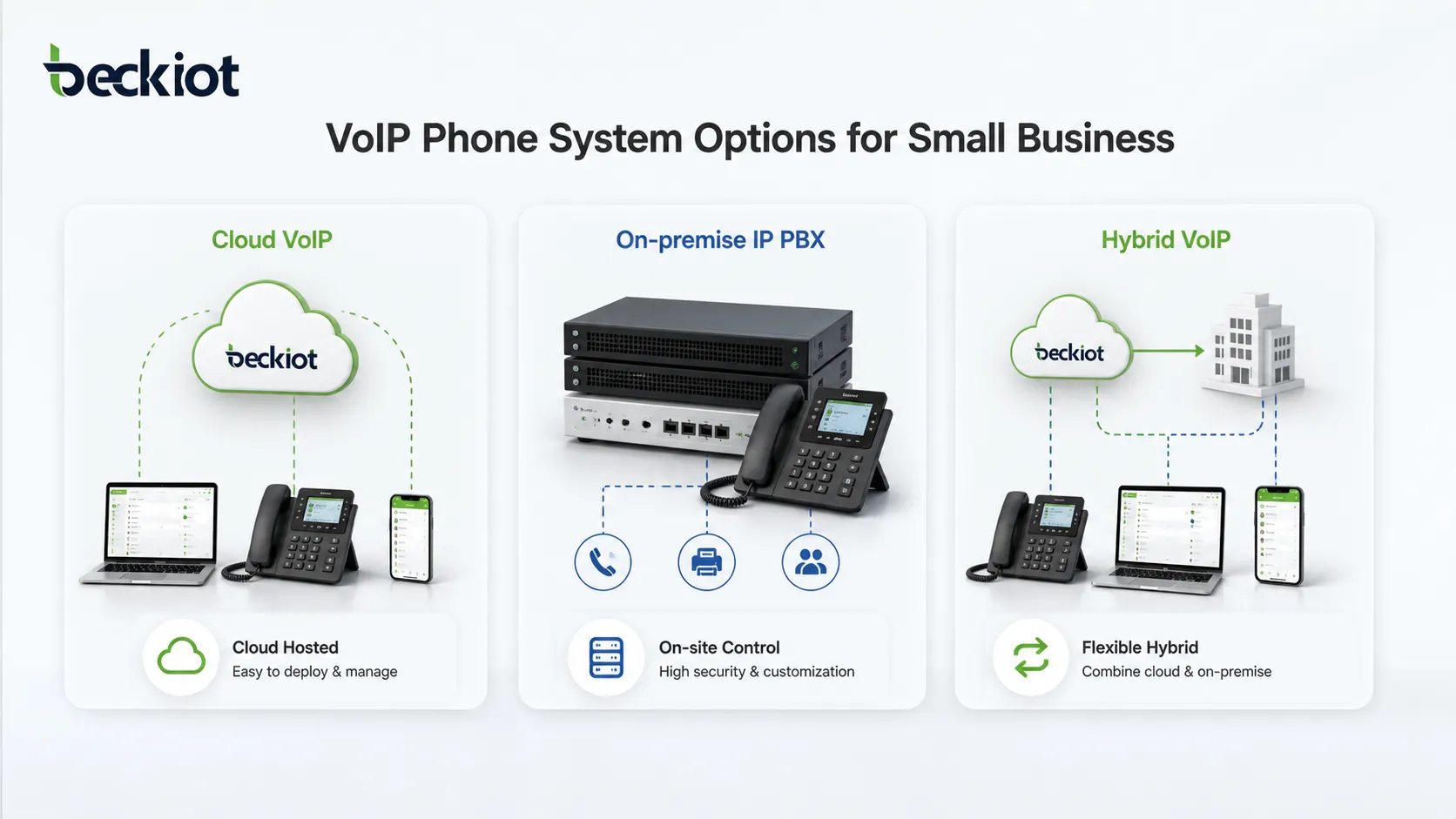
An on-premise PABX gives the organization more local control and may suit businesses with internal IT teams, strict security requirements, or custom integration needs. A cloud PABX reduces local hardware maintenance and is easier to deploy for distributed users.
A hybrid system is useful when the company wants to keep existing analog or digital equipment while gradually moving toward IP-based communication.
Check SIP and VoIP Compatibility
SIP compatibility is now one of the most important selection factors. A SIP-enabled PABX can connect SIP phones, SIP trunks, VoIP gateways, paging gateways, SIP intercoms, emergency phones, and third-party communication platforms.
This gives businesses more flexibility when choosing devices, carriers, communication endpoints, and integration solutions.
Evaluate Reliability and Security
A business phone system should be stable, secure, and easy to maintain. Important points include backup power, network quality, failover routing, user permissions, password policies, firewall settings, encryption options, monitoring, and regular updates.
For critical environments, emergency call routing, redundant trunks, hot standby, and backup communication paths should also be considered.
Review Management and Support
The system should be easy for administrators to manage. Common tasks include adding users, changing extensions, viewing call records, adjusting routing rules, updating prompts, checking trunk status, and troubleshooting call problems.
Good documentation, technical support, training, and long-term maintenance are important when selecting a PABX vendor or solution provider.
PABX and the Future of Business Communication
The role of the PABX system is changing. It is no longer only a device that connects office telephones. Modern PABX platforms are becoming part of unified communication, customer service, security, dispatch, paging, and emergency response systems.
With IP networks, SIP protocols, cloud platforms, mobile extensions, and software-based management, businesses can build more flexible voice communication environments. Calls can be connected with video, intercom, paging, recording, monitoring, alarm systems, and workflow platforms.
For companies that need reliable communication across offices, industrial sites, service teams, remote users, and control rooms, a well-designed PABX system remains a practical foundation for business voice communication.
Becke Telcom for Industrial PABX and SIP Communication
For ordinary office communication, a standard cloud or IP PABX may be enough. For industrial, transportation, energy, tunnel, campus, hospital, and public safety environments, the communication system often needs stronger integration with field devices and emergency workflows.
Becke Telcom can provide SIP-based industrial communication solutions that connect IP PBX systems with industrial telephones, emergency phones, SIP intercoms, paging terminals, dispatch consoles, VoIP gateways, and public address systems.
This type of solution is suitable for projects where business calls, field communication, emergency response, and control room coordination need to work together through one managed voice communication architecture.
Conclusion
A PABX system is an essential business telephone solution for managing internal extensions, external calls, call routing, voicemail, call transfer, call queues, and many other communication functions. It helps organizations reduce costs, improve call handling, support internal collaboration, and provide a more professional communication experience.
Whether a business chooses analog PABX, digital PABX, IP PABX, cloud PABX, or hybrid PABX, the right solution should match current needs and future growth. For modern organizations, SIP compatibility, scalability, reliability, security, centralized management, and system integration are key factors.
As voice communication continues to merge with SIP, VoIP, dispatch, paging, and emergency systems, PABX remains a practical foundation for businesses that need organized and reliable communication.
FAQ
What does PABX stand for?
PABX stands for Private Automatic Branch Exchange. It is a private telephone system that automatically connects internal extensions and manages external calls for a business or organization.
Is PABX the same as PBX?
In most modern usage, PABX and PBX mean almost the same thing. PABX emphasizes automatic call switching, while PBX is the broader term for a private branch exchange system.
Can a PABX system use VoIP?
Yes. Modern IP PABX systems can use VoIP technology and SIP trunks to make and receive calls over IP networks. They can also connect SIP phones, softphones, gateways, paging terminals, and remote extensions.
What type of business needs a PABX system?
Any organization that needs multiple extensions, shared external lines, professional call routing, voicemail, call transfer, call queues, and centralized telephone management can benefit from a PABX system.
How do I choose between cloud PABX and on-premise PABX?
Cloud PABX is suitable for businesses that want simple deployment and lower hardware maintenance. On-premise PABX is better for organizations that need more local control, custom integration, or strict communication security requirements.