Camera SIP and IP Phone SIP in GB/T28181 Video Integration
Camera-side SIP in GB/T28181 systems is not the same as IP phone SIP. This article explains registration limits, media workflow differences, gateway conversion, transcoding, and project testing for video dispatch integration.
Becke Telcom
In video surveillance and converged communication projects, engineers often find SIP-related settings on an IP camera’s GB/T28181 configuration page. At the same time, IP phones, SIP intercoms, dispatch consoles, video phones, and VoIP platforms also use SIP for communication. Because the configuration fields look similar, it is easy to ask a practical question: can a surveillance camera register to a normal SIP server and work like an IP video phone?
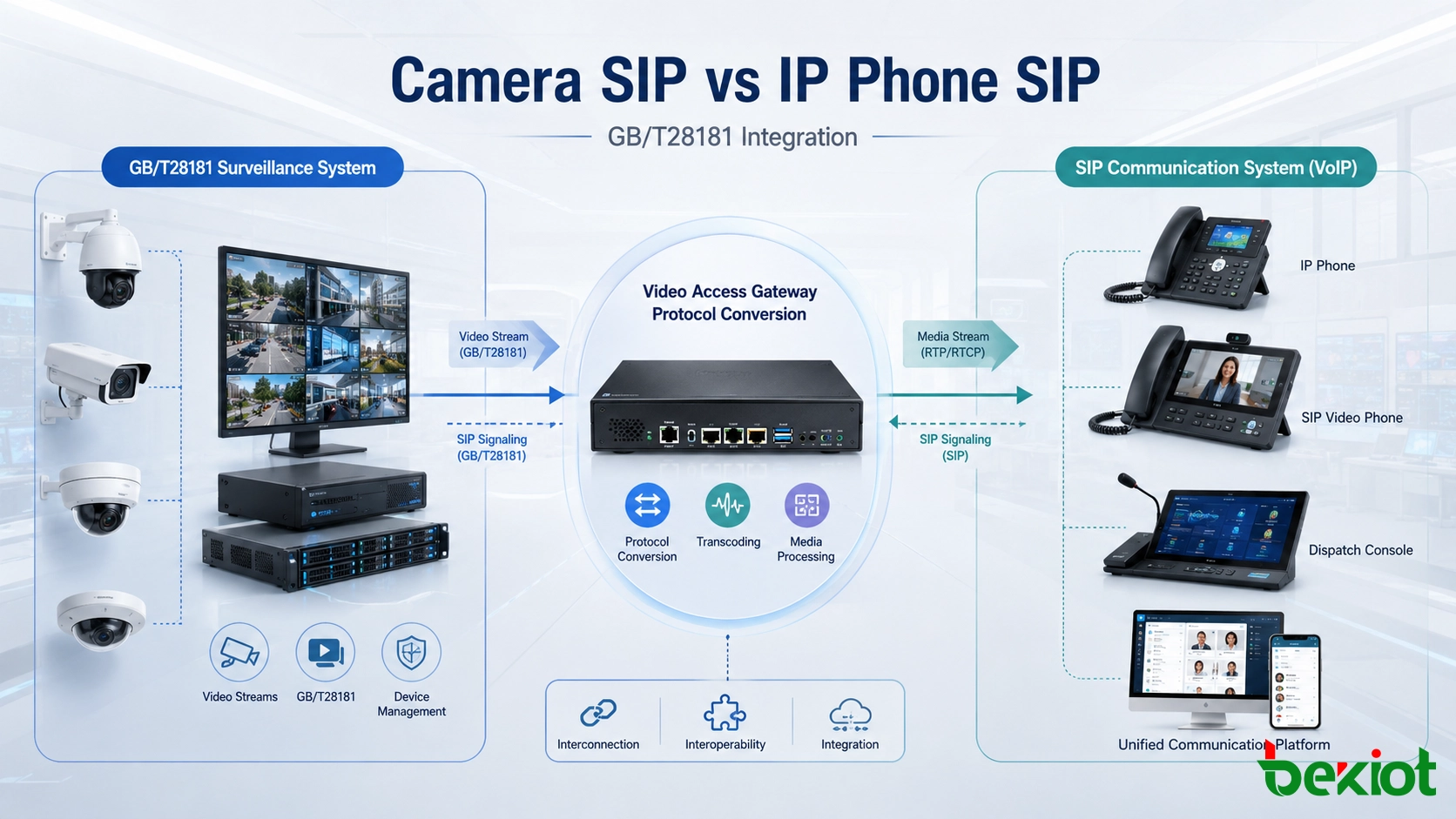
The direct answer is: not in the same way. Camera-side SIP in a GB/T28181 system and IP phone SIP belong to the same general signaling family, but they are built for different business logic. A GB/T28181 camera uses SIP-based signaling mainly for video surveillance networking, device registration, directory management, live view requests, playback control, PTZ operation, alarm reporting, and platform cascading. IP phone SIP is mainly used for VoIP registration, call setup, ringing, media negotiation, and real-time voice or video communication between terminals.
This difference is important in command centers, industrial dispatch platforms, emergency communication systems, campus security systems, transportation control rooms, and public safety projects. A camera may appear to register successfully, but that does not automatically mean an IP phone, SIP dispatch console, or unified communication platform can call the camera and display video correctly.
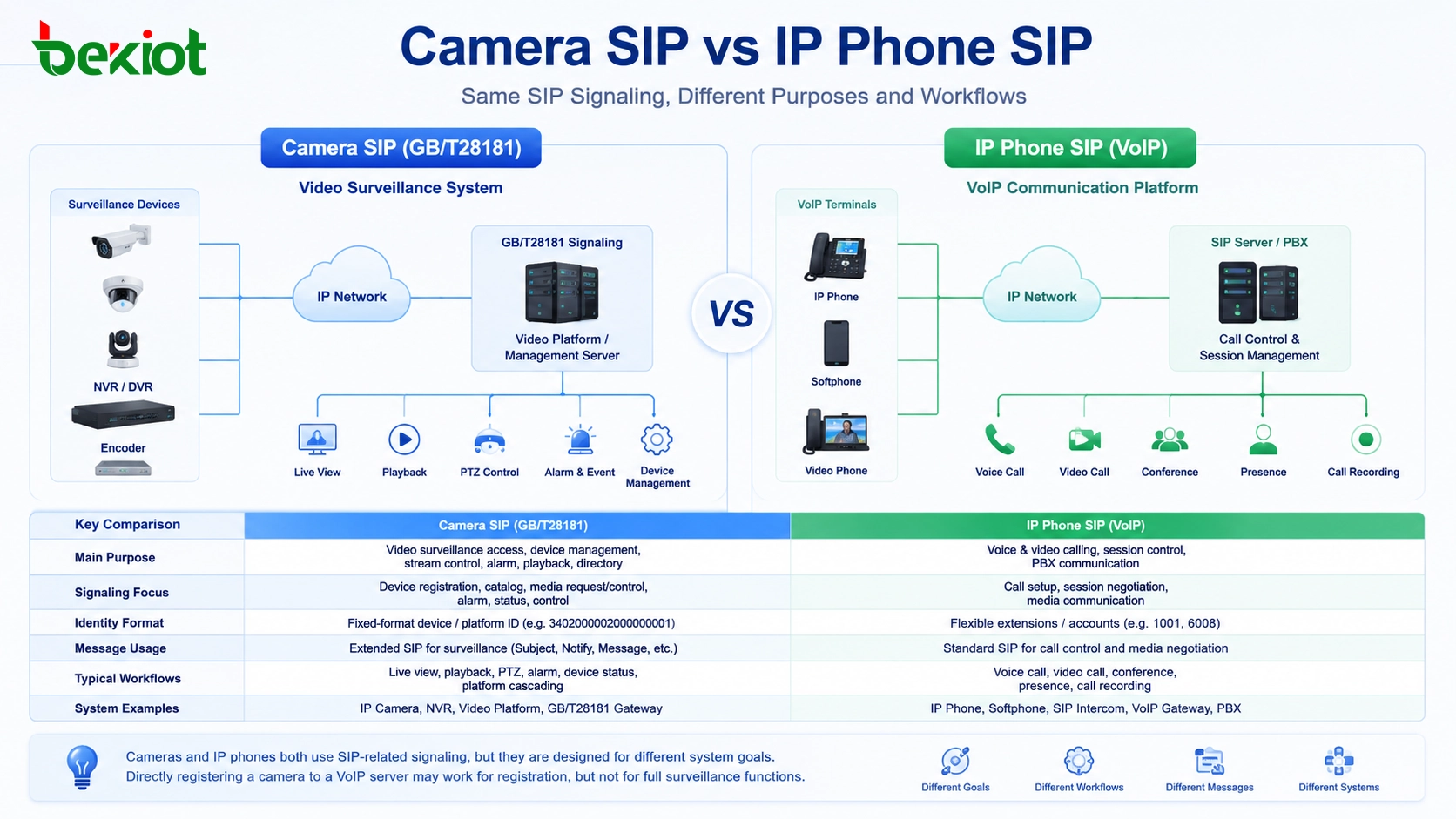
Camera SIP and IP phone SIP use related signaling concepts, but they are designed for different system workflows.
Why SIP settings appear on IP cameras
Many IP cameras include a GB/T28181 configuration page. On this page, users may see fields such as SIP server ID, SIP server domain, server address, server port, device ID, authentication username, password, and local SIP port. These names are very close to the settings used by IP phones or SIP video phones.
This visual similarity often creates misunderstanding. In a VoIP system, an IP phone usually needs a SIP server address, an extension number, an authentication ID, and a password. After registration, the phone can make and receive calls through an IP PBX or SIP server. When a camera also has SIP-like parameters, some users assume that the camera can behave like another SIP extension.
In real projects, a GB/T28181 camera may sometimes register to a normal SIP server after the address, port, username, and password are adjusted. However, successful registration only proves that part of the signaling handshake has been accepted. It does not prove that the server understands the camera’s surveillance workflow, stream request method, media transport behavior, or monitoring-specific message fields.
Different system goals behind similar signaling
Standard SIP in VoIP systems is mainly used to establish, modify, and terminate communication sessions. It allows IP phones, softphones, SIP intercoms, video phones, gateways, and IP PBX platforms to register accounts, set up calls, negotiate audio or video media, send DTMF, and manage call status.
GB/T28181 has a different target. It is designed for video surveillance networking, especially in projects where cameras, NVRs, video platforms, and upper-level monitoring platforms must be connected through a standardized structure. It uses SIP-based signaling ideas, but its purpose is not simply “making a call.” Its workflow includes device registration, catalog query, channel management, live video request, recording playback, PTZ control, alarm information, device status reporting, and platform interconnection.
So the SIP on a camera is more like a surveillance access and control mechanism. The SIP on an IP phone is a communication session mechanism. They may look close in configuration, but the behavior after registration is very different.
Key differences between GB/T28181 SIP and VoIP SIP
One major difference is identity structure. In a normal VoIP SIP system, account numbers are usually flexible. An IP phone extension can be 1001, 6008, room101, guard01, or another format defined by the PBX. In a GB/T28181 system, device IDs, channel IDs, and platform IDs usually follow stricter numbering rules and are often long fixed-format numeric identifiers.
Message usage is also different. GB/T28181 extends SIP signaling for video surveillance. Some message fields may carry device IDs, channel numbers, stream request information, playback commands, alarm data, or platform control information. A standard VoIP SIP server may accept the registration message, but it usually does not know how to interpret these monitoring-related fields.
This is why direct registration can be misleading. A camera may show online at the SIP layer, while the actual service remains unavailable. The SIP server may not know how to request the camera stream, select the right channel, control PTZ, pull historical playback, or process alarm reporting.
Item
Camera GB/T28181 SIP
IP Phone VoIP SIP
Main purpose
Video surveillance access, device management, stream control
Voice and video calling, session control, PBX communication
Typical devices
IP camera, NVR, VMS platform, surveillance gateway
IP phone, SIP intercom, softphone, video phone, VoIP gateway
Identity rules
Usually uses fixed-format device, channel, or platform IDs
Usually uses flexible extension numbers or SIP accounts
Core functions
Live view, playback, PTZ, alarm, catalog, status reporting
Registration, calling, ringing, media negotiation, DTMF
Direct compatibility
Usually requires gateway conversion or platform adaptation
Works with standard SIP servers and IP PBX systems
Why registration does not prove video compatibility
In some integration tests, project teams may see a GB/T28181 camera appear online on a SIP server. This can happen when authentication information and server parameters are accepted. But when the team tries to start a SIP video call, pull live video, or display the image on a SIP video phone, the video may still fail.
The reason is that media control is not the same. A VoIP SIP call expects both sides to behave like communication terminals. The call is created, the media capability is negotiated, and the audio or video session is established. A GB/T28181 camera expects a surveillance platform to send monitoring-specific commands, request a specific video channel, define stream behavior, and handle media according to the national standard workflow.
Codec and resolution are another common problem. Many surveillance cameras output high-resolution video, including 4K streams, and H.265 is widely used in modern video systems. However, many SIP video phones, dispatch clients, and communication terminals are designed around H.264 and 720P or 1080P video communication. Even if signaling can be adapted, the receiving terminal may still be unable to decode the video stream.
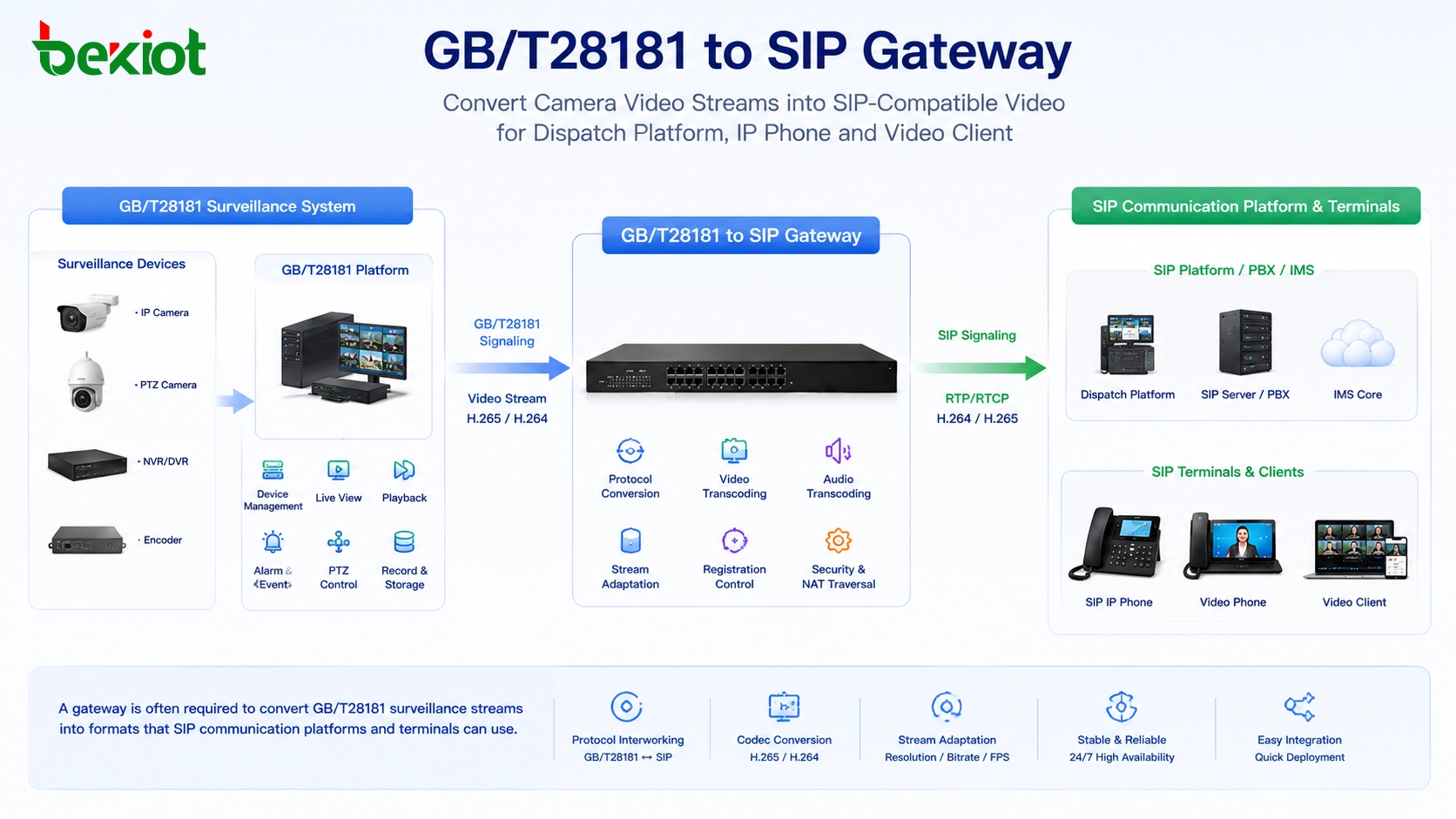
A video gateway often bridges GB/T28181 surveillance resources and SIP-based communication terminals.
The practical role of a video access gateway
For most heterogeneous video and communication projects, a video access gateway is the safer and more practical solution. It may also be called a GB/T28181-to-SIP gateway, surveillance video integration gateway, video dispatch gateway, or protocol conversion gateway. Its job is to connect the surveillance side and the communication side without forcing one protocol to behave like the other.
On the surveillance side, the gateway should understand GB/T28181 workflows. This may include camera registration, platform cascading, catalog query, channel management, live preview, playback control, PTZ control, device status, location information, and alarm reporting. These functions allow the gateway to communicate with cameras and video platforms in the language of a surveillance system.
On the communication side, the gateway should support SIP networking, SIP video calling, stream forwarding, video dispatch, and terminal adaptation. This allows a command center, SIP video phone, dispatch console, unified communication platform, or emergency communication system to access camera resources through a communication-friendly method.
In a converged communication project, Becke Telcom / 贝克通信 can be considered when the system needs SIP dispatch, field communication terminals, video linkage, alarm integration, and command center collaboration. In this type of architecture, the video access gateway becomes the bridge between camera resources and real-time communication workflows.
Transcoding is not optional in many deployments
Protocol conversion solves only part of the integration problem. In many real-world projects, media adaptation is just as important. A camera may provide H.265 video at 4K resolution with a high bitrate, while the receiving SIP terminal may support only H.264 at 1080P. The signaling path may be connected, but the video still cannot be displayed correctly.
A practical gateway should therefore support transcoding and stream adaptation. Depending on the project, it may need to convert H.265 to H.264, reduce resolution, adjust bitrate, change frame rate, or repackage the stream for SIP video communication, web preview, dispatch software, or mobile command clients.
This is especially important in industrial control rooms, emergency command centers, transportation dispatch, energy facilities, chemical plants, campus security centers, and public safety operations. These environments do not only need to “see the camera.” They need stable video that can be used together with voice calls, alarms, maps, dispatch records, and operator workflows.
Where camera-to-SIP integration brings value
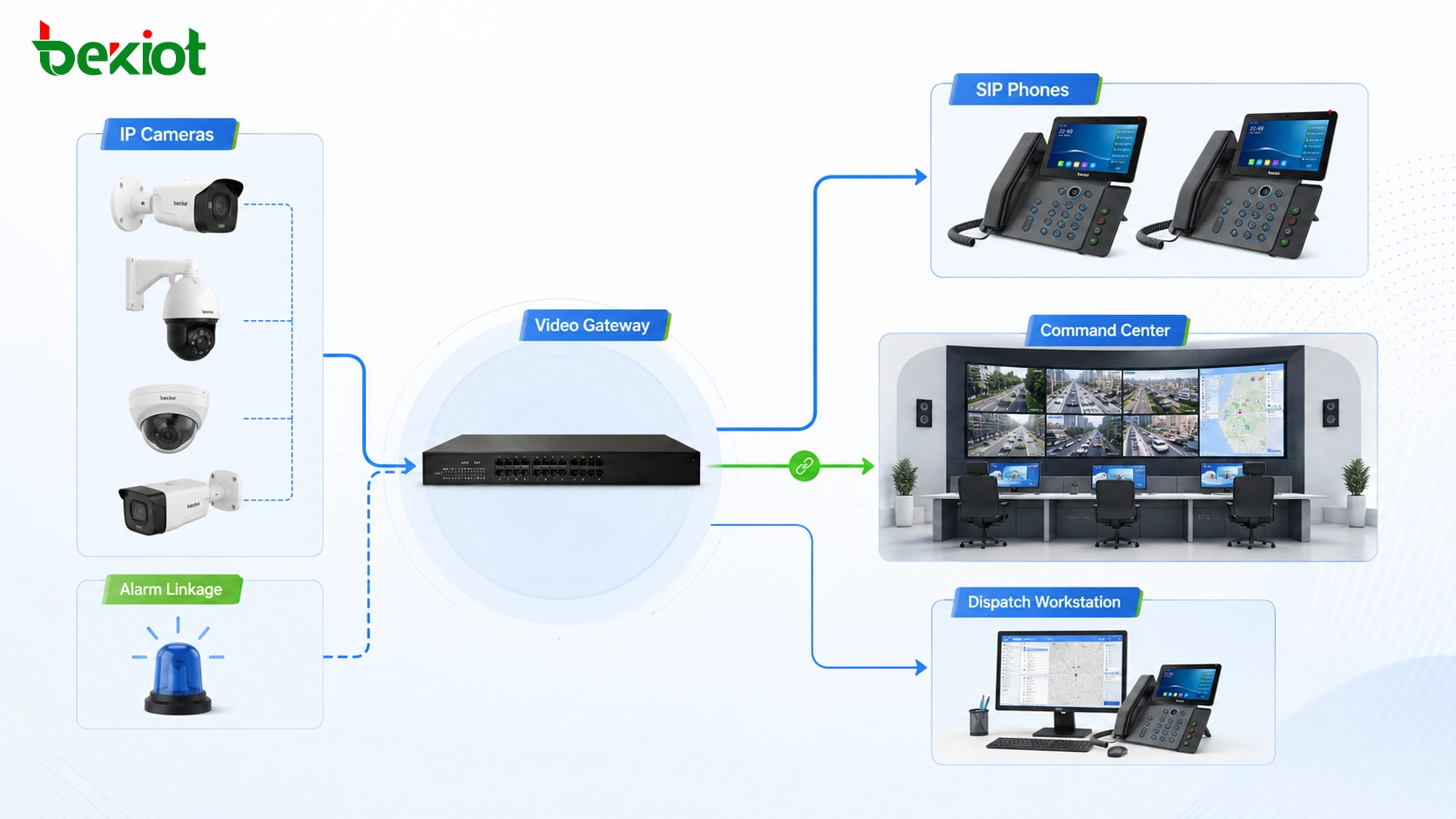
The difference between camera SIP and IP phone SIP matters most when video surveillance needs to work together with voice dispatch. For example, a command center may need to call a nearby IP phone while opening a live camera feed from the same area. An industrial control room may need to link a gas alarm with live video and a voice dispatch group. A security team may need to view an entrance camera while speaking to a SIP intercom or emergency phone.
In transportation, energy, petrochemical, campus, hospital, industrial park, municipal, tunnel, port, and public safety projects, video has become part of operational decision-making. Operators often need to combine camera images, SIP calls, alarm events, location data, paging, and dispatch actions in one interface.
A well-designed gateway layer allows cameras, surveillance platforms, SIP terminals, and dispatch systems to work together while keeping each protocol in its proper role. This reduces compatibility risk, shortens project testing time, and makes long-term maintenance easier.
In a converged communication system, camera video can support dispatch decisions when it is properly adapted for SIP platforms and terminals.
Project design checklist before deployment
Before connecting a camera system to a SIP communication platform, the project team should first confirm the actual camera access method. The camera or video platform may support GB/T28181, RTSP, ONVIF, private SDK access, or multiple methods at the same time. Each method has a different integration path.
The team should also define the real business requirement. Simple live viewing is different from SIP video calling. Alarm linkage is different from playback control. PTZ operation is different from platform cascading. If the requirement is not clear at the beginning, the project may choose the wrong integration method and discover the problem only during commissioning.
Media capability should be checked early. Important items include codec, resolution, bitrate, frame rate, audio support, stream type, channel structure, authentication method, and network delay. If the receiving side includes SIP video phones, dispatch clients, or command consoles, their decoding capability must be confirmed before final deployment.
For reliable acceptance testing, do not treat successful SIP registration as final proof of compatibility. A complete test should include live viewing, SIP video calling if required, stream pulling, playback, PTZ control, alarm linkage, codec compatibility, reconnection behavior, long-duration stability, and terminal display performance.
Camera SIP and IP phone SIP are related at the signaling level, but they are not designed for the same system purpose. Direct registration may work in limited cases, while real service compatibility usually depends on gateway conversion, workflow adaptation, and media transcoding.
Summary
Camera SIP in GB/T28181 and IP phone SIP in VoIP systems are not completely the same. GB/T28181 uses SIP-based signaling for video surveillance networking, while IP phone SIP is designed for communication sessions, PBX registration, call control, and media negotiation. Their configuration pages may look similar, but their identity rules, message fields, control logic, media behavior, and service goals are different.
For real engineering projects, the safer approach is to use a video access gateway or GB/T28181-to-SIP gateway when surveillance video needs to enter a SIP dispatch platform or unified communication system. With proper protocol conversion, transcoding, and terminal adaptation, IP cameras can become usable video resources for command centers, emergency response platforms, industrial dispatch rooms, SIP terminals, and security operation centers.
FAQ
Can an IP phone dial an IP camera directly?
Usually not. Even if the camera has SIP-related settings, it may not behave like a standard SIP video phone. A gateway or platform adaptation layer is usually needed before camera video can be used by SIP communication terminals.
Why does the camera show online but no video appears?
The camera may have completed basic signaling registration, but the platform may not support the GB/T28181 stream request process, monitoring control messages, codec format, or media transport method.
Is RTSP easier than GB/T28181 for video access?
RTSP can be useful for simple stream pulling. GB/T28181 is more suitable when the project needs device registration, catalog management, platform cascading, alarm reporting, playback, or surveillance system integration.
When is transcoding required?
Transcoding is needed when the camera stream format is not supported by the receiving terminal or platform. Common examples include H.265 to H.264 conversion, 4K to 1080P downscaling, bitrate adjustment, or frame rate adaptation.
What should be tested before project acceptance?
Test camera registration, live viewing, SIP video calling if required, codec compatibility, delay, reconnection, PTZ control, alarm linkage, playback, terminal decoding, and long-term stream stability.