An accessible guide to IP PBX systems for business VoIP, covering call routing, extensions, SIP trunks, remote users, softphones, administration, integration, and how companies choose the right system.
Becke Telcom
An IP PBX system is a business telephone platform that manages voice communication through an IP network. It controls extensions, call routing, voicemail, call transfer, conferencing, SIP trunk access, remote users, and other daily telephony functions without relying only on traditional analog or legacy digital phone lines.
For many organizations, the move to IP PBX is not only a replacement of old telephone equipment. It is a shift toward a more flexible communication structure. Companies now operate across headquarters, branch offices, warehouses, service teams, home offices, mobile users, and customer-facing departments. A modern phone system must support that reality.
Compared with a traditional PBX, an IP PBX is usually easier to expand, easier to manage, and better suited to VoIP communication. It can connect desk phones, softphones, mobile clients, SIP trunks, paging devices, intercom terminals, and remote workers under one communication architecture.
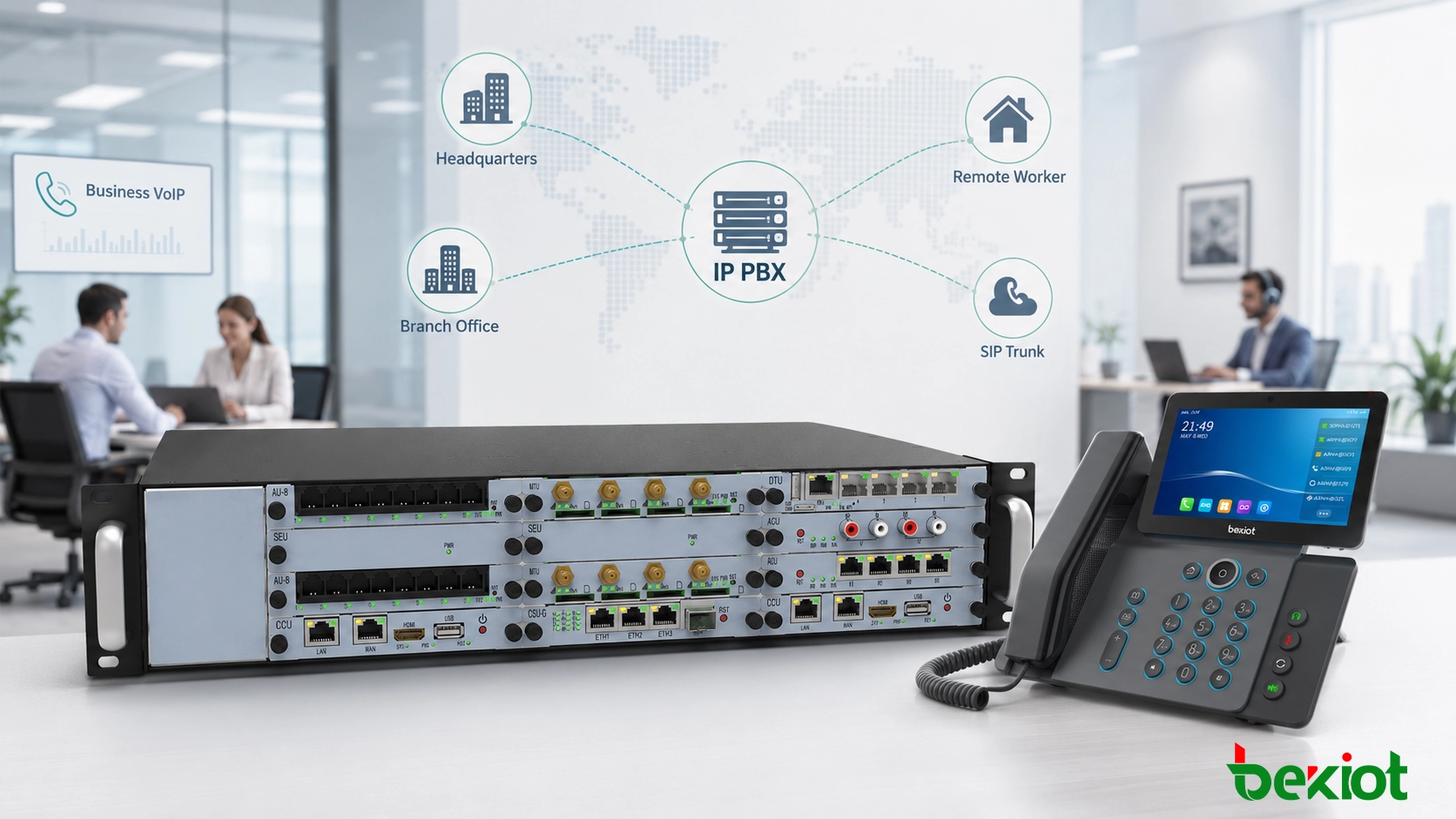
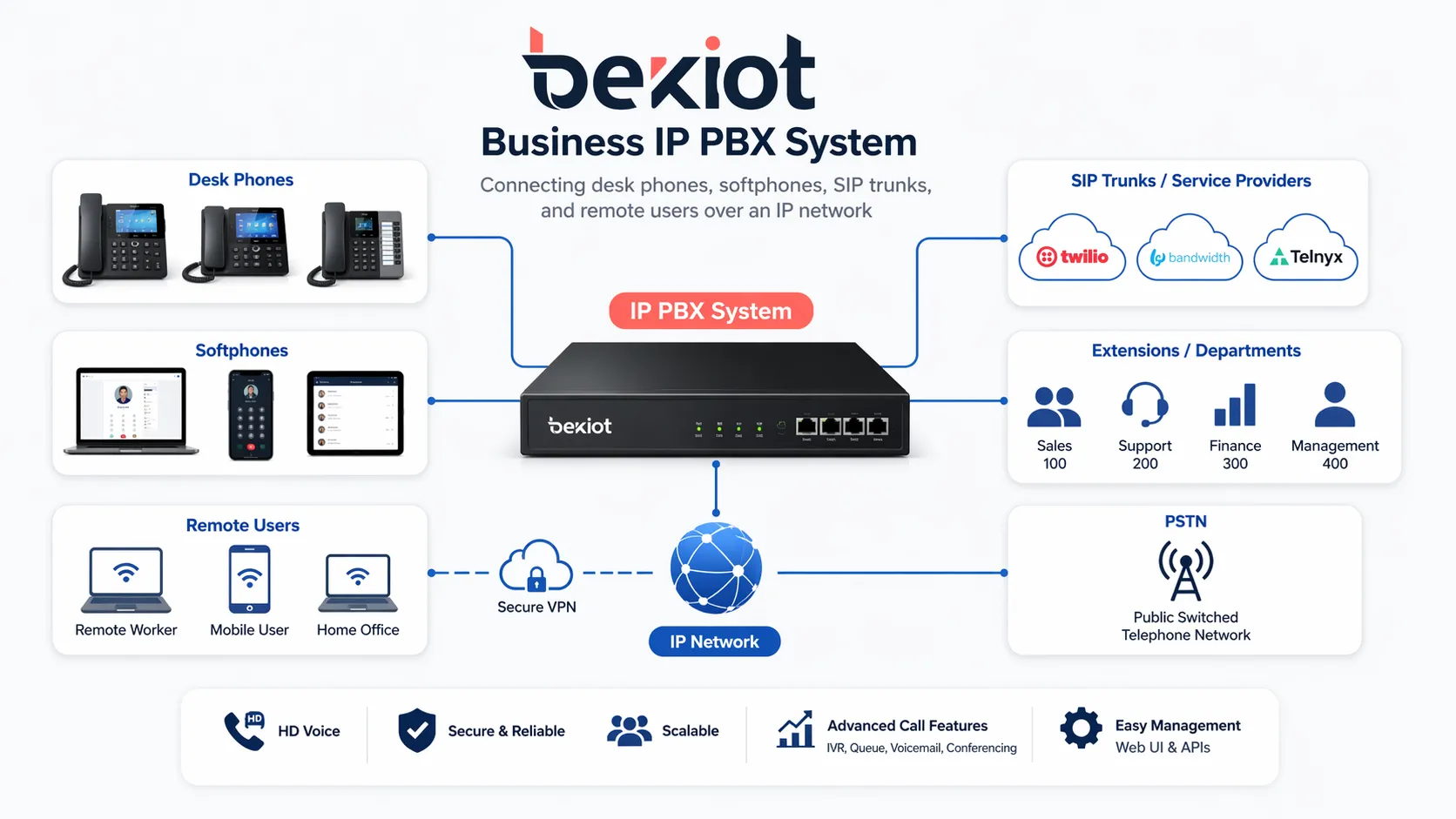
IP PBX systems bring desk phones, softphones, SIP trunks, and remote users into one managed business communication platform.
What an IP PBX System Does
A private business phone system over IP
IP PBX stands for Internet Protocol Private Branch Exchange. It is the private call control system used inside an organization to connect internal users and route calls to external networks. Instead of depending mainly on copper-based telephone wiring, it uses IP networking to carry voice traffic across local networks, wide area networks, or secure internet-based connections.
In daily use, the system manages extension numbers, user permissions, call rules, incoming routes, outgoing routes, voicemail, ring groups, and call handling logic. Employees can call each other by extension, receive external calls, transfer callers, join conferences, or use softphone clients when they are away from the office.
More than a legacy PBX replacement
Many businesses first consider IP PBX because they want to replace an older PBX or reduce traditional line costs. That is a valid reason, but the real value is broader. An IP PBX gives the company a communication foundation that can support multi-site networking, remote work, SIP integration, centralized administration, and future system expansion.
In some projects, the IP PBX also becomes the control layer for paging, intercom, front-desk calling, alarm notification, call recording, or industry-specific communication workflows. This makes it more than a phone switch. It becomes part of the organization’s daily operating system.
An IP PBX is not only a telephone system. For many businesses, it becomes the communication core that connects employees, branches, service teams, and customer-facing workflows.
How It Supports Business VoIP
Internal and external calling
At the basic level, an IP PBX handles internal extension calls and external voice traffic. Staff can call each other directly through extension numbers, while outside calls can be routed through SIP trunks, VoIP service providers, analog gateways, or other telephony interfaces depending on the project design.
This structure helps businesses move away from isolated legacy circuits and toward a more flexible VoIP environment. For companies with more than one site, IP-based calling can also simplify inter-office communication and reduce dependence on separate phone systems in each location.
Communication beyond the office desk
Business communication no longer happens only at fixed desks. Employees may work from branch offices, home offices, warehouses, service vehicles, factories, or temporary project locations. An IP PBX can keep these users connected through remote extensions, VPN access, softphones, mobile clients, and SIP endpoints.
This is especially useful for hybrid work and distributed teams. A user at headquarters, a support agent at home, and a branch office employee can remain under the same dial plan, caller identity, user directory, and call policy. That consistency makes communication easier for both staff and customers.
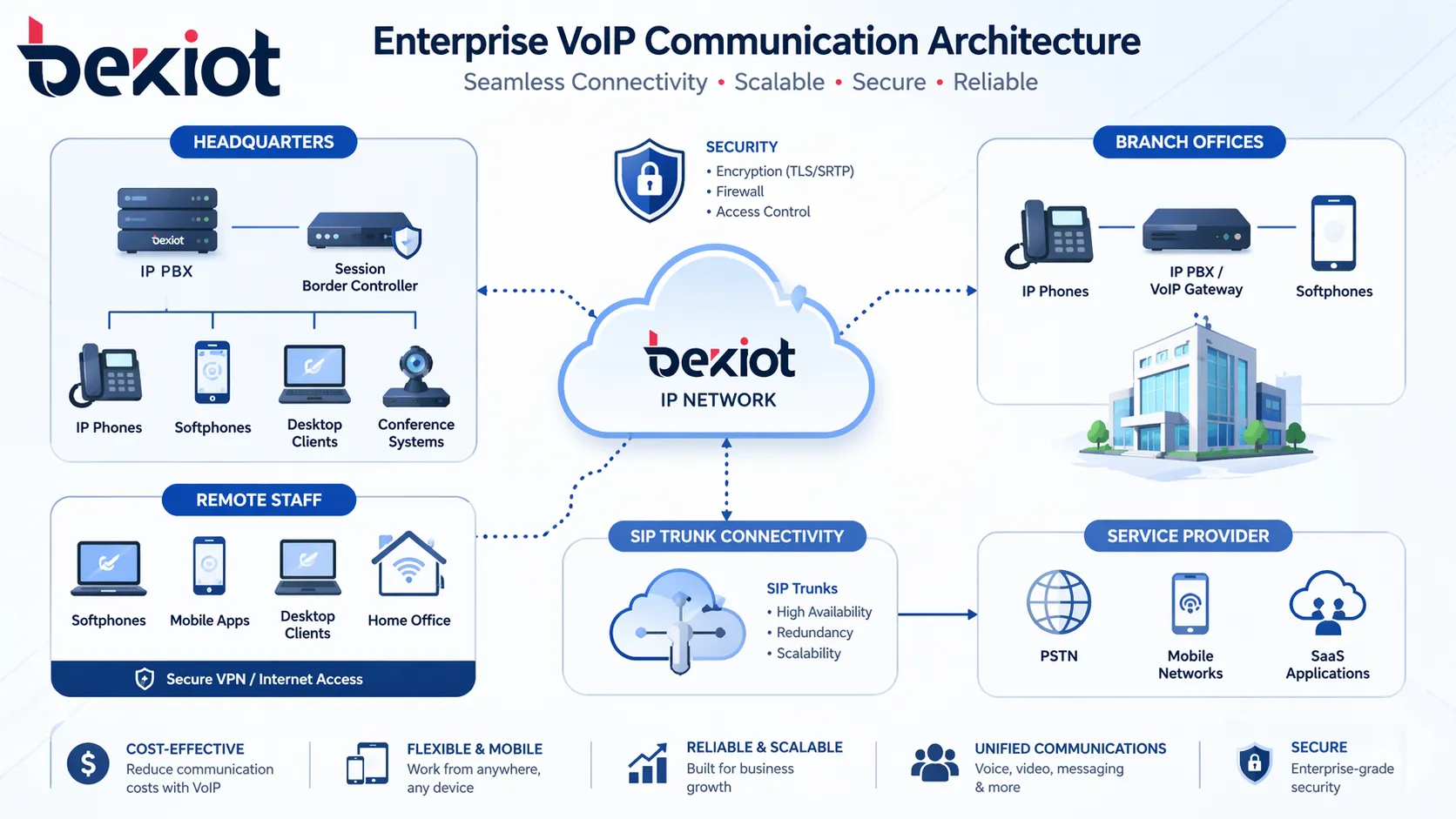
With IP PBX, headquarters, branches, and remote users can operate under one VoIP communication framework.
Core Features Companies Usually Need
Call control and routing
A professional IP PBX system should support the common call handling functions that businesses depend on every day. These include extension management, call transfer, call hold, call forwarding, ring groups, hunt groups, auto attendant, voicemail, conference calling, and caller routing by department or schedule.
These functions help organizations handle calls more consistently. Incoming calls can be routed to the right department, unanswered calls can move to backup users, and callers can be guided through an IVR menu instead of waiting for manual transfer.
Administration and visibility
Web-based administration is one of the reasons many companies prefer IP PBX. Administrators can create users, assign extensions, configure trunks, adjust call rules, manage permissions, check call logs, and monitor system activity from a central interface.
This is much easier than maintaining scattered legacy systems. When the business adds users, opens a branch, changes departments, or adjusts call flows, the system can usually be updated through software instead of physical rewiring.
Mobility and remote access
IP PBX systems can support multiple endpoint types under one communication identity. A user may have a SIP desk phone in the office, a softphone on a laptop, and a mobile client for remote work. Calls can be routed according to role, availability, or business rules.
This helps companies maintain professionalism even when employees are not in the office. Customers can still call the business number, and the PBX can route the call to the right person or team.
Integration with wider communication systems
In more advanced projects, an IP PBX may connect with paging systems, SIP intercoms, video calling, call recording, dispatch platforms, CRM software, alarm notification, or access control. This allows voice communication to support real business workflows instead of remaining a standalone phone service.
A warehouse may need paging and internal extensions. A campus may need intercom and emergency notification. A service team may need call queues and recording. An industrial site may need SIP phones, gateways, intercom points, and dispatch positions. IP PBX gives these projects a more flexible foundation.
Function
What It Does
Business Value
Extension Management
Creates and manages user extensions across departments and locations
Simplifies internal communication and user organization
Auto Attendant / IVR
Guides callers through menu options and routes them automatically
Improves caller experience and reduces manual transfer work
Call Forwarding and Transfer
Sends calls to other users, devices, groups, or departments
Reduces missed calls and improves response speed
Voicemail and Recording
Stores missed messages or call records for later review
Supports follow-up, service quality, training, and compliance needs
Remote Extensions
Connects off-site users to the business phone system
Supports remote work, branch offices, and mobile teams
SIP Trunk Connectivity
Links the PBX to external VoIP service providers
Improves scalability and may reduce calling infrastructure cost
Why Companies Move from Traditional PBX to IP PBX
Easier growth
Traditional PBX systems can become difficult to scale when a company adds more users, more branches, or more services. Expansion may require dedicated hardware modules, cabling changes, or vendor-specific configuration.
IP PBX systems are usually more adaptable because they are based on network architecture. New users, SIP phones, soft clients, branches, and remote extensions can often be added with less disruption. This makes IP PBX a better fit for organizations that expect growth or operational change.
Lower operating pressure
VoIP-based communication can reduce dependence on traditional line services and simplify inter-office calling. SIP trunks can also provide a more flexible way to manage external calling capacity compared with many older line-based models.
The operational benefit is just as important. Moves, adds, and changes are usually easier to handle. IT teams can adjust call flows, create extensions, manage users, and update routing rules from a central platform instead of relying on frequent physical changes.
Better fit for distributed work
Modern companies may have employees across several locations. Some work from home, some travel, and some operate in field environments. A traditional PBX was not designed for this level of mobility.
IP PBX supports distributed communication more naturally. Users can remain connected to the business system through softphones, SIP devices, VPN access, mobile clients, or branch connectivity. This helps the company keep one communication identity even when the workforce is not located in one office.
Businesses often switch to IP PBX not only to modernize telephony, but to gain a system that is easier to scale, easier to manage, and better suited to multi-site and remote work.
Common Business Use Cases
Office communication and branch networking
The most common use case is still office communication. Companies use IP PBX systems to connect employees, reception desks, departments, management teams, branch offices, and remote users under one extension plan.
This creates a more professional calling structure. Sales teams, support teams, front desks, supervisors, and administrative users can handle calls through shared rules instead of relying on disconnected phones or personal numbers.
Customer service and sales operations
Customer-facing teams often need call queues, ring groups, auto attendants, call transfer, voicemail, recording, and reporting. An IP PBX can help organize these workflows and improve the way callers reach the right department.
For sales and service teams, call handling affects customer experience directly. A well-configured IP PBX can reduce missed calls, improve response speed, and support more consistent service quality.
Operational sites that need more than desk calling
Not every communication point is an office desk. Warehouses, factories, schools, hotels, hospitals, campuses, and large commercial sites may need paging, intercom, emergency calling, public announcements, and mobile communication.
In these environments, an IP PBX can act as the backbone for multiple voice applications. It can connect office extensions with operational endpoints, helping staff move from normal business communication to site response more efficiently.
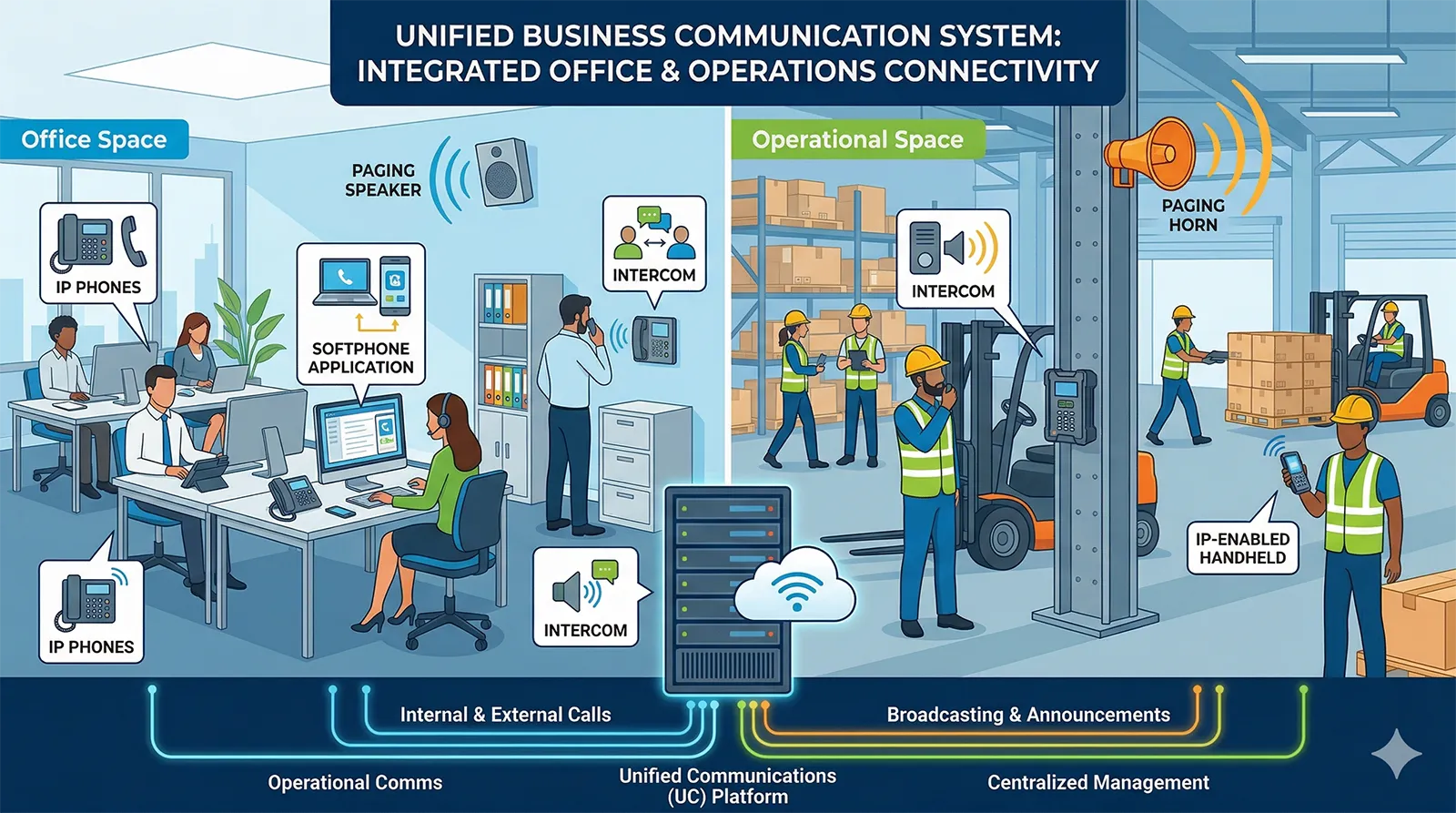
In many business environments, IP PBX supports not only office telephony, but also paging, intercom, and site-wide communication workflows.
How to Choose the Right IP PBX System
Start with real communication needs
The right system depends on how the organization communicates. A small office may focus on basic calling, voicemail, IVR, and SIP trunk access. A multi-site company may need centralized administration, branch connectivity, remote extensions, and unified numbering. A more specialized site may also require paging, intercom, gateways, or call recording.
It is better to plan beyond the current number of users. Consider future extension growth, branch expansion, remote work, expected call volume, external line capacity, and possible integration needs.
Review interoperability and endpoint support
A strong IP PBX should support standard SIP endpoints and work well with the devices the business plans to use. These may include SIP desk phones, softphones, mobile clients, conference phones, analog gateways, SIP trunks, paging devices, intercom terminals, or video phones.
Interoperability becomes more important when the PBX must connect to broader communication systems. A closed or limited platform may work for simple calling, but it can restrict future expansion.
Check security and reliability
Because IP PBX runs on the network, security planning is essential. Businesses should consider account policies, SIP access control, firewall rules, remote extension security, encryption options, user permissions, and management access.
Reliability should also be reviewed. For important sites, network quality, QoS, PoE, backup power, redundant links, and failover planning can make a major difference in voice performance and business continuity.
Think about long-term value
The best IP PBX is not always the system with the longest feature list. It is the system that fits current workflows and can grow with the business. Ease of administration, stable operation, SIP compatibility, expansion capacity, and integration options should all be part of the decision.
Practical Selection Checklist
Selection Area
Questions to Ask
User Scale
How many extensions are needed now, and how many may be needed in the next few years?
Deployment Model
Does the business need on-premises, hosted, hybrid, or multi-site deployment?
External Calling
Will the system use SIP trunks, analog gateways, PSTN lines, or a mixed approach?
Remote Access
Do employees need softphones, mobile clients, VPN access, or remote SIP phones?
Business Features
Are IVR, call queues, ring groups, voicemail, recording, conferencing, or reporting required?
Integration
Will the PBX connect with paging, intercom, CRM, help desk, access control, or alarm systems?
Security
How will the system protect accounts, remote access, SIP trunks, and administration interfaces?
Talk to Becke Telcom About Your IP PBX Project
Becke Telcom supports IP PBX and VoIP communication solution planning for businesses, campuses, industrial sites, commercial buildings, public service environments, and multi-site organizations. The solution can cover SIP phones, IP PBX platforms, SIP trunks, VoIP gateways, paging systems, intercom terminals, emergency phones, and dispatch-related communication tools.
For organizations planning a PBX upgrade or a new VoIP deployment, Becke Telcom can help evaluate extension planning, endpoint types, SIP trunk requirements, remote-user access, analog gateway needs, and integration with paging or intercom systems.
The goal is to build a communication platform that is practical for daily use, manageable for administrators, and flexible enough to support future business growth.
Conclusion
An IP PBX system gives businesses a practical way to modernize voice communication and build a more flexible VoIP environment. It supports internal calling, external calling, remote users, SIP trunks, branch offices, call routing, voicemail, conferencing, and centralized management in one platform.
Compared with traditional PBX infrastructure, IP PBX is usually easier to expand and better suited to modern business needs. It can also become the foundation for broader communication applications such as paging, intercom, recording, and site-wide voice workflows.
For companies replacing legacy PBX systems or planning a future-ready communication platform, IP PBX remains one of the most effective options for scalable business VoIP.
FAQ
What is the difference between an IP PBX and a traditional PBX?
A traditional PBX mainly relies on legacy telephone lines and circuit-based switching. An IP PBX uses IP networks to manage voice traffic, which makes it more flexible for SIP trunking, remote access, multi-site deployment, and integration with modern communication applications.
Is an IP PBX the same as VoIP?
No. VoIP refers to transmitting voice over IP networks. An IP PBX is the business phone system that manages VoIP communication, including extensions, call routing, transfers, voicemail, policies, and external connectivity.
Can an IP PBX support remote and hybrid employees?
Yes. An IP PBX can support remote extensions, softphones, mobile clients, branch users, and secure network access, allowing employees to stay connected to the same business communication system from different locations.
Is IP PBX only suitable for large enterprises?
No. Small and medium-sized businesses also use IP PBX for professional call handling, scalability, cost efficiency, and easier administration. The right system depends on communication needs rather than company size alone.
What should businesses check before choosing an IP PBX system?
Businesses should review user scale, deployment model, SIP compatibility, trunk requirements, endpoint types, remote access, security, administration tools, and integration needs such as paging, intercom, CRM, or call recording.
Can an IP PBX work with paging and intercom systems?
Yes. Many IP PBX systems can connect with SIP paging devices, IP speakers, intercom terminals, emergency phones, VoIP gateways, and dispatch platforms, making them useful for both office and operational communication.