VoIP System Guide: How IP-Based Voice Communication Works for Modern Businesses
A practical guide to VoIP systems, explaining how IP-based voice communication works, what components are required, why SIP matters, and how businesses choose a scalable VoIP platform.
Becke Telcom
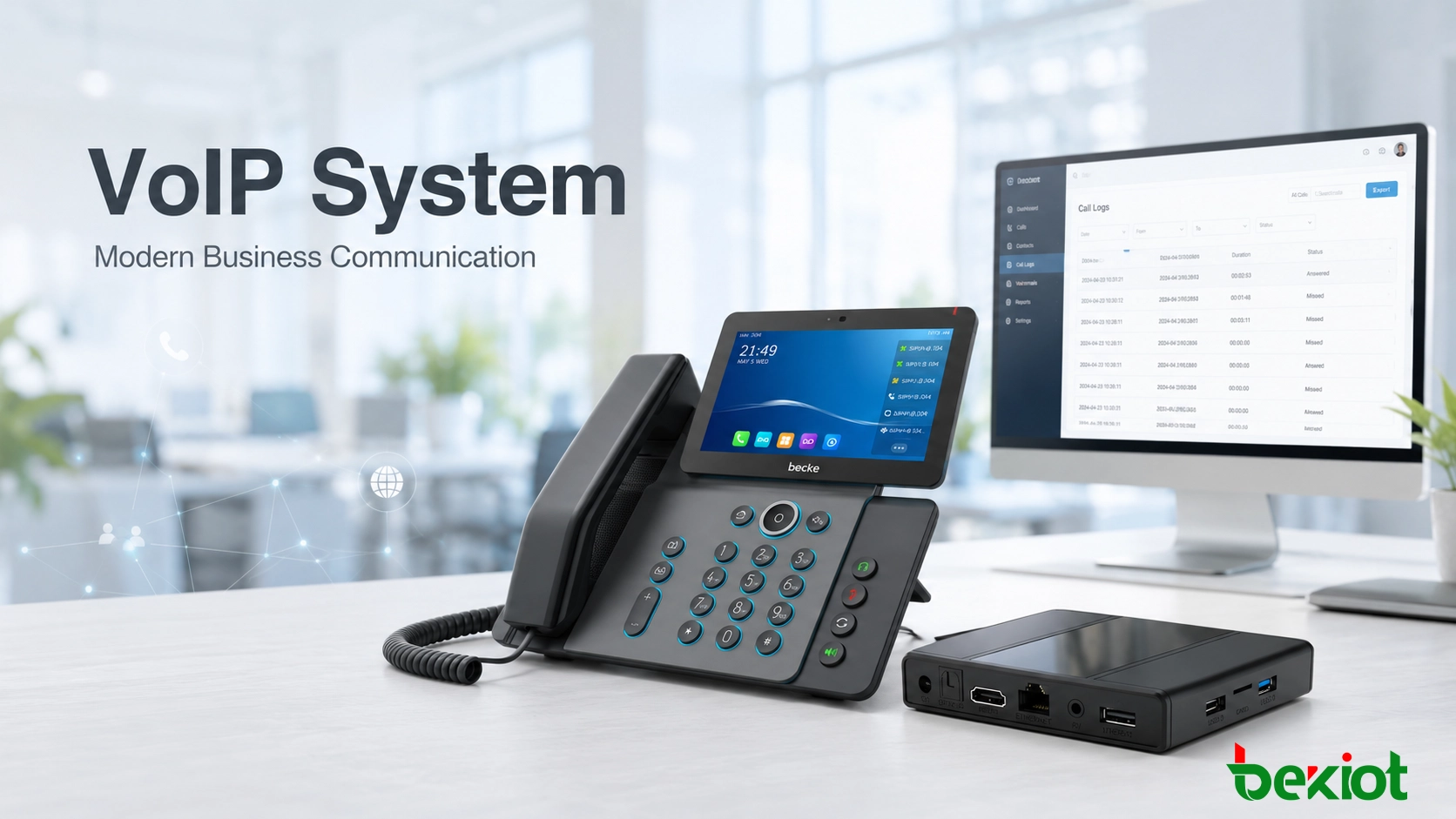
Voice communication is no longer limited to fixed phone lines or office desk phones. A modern VoIP system allows businesses to make and receive calls through IP networks while supporting IP desk phones, softphones, mobile extensions, conferencing, call routing, SIP trunks, gateways, and integration with other communication tools.
This change matters because business communication now happens across headquarters, branch offices, warehouses, campuses, control rooms, service sites, and remote work locations. A VoIP system gives organizations a more flexible way to connect users, manage calls, and expand communication services without being locked into the limits of legacy telephony.
For many companies, VoIP is not only a cheaper way to make calls. It is a network-based communication layer that can support daily collaboration, customer service, remote work, multi-site operation, and future integration with paging, intercom, video, dispatch, or business software.
A VoIP system is not just a replacement for old phone lines. It is a communication framework that connects people, devices, and workflows through an IP network.
What Is a VoIP System?
VoIP stands for Voice over Internet Protocol. A VoIP system converts voice into digital data packets and transmits those packets over an IP network instead of using the circuit-switched telephone infrastructure used by traditional phone systems.
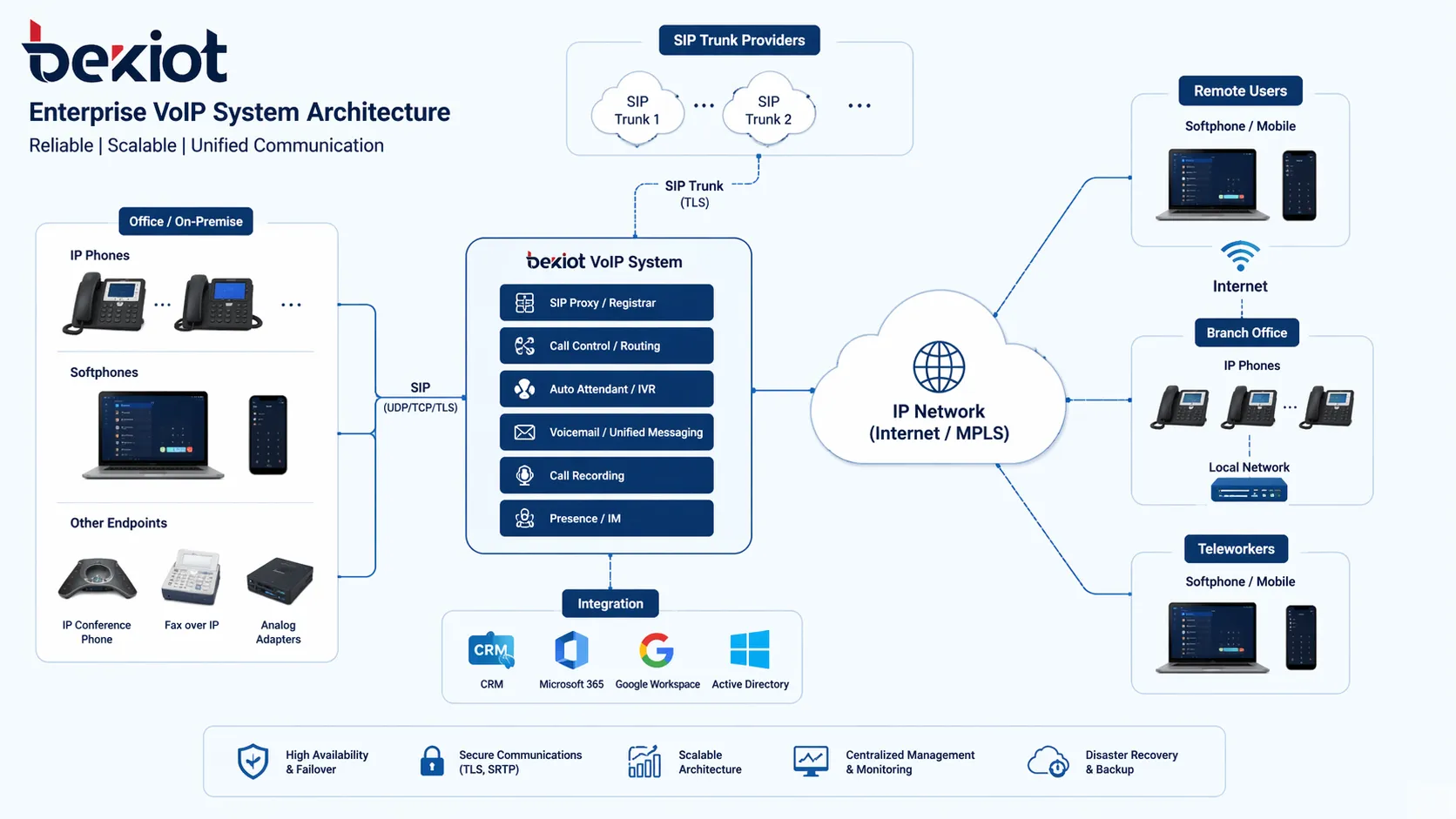
In a simple office, a VoIP system may include only a few IP phones, a SIP service, and an internet connection. In a larger deployment, it may include an IP PBX, SIP trunks, softphones, mobile apps, voicemail, recording, conferencing, gateways, paging devices, intercom terminals, and centralized management software.
The main value is flexibility. Once voice becomes IP data, it can be routed, managed, recorded, secured, and integrated with other systems more easily than in a traditional line-based telephone environment.
A VoIP system connects endpoints, call control platforms, SIP trunks, and remote users through an IP-based communication architecture.
How Does a VoIP System Work?
Voice capture and digital conversion
When a user speaks into an IP phone, headset, video phone, or softphone, the device captures the sound and converts it into digital audio. Audio codecs compress the voice stream so it can travel efficiently across the network while preserving clear speech quality.
Codec choice can affect bandwidth usage, call clarity, and compatibility. In business environments with many simultaneous calls, this becomes part of the overall system design rather than a minor technical detail.
Signaling and call setup
Before two users can talk, the system needs to register endpoints and set up the call session. In most business VoIP deployments, this is handled by SIP, or Session Initiation Protocol.
SIP manages registration, call setup, ringing, answering, transfer behavior, and session termination. Because SIP is widely supported, it helps IP phones, IP PBX platforms, SIP trunks, gateways, and third-party systems work together more easily.
Packet transmission across the network
After the call is established, the voice stream is divided into packets and sent across the IP network. These packets may travel through a local office LAN, a private WAN, a VPN, the public internet, or a hybrid network depending on the deployment.
Unlike traditional telephony, VoIP does not require one dedicated physical phone line for each call. It uses available network resources dynamically, which makes scaling and multi-site communication easier.
Audio reconstruction at the receiving end
The receiving device collects the packets, arranges them in the correct order, decodes the audio, and plays the voice back to the listener. To keep the conversation natural, the system must manage jitter, delay, packet loss, echo, and background noise.
This is why network quality still matters. A VoIP system can be flexible and software-driven, but call performance depends heavily on stable network design, suitable endpoints, and proper QoS planning.
Call control and business features
Behind the call, a VoIP server or IP PBX controls the communication logic. It decides which extension should ring, applies call routing rules, handles voicemail, supports forwarding, manages conference calls, and controls features such as queues, ring groups, recording, paging, or intercom integration.
VoIP works because voice becomes data. Once voice becomes data, businesses can route it, manage it, secure it, and connect it with other digital systems.
Main Components of a VoIP System
IP phones and softphones
IP desk phones are still common in offices, reception areas, customer service teams, meeting rooms, and control rooms. They provide a familiar handset experience while connecting directly to the IP network.
Softphones extend business calling to laptops, tablets, and smartphones. This allows remote users, mobile staff, and hybrid workers to stay connected under the same business communication system.
VoIP server or IP PBX
The VoIP server or IP PBX is the control core of the system. It manages extensions, call routing, user registration, voicemail, permissions, trunks, and service features.
Depending on the project, the platform may be deployed on-premises, in a private cloud, through a hosted service, or as part of a hybrid architecture. The right model depends on business size, control requirements, security needs, and long-term expansion plans.
SIP trunks
SIP trunking connects the VoIP system to external calling networks. Instead of relying only on traditional phone lines, businesses can use SIP trunks for inbound and outbound calls, number management, and scalable calling capacity.
For companies with multiple offices or high external call volume, SIP trunks can simplify the connection between the internal VoIP environment and outside telephone networks.
Gateways and integration devices
Many organizations still need to connect older systems, analog phones, PSTN lines, radio systems, paging equipment, or specialized communication devices. Gateways make this possible by translating between VoIP and other communication formats.
Gateways are especially useful during migration projects. A business can modernize its core system while still keeping selected legacy devices or infrastructure in use where it makes sense.
IP network infrastructure
The network is the foundation of every VoIP deployment. Switches, routers, firewalls, wireless coverage, bandwidth, VLAN planning, QoS, and backup power all affect voice quality and reliability.
A good VoIP system is not only about choosing the right phones or server. It also requires a network that can carry real-time voice traffic consistently.
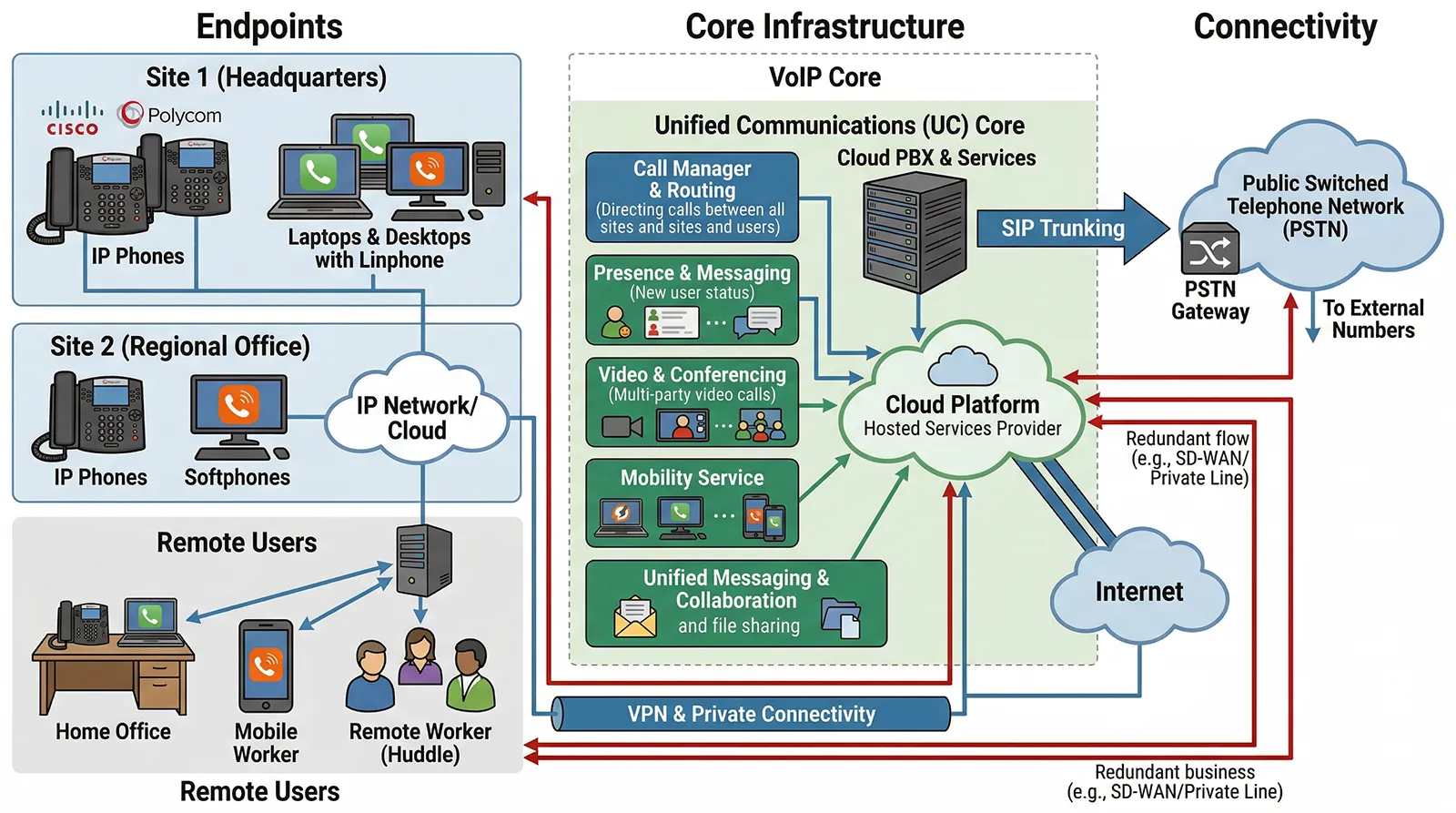
VoIP systems can support IP desk phones, softphones, video endpoints, mobile clients, and SIP-based communication devices.
Why VoIP Systems Matter for Businesses
Less dependence on legacy phone infrastructure
Traditional phone systems often depend on dedicated circuits, fixed wiring, specialized hardware, and more rigid maintenance processes. VoIP replaces much of that structure with a network-based approach that is easier to adapt when business needs change.
This gives organizations a cleaner path for upgrading old telephone systems, adding new users, and connecting multiple locations without rebuilding the entire voice infrastructure.
Better support for modern work patterns
Employees may work from headquarters, branches, warehouses, industrial sites, home offices, or mobile locations. A VoIP system allows those users to stay under one extension plan and one communication policy, even when they are not in the same building.
This helps businesses support remote work, mobile teams, and distributed operations without losing professional call handling or internal reachability.
Easier expansion
In a legacy phone system, adding users or capacity may require new lines, hardware cards, or physical wiring changes. With VoIP, businesses can usually add users, endpoints, remote extensions, or new sites more flexibly through network and software configuration.
This is valuable for growing companies, multi-site organizations, and businesses that need to adjust quickly to new teams or changing workflows.
Stronger integration possibilities
Modern communication is not only voice calling. Many businesses want phone systems to connect with CRM platforms, contact center tools, video systems, paging, SIP intercom, alarm workflows, dispatch consoles, or monitoring applications.
Because VoIP is based on IP networking and commonly uses SIP, it is better suited for these integrations than older isolated phone systems.
Centralized management
Administrators can often manage users, extensions, device settings, call policies, firmware, call logs, and permissions from a central interface. This reduces manual work and helps keep communication policies consistent across departments and locations.
VoIP vs Traditional Phone Systems
The difference between VoIP and traditional telephony is not only cost. It is also architecture. Traditional phone systems are built around dedicated voice lines and hardware switching. VoIP systems are built around IP connectivity, software control, and flexible endpoint access.
In a traditional environment, expanding capacity often means adding physical lines or dedicated equipment. In a VoIP environment, expansion is usually more network-led and software-led. This makes VoIP more suitable for businesses that need mobility, multi-site communication, remote users, centralized management, and future integration.
Comparison Point
Traditional Phone System
VoIP System
Transmission Method
Dedicated telephone lines and circuit switching
Voice packets over IP networks
Expansion
Often requires additional lines, cards, or wiring
Usually easier through network and software configuration
Remote Users
Limited or difficult to support
Supports softphones, mobile clients, and remote extensions
Integration
Usually more limited
Better suited for SIP, CRM, paging, intercom, and software platforms
Management
Often hardware-dependent
More centralized and software-based
Common Business Uses for VoIP Systems
Office communication
In offices, VoIP supports extension dialing, auto attendants, voicemail, call transfer, conference calling, call forwarding, and external business calling. This is the most familiar use case and remains one of the most important.
Multi-site organizations
Companies with branch offices, regional teams, warehouses, service centers, or satellite locations can use VoIP to bring users into one communication framework. This creates a more consistent dialing plan and makes administration easier across the business.
Remote and hybrid teams
Softphones and mobile clients allow staff to remain reachable without being tied to a desk phone. Remote users can keep their business extension and professional caller identity while working from home or on the road.
Operational and industrial environments
VoIP can also support communication beyond ordinary offices. It can work with SIP intercoms, IP paging, emergency help points, dispatch consoles, video phones, and gateway devices. This makes it relevant for campuses, hotels, hospitals, factories, transport sites, and industrial facilities.
VoIP supports business communication across offices, remote teams, branch sites, and operational environments.
What to Look for When Choosing a VoIP System
Standards-based compatibility
A SIP-based design usually provides better interoperability. Businesses should check whether the system supports standard SIP phones, SIP trunks, gateways, softphones, and third-party platforms. Open compatibility helps avoid unnecessary lock-in.
Audio quality and network reliability
Call clarity remains essential. Look for support for wideband audio, echo cancellation, jitter handling, and noise reduction where needed. At the same time, review network readiness, QoS planning, PoE capacity, backup power, and internet or WAN stability.
Flexible deployment options
Some businesses prefer an on-premises IP PBX for control and local management. Others prefer hosted or cloud VoIP. Many organizations need a hybrid deployment. A strong VoIP solution should fit the business model rather than forcing one fixed architecture.
Integration readiness
If the business expects to connect paging, intercom, video, mobile apps, gateways, alarm systems, or external software, the VoIP platform should support that direction from the beginning. Integration is often what separates a short-term phone replacement from a long-term communication platform.
Management and growth capacity
The right system should be easy to maintain today and capable of future expansion. Consider user growth, branch growth, device growth, remote access, security settings, and feature requirements before selecting a platform.
The best VoIP system is not simply the one that can make calls. It is the one that fits how the business communicates now and how it expects to communicate next.
Solution Planning with Becke Telcom
Becke Telcom supports VoIP and IP communication solution planning for offices, campuses, industrial facilities, public service sites, transport environments, hospitality buildings, healthcare facilities, and multi-site organizations.
Depending on the project, the solution can include IP PBX platforms, SIP phones, softphone access, SIP trunks, VoIP gateways, paging systems, SIP intercoms, emergency phones, dispatch consoles, and integrated communication endpoints.
The goal is to help organizations build a VoIP communication environment that is practical for daily use, stable for business operation, and flexible enough for future expansion.
Conclusion
VoIP systems matter because they turn business telephony into a flexible, network-based service. They support office calling, remote users, branch communication, softphones, SIP trunks, centralized management, and system integration in a way traditional phone systems often cannot.
For businesses evaluating communication infrastructure, understanding how VoIP works is the first step toward choosing a system that supports both current operations and future growth. Whether the requirement is simple office calling or a broader unified communication environment, VoIP has become a practical foundation for modern business communication.
FAQ
What is the difference between VoIP and a traditional phone system?
A traditional phone system uses dedicated telephone lines and circuit-switched infrastructure. A VoIP system sends voice as digital packets over an IP network, making it easier to scale, manage, and integrate with other communication tools.
Does a VoIP system require the internet?
Not always. A VoIP system requires an IP network, which can be a local business network, a private WAN, or an internet-connected environment. External calling and remote access often require internet or service-provider connectivity, while internal calls can work within a local network.
What devices can be used with a VoIP system?
Common devices include IP desk phones, video phones, softphones on computers, mobile clients, SIP endpoints, and conference phones. Some systems can also connect analog devices or older infrastructure through gateways.
Is VoIP only suitable for offices?
No. VoIP is widely used in offices, but it can also support campuses, hotels, hospitals, industrial sites, transport environments, public service areas, and other locations where network-based voice communication is needed.
Why is SIP important in VoIP?
SIP is a common signaling protocol used to register devices, establish calls, manage sessions, and connect different VoIP systems. Because it is widely adopted, SIP helps improve interoperability and system flexibility.
How should a business choose a VoIP system?
A business should review user count, call volume, network readiness, SIP compatibility, deployment model, remote access needs, security, audio quality, management tools, and future integration requirements before choosing a VoIP system.