IP-Based Video Processing for Command Centers and Field Video Integration
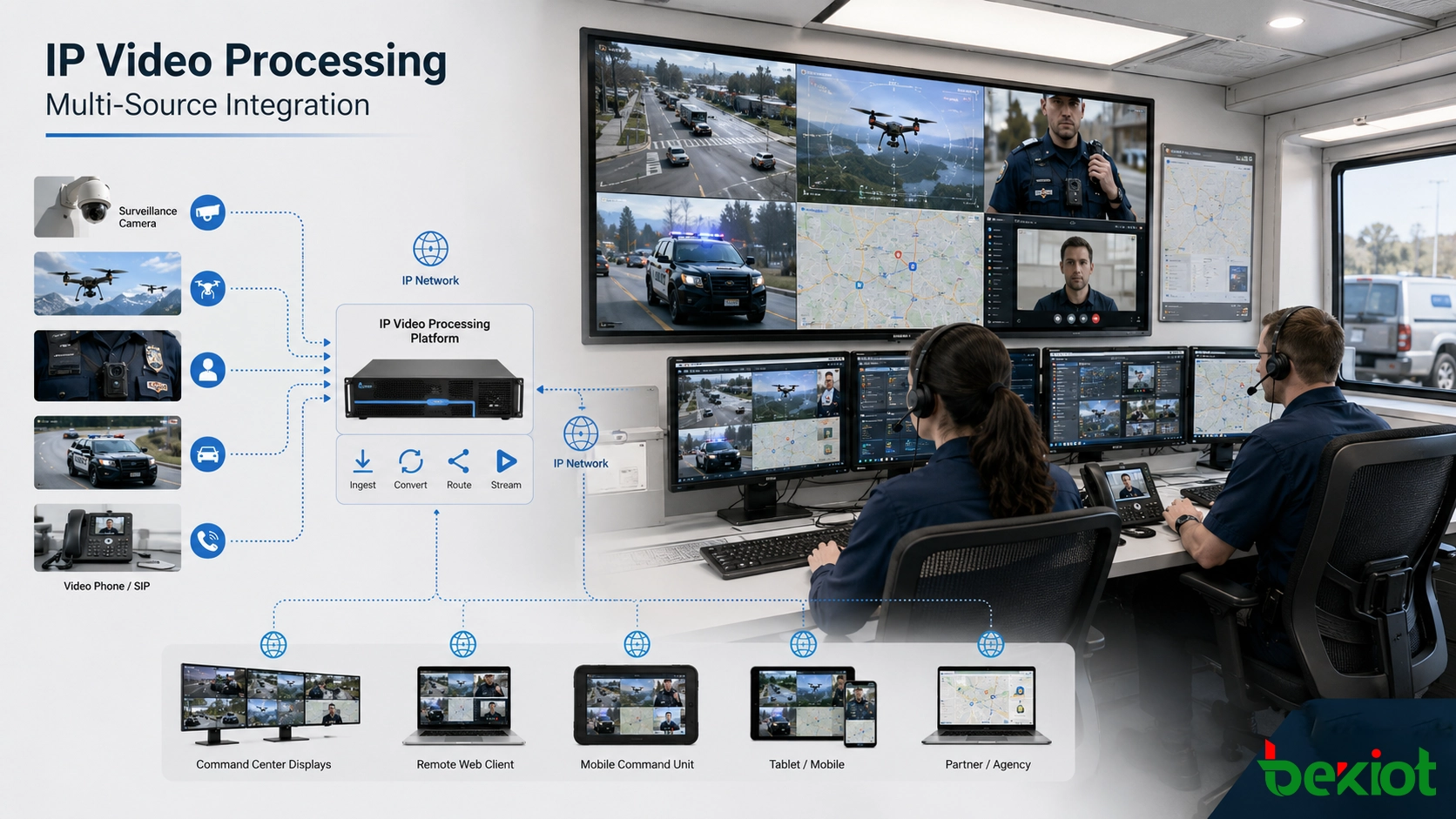
IP-based video processing helps command centers, emergency vehicles, industrial parks, and dispatch rooms replace complex HDMI routing with network-based video access, protocol conversion, software control, and flexible distribution.
Becke Telcom
Video integration used to be a hardware-heavy task. Cameras, conference systems, laptops, decoders, monitors, and video walls were often connected through HDMI cables, HDMI matrix switches, splitters, extenders, and point-to-point wiring. In a small room with a few fixed sources, this method can still work. The structure is visible, the signal path is direct, and troubleshooting is relatively easy.
The problem appears when the project becomes larger or more mobile. A command center may need to receive surveillance cameras, body-worn cameras, drones, vehicle-mounted cameras, video phones, mobile command vehicles, emergency site video, and remote platform streams at the same time. These sources may need to be sent to local screens, upper-level platforms, web browsers, mobile clients, recording servers, dispatch consoles, and remote expert systems.
In that kind of environment, a purely HDMI-based design quickly becomes difficult to manage. IP-based video processing offers a more flexible direction. Instead of routing every signal through physical HDMI cables, video can be received, converted, managed, distributed, viewed, and shared through network-based media protocols. For emergency command vehicles, industrial parks, enterprise fire stations, control rooms, and dispatch centers, this approach can reduce cabling pressure and make video part of a software-managed command workflow.
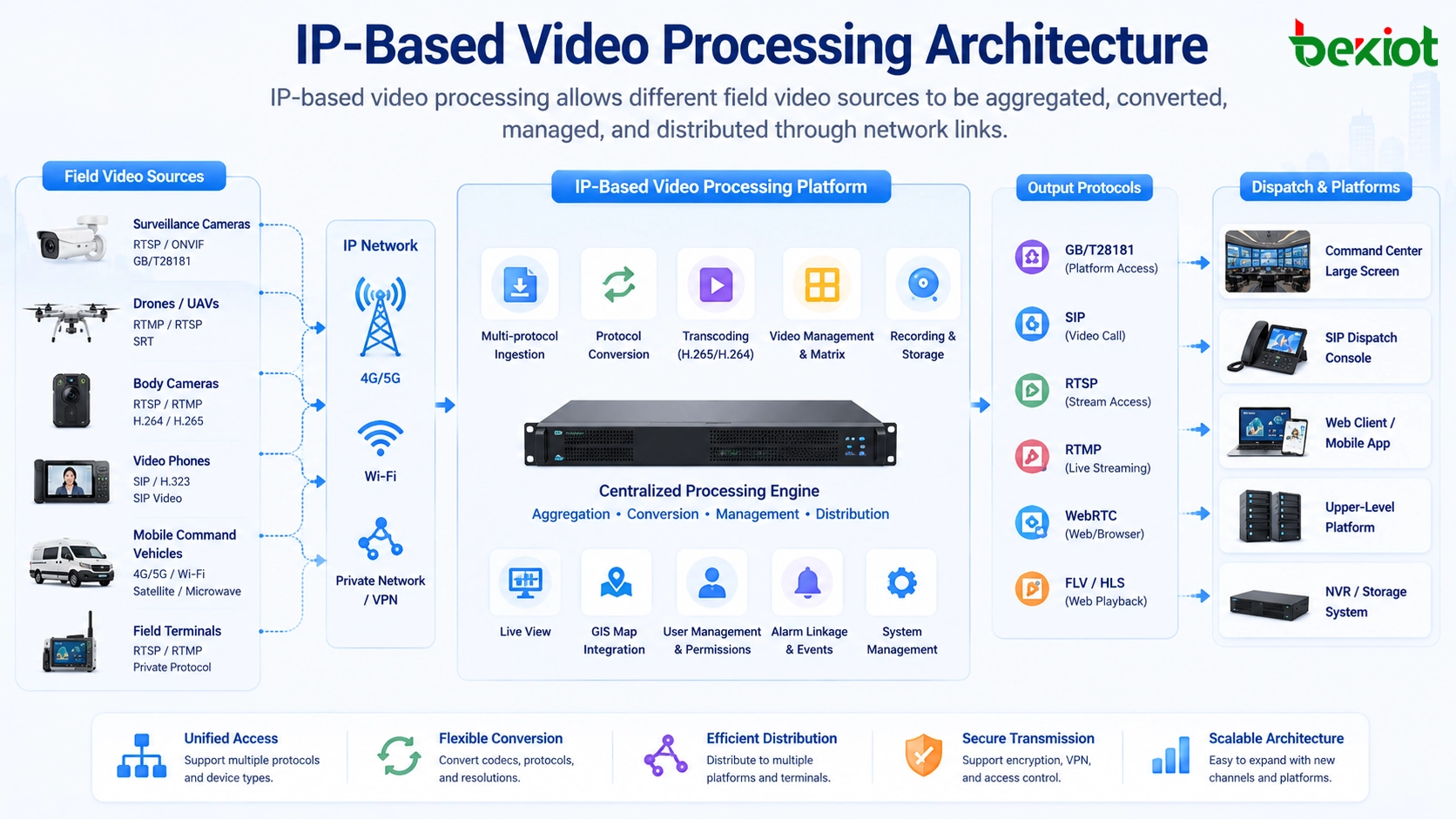
IP-based video processing allows different field video sources to be aggregated, converted, managed, and distributed through network links.
Why HDMI-based systems become harder to expand
Traditional HDMI video integration usually depends on direct cabling between source devices, matrix switches, decoders, screens, and control equipment. When the number of inputs and outputs is limited, this structure is easy to understand. But once the system needs more sources, more destinations, more control functions, or mobile deployment, the wiring structure becomes much more complicated.
This issue is especially obvious in emergency command vehicles and compact command rooms. These spaces have limited rack space, strict installation requirements, and frequent changes in operational needs. If many HDMI devices, converters, and cables are installed inside a small cabinet, later maintenance becomes inconvenient. Replacing one source or adding one output may require cable tracing, matrix reconfiguration, and physical rewiring.
HDMI is also mainly designed for local signal transmission. It is not naturally built for remote platform sharing, browser viewing, cross-network forwarding, cloud access, multi-party collaboration, or integration with dispatch software. When one video stream needs to be sent to several systems at the same time, a traditional HDMI structure often requires additional encoders, splitters, decoders, and manual signal routing.
Moving field video directly onto the network
Most modern video devices already support IP transmission in some form. Surveillance cameras, portable monitoring balls, body-worn cameras, UAV video gateways, video phones, vehicle-mounted cameras, and mobile terminals often provide standard or semi-standard network streams. Instead of converting every signal into HDMI first, an IP-based video aggregation system can receive many of these streams directly.
Common access methods include GB/T28181, RTSP, RTMP, SIP, and other media or communication protocols. These protocols allow different video devices to enter the same processing environment. After the video is received as an IP stream, the system can handle unified management, preview, protocol conversion, transcoding, recording, dispatch linkage, and multi-destination distribution.
Compared with physical video routing, this model reduces the dependence on point-to-point cabling. A network switch, gigabit interface, private network, or fiber link can carry multiple video channels at the same time. In a suitable architecture, one compact audio and video aggregation device may support a large number of video inputs while occupying much less space than a traditional matrix-based system.
The value of IP-based video processing is not only fewer cables. Its deeper value is that video becomes a manageable network resource that can be routed, converted, shared, viewed, recorded, and connected with dispatch workflows.
More flexible access for different field devices
In emergency response, industrial safety, transportation command, and mobile inspection projects, video sources are rarely limited to one device type. A dispatch platform may need fixed surveillance cameras, temporary deployment cameras, drone footage, vehicle video, body-worn camera streams, video intercom calls, and remote mobile terminals at the same time.
A network-based video processing solution can aggregate these sources through software-defined access. Different devices can use the protocol that fits their own system instead of being forced into the same HDMI format. A surveillance camera may provide RTSP. A government video platform may require GB/T28181. A SIP video phone may enter through SIP. A live streaming device may use RTMP.
This flexibility matters because field equipment often comes from different manufacturers and may use different codecs, resolutions, bitrates, frame rates, and authentication methods. A proper IP video processing layer should support multi-protocol access, stream adaptation, media conversion, and output matching. Without this layer, video integration may look simple during demonstration but become unstable in real deployment.
Output is no longer limited to local display screens
In older systems, video output usually meant sending HDMI to a monitor, large screen, or video wall. In modern command and communication projects, video output is much broader. One input stream may need to go to an upper-level platform, a local dispatch console, a browser page, a mobile client, a recording server, a remote expert system, or another emergency coordination center.
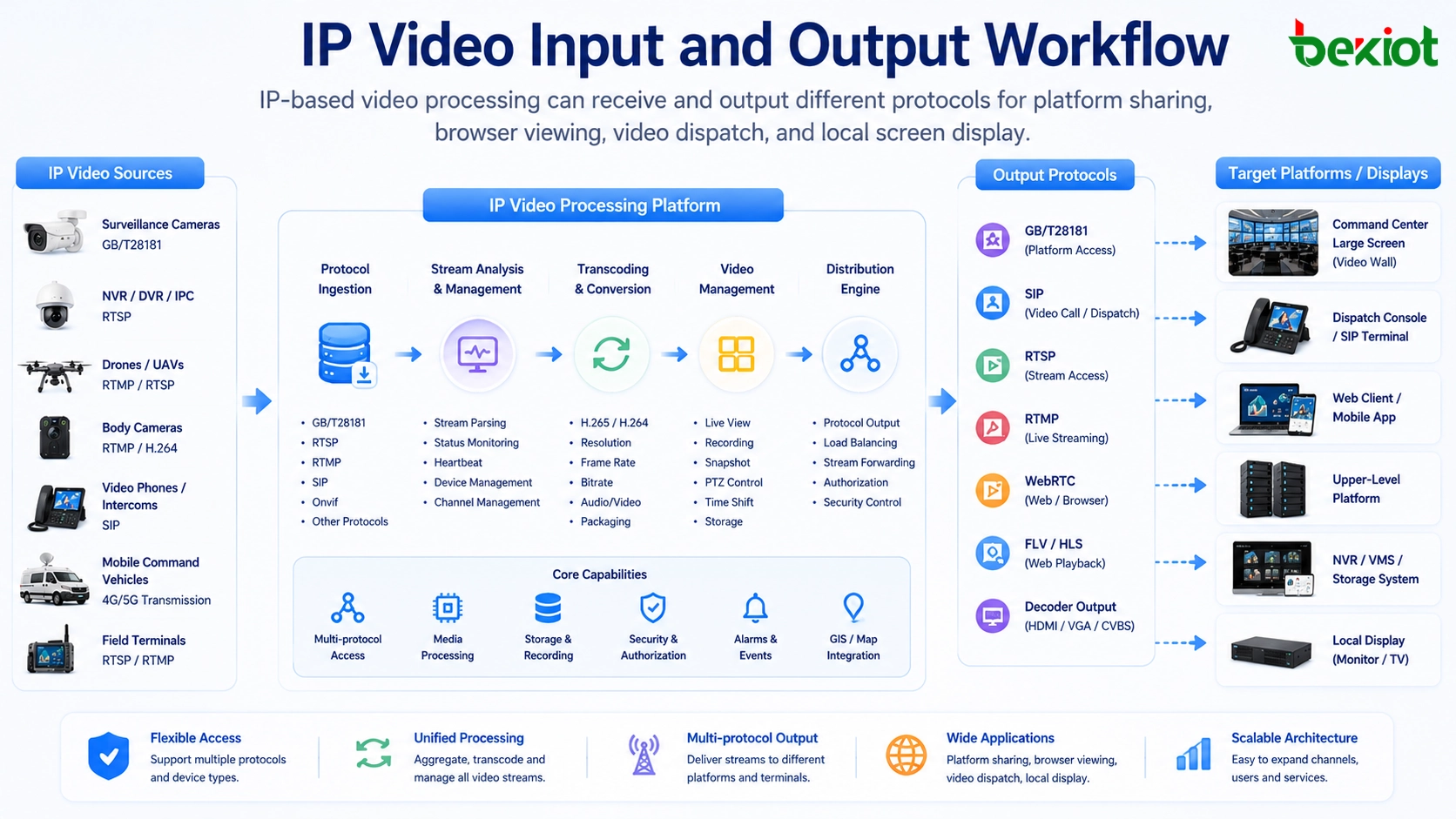
IP-based output makes this distribution more practical. The same input stream can be converted and forwarded to different destinations through different protocols. For example, a video system may output SIP video for communication terminals, GB/T28181 streams for government or public security platforms, WebRTC for low-latency browser viewing, and FLV or other formats for web-based preview.
HDMI does not disappear completely. If a local screen or video wall still requires HDMI, a decoder can be placed near the display. Long-distance transmission can remain IP-based, and HDMI only appears at the final display point. This reduces long HDMI cable runs and makes the system easier to expand across rooms, vehicles, buildings, and remote sites.
IP-based video processing can receive and output different protocols for platform sharing, browser viewing, video dispatch, and local screen display.
Software control changes the operating model
Once video signals are processed as IP streams, system management can move from physical cable switching to software-based control. Operators can view video sources, select channels, switch layouts, create split-screen views, push streams to platforms, start video sessions, and manage remote terminals from a unified interface.
This is very different from a traditional HDMI matrix. A matrix mainly switches physical signals. It usually does not provide full video communication, multi-party conferencing, protocol forwarding, remote sharing, platform registration, or dispatch workflow integration. IP-based processing allows video management to become part of the communication process rather than a separate display-only function.
For a command center, this means an operator can pull a field video source into a dispatch screen, share it with a remote expert, forward it to an upper-level platform, or combine it with voice communication. For an emergency command vehicle, it means the vehicle can receive multiple field sources and forward selected streams back to headquarters without rebuilding the physical wiring structure.
Protocol conversion is the real technical challenge
The biggest challenge in IP video transformation is not only network transmission. The real difficulty is protocol diversity. Different video devices may use different media protocols, authentication rules, codecs, resolutions, bitrates, frame rates, audio formats, and transport methods. Even when two devices both claim to support IP video, they may not be directly compatible.
A practical video aggregation and processing platform must solve several problems at the same time. It should receive different stream formats, identify media parameters, convert incompatible protocols, adapt resolution when needed, adjust bitrate for network conditions, synchronize audio and video, and output the required format to each destination system.
For example, drone video may need high compression for remote backhaul. Body-worn camera video may need stable uplink under weak network conditions. A surveillance platform may require GB/T28181 registration. A browser-based command screen may need WebRTC or another web-compatible preview format. These requirements cannot be solved by a basic HDMI matrix or a simple encoder alone.
Compact deployment with stronger integration
A major advantage of IP-based video processing is system miniaturization. In a traditional structure, different functions may require HDMI matrix equipment, encoders, decoders, audio processors, video conference terminals, stream forwarding servers, and control devices. This increases rack space, power consumption, wiring work, and maintenance difficulty.
An integrated audio and video aggregation device can combine many of these functions into one compact platform. It can receive IP video, process streams, convert protocols, support video communication, output to multiple systems, and provide unified software control.
This is valuable for small command posts, emergency command vehicles, enterprise fire stations, industrial park dispatch rooms, temporary emergency sites, and mobile operations. These scenarios need strong video capability, but they cannot accept large cabinets, heavy cable bundles, high power consumption, or complicated maintenance procedures.
Better support for command and dispatch workflows
Video integration is no longer only about seeing images. In modern command scenarios, video must work together with voice, maps, alarms, field reports, emergency contacts, and dispatch procedures. A video stream may become part of an incident record, a command decision, a remote consultation, a multi-party meeting, or cross-department coordination.
When video is IP-based, it is easier to connect it with dispatch platforms and communication systems. A field video source can be associated with a location, a vehicle, a person, an alarm event, or a response task. Operators can use video as part of the full communication chain instead of treating it as an isolated screen signal.
For example, an emergency command vehicle may receive drone footage, body camera video, vehicle camera feeds, and video calls from field staff. The dispatcher can select key sources, create a split-screen layout, open a video conference, and push important streams to the command center. This workflow is difficult to achieve with HDMI switching alone.
Becke Telcom / 贝克通信 can be lightly considered in this type of architecture through converged communication and dispatch solutions. In projects that combine SIP communication, field terminals, video access, paging, alarms, and command center coordination, an IP-based video processing layer can help the dispatch platform receive and distribute visual information more efficiently.
HDMI matrix and IP-based processing compared
Item
HDMI Matrix-Based Structure
IP-Based Video Processing Structure
Signal access
Mainly depends on physical HDMI input and output ports
Receives network streams from cameras, drones, recorders, platforms, and terminals
Transmission distance
Limited by HDMI cable length or additional extension equipment
Can use Ethernet, optical fiber, VPN, private network, or cellular backhaul
Expansion
Often requires more ports, cables, converters, and hardware changes
Can add streams through network configuration and platform capacity planning
Output method
Mainly local monitor, video wall, or display endpoint
Supports platform forwarding, web viewing, remote dispatch, decoding, and local display
Management
Focused on physical signal switching
Supports software control, split-screen display, stream routing, conferencing, and integration
Typical limitation
Wiring complexity and weak platform integration
Requires good protocol adaptation, network planning, and codec processing capability
Network planning still decides real performance
IP-based video processing reduces physical wiring complexity, but it does not mean any network can carry video smoothly. Video traffic requires careful planning, especially when many high-definition streams are transmitted at the same time. Bandwidth, latency, packet loss, jitter, switch capacity, uplink design, firewall policy, and QoS configuration can all affect the final viewing experience.
For local command rooms, gigabit or higher-speed network infrastructure is usually recommended. For mobile command vehicles, the system may combine onboard LAN, 4G/5G links, satellite links, private wireless bridges, and fiber access when available. For remote sites, the design should consider uplink bandwidth, compression strategy, reconnect behavior, local buffering, and backup paths.
When video needs to be sent to an upper-level platform, the project team should confirm the receiving protocol, codec requirement, authentication method, channel registration logic, stream naming rules, and platform concurrency. These details determine whether the video can be smoothly connected after the physical network is ready.
A successful IP video system depends on both media processing capability and network design. Protocol support alone is not enough if bandwidth, routing, security, and platform integration are not planned correctly.
Where this architecture creates the most value
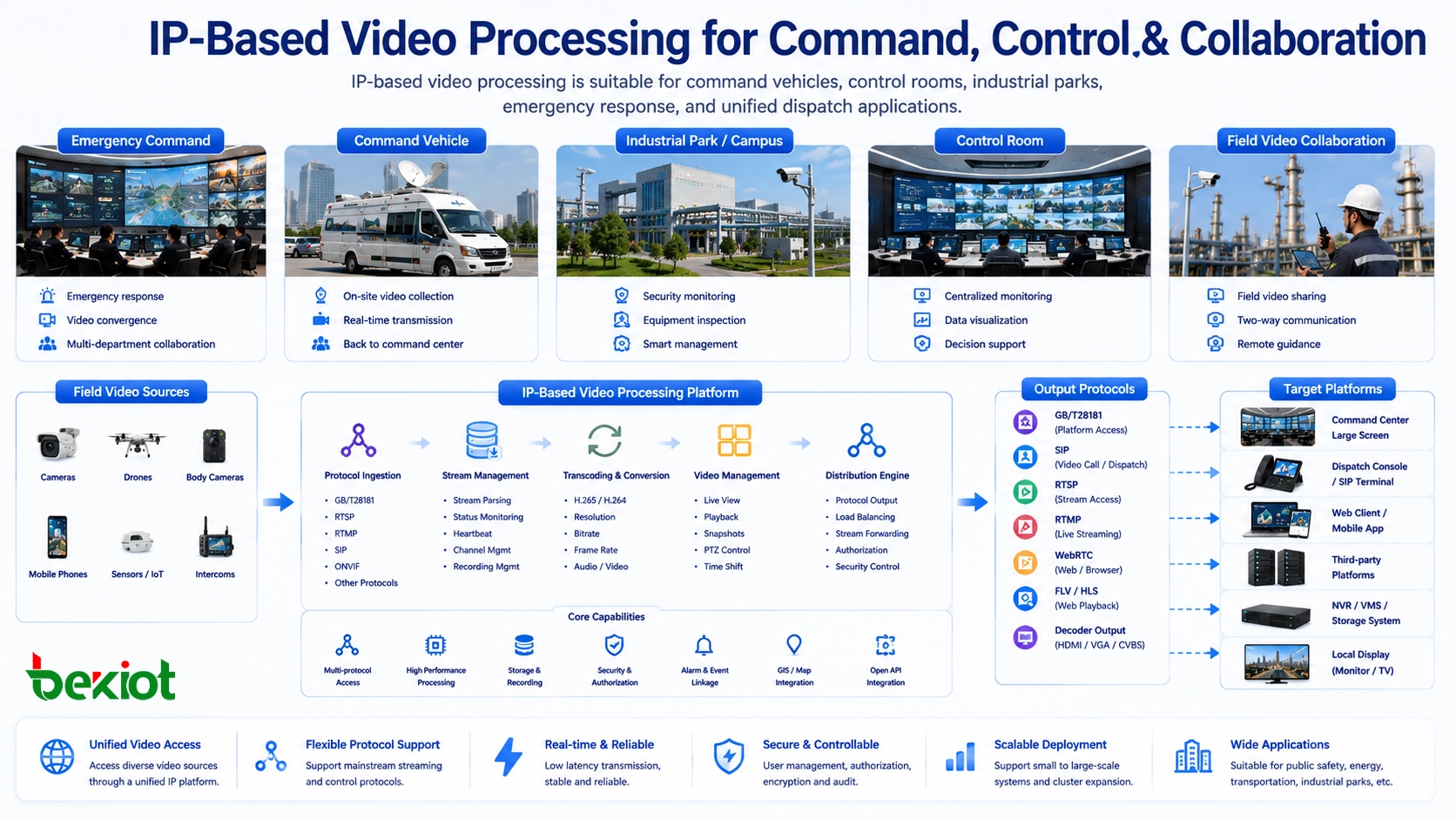
IP-based video processing is especially valuable in projects that need many video sources, flexible distribution, remote viewing, compact deployment, and integration with communication systems. Typical environments include emergency command vehicles, temporary command posts, public safety dispatch rooms, industrial park control centers, enterprise fire stations, traffic management centers, energy operation sites, and large facility security rooms.
In an emergency response project, the system can receive mobile field video and forward selected streams to the command center in real time. In an industrial park, it can aggregate fixed cameras, inspection terminals, and alarm-related video. In a transportation project, it can connect vehicle video, roadside cameras, and control room displays. In an enterprise campus, it can combine video, voice, intercom, paging, and incident response workflows.
The common requirement behind these scenarios is not just video display. The real requirement is faster decision-making, better situational awareness, simpler expansion, and more efficient coordination between field staff and the command center.
IP-based video processing is suitable for command vehicles, control rooms, industrial parks, emergency response, and unified dispatch applications.
Implementation checklist for project design
Before deploying an IP-based video processing solution, the project team should list all required video sources. This includes camera types, device brands, access protocols, resolution, bitrate, frame rate, audio requirement, control requirement, and whether two-way communication is needed.
The second step is to define output destinations. Some streams may need to go to a video wall, some to a browser interface, some to an upper-level GB/T28181 platform, some to a SIP video communication system, and some to a recording or storage server. Each destination may require different encoding and transport parameters.
The third step is network and capacity planning. The project should estimate concurrent stream quantity, total bandwidth, uplink demand, storage requirement, decoding load, CPU or hardware transcoding capacity, and failover method. If the system is used in emergency or industrial safety scenarios, redundancy and backup links should be considered from the beginning.
The final step is operation design. The system should be easy for dispatchers to use. Operators should be able to preview sources, switch layouts, push streams, start conferences, control terminals, and check system status without dealing with complex engineering parameters during an emergency.
Long-term value for system owners
For system owners, the long-term value of IP-based video processing is not only lower cabling complexity. It also improves system adaptability. When new cameras, drones, mobile devices, or platforms are added, the system can often expand through network configuration, protocol adaptation, or software upgrade instead of rebuilding the whole video wiring structure.
It also improves maintainability. Engineers can monitor stream status, check device online state, diagnose protocol problems, and adjust video parameters from the platform side. This is more efficient than tracing large numbers of HDMI cables, converters, splitters, and matrix ports in a crowded rack or vehicle cabinet.
For command applications, it improves collaboration. Video can be shared across departments, sent to remote experts, combined with voice meetings, linked with dispatch events, and displayed on different terminals according to the workflow. This makes video a practical part of the command system rather than a separate visual island.
Summary
Traditional HDMI matrix-based video integration can still work in small and fixed environments, but it becomes difficult to expand when projects involve many sources, remote destinations, mobile deployment, platform sharing, and command dispatch workflows.
IP-based video processing moves video into a network-managed architecture. It can receive streams from cameras, drones, body cameras, video phones, vehicles, and remote platforms, then convert, distribute, record, preview, and share them through software control. For command centers, emergency vehicles, industrial parks, enterprise fire stations, and dispatch rooms, this provides a more compact and scalable way to build modern video communication systems.
FAQ
Does IP-based video processing completely replace HDMI?
Not always. HDMI is still useful for final display output, local screens, and some dedicated equipment. In many projects, the better approach is to use IP for long-distance transmission, stream management, protocol conversion, and platform sharing, while using HDMI decoders only near the final display device.
Why are GB/T28181, RTSP, RTMP, SIP, WebRTC, and FLV important?
Different devices and platforms use different media protocols. GB/T28181 is common in security and government video platforms, RTSP is widely used by IP cameras, RTMP is often used for live streaming, SIP supports video communication, WebRTC supports browser-based low-latency viewing, and FLV can be used for web preview in some systems.
Can one compact device handle many video channels?
It depends on hardware performance, network capacity, codec type, resolution, bitrate, and whether transcoding is required. A compact aggregation device can receive many IP streams in suitable designs, but actual capacity should always be calculated according to project requirements.
What is the biggest risk in IP video integration?
The biggest risk is assuming all IP video streams are automatically compatible. In reality, different codecs, resolutions, bitrates, frame rates, transport methods, and authentication rules can create integration problems. Protocol compatibility and transcoding requirements should be verified before deployment.
Which projects benefit most from this architecture?
Projects with many video sources, limited installation space, remote viewing needs, mobile deployment, upper-level platform connection, or command-and-dispatch workflows benefit the most. Examples include emergency command vehicles, enterprise fire stations, industrial park control rooms, public safety dispatch centers, and transportation command systems.