SIP-Based Paging Workflow for Intercom Alarm Linkage and Emergency Broadcast
A SIP-based paging workflow connects intercom calls, alarm inputs, CCTV, control room operation, zone paging, emergency broadcast, and event records for faster and more traceable site response.
Becke Telcom
Public address systems are no longer used only for simple one-way announcements. In many modern facilities, paging must work together with SIP intercom calls, alarm inputs, access events, CCTV systems, security desks, emergency phones, and control room response procedures. This is where a SIP-based paging workflow becomes more valuable than a basic broadcast path.
A traditional paging system usually depends on manual operation. An operator selects a zone, picks up a microphone, and makes an announcement. This model can still work for daily notices, but it is limited when communication needs to respond to door intercom calls, emergency buttons, equipment alarms, access control events, sensor signals, or security incidents.
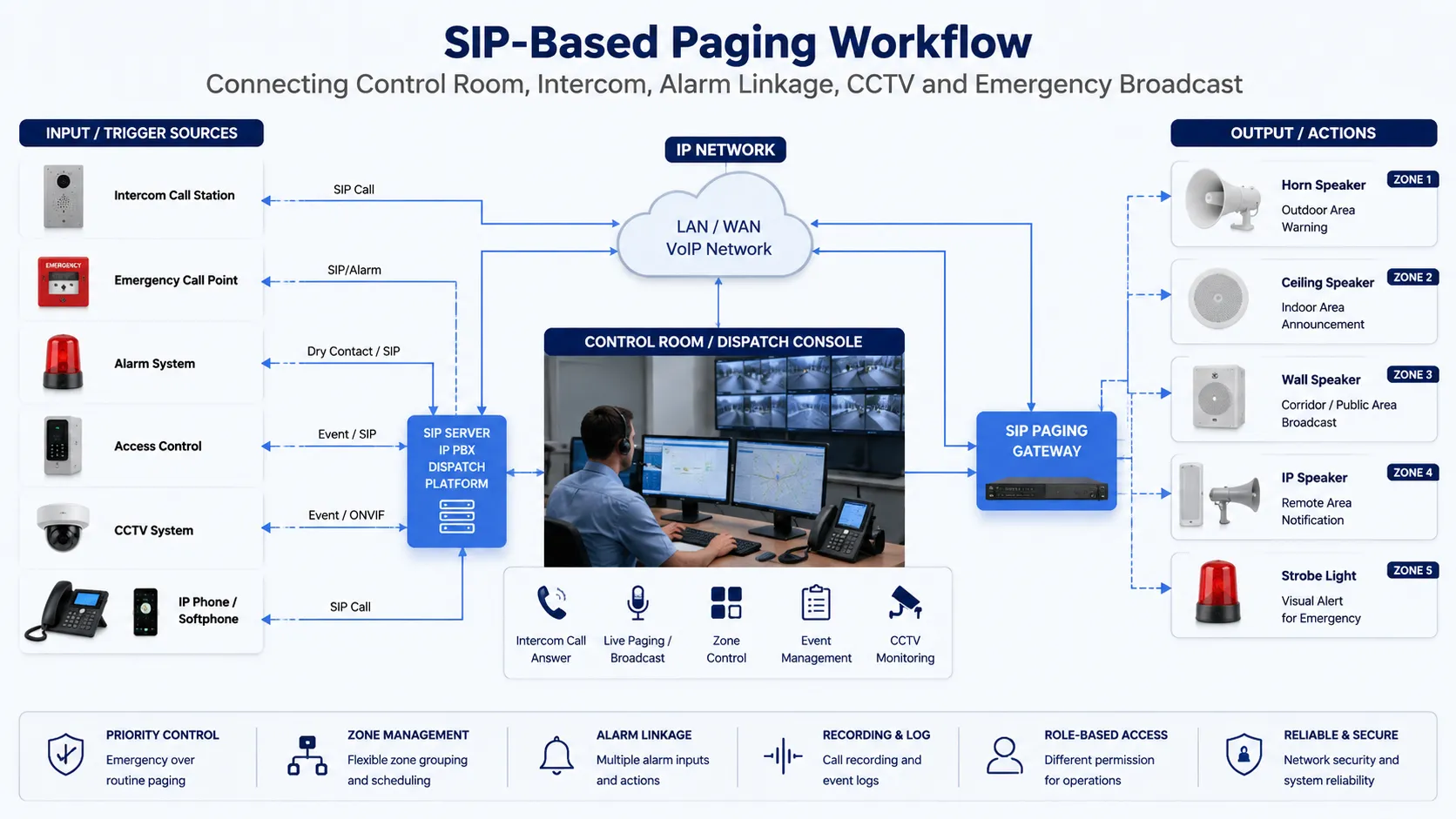
A SIP-based paging workflow changes the logic. It connects triggers, operators, devices, speaker zones, cameras, and response records into one communication process. Instead of treating paging, intercom, alarm, and video as separate systems, the workflow helps the control room decide what happened, where it happened, who should respond, and which broadcast action should follow.
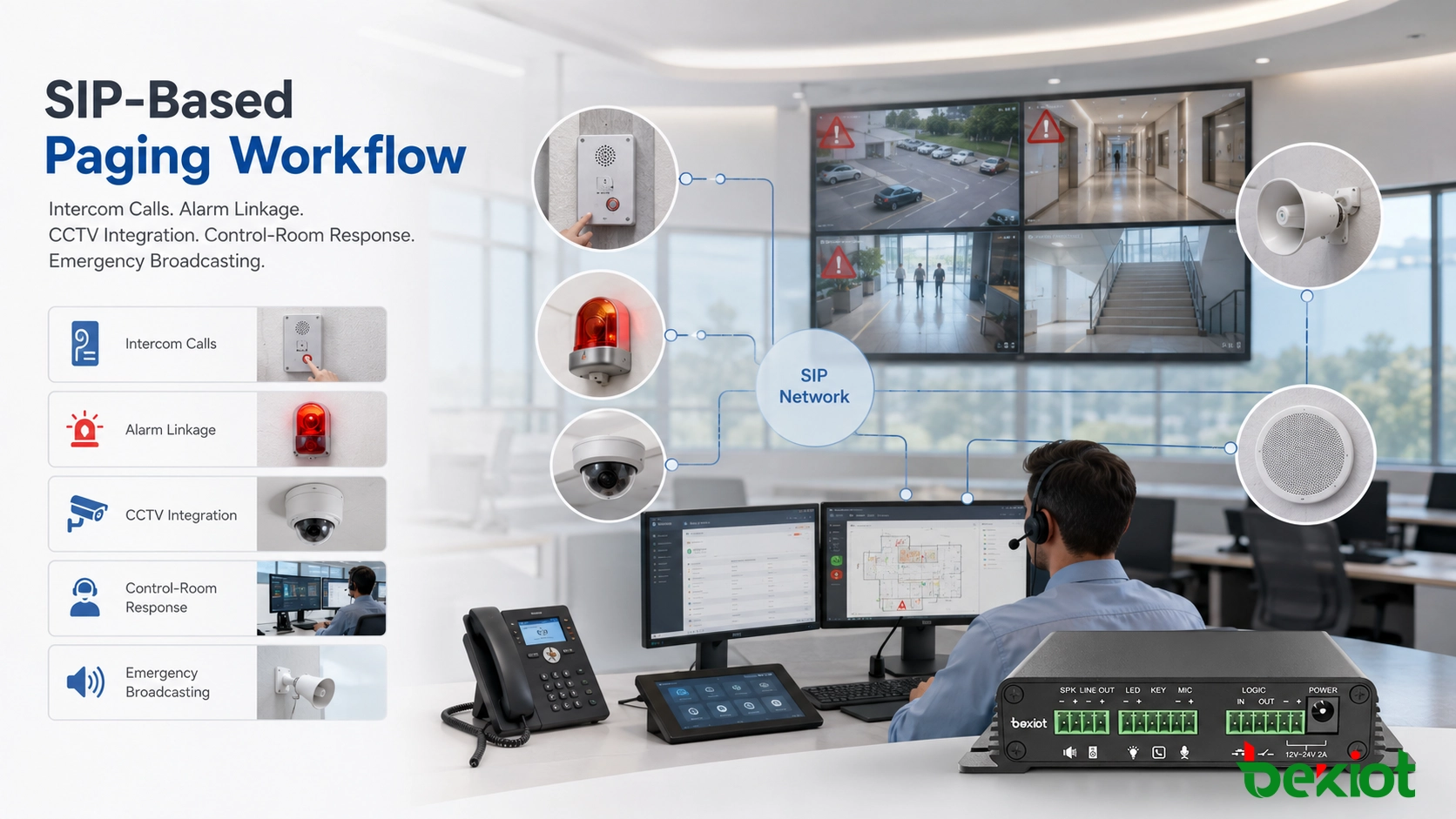
SIP-based paging workflow connects control room communication, intercom calls, alarm linkage, CCTV, and emergency broadcast actions.
The value of SIP-based paging is not only sending louder messages. It is connecting the right trigger, the right operator, the right zone, and the right response action.
From Manual Paging to Event-Driven Communication
Manual paging starts when a person notices an event and decides to make an announcement. Event-driven communication starts earlier. A call button, alarm input, access relay, door contact, sensor output, or operator action can become the first step of a defined response process.
When the workflow is designed properly, one trigger can start several linked actions. The system may notify the control room, open a voice path, activate a warning tone, call the responsible team, display a camera, play a pre-recorded message, or allow the operator to make a live announcement. This makes paging part of an operational response chain instead of a standalone audio function.
This approach is useful for offices, campuses, hospitals, factories, transportation facilities, parking areas, warehouses, industrial parks, and public service buildings. In these environments, communication is rarely limited to one microphone and one speaker line. Real response often requires two-way confirmation, zone control, alarm priority, camera verification, and traceable records.
Intercom Calls as the First Step of Response
Many communication events begin with a person requesting access, help, service, or confirmation. This may happen at a gate, entrance, loading dock, parking area, clean room door, equipment room, service window, warehouse door, or restricted zone. When the intercom call reaches the control room, the operator should not only answer the call. The system should also show where the call comes from and what actions are available.
Entrance and Service-Point Communication
In an entrance communication scenario, a visitor presses the intercom call button. The call is routed through the SIP system to the security desk or reception desk. The operator can speak with the visitor, check the related camera, unlock the door if authorized, record the call, and use a nearby speaker to give local instructions.
This type of workflow is suitable for gatehouses, parking entrances, delivery points, reception doors, warehouse docks, staff-only areas, and service windows. It improves response because the operator does not need to switch manually between separate intercom, CCTV, and paging systems.
Two-Way Confirmation Before Broadcast
Not every event should immediately become a public announcement. In some cases, the operator needs to confirm the situation before deciding whether to page a zone, unlock a door, notify maintenance, call security, or escalate the event.
Two-way intercom confirmation helps reduce false alarms and unnecessary broadcasts. It also allows the control room to collect basic information before activating a wider notification workflow. For sites with many users or sensitive areas, this step can prevent confusion and keep communication more controlled.
Alarm Linkage That Reduces Operator Delay
Alarm linkage often starts from a simple signal. It may come from an emergency button, access control relay, door contact, sensor output, fire alarm interface, equipment fault signal, or security panel. When connected through a SIP paging gateway or communication platform, this signal can trigger audio notification or operator alert actions automatically.
The response does not need to be the same for every event. A low-level maintenance signal may notify only a technical team. A restricted-area warning may play a local voice prompt. A safety alarm may trigger a warning tone, notify the control room, and prepare a live paging channel.
Dry Contact and Sensor-Triggered Actions
Dry contact inputs are commonly used because they are simple and reliable. A relay signal can tell the communication system that a door is open, a button has been pressed, a device has failed, or a sensor has detected abnormal conditions. The SIP-based workflow then decides what communication action should happen next.
For example, an emergency button in a remote area can trigger a local speaker message and alert the control room at the same time. An equipment alarm can page the maintenance team without disturbing the whole site. A door-left-open alarm can play a reminder only near the affected entrance.
Pre-Recorded Messages and Live Override
Some events are best handled by pre-recorded messages because the instruction must be clear, calm, and consistent. Examples include restricted-area warnings, evacuation guidance, door-left-open reminders, equipment-area alerts, and safety notices.
However, live paging still matters. A good workflow should allow authorized operators to override or follow the recorded message with a live announcement when the situation changes. Becke Telcom can support this type of planning by combining paging gateways, SIP speakers, industrial telephones, intercom terminals, and dispatch-side operation logic according to the project environment.
Control Room Workflow Design
A control room needs more than sound. Operators need to know where the event happened, which device was triggered, which zone is affected, whether a call is active, which camera is related, and what response options are available. When communication is designed as a workflow, audio, video, device status, and event information can support one decision process.
In a security or industrial control room, this may include an incoming SIP intercom call, an alarm pop-up, a linked camera view, a paging zone button, and a record of the operator’s action. The goal is to reduce confusion during time-sensitive events and help operators move from information to action faster.
Event Visibility for Operators
Event visibility means that the operator should not need to guess where the alarm came from or which device is calling. The platform should display the device name, zone, location, event type, call status, related camera, and available response actions where possible.
This visibility is especially important in campuses, hospitals, factories, tunnels, transportation facilities, logistics parks, and large public buildings. When many devices are deployed across different areas, clear event information helps operators respond accurately.
Role-Based Response Actions
Different users should not have the same operation permissions. A receptionist may answer visitor calls. A security operator may trigger local warnings. A maintenance dispatcher may page technical staff. An emergency supervisor may activate wider notifications or site-wide broadcast.
Role-based workflow design helps prevent accidental broadcasts and supports more controlled response. It also makes daily operation easier because each user only sees the functions that match their responsibility.
Practical Workflow Examples
Gate Intercom to Security Desk
A visitor presses the call button at an entrance station. The call reaches the security desk through the SIP system. The operator answers, checks the linked camera, gives instructions through the intercom, and uses a local speaker if people near the entrance also need to hear the message.
This workflow is suitable for gates, parking entrances, delivery points, warehouse docks, office entrances, and restricted access areas where voice confirmation and local instruction are both needed.
Emergency Button to Local Alert
A person presses an emergency button in a remote area. The signal triggers a control room alert and activates a nearby speaker with a warning tone or assistance message. The operator can then open a live voice channel, notify nearby staff, or escalate the event to a wider paging zone.
This workflow is useful for industrial sites, campuses, tunnels, parking areas, public service spaces, and outdoor areas where people may need quick assistance.
Equipment Alarm to Maintenance Paging
A fault signal from an equipment room can trigger a maintenance notification instead of a public announcement. The system may page only the technical team, call a maintenance extension, or send a localized audio reminder near the affected equipment area.
This reduces unnecessary site-wide noise while still making sure the correct team receives the message. In Becke Telcom industrial communication projects, this workflow can be integrated with industrial telephones, horn speakers, alarm inputs, paging gateways, and control room dispatch.
Recording and Traceability
For many sites, communication records are part of operation management. Intercom calls, alarm-triggered broadcasts, operator live paging, and response actions may need to be reviewed after an incident. Recording and event logs help teams understand who responded, what message was delivered, which zone was selected, and when each action happened.
Traceability is also useful for training and process improvement. If a response took too long or the wrong zone was selected, the record can help the project team improve the workflow, adjust permissions, change zone design, or redesign the announcement process.
In security, industrial, healthcare, transportation, campus, and public service environments, traceable communication helps support accountability. It also gives managers practical evidence for improving future response.
Design Points for Project Planning
Define the Event Before Choosing the Device
A reliable workflow should begin with the event, not the hardware. The project team should first define what may happen on site, who should receive the alert, which zone should hear the message, whether two-way communication is required, and whether the action needs to be recorded.
Once the workflow is clear, it becomes easier to choose the right paging gateway, speaker type, intercom terminal, relay input, control platform, and network connection method.
Separate Routine Messages from Urgent Alerts
Routine messages and urgent alerts should not follow the same priority rules. Daily announcements, visitor guidance, maintenance reminders, and background paging can use normal priority. Emergency buttons, safety warnings, and security events should have higher priority and clearer operator control.
Priority planning helps prevent important alerts from being covered by routine audio. It also helps operators understand which communication action should happen first.
Plan Zones Around People and Risk Areas
Paging zones should be designed around how people move and where risks exist. A zone may be a floor, corridor, workshop, gate, parking area, warehouse section, equipment room, outdoor yard, or tunnel section. The right zone design makes announcements more targeted and reduces unnecessary disturbance.
For projects that combine paging with intercom and alarm linkage, zone planning should also consider camera coverage, operator visibility, door locations, emergency call points, staff response routes, and background noise.
Building a More Responsive Communication Workflow
A SIP-based paging system becomes more powerful when it is connected with intercom calls, alarm signals, control room operation, CCTV linkage, and event records. This approach helps facilities move from manual paging to coordinated response, where each trigger can lead to a clear communication action.
For offices, campuses, hospitals, factories, transportation sites, public facilities, parking areas, and industrial projects, workflow-based design can improve both daily management and emergency response. With proper planning and Becke Telcom communication products, organizations can build a paging and intercom system that is easier to operate, easier to trace, and more suitable for real site conditions.
Conclusion
SIP-based paging workflow is not only about sending announcements through speakers. It is about connecting intercom calls, alarm inputs, CCTV, control room decisions, paging zones, and response records into one practical communication process.
When designed correctly, this workflow helps operators confirm events, choose the right response action, notify the correct zone, reduce unnecessary broadcasts, and keep a traceable record of what happened. For modern facilities that need both daily communication and emergency readiness, SIP-based paging is a stronger and more flexible approach than isolated manual broadcasting.
FAQ
How is an event-driven paging workflow different from normal paging?
Normal paging usually depends on a user making a manual announcement. An event-driven workflow can start from an intercom call, emergency button, alarm input, access signal, sensor event, or operator action, then route the response to the correct speaker zone or control room user.
Does every alarm need to trigger a public announcement?
No. Some alarms should notify only operators or maintenance teams, while others may need local or site-wide broadcast. The workflow should define different response rules according to event type, risk level, affected zone, and operator permission.
Why is two-way intercom useful before paging?
Two-way intercom allows the operator to confirm the situation before sending a wider announcement. This can reduce false alarms, improve response accuracy, and help the operator decide whether to use local paging, team notification, or emergency escalation.
Can CCTV be connected with paging and intercom workflows?
Yes. In many control room designs, an intercom call or alarm event can be associated with a camera view, helping the operator understand the site condition before giving instructions or activating a paging zone.
What should be planned first in this type of project?
The first step is to define the response workflow: what event may occur, who should receive it, which zone should hear the message, whether live talkback is needed, and whether the action should be recorded. Device selection should follow the workflow design.