Computer-Aided Dispatch System for Faster Emergency Response and Control Room Coordination
Computer-aided dispatch systems help control rooms manage emergency calls, incidents, responders, alarms, CCTV, paging, and communication workflows with faster response, clearer records, and better coordination.
Becke Telcom
Emergency response depends on clear information, fast decisions, and coordinated action. When a call reaches a control room, the dispatcher must quickly understand what happened, where it happened, who should respond, and how the incident should be followed up. If this work relies only on phone calls, paper notes, separate radio channels, and manual records, important details can easily be delayed, repeated, or missed.
A computer-aided dispatch system, often called a CAD system, helps solve this problem by giving dispatchers a structured digital platform for receiving incidents, creating response records, assigning resources, tracking field teams, and coordinating communication across departments. It is widely used in public safety agencies, transportation control rooms, campuses, industrial facilities, emergency communication centers, and large security operations.
The value of CAD is not only speed. More importantly, it helps different people work from the same information at the same time. Dispatchers, supervisors, field responders, security teams, and support departments can follow one incident record, one response timeline, and one operational picture. This makes emergency response easier to manage, easier to review, and more consistent during both daily incidents and major emergencies.
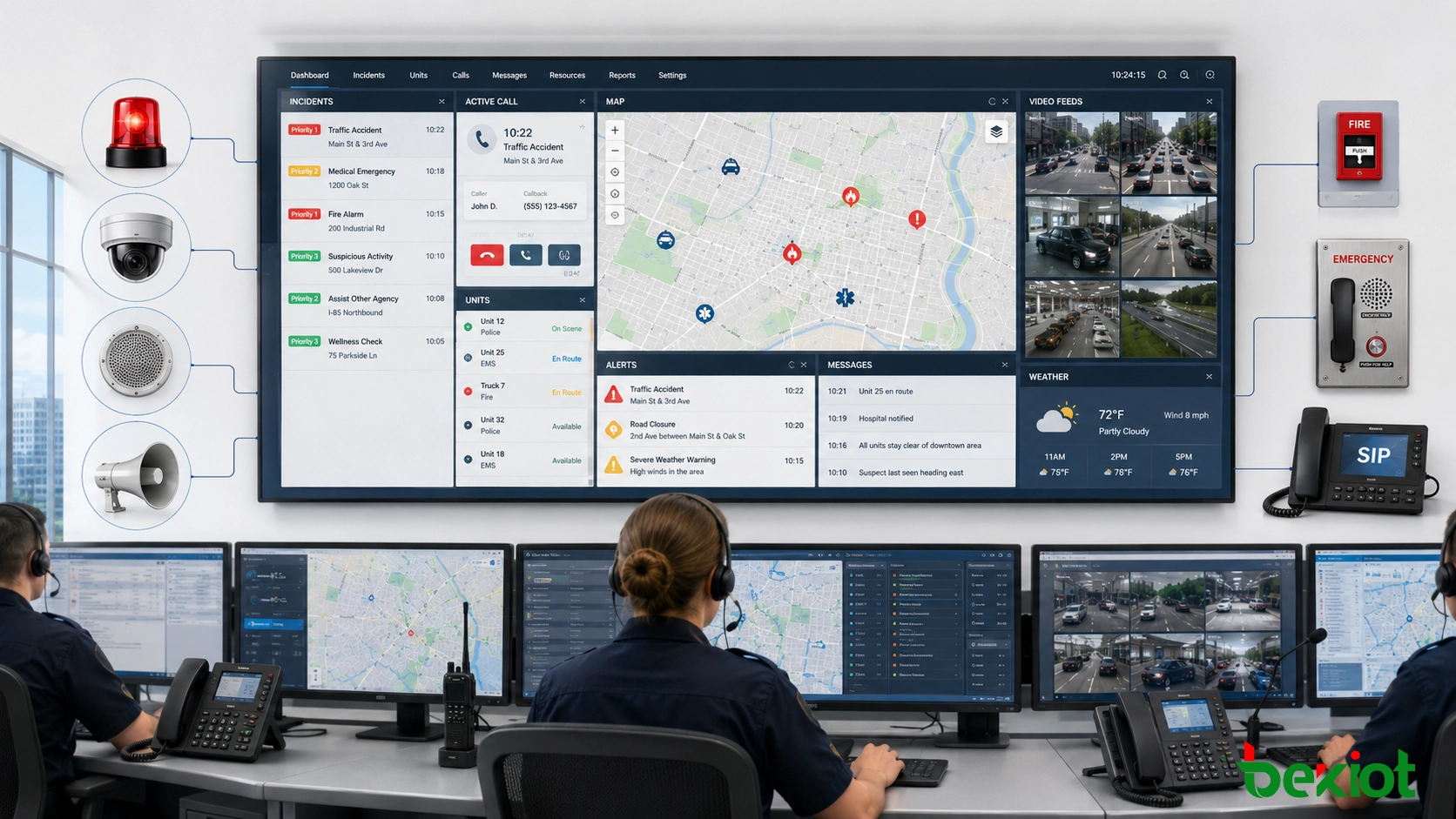
A computer-aided dispatch system helps control rooms manage calls, incidents, responders, and emergency communication in a more organized way.
What a Computer-Aided Dispatch System Does
A computer-aided dispatch system is a digital platform used to manage emergency calls, incident information, responder assignments, resource status, location data, and response records. It is commonly used by police departments, fire departments, emergency medical services, transportation operators, campus security teams, industrial safety teams, utilities, and command centers.
In a typical workflow, the dispatcher receives a call or alarm, enters the incident details, confirms the location, checks available teams, assigns the right resource, and tracks the response status. These steps are kept in one operational record, so the control room does not need to depend only on memory, handwritten notes, or disconnected software.
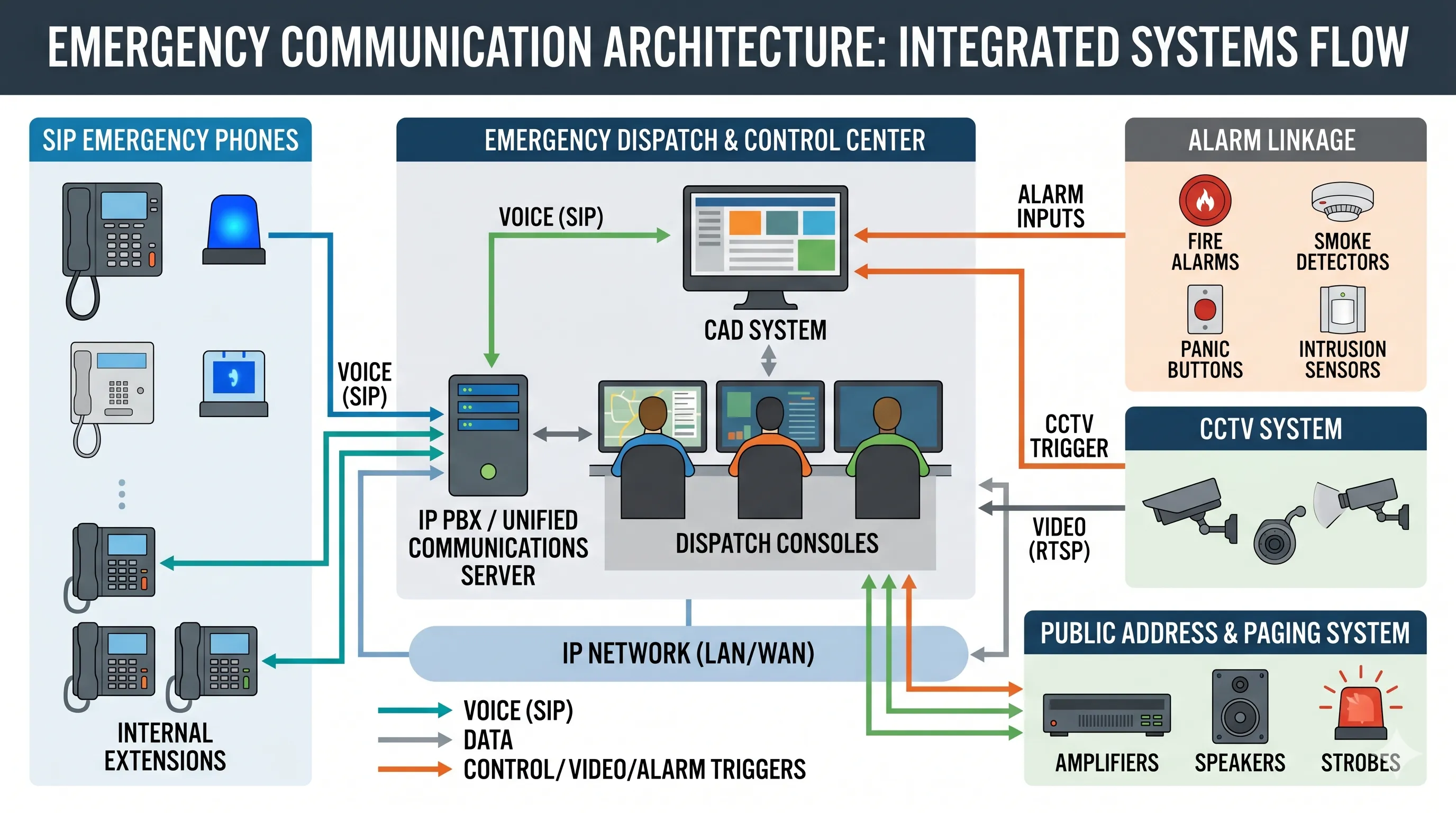
When CAD is connected with maps, telephony systems, radio gateways, emergency phones, CCTV, alarms, paging systems, and public address platforms, it becomes the central information layer of an emergency communication architecture. It links incoming information with response actions and helps the control room move from call taking to coordinated dispatch.
One of the most practical benefits of CAD is that it reduces manual work during dispatch. The system helps operators record incident information in a standard format, check resource availability, and assign responders without searching through paper logs, separate spreadsheets, or disconnected contact lists.
This becomes especially important when several incidents happen at the same time. Instead of relying on scattered notes, dispatchers can see active incidents, available units, assigned teams, and response progress in one place. This helps them act faster and reduce avoidable delays.
Clear Steps Under Pressure
Emergency dispatch work is often done under pressure. A CAD system gives the operator a repeatable workflow, so key information is less likely to be skipped. The dispatcher can follow the incident process, update the record, assign resources, and keep the response moving even when the situation is tense.
The system does not replace the dispatcher’s judgment. It gives dispatchers better structure, better visibility, and better tools for making timely decisions.
Better Situational Awareness
Situational awareness means understanding the incident, its location, the people involved, available resources, and the latest response status. CAD improves this by bringing key information into one view. Dispatchers can see incident records, unit status, location details, notes, updates, and related system information as the event develops.
An emergency may begin from a campus call point, an industrial telephone, a tunnel emergency phone, a fire alarm, a security report, or a radio message. With proper integration, the control room can connect the source of the incident with its exact location and the proper response procedure.
GIS and Location-Based Dispatch
Many CAD systems work with GIS maps. This helps operators see where the incident is located and which responders, facilities, routes, or risk areas are nearby. In airports, ports, factories, campuses, utility corridors, transportation networks, and city facilities, map-based dispatch can reduce confusion and improve response accuracy.
Location information also helps field teams. When responders receive clearer instructions, they can reach the correct area faster and understand the site conditions before arrival.
A good CAD system turns emergency information into an operational picture that dispatchers and response teams can act on.
More Effective Resource Allocation
Sending the Right Team
Emergency response is not only about sending someone quickly. It is about sending the right people, with the right equipment, to the right place. CAD helps dispatchers check which units are available, which are already busy, which are closest, and which are suitable for the incident type.
In public safety, this may involve police, fire, EMS, traffic control, or specialized rescue units. In an industrial or campus environment, it may involve security staff, safety officers, maintenance teams, medical personnel, emergency response teams, or facility managers.
Avoiding Conflicting Assignments
When dispatch is handled manually, it can be difficult to track every active unit. A team may be assigned to two incidents at once, or an important area may be left without coverage. CAD reduces this risk by keeping unit status and incident assignments visible.
This makes the control room more organized during both daily operations and major incidents. It also helps supervisors understand resource pressure and adjust priorities when the situation changes.
Centralized Emergency Communication
Emergency communication often comes from many sources. A control room may receive calls from emergency phones, SIP intercoms, industrial telephones, radio users, alarm systems, security stations, mobile teams, or public help points. If these sources are handled separately, the dispatcher must move information between systems by hand.
A CAD system helps centralize this workflow. It connects the call or alarm with an incident record, then links that record to response actions. This reduces the chance of losing important information and makes the whole process easier to manage.
Working with Communication Systems
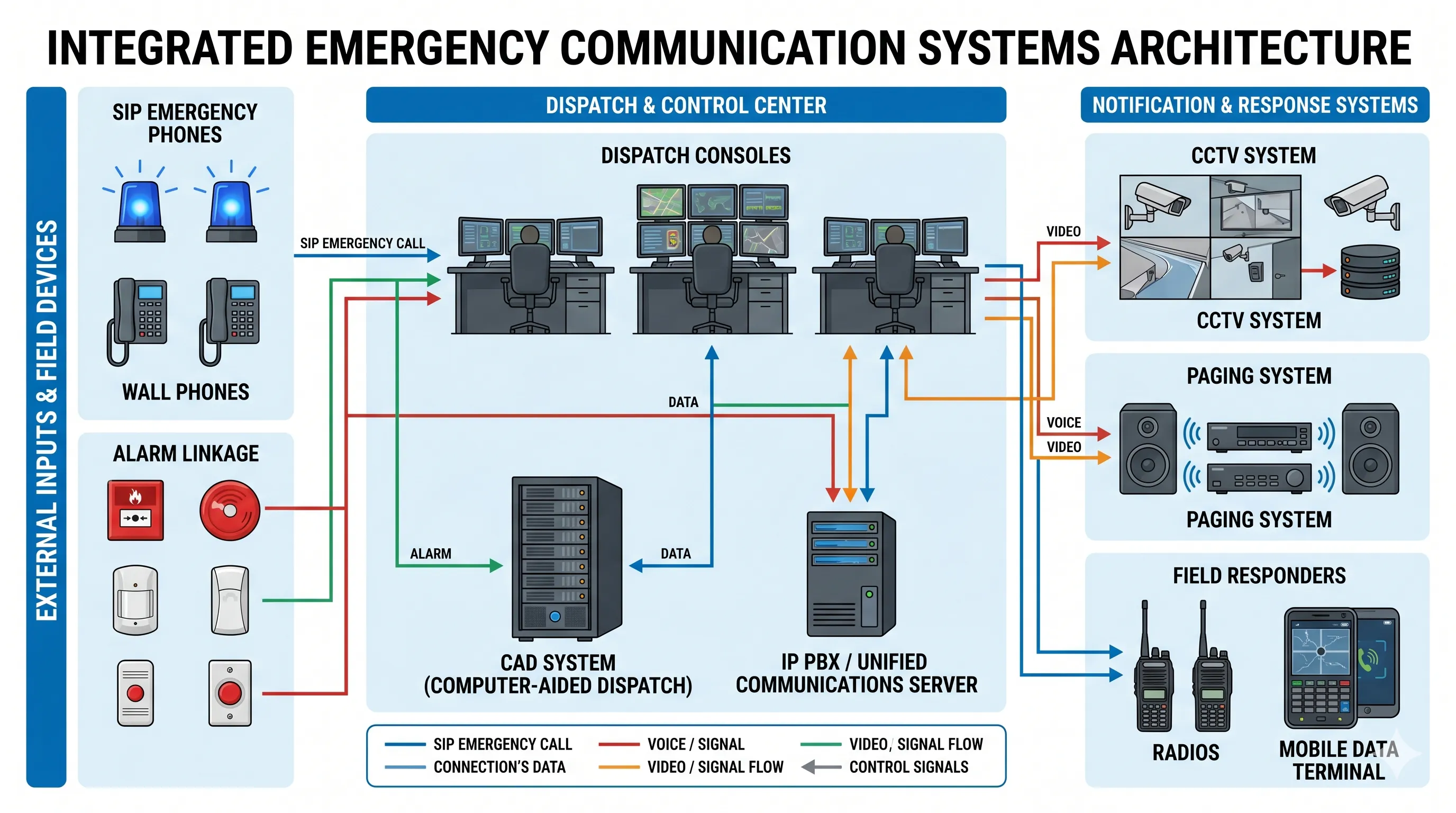
CAD becomes more valuable when it works with the wider communication environment. In many projects, it can connect with an IP PBX, SIP server, dispatch console, radio gateway, public address system, CCTV platform, alarm system, access control system, or paging platform.
This allows the control room to receive an emergency call, identify the location, create an incident, contact responders, activate paging, and follow the response in a connected process. The result is not only faster call handling, but better coordination from start to finish.
A CAD-centered emergency communication architecture can connect dispatch software with phones, alarms, cameras, paging, and response teams.
Accurate Incident Records and Reporting
Complete Event Timeline
Every incident creates a timeline. The control room needs to know when the call arrived, who handled it, what information was collected, which unit was assigned, when the team responded, what actions were taken, and how the incident was closed.
CAD systems record these details in a structured way. This gives the organization a clearer history of what happened and reduces dependence on memory, incomplete notes, or separate manual reports.
Review, Training, and Accountability
Incident records are useful after the event. Supervisors can review response time, call handling, resource use, recurring locations, common incident types, and communication gaps. These records can support training, reporting, compliance, and long-term improvement.
For public safety agencies, industrial facilities, transportation sites, campuses, and other large organizations, accurate records are part of accountability. They help teams understand what worked, what caused delays, and what should be improved in the next response.
Stronger Multi-Department Coordination
Many emergencies involve more than one team. A road accident may involve police, fire, medical teams, and traffic management. A campus incident may involve security, medical support, facility management, and public address notification. An industrial accident may involve the control room, safety team, maintenance staff, emergency response team, and outside rescue services.
CAD helps these groups work from a shared incident record. It keeps assignments, notes, updates, and response status more organized, which is important when the situation changes quickly.
Reducing Gaps During Escalation
When an incident escalates, communication can become fragmented. New calls may arrive, more responders may be needed, alarms may be triggered, and supervisors may request updates. CAD gives the control room a structured way to manage these changes.
This is especially important for large sites and public safety environments where several teams must act at the same time. Clear coordination helps reduce duplicated work and keeps the response focused.
Better Daily Efficiency and Future Scalability
CAD systems are not only useful during major emergencies. They also improve daily dispatch work. Operators can manage routine incidents, service calls, patrol tasks, safety reports, maintenance requests, and security events with a more consistent workflow.
When daily operations are organized, the team is better prepared for serious events. Dispatchers know where to find information, supervisors can review performance, and field teams can receive clearer instructions.
Preparing for More Devices and More Locations
As an organization grows, its emergency communication needs usually become more complex. There may be more buildings, more emergency phones, more cameras, more alarms, more responders, and more departments involved.
A scalable CAD system helps support this growth. It allows an organization to expand from a small dispatch center to a larger integrated command platform. This is useful for smart campuses, transportation hubs, industrial parks, city facilities, utilities, and other environments where safety systems continue to develop over time.
The long-term value of CAD is that it gives emergency communication a stable structure instead of leaving every response to manual coordination.
How CAD Fits into a Modern Emergency Communication System
From Standalone Tools to Connected Workflow
Many organizations already have emergency phones, CCTV systems, alarms, PA systems, access control, and radio communication. The challenge is that these systems may not work together smoothly. CAD helps bring these separate tools into a connected response workflow.
For example, when a SIP emergency phone is activated, the control room should be able to answer the call, identify the device location, check related video, create an incident record, notify responders, and activate area broadcasting when needed. CAD helps organize these steps so the response is easier to control.
Integration Should Be Planned Early
CAD should not be treated as a separate software purchase at the end of a project. It should be considered during the planning of the whole emergency communication system. Project teams should think about how calls are received, how alarms are linked, how responders are notified, how records are stored, and how the system will expand later.
This approach is especially important for facilities with high safety requirements, such as tunnels, ports, industrial plants, campuses, hospitals, airports, and public service centers.
Becke Telcom Perspective on Connected Dispatch
For emergency communication projects, Becke Telcom provides industrial communication terminals and integrated communication solutions for demanding environments. These may include SIP emergency phones, weatherproof telephones, industrial telephones, paging devices, gateways, and dispatch-related communication products.
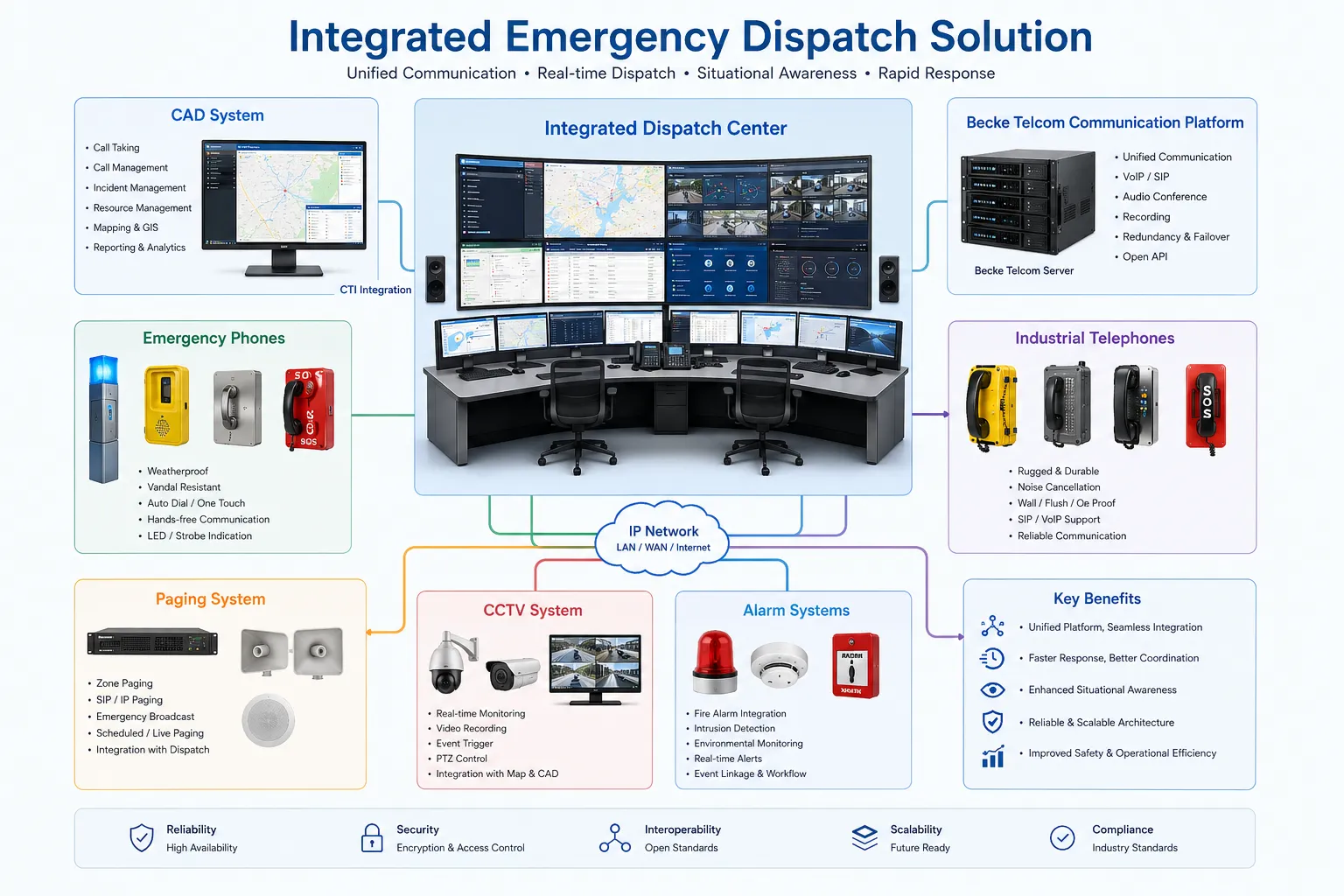
The Becke Telcom Converged Communication System is designed to integrate telephone communication, broadcasting, monitoring linkage, alarm linkage, dispatch coordination, and emergency response workflows. In a CAD-centered project, this communication layer can help connect field devices with the control room and support a more complete response process.
Designing the Full Response Chain
A practical emergency communication solution should not focus only on one device. It should define the full response chain: how the incident is reported, how the dispatcher receives it, how the location is confirmed, how responders are notified, how broadcast messages are sent, how cameras and alarms are linked, and how the event is reviewed afterward.
When CAD and the communication platform are planned together, the system becomes easier to operate and easier to expand. This is the real value for system integrators, project owners, and safety teams.
An integrated emergency dispatch solution connects field communication devices with the control room, monitoring systems, alarm workflows, and response teams.
Key Points Before Choosing a CAD System
Operational Fit
A CAD system should match the organization’s real dispatch workflow. The interface should be clear, the incident process should be easy to follow, and operators should be able to use the system under pressure. A powerful system is not helpful if dispatchers cannot operate it smoothly during an emergency.
Before selection, project teams should review main incident types, user roles, response procedures, reporting needs, and training requirements. The system should support daily operations as well as emergency escalation.
Integration Capability
Integration is a key selection factor. The CAD system should work with communication systems, maps, alarms, cameras, access control, radio systems, paging systems, and third-party platforms where required.
Integration should be tested around real workflows, not only listed as a feature. The project team should confirm how an alarm becomes an incident, how a call is linked with a location, how responders are notified, and how records are stored.
Reliability and Long-Term Maintenance
Emergency communication systems need stable networks, backup planning, clear user permissions, data protection, maintenance procedures, and room for future expansion. CAD should be treated as mission-critical infrastructure, not just as a management tool.
Conclusion
Computer-aided dispatch systems bring practical value to public safety and emergency communication. They help dispatchers respond faster, understand incidents more clearly, assign resources more effectively, centralize communication, keep accurate records, coordinate multiple teams, and improve daily efficiency.
For organizations that manage safety and emergency response, CAD provides a stronger foundation for control room operations. When it is combined with emergency phones, industrial telephones, paging systems, CCTV, alarms, dispatch consoles, and a converged communication platform, it can support a more connected and reliable response architecture.
The purpose of CAD is simple: help the right people receive the right information at the right time. In emergency communication, that clarity can make the whole response process faster, safer, and easier to manage.
FAQ
What does CAD mean in emergency dispatch?
CAD means computer-aided dispatch. It is a digital system used to manage emergency calls, incident records, responder assignments, unit status, location information, and response workflows.
Who uses computer-aided dispatch systems?
CAD systems are used by police departments, fire departments, emergency medical services, transportation operators, campus security teams, industrial control rooms, utilities, and public safety command centers.
How does CAD improve emergency response?
CAD improves emergency response by organizing incident information, showing available resources, supporting location-based dispatch, tracking response status, and helping dispatchers coordinate communication more clearly.
Can CAD systems connect with emergency phones and alarm systems?
Yes. In many projects, CAD systems can integrate with SIP emergency phones, industrial telephones, IP PBX systems, paging systems, CCTV platforms, alarm systems, and dispatch consoles.
Is CAD only for police, fire, and EMS?
No. CAD is also useful for campuses, factories, tunnels, ports, airports, hospitals, industrial parks, utilities, and large facilities that need structured emergency communication and response coordination.