How Does an IP PBX Work? Features, Architecture & Applications
An IP PBX is a private branch exchange built for IP networks, managing internal and external voice calls, extensions, and features like voicemail and conferencing. Discover how it works, its architecture, and the real-world applications that make it essential for offices, remote teams, and multi-site organizations.
Becke Telcom
IP PBX stands for Internet Protocol Private Branch Exchange, but that name only scratches the surface. It’s a business phone system that ditches old-fashioned telephone cables and instead rides on your IP network to control, route, and manage all voice communications—both inside the company and out to the world. Because voice traffic becomes just another data type, it slots neatly into the wider IT environment without building a separate infrastructure.
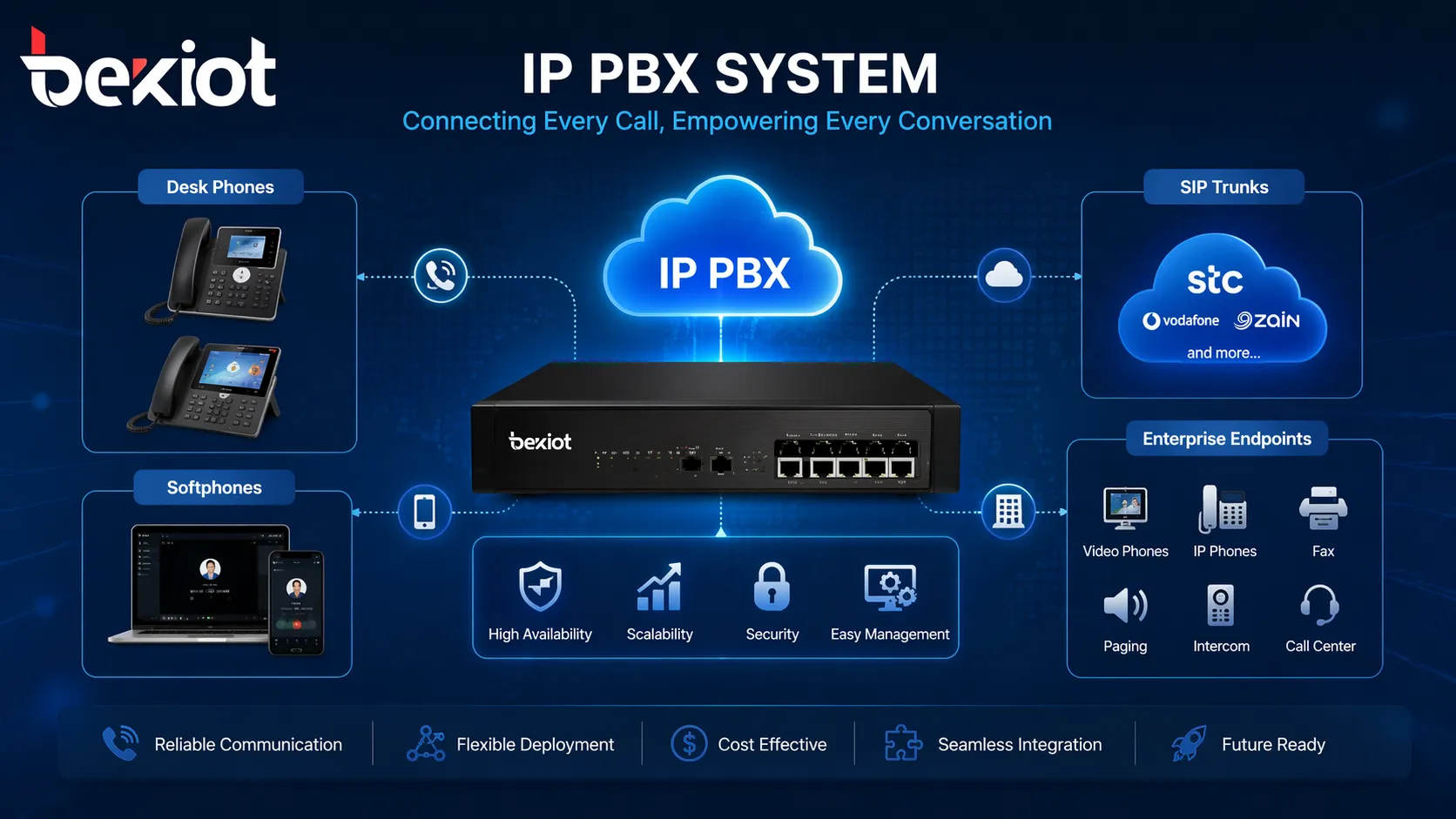
Today, an IP PBX does a lot more than replace a dusty PBX cabinet in the basement. It’s the central hub that ties together desk phones, softphones, SIP trunks, remote workers, voicemail, auto attendants, and conferencing resources into a single manageable platform. That’s why you’ll find it in offices, branch networks, hotels, hospitals, campuses, industrial sites—anywhere that needs telephony that can flex and scale with the organization.
IP PBX creates a unified business calling environment across users, devices, and external voice services.
What Is an IP PBX?
What it really does
An IP PBX is, at its core, a private telephone switch designed from the ground up for Internet Protocol. Its job is to keep all your extensions in order, make smart routing decisions, apply dial plans, and serve up the features people expect in a business phone system—call transfer, hold, forwarding, voicemail, conference bridges, you name it. You can think of it as the voice control centre of your entire network.
The big shift from traditional PBX is the transport layer. Instead of hardwiring every phone to a dedicated voice circuit, an IP PBX uses Ethernet and IP packets. That means voice services live on the same local area network, wide area network, or VPN that already carries your data. Adding a new user, moving a department, or plugging in a remote worker becomes a software change rather than a cabling project.
Architecture-wise, “PBX” still points to internal exchange, while “IP” signals that the switching happens over packet-based networking. Marrying those two ideas is what gives the platform its adaptability and long-term staying power.
How it breaks away from traditional PBX
Traditional PBX systems tend to be anchored to physical phone lines, rigid hardware, and slow expansion paths. They deliver solid voice quality, but when you need to grow, open a branch, or support hybrid work, you often face more specialised hardware, more wiring, and more complexity.
IP PBX flips that model. Endpoints register through LAN, WAN, VPN, or managed remote access, and external calls travel over SIP trunks or gateways. That makes the system inherently easier to scale, simpler to integrate with business tools, and a much better fit for multi-site or hybrid teams.
Another difference lies in the service layer. A legacy PBX mostly handles voice switching. An IP PBX, on the other hand, is expected to support unified communications, mobile clients, CRM integration, call recording, reporting, video endpoints, and interoperability with all sorts of IP-based business systems. It’s a platform, not just a switch.
IP PBX isn’t simply a newer phone switch. It’s the evolution of enterprise telephony into a software-driven, network-based communications platform.
How IP PBX Works
Signalling, control, and how sessions get set up
When a user dials from a SIP phone or softphone, the endpoint immediately sends signalling data to the IP PBX. The system checks the dialled number, the caller’s permissions, and the active routing rules—often in milliseconds. Only then does it decide whether the call stays inside the enterprise, goes to another branch, reaches a remote user, or heads out through a SIP trunk or voice gateway.
This signalling dance is the brainwork. Before any voice packets travel, the IP PBX already knows if the call needs IVR treatment, should be recorded, or must obey a time-based routing rule. Services like call transfer, ring groups, least-cost routing, and pickup all run inside the same call control engine—no bolt-on boxes needed.
How voice media actually travels
Once the call is established, voice moves as media streams—usually via RTP—across the IP network. Codec choice (G.711 for wide compatibility, G.722 for HD audio, or others depending on bandwidth planning) shapes quality and bandwidth consumption. Because voice now shares the pipe with email, file transfers, and cloud apps, the health of your LAN and WAN directly affects conversation quality. Latency, jitter, and packet loss become real planning factors, which is why proper QoS and voice VLANs are so common.
In many setups, the media path flows directly between endpoints after signalling finishes. In others, it might go through conference bridges, session border controllers, or media gateways. The exact pattern depends on your design, security model, and the features you turn on.
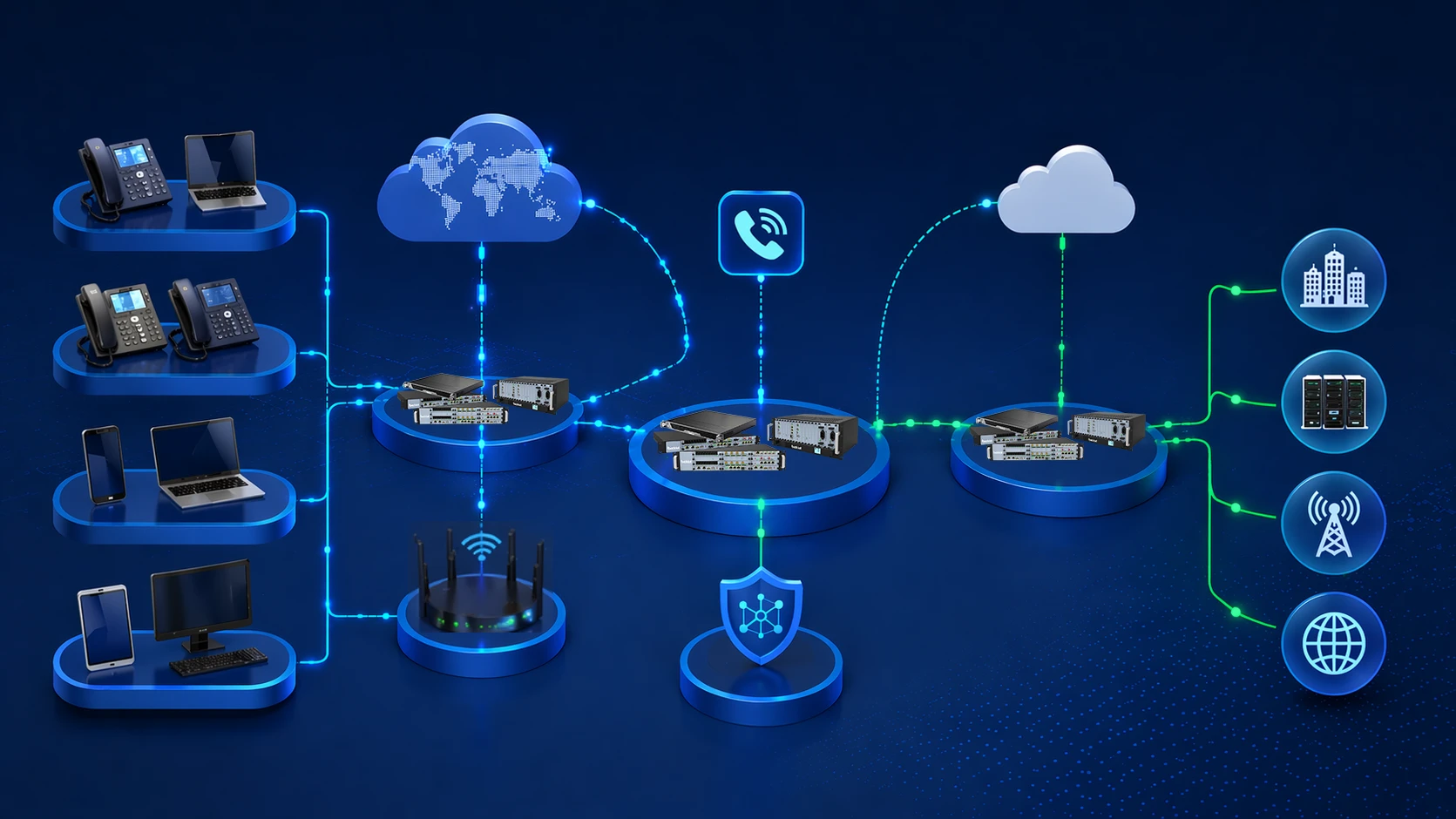
The IP PBX manages call logic, while voice media flows through the IP communication environment according to network design.
Core Features of IP PBX
Extension management and centralised control
One of the biggest day-to-day wins is centralised extension management. From a web interface, you can create users, assign numbers, set permissions, define classes of service, and restructure departments without touching a punch-down block. Adding a new starter or moving a team becomes a quick config change.
That agility is even more valuable in organisations that change often. Branches and home workers can be managed from the same pane of glass. IT teams gain visibility into registrations, call logs, and policy enforcement across the whole estate—instead of hopping between local boxes.
Business telephony and call logic
Feature lists are long: voicemail, auto attendant, IVR, forwarding, transfer, hold, park, ring groups, pickup, caller ID management, conferencing, and recording. But what really counts is how you combine them. You can route calls differently for office hours versus after hours, automatically record support conversations, and give key users priority routing—all governed by software rules rather than hardware limits.
Because these services live in software, adapting to new business processes doesn’t require a forklift upgrade. You adjust the logic, and the platform follows.
Remote access and mobility built in
IP PBX naturally supports remote and hybrid work. Softphones on laptops or mobiles register as full extensions, so people working from home, on the road, or at a temporary site can still make and receive calls with the company’s identity. They get transfer, conference, extension dialling, and the same workflow integration as someone sitting at a desk in HQ.
This isn’t a bolted-on extra—it’s an architectural advantage. Organisations can maintain business continuity during travel, expansion, or unexpected disruption without re-engineering their voice setup.
Scalability and a wide device ecosystem
A real strength is the ability to start small and grow organically. You might begin with ten desk phones and a SIP trunk, then later add mobile clients, conference bars, paging speakers, intercoms, recording servers, and branch-level policies—all without ripping out the core. And because IP PBX systems talk standard SIP, they work with a broad range of endpoints: desk phones, video phones, analogue phones (via gateways), intercoms, paging devices, and even vertical-specific terminals.
That turns the PBX into a communication integration layer rather than a closed phone system. It sits comfortably between users, external networks, and the business applications that rely on voice.
The strongest advantage of IP PBX is that it turns telephony from isolated hardware into a flexible network service that can grow with business structure and communication demands.
IP PBX Network Architecture
The building blocks
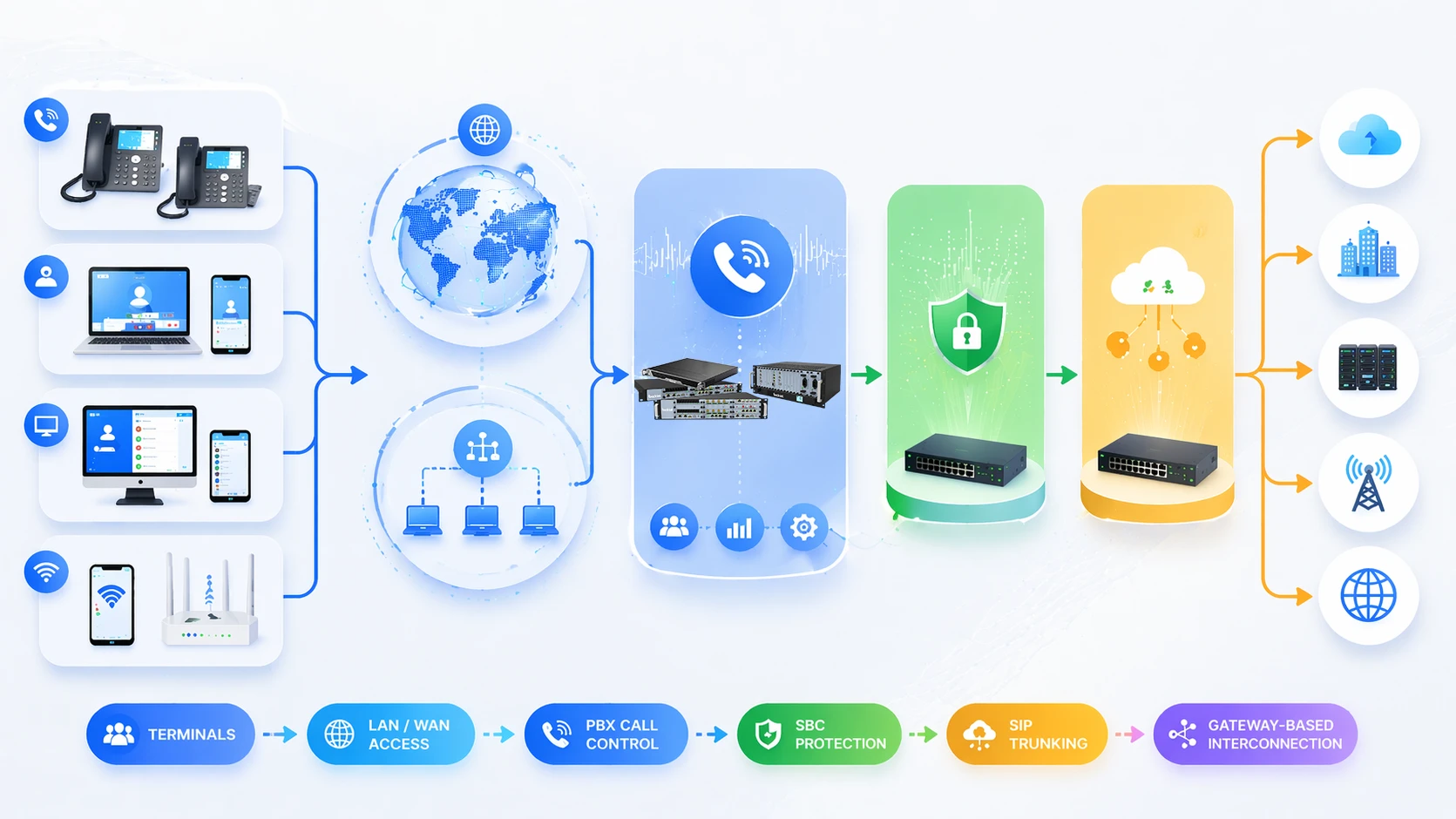
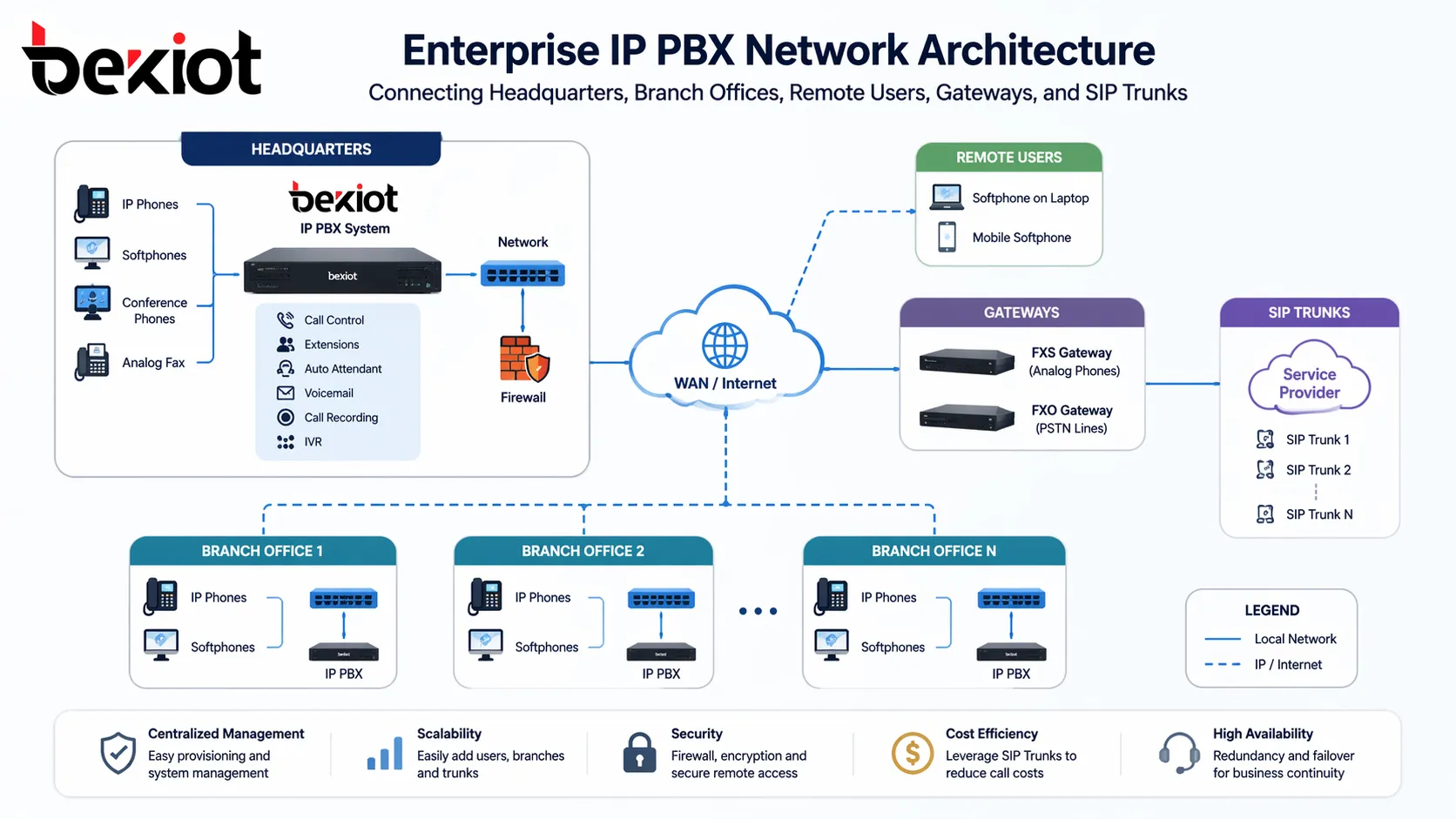
A typical deployment includes the IP PBX server (or controller), IP phones or soft clients, Ethernet switches (often with PoE), voice gateways, SIP trunks, management interfaces, and sometimes session border controllers at the edge. The server acts as the central control node—endpoints register to it, trunks connect through it, and policy is enforced by it.
Where existing analogue devices or PSTN lines must stay in play, the architecture might also involve FXS/FXO gateways or digital trunk gateways. If you’re using external SIP services, an SBC can handle NAT traversal, encryption, and signalling normalisation, keeping the core safe and tidy.
Single-site, multi-site, and hybrid setups
In a single office, the IP PBX usually sits on the LAN, serving local users directly. That’s common for small and medium businesses where everyone is under one roof. In a multi-site model, a centralised IP PBX (or a distributed system with coordinated routing) links headquarters and branches over the WAN, often through VPN tunnels. Users across locations share one numbering plan and one communication environment.
Hybrid models mix desk phones at HQ, local endpoints at branches, and soft clients for remote workers—all bound together by the same call control framework. The IP PBX doesn’t care where a user sits; it just sees a registered extension.
Why network quality and security can’t be afterthoughts
Because IP PBX rides on your data network, voice quality is only as good as the underlying transport. Voice VLANs, QoS, adequate bandwidth, and switch-level tuning aren’t optional luxuries—they’re what keep calls crisp. A poorly engineered network can drag down the user experience, no matter how smart the PBX software is.
Security is just as critical. Exposing SIP services without tight controls invites toll fraud, unauthorised registrations, and call hijacking. Best practice means TLS for signalling, SRTP for media, strong authentication, firewall rules, access control lists, and often a segmented voice network. In a well-designed IP PBX setup, telephony, network quality, and security form a single, cohesive responsibility.
IP PBX architecture can support centralised call control across headquarters, branches, remote users, and external voice networks.
Applications of IP PBX
Office and enterprise backbone
The most common home for IP PBX is still the office—providing extension dialling, departmental routing, inbound call handling, and all the features that make a business sound professional. Compared with traditional PBX, it adapts far better to branch growth, remote workers, and modern IT management. You centralise call control while still supporting users across buildings, floors, or locations.
For businesses that want structured telephony control without freezing their infrastructure in the past, IP PBX remains one of the most practical choices.
Customer service and operational coordination
Beyond basic desk-to-desk calling, IP PBX shines in support teams, sales departments, and anywhere that call handling matters. IVR menus, ring groups, queues, call recording, and CRM integration help teams manage interactions efficiently. Even outside formal contact centres, calls can be routed to the right people faster, and backup paths catch unanswered calls automatically—reducing the chaos of manual forwarding.
This blend of customer-facing polish and internal workflow discipline makes IP PBX a quiet driver of operational efficiency.
Hotels, campuses, healthcare, and industrial sites
Vertical markets have embraced IP PBX too. Hotels use it for room phones and front-desk coordination. Campuses connect administration, help points, paging, and emergency phones. Healthcare environments rely on it for staff communication and department workflows, often integrated with nurse call or patient management systems.
In industrial settings, an IP PBX often partners with SIP intercoms, paging systems, broadcast speakers, emergency telephones, radio gateways, and dispatch platforms. Here, the PBX isn’t the entire solution—but it usually acts as the central voice control component that holds everything together.
In many modern projects, IP PBX functions as the voice control foundation that connects enterprise calling with intercom, paging, mobility, and application-level communication workflows.
Benefits of IP PBX
Flexibility for organisations that don’t stand still
Operational flexibility sits at the top of the benefits list. You can add users, move departments, connect a new branch, or enable a distributed workforce without being handcuffed to hardware. Because the system is defined in software, the communication environment can reshape itself as the business does—with far less disruption.
For companies with evolving staffing patterns or multiple operating locations, that flexibility isn’t a luxury; it’s a practical necessity.
Better alignment with modern IT
IP PBX brings voice into the fold of the enterprise network, instead of keeping it as a separate telecom island. That makes maintenance simpler, encourages standardisation, and opens the door to tighter integration with business tools. Voice, video, mobility, and conferencing can be planned as related services, not as disconnected point solutions.
In a world where digital operations keep expanding, that alignment makes the whole communication stack easier to manage and evolve.
Long-term growth and service expansion
A well-planned IP PBX doesn’t box you in. You might start with simple desk-to-desk calling and SIP trunks, then later introduce mobile clients, conference bars, paging integration, intercoms, recording, and call centre tools—all without a complete system overhaul. This staged growth mirrors how real organisations mature, protecting your initial investment while letting the platform expand in step with your needs.
That combination of scalability, feature richness, and architectural headroom is exactly why IP PBX remains a go-to foundation for business voice.
Conclusion
An IP PBX is a private branch exchange built for IP networking. It handles call control, extensions, telephony features, and outside connectivity through a software-driven, network-native approach. That makes it more flexible and more aligned with how businesses actually run today than any legacy phone system.
Its value comes from several directions at once: centralised administration, deep telephony features, multi-site connectivity, built-in remote access, SIP trunk integration, and an open ecosystem of endpoints. But it also demands careful network design, quality enforcement, and a security-first mindset to deliver consistent, professional voice services.
For any organisation building modern voice infrastructure, IP PBX is more than a phone upgrade. It’s a communication platform that connects people, branches, devices, and workflows through one controlled IP-based framework.
FAQ
Is IP PBX the same as VoIP?
No. VoIP is the transport technology that shuttles voice over IP networks. IP PBX is the business communication system that manages extensions, routing, and features using that transport. Think of VoIP as the road and IP PBX as the vehicle.
Can IP PBX work with traditional telephone lines?
Yes. Through analogue or digital gateways, an IP PBX can connect to existing PSTN lines or legacy equipment. That lets organisations migrate in stages rather than rip out everything on day one.
What devices can connect to an IP PBX?
SIP desk phones, softphones, conference phones, video phones, analogue phones (via gateways), intercoms, paging speakers, and a wide range of SIP-compatible terminals. In practice, if it speaks standard SIP, it can likely join the system.
Why do businesses replace traditional PBX with IP PBX?
Usually for better scalability, simpler administration, remote work support, richer features, multi-site flexibility, and stronger alignment with modern IT and communication systems.
Where is IP PBX commonly used?
Offices, enterprise headquarters, branch networks, hotels, schools, hospitals, customer service departments, and industrial communication projects that need structured voice control and flexible deployment.