Alarm trigger activation explained for fire, security, industrial and emergency systems, covering trigger sources, signal validation, linkage rules, paging, video, notifications, testing and maintenance.
Becke Telcom
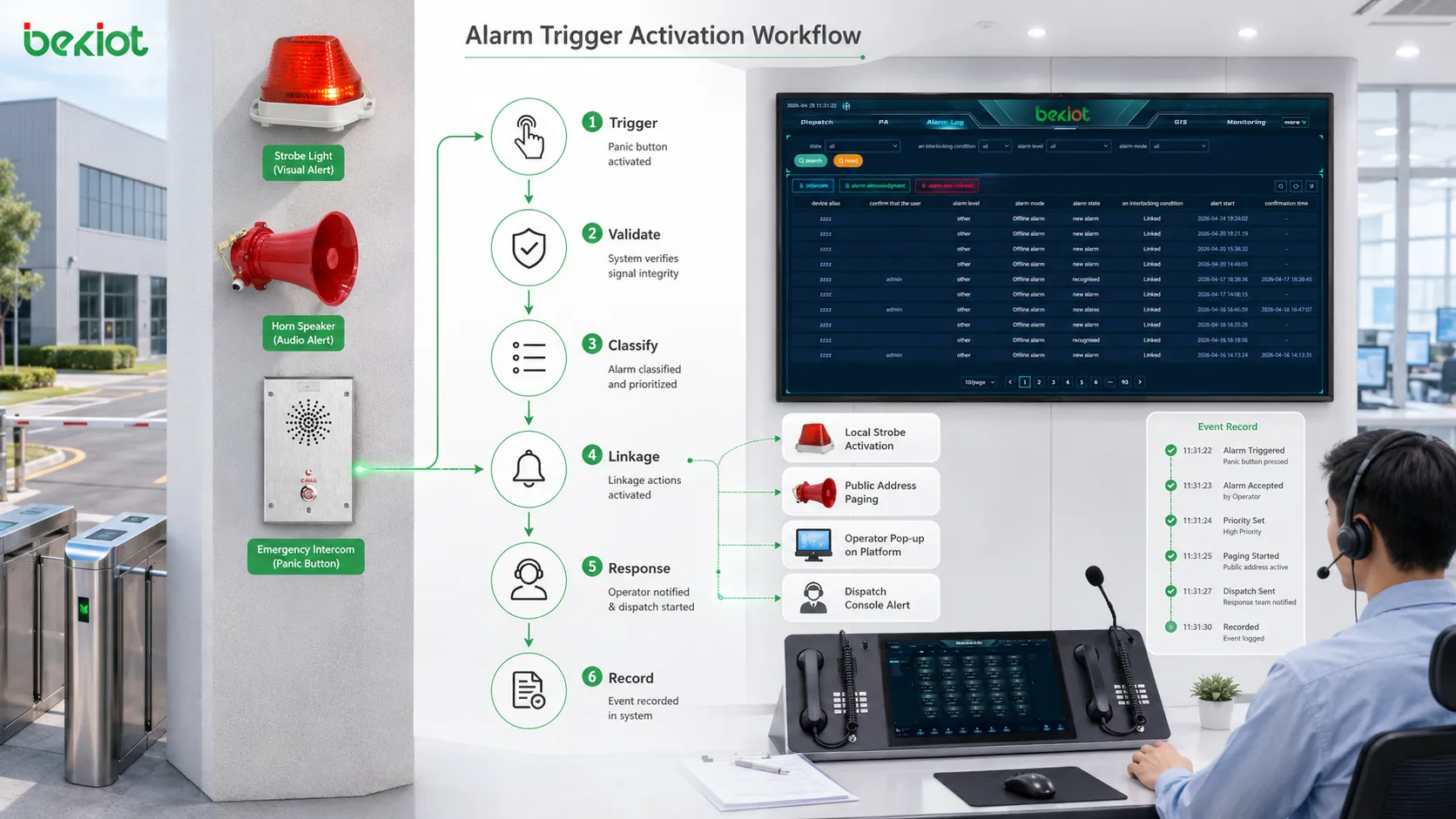
An alarm system does not become active only because a siren sounds or a warning light flashes. Before that visible response appears, the system must receive a valid trigger, identify where it came from, decide what type of event it represents, and then execute the correct response rule.
The trigger may come from a smoke detector, emergency button, gas sensor, door contact, intercom call point, equipment controller, access control event, video analytics platform, or software system. Once the trigger is confirmed, the alarm platform can start sound and light warnings, paging broadcasts, video pop-ups, dispatch notifications, access control actions, event recording, and escalation workflows.
Related solution: Intelligent Fire Alarm and Emergency Evacuation Solution
From trigger signal to response
The activation process begins when an alarm source changes state. A panic button may close a circuit. A smoke detector may send an alarm signal. A gas detector may exceed a threshold. A door contact may report forced opening. A network device may go offline. A control platform may generate an alarm event through an API or protocol message.
The alarm system receives this signal and checks whether it matches a valid alarm condition. This step is important because not every signal change should trigger a full response. Some signals may be caused by testing, maintenance, electrical noise, repeated false alarms, or low-level warnings.
After the trigger is accepted, the system follows configured linkage rules. These rules define whether the response should be a local siren, paging announcement, operator pop-up, emergency call, video display, mobile notification, access control action, dispatch task, or event record. In a platform such as the Becke Telcom BK-RCS alarm system, this turns separate alarm signals into centralized response management.
Alarm trigger activation is a chain of signal detection, validation, event classification, linkage execution, and response recording.
Common alarm trigger sources
Manual emergency triggers
Manual triggers are activated by people. They include panic buttons, emergency call boxes, pull stations, help points, wall-mounted alarm buttons, desk buttons, and emergency intercom keys. Their purpose is to let a person request help immediately when danger, injury, intrusion, conflict, equipment failure, or public safety risk occurs.
Manual triggers are valuable because people can notice situations that sensors may not understand. A worker may see smoke before a detector confirms it, find an injured person, notice suspicious behavior, or need urgent assistance in a remote area. Once pressed, the trigger should send a clear location and event signal to the system.
Sensor-based triggers
Sensor triggers are activated by measured conditions. Smoke, heat, gas concentration, water leakage, vibration, motion, temperature, pressure, humidity, power abnormality, equipment fault, or environmental change can all become alarm sources when they cross configured thresholds.
These triggers are useful because they monitor continuously. The key is correct threshold design. If a threshold is too sensitive, false alarms increase. If it is too loose, response may be delayed.
Software and system triggers
Some triggers come from software systems rather than physical devices. A video analytics system may detect intrusion. A building management system may report equipment failure. A network monitoring platform may detect offline devices. An access control system may report forced entry or repeated authentication failure.
Software triggers are important in integrated projects because many risks are discovered through data. Alarm events can be exchanged through APIs, MQTT, SNMP, Modbus TCP, webhooks, relay signals, or middleware so that different systems participate in one response workflow.
Linked event triggers
A linked event trigger occurs when one event starts another action. A fire alarm may trigger emergency paging. A panic button may open nearby camera views. A gas alarm may activate evacuation instructions. A help point call may start recording and display a location.
This is where integration creates real value. The operator does not need to perform every step manually. Predefined linkage rules shorten the time between detection and response.
How trigger signals are transmitted
Dry contact and relay input
Dry contact and relay signals are common in alarm integration. A device changes circuit state, and the controller detects the change. This method is simple, reliable, and widely used for emergency buttons, fire panels, door contacts, and equipment fault outputs.
The advantage is compatibility. Many devices can provide relay output even if they do not support network protocols. The limitation is that the signal usually carries limited information, so device meaning and location must be mapped in the alarm platform.
Network protocol transmission
Network transmission can carry richer data such as alarm type, source ID, timestamp, priority, location, device status, and handling information. Devices or platforms may use TCP/IP protocols, HTTP APIs, MQTT, SNMP, Modbus TCP, BACnet, SIP event mechanisms, or proprietary protocols.
This method is useful for centralized monitoring and remote sites. It supports cross-system linkage, but network reliability, protocol mapping, authentication, and data format must be tested carefully.
Serial, fieldbus, and wireless channels
Industrial and building systems may still use RS-485, Modbus RTU, CAN, or other fieldbus methods. These systems require correct addressing, polling, baud rate, termination, and protocol mapping. Incorrect mapping may cause alarm data to be interpreted wrongly.
Wireless alarm channels may use Wi-Fi, cellular networks, private wireless networks, radio links, or low-power wireless methods. They are useful where cabling is difficult, but coverage, interference, power supply, battery life, latency, and reliability must be verified under real site conditions.
How the system verifies a trigger
The first verification step is state confirmation. The system checks whether the input state meets the alarm rule: a normally open contact closes, a sensor value exceeds a threshold, a software event matches a defined condition, or a device fault reaches a configured level.
Debounce and delay logic are used to avoid unstable signals. A button press, relay bounce, noisy wire, or unstable sensor may create rapid repeated changes. The system can require the signal to remain active for a short period or ignore repeated pulses within a time window.
Threshold and multi-condition logic can improve accuracy. A temperature alarm may depend on a set value, while a higher-level safety event may require smoke detection and temperature rise together. This reduces false alarms while keeping serious events visible.
The system should also distinguish real alarms from test events, maintenance states, and device faults. A detector test should not always trigger a full emergency process. A device offline event should be treated differently from a confirmed fire, gas leak, or panic button press.
What happens after verification
Event classification
After verification, the alarm is classified. It may become a fire alarm, security alarm, emergency help request, gas alarm, equipment fault, environmental warning, communication fault, access alarm, or service event. The category determines the next response path.
Classification helps operators understand urgency. A critical evacuation event should not appear the same as a low-level maintenance warning. Interface color, sound, icon, priority, and workflow should reflect the severity of the event.
Priority assignment
Priority decides how strongly the system responds. A high-priority alarm may interrupt normal audio, trigger emergency paging, call supervisors, open video feeds, and require acknowledgement. A lower-priority alarm may create a record or maintenance task without disturbing all users.
Priority should reflect real risk. If too many alarms are high priority, operators may suffer alarm fatigue. If serious events are assigned low priority, response may be delayed.
Linkage rule execution
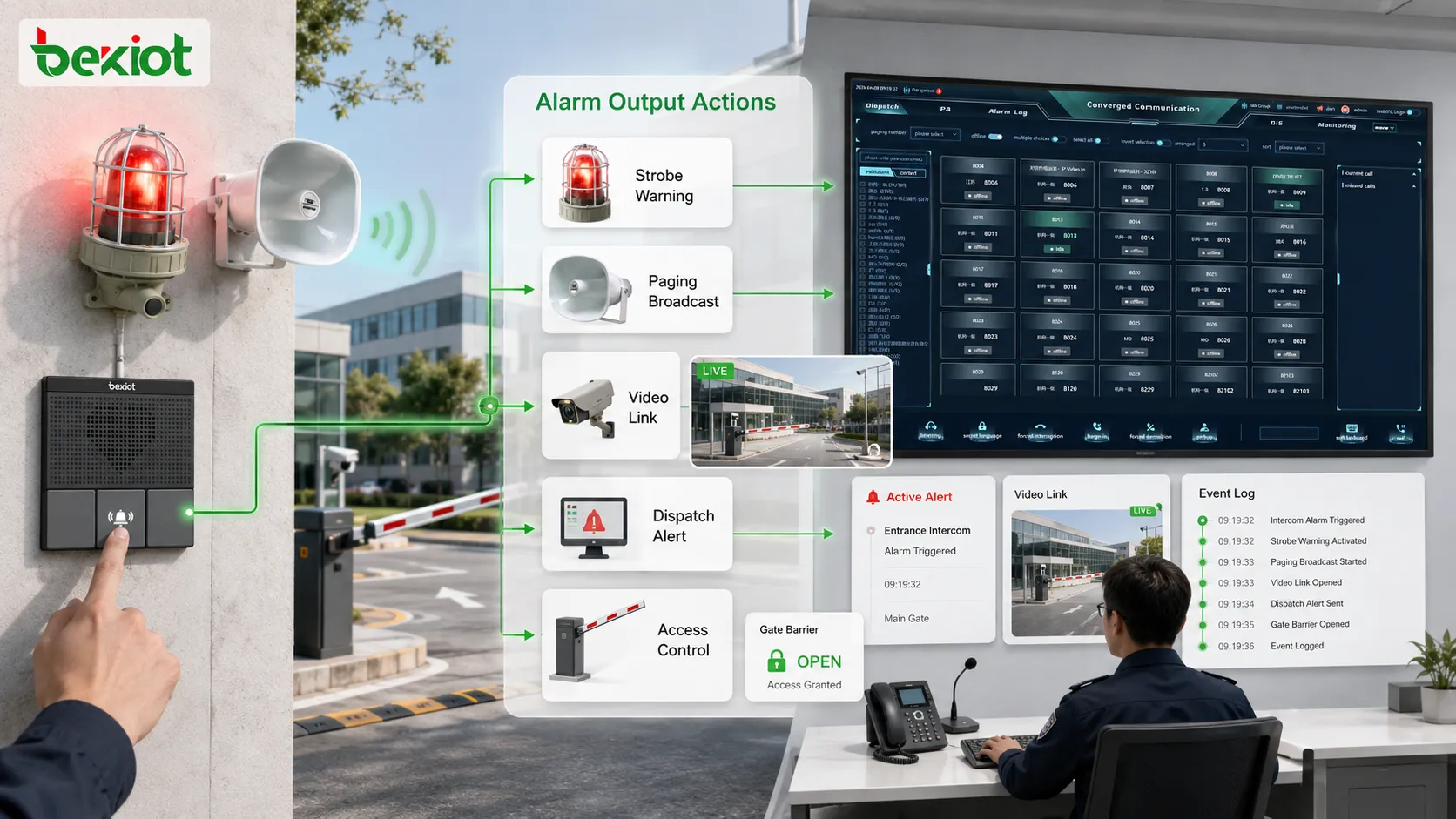
Linkage rules define the actions after classification. A rule may activate sirens, warning lights, paging zones, video pop-ups, access control actions, dispatch calls, mobile notifications, SMS, email alerts, recording, or work orders.
In centralized systems such as BK-RCS, linkage rules can connect a trigger with location, response group, paging path, notification target, and record trail. This prevents the alarm from remaining only a local buzzer or isolated signal.
Acknowledgement and escalation
An alarm should be acknowledged by an authorized user or system process. Acknowledgement means the event has been noticed, not necessarily resolved. The system may still require field confirmation, repair handling, or closure notes.
If no one acknowledges the alarm within a defined time, escalation may notify another operator, call a supervisor, activate a wider alert, or send the event to a higher-level platform. Escalation reduces the risk of missed alarms.
Output actions after activation
Sound and light warning
Sirens, buzzers, strobes, indicator lamps, alarm columns, and local panels are common outputs. They alert nearby people and are useful when immediate local attention is required.
Output intensity should match the environment. A noisy workshop may need strong audible warning, while a hospital, school, or office may need controlled levels and clear instructions rather than only loud sound.
Paging and evacuation announcement
Paging gives people instructions, not just warning tones. An announcement can tell people where the event occurred, what action to take, which route to use, and whether evacuation is required.
Zone selection matters. A local equipment fault may only need a maintenance zone announcement. A fire event may need broader evacuation guidance. A gas alarm may need warning in affected and nearby zones.
Video and location display
Alarm linkage can display related cameras, maps, floor plans, device locations, or GIS information. A gate alarm may open the gate camera. A help point alarm may show the exact location. A fire alarm may highlight the building zone.
Video and location context reduce uncertainty. Operators can see where to send staff and what the situation looks like before dispatching the wrong team.
Dispatch notification and event record
Alarm activation may notify duty personnel, maintenance teams, security staff, emergency commanders, or external response groups through dispatch consoles, phone calls, mobile apps, SMS, email, radios, or third-party systems.
The system should also create a record including trigger source, location, time, alarm type, priority, linkage actions, operator acknowledgement, dispatch response, and closure result. This supports review, accountability, and maintenance analysis.
After activation, an alarm trigger can start sirens, warning lights, paging, video linkage, dispatch notifications, access control actions, and event logs.
Typical application scenarios
Fire alarm and evacuation
Fire and evacuation systems may receive triggers from smoke detectors, heat detectors, manual call points, fire panels, or emergency buttons. Once verified, the system can activate evacuation announcements, warning lights, fire zone display, access control linkage, and operator notifications.
The value is not only speed but clarity. People need to know that an emergency exists and what action to take. A well-designed system connects the trigger with guidance, location display, and response records.
Industrial safety and equipment alarms
Industrial sites use triggers for gas detection, equipment failure, high temperature, power abnormality, water leakage, emergency stop, and production line faults. The system can activate local warnings, notify maintenance staff, page affected zones, and create repair tasks.
This helps prevent small faults from becoming larger incidents. A signal from a sensor or controller can reach the correct team quickly and leave a traceable record.
Security and access control
Security triggers may come from door forced-open events, intrusion sensors, perimeter alarms, panic buttons, intercom calls, access denial records, or video analytics. The alarm system can display camera views, notify guards, lock or unlock doors, and dispatch patrol staff.
Security response depends on verification speed. A triggered alarm with camera and location context gives operators more useful information than a simple text alert.
Public help points and facility management
Campuses, hospitals, parks, parking lots, stations, tunnels, and commercial complexes may use emergency help buttons or call boxes. When triggered, the system can call the control room, show the location, start recording, open nearby cameras, and notify responders.
Building and utility systems may also trigger alarms from elevators, power rooms, pumps, HVAC, water tanks, drainage systems, substations, pipelines, or remote equipment rooms. Not every trigger needs a siren, but every meaningful trigger needs a clear response path.
Design considerations for reliable activation
Clear trigger mapping
Every trigger should map to a device, location, alarm type, priority, and response rule. Operators should not see only an engineering code such as “DI-08.” Labels should include location, area, function, and alarm purpose where possible.
False alarm reduction
False alarms reduce trust. Proper thresholds, debounce logic, confirmation rules, maintenance modes, and filtering can reduce unnecessary activation. The rule should match the risk level: a maintenance warning may allow delay, while a panic button may require immediate activation.
Priority and escalation
Critical triggers should receive stronger response than minor faults. Fire alarms, panic buttons, and hazardous gas events should not be handled like routine maintenance warnings. Escalation rules should also prevent alarms from remaining unnoticed.
Power and communication reliability
Alarm activation depends on power and communication paths. If the detector has no power, the line is broken, the controller is offline, or the network path fails, the alarm may not reach the platform. Backup power, monitored wiring, communication supervision, and fault reporting are important.
Full-chain testing
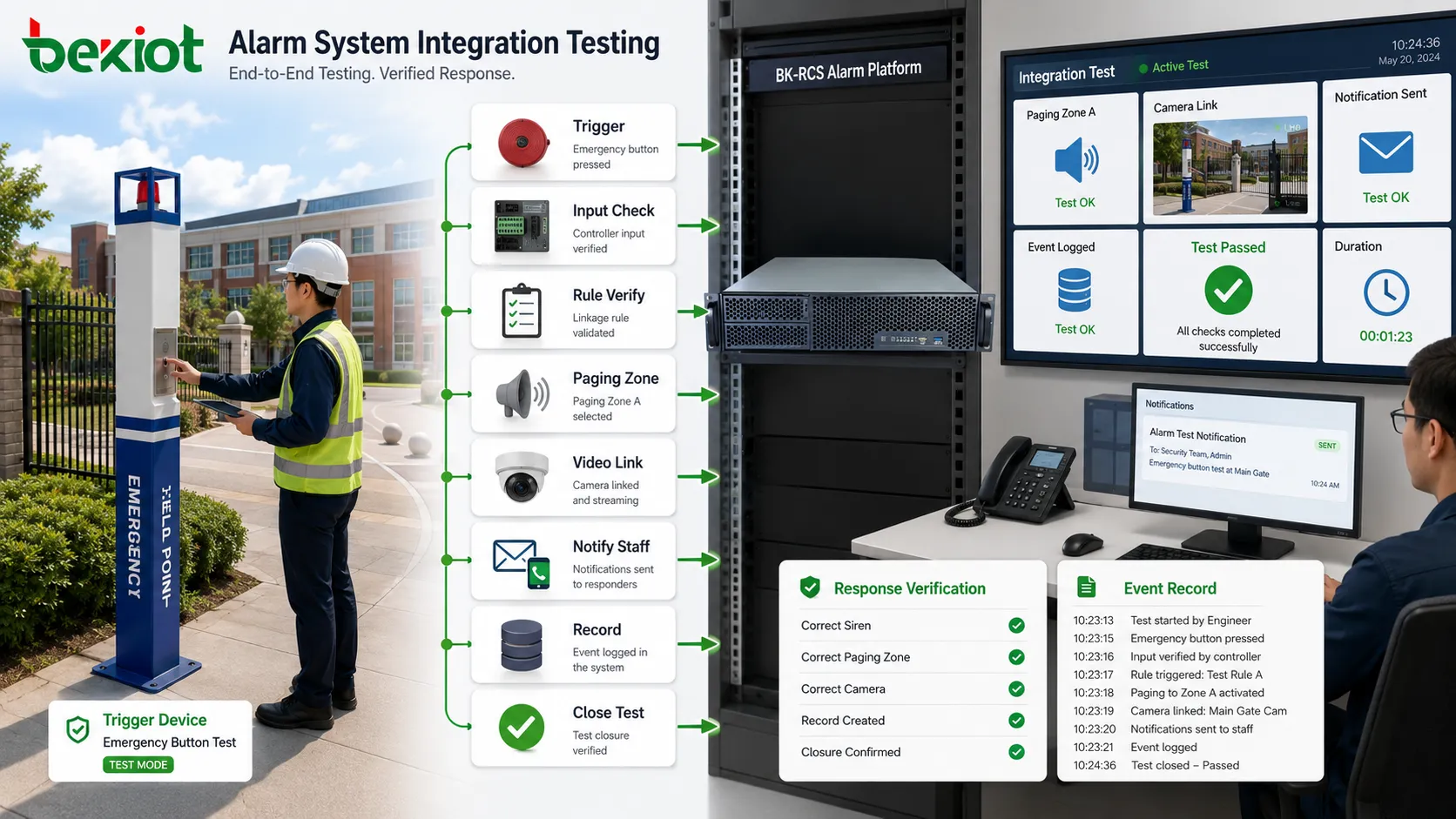
Testing should cover the complete path: trigger device, input module, controller, platform, linkage rule, output device, notification path, record creation, acknowledgement, and closure. It is not enough to test only the button or only the software pop-up.
Reliable alarm activation requires testing the complete path from trigger device to platform, linkage output, notification, and response record.
Common problems and better fixes
Problem
Likely Cause
Better Fix
Trigger is received but no action occurs
Missing linkage rule, wrong category, disabled output, or incorrect priority
Check event recognition, rule conditions, output status, and schedule restrictions
Wrong zone or device activates
Incorrect mapping, wrong address, outdated floor plan, or wrong notification group
Perform point-by-point verification against the real physical location
Alarm repeats too frequently
Unstable sensor, contact bounce, poor wiring, interference, or unresolved fault
Use debounce, suppression, threshold review, and maintenance investigation
Works in test but fails in operation
Only local device was tested, not the full linkage path
Test under real network load, backup power state, operator workflow, and multi-event scenarios
Operators cannot understand the event
Unclear labels, weak classification, missing location, or poor display design
Use readable names, location maps, priority icons, and clear handling instructions
How to evaluate activation design
Trigger accuracy is the first standard. The system should activate for real alarm conditions while avoiding unnecessary activation from noise, test states, maintenance work, or short unstable signals.
Response speed should match the scenario. Emergency buttons, fire alarms, and safety events usually require immediate response. Maintenance alarms may tolerate controlled delay. This timing should be tested instead of assumed.
Linkage correctness is critical. A fire trigger should activate the right evacuation process. A security trigger should open the right camera. A gas alarm should warn the right zone. Incorrect linkage can create response confusion.
Operator clarity also matters. The interface should show what happened, where it happened, what priority it has, what action has already started, and what the operator needs to do next.
Traceability completes the evaluation. The system should record trigger time, source, type, location, linkage actions, acknowledgement, escalation, handling notes, and closure result for review and improvement.
Final view
An alarm trigger activates the system by sending a valid abnormal signal into a detection and response chain. The system verifies the trigger, classifies the event, assigns priority, executes linkage rules, activates outputs, notifies responsible users, and records the result.
The main trigger sources include manual emergency buttons, sensors, detectors, access control events, equipment controllers, software platforms, and linked system events. The main outputs include sirens, warning lights, paging announcements, video pop-ups, dispatch notifications, access control actions, recording, and event logs.
A reliable alarm activation design depends on clear trigger mapping, false alarm control, priority and escalation rules, stable power and communication paths, full-chain testing, and long-term maintenance. When these elements are handled properly, the alarm trigger becomes the starting point of a fast, traceable, and effective safety response workflow.
FAQ
What is an alarm trigger?
An alarm trigger is a signal or event that starts an alarm process. It may come from a manual button, sensor, detector, access control device, equipment controller, software platform, or linked system event.
Does every trigger activate all alarm outputs?
No. The response depends on classification, priority, verification rules, and linkage configuration. Some triggers activate full emergency response, while others only create maintenance alerts or operator notifications.
Why is trigger verification important?
Verification helps reduce false alarms and unstable signals. The system checks whether the event is valid, whether thresholds are met, and whether debounce or delay rules should apply.
What systems can an alarm trigger activate?
An alarm trigger can activate sirens, warning lights, paging systems, video pop-ups, dispatch consoles, mobile notifications, access control actions, emergency calls, recording platforms, and event management systems.
How should alarm trigger activation be tested?
Testing should cover the complete path from trigger device to controller, alarm platform, linkage output, notification, acknowledgement, escalation, and event record. Realistic scenario testing is more reliable than checking one device alone.