Alarm Integration explained for industrial, security, fire and facility systems, covering alarm classification, video linkage, paging, dispatch, access control, traceability, response workflows and maintenance.
Becke Telcom
In many facilities, an alarm is not a single event on one screen. A fire alarm may require evacuation paging, video verification, access control linkage, dispatch notification, emergency call recording, and follow-up review. A gas alarm may need local warning, control room notification, ventilation checks, and incident records. A security alarm may need camera pop-up, patrol dispatch, gate control, and supervisor escalation.
This is where Alarm Integration becomes valuable. It connects separate alarm sources, communication systems, video systems, paging platforms, access control devices, dispatch tools, and maintenance workflows into one response process. Instead of asking operators to switch between many systems manually, the integrated platform helps identify the alarm source, display the location, trigger related actions, notify the right people, and record the full event.
From alarm signal to response workflow
Traditional alarm handling often starts with a simple signal: a buzzer, warning light, dry contact input, software pop-up, or sensor status change. The signal tells the operator that something abnormal has happened, but it may not provide enough context for fast decision-making.
The operator may still need to confirm the location, check the camera, call the responsible team, activate a broadcast, open a maintenance ticket, and write a record. Every manual step adds time and creates the possibility of missing information.
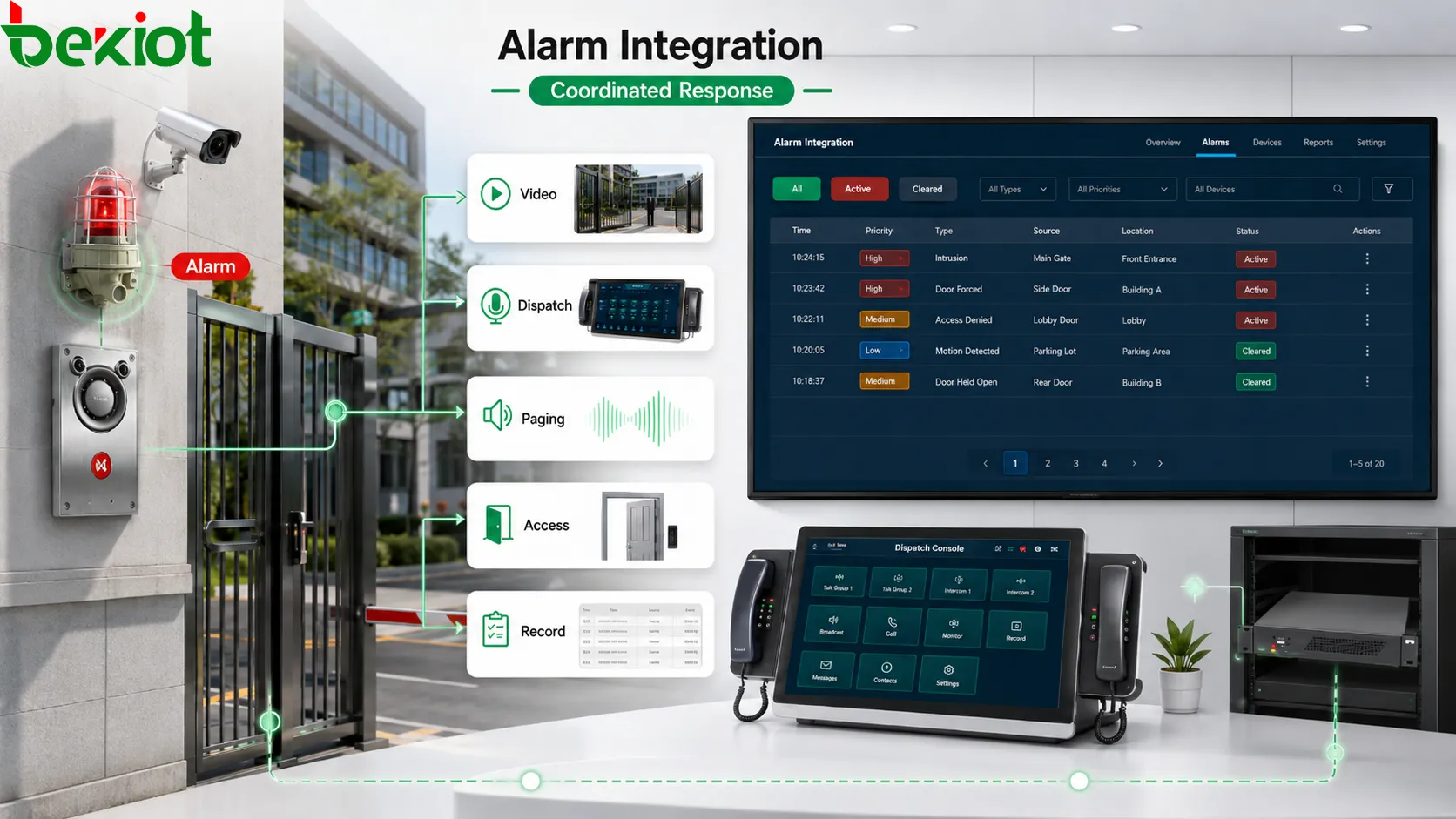
Alarm Integration changes the process by turning a signal into a structured event. The platform can associate the alarm with a device name, location, event type, priority level, video channel, paging zone, response group, access control area, escalation rule, and handling record. The alarm is no longer only a warning; it becomes part of a managed workflow.
Alarm Integration links alarm signals with video, dispatch, paging, access control, and event records to form a coordinated response workflow.
How Alarm Integration works
Alarm source collection
The system first collects events from different sources. These may include fire panels, gas detectors, emergency buttons, intrusion sensors, door contacts, access control devices, equipment controllers, environmental sensors, power systems, intercom terminals, video analytics, network monitoring tools, and building management systems.
These sources may use different technical formats. A dry contact signal, relay output, API event, SNMP trap, serial message, software webhook, or protocol packet can all represent an alarm. The integration layer normalizes these inputs so the platform can process them in a unified way.
Classification and priority
After collection, the system classifies the alarm. A fire alarm, gas warning, forced-door event, help point call, temperature warning, equipment fault, and network offline alarm should not be handled in the same way. Classification tells the system what the event means.
Priority decides how urgent the response should be. High-priority alarms may trigger sound and visual warning, emergency paging, video pop-up, supervisor notification, or escalation. Low-priority alarms may only create a maintenance ticket or monitoring record. Clear priority prevents both underreaction and alarm fatigue.
Rule engine and linkage action
The rule engine defines what happens after the alarm is recognized. It may open a related camera, send a paging announcement, call duty personnel, activate warning lights, lock or unlock doors, start recording, send mobile notifications, create a work order, or escalate the event after a timeout.
Linkage rules must follow real procedures. A gas alarm should not use the same rule as a visitor intercom call. A door forced-open event should not be handled like a low battery warning. Integration is useful only when the rule reflects the actual response need.
Feedback and closure
Alarm handling should not stop after the first notification. The system should track whether the event was acknowledged, who handled it, what actions were taken, whether the alarm cleared, whether follow-up was required, and when the event was closed.
This feedback loop supports review. If one device creates repeated alarms, maintenance teams can investigate the root cause. If response is often delayed, the procedure can be improved. If false alarms are frequent, thresholds or confirmation rules may need adjustment.
Core system value
Faster response
The most direct value is faster response. When the alarm is automatically linked with location, video, paging, notification, and dispatch rules, operators do not need to search for related information one system at a time.
For example, when an emergency button is pressed, the platform can show the exact location, open the nearby camera, call the duty desk, start recording, and notify the response group. This reduces the time between detection and action.
Better situational awareness
Alarm Integration gives operators a wider view of the event. They can see where the alarm occurred, which device triggered it, which camera is related, whether other alarms are active nearby, which team should respond, and whether previous events occurred in the same area.
This context improves judgment. A single temperature warning may be routine, but a temperature warning combined with smoke, power abnormality, and repeated equipment alarms may require a stronger response.
Less manual operation
In a non-integrated environment, operators may need to check the alarm panel, find the camera, call a supervisor, activate paging, record notes, and create a maintenance ticket separately. These steps slow down the response and increase the risk of mistakes.
Integration does not remove human decision-making, but it supports the operator with structured information and predefined actions. The operator can focus on verification, command, and follow-up instead of searching through disconnected systems.
More consistent procedures
Emergency response should follow defined procedures, but under pressure people may forget steps or perform them in different orders. Alarm Integration embeds part of the procedure into the system. When a certain alarm occurs, the platform can guide or trigger the required actions consistently.
This is useful for evacuation, fire response, gas warning, security lockdown, equipment shutdown, medical assistance, and public safety incidents. Integrated rules reduce dependence on individual memory, especially during night shifts or multi-site operation.
Stronger traceability
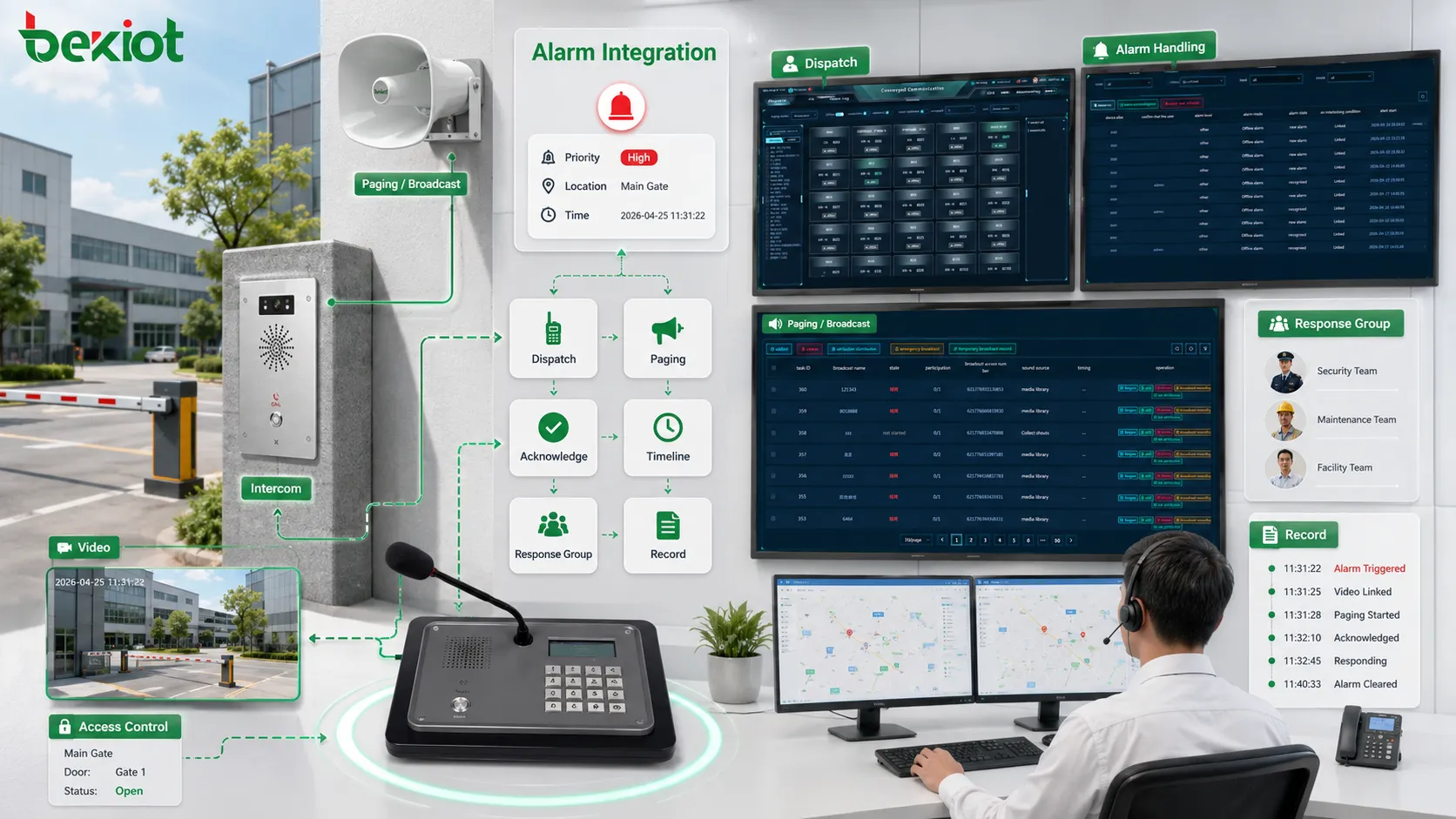
An integrated alarm system can record the full event timeline: trigger time, source device, location, operator acknowledgement, video access, paging broadcast, dispatch task, notification result, response notes, clearance time, and closure result.
Traceability supports accountability, training, compliance review, maintenance analysis, and incident investigation. Managers can review whether the right people were notified, whether linkage actions worked, and whether the response followed procedure.
Integrated alarm dashboards help operators understand priority, location, related video, response workflow, and acknowledgement status.
Where it is commonly used
Industrial production and equipment safety
Industrial sites use Alarm Integration for equipment faults, gas detection, temperature warnings, power abnormalities, emergency buttons, production line alarms, utility system alerts, and safety interlocks. When an event occurs, the system can notify the control room, page affected zones, display equipment status, and create a maintenance task.
This helps reduce downtime and safety risk. A repeated fault can be reviewed through historical records, while a hazardous alarm can trigger local warning and operator notification before the situation expands.
Security and access control
Security systems can integrate intrusion alarms, forced-door events, access denial records, perimeter sensors, visitor intercoms, emergency call points, and video surveillance. When an event occurs, the platform can open the related camera, notify guards, start recording, and dispatch patrol staff.
The value is faster verification. Operators can see whether the event is a false trigger, unauthorized entry, suspicious behavior, or real security incident. This reduces blind response and improves decision-making.
Fire and emergency broadcast linkage
Fire and emergency scenarios often require immediate communication. Alarm Integration can connect fire signals, smoke detection, manual call points, emergency buttons, paging zones, public address systems, and evacuation messages.
Emergency broadcast linkage should be designed carefully. Different zones may need different instructions. Routine audio may need to be overridden. Broadcast records should be kept. The purpose is to deliver clear instructions to the correct areas at the correct time.
Transportation and public facilities
Railway stations, metro systems, airports, ports, tunnels, parking areas, and bus terminals use integrated alarms for crowd safety, equipment faults, emergency help points, access events, smoke detection, and service disruption response.
In busy public environments, many people may be affected quickly. Integration helps operators connect public safety events with video, announcements, staff dispatch, and incident records.
Healthcare, campus, and commercial buildings
Hospitals, campuses, office parks, hotels, shopping centers, and public buildings use Alarm Integration for emergency calls, equipment rooms, elevator alarms, security alerts, fire signals, nurse or service calls, and facility maintenance warnings.
Integrated alarms help route events to the right team. A facility fault may go to maintenance. A security event may go to guards. A public help request may go to service staff. A fire alarm may follow emergency workflow.
Communication system linkage
Paging and public address
Paging and public address systems are commonly linked with alarms because many events require audible notification. The platform can trigger zone announcements, warning tones, evacuation messages, staff calls, or service prompts based on alarm location and priority.
This is useful when visual alarms are not enough. Workers may not be watching screens, visitors may not understand a warning light, and field personnel may be far from the control room. Paging linkage brings alarm information into the physical environment.
Intercom and emergency calls
Emergency call points and intercom terminals can become alarm sources. When a person presses a help button, the system can show the location, open related video, ring the control room, start recording, and create an event.
Intercom linkage also allows two-way verification. Operators can speak with the person at the scene, confirm the situation, and decide whether to dispatch support, trigger paging, or escalate the incident.
Dispatch and notification
Alarm Integration often connects with dispatch systems. When an alarm occurs, the system can assign a response task, notify duty personnel, call a team, send a mobile alert, or escalate to a supervisor.
Notification rules should match responsibility. A power alarm should go to electrical maintenance. A security event should go to guards. A medical assistance alarm should go to trained responders. Sending alarms to the wrong people wastes time.
Recording and audit
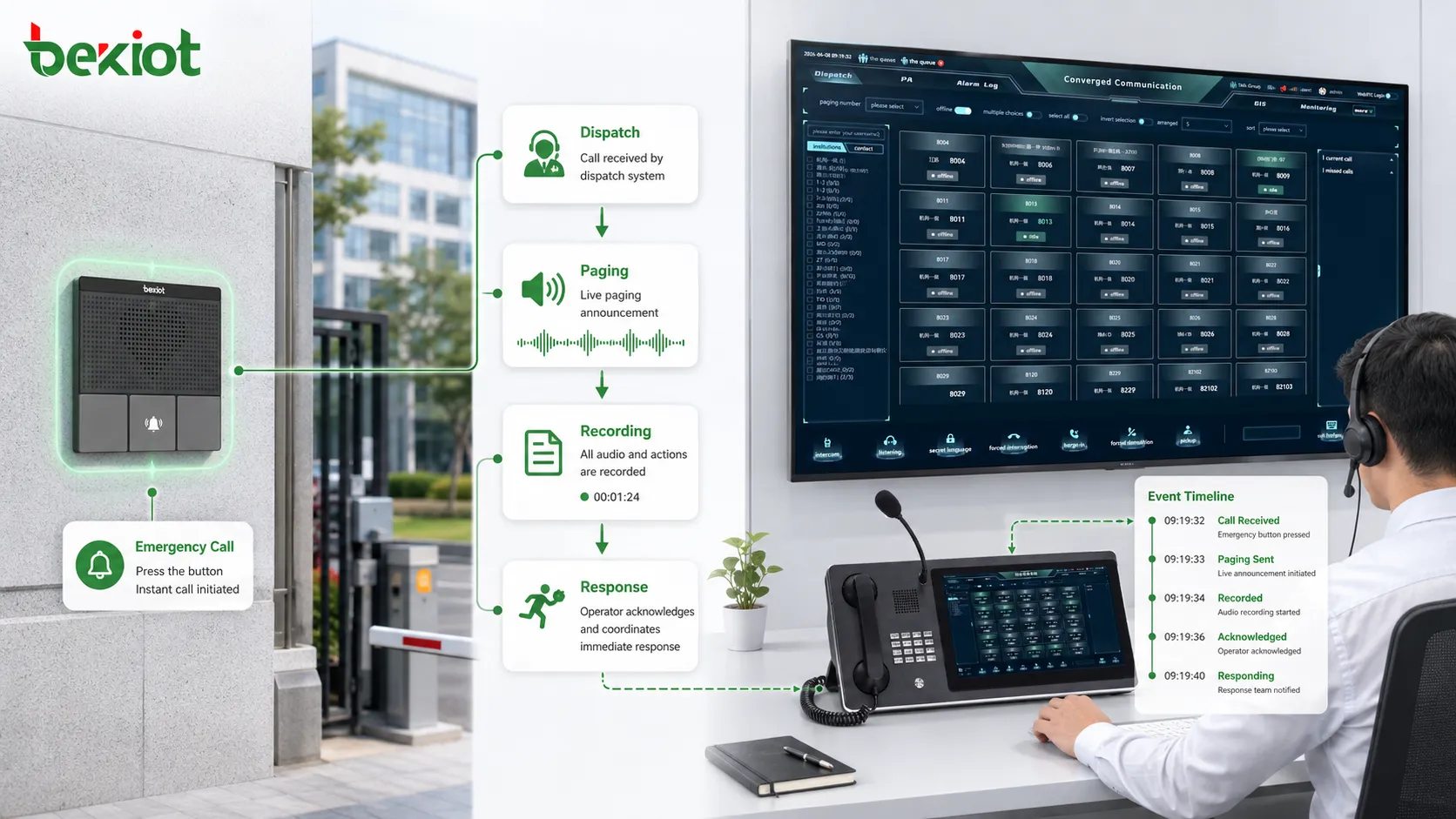
If an alarm triggers a call, paging message, video pop-up, access control action, or dispatch task, these actions should be linked to the same event timeline. This makes later review much easier.
Recording and audit linkage are important for emergency systems, security incidents, service disputes, and compliance management. The record should show not only that the alarm occurred, but also what happened after it occurred.
Alarm Integration can link emergency calls, paging broadcasts, dispatch notifications, recordings, and operator actions into one response record.
Design considerations
Classify alarms clearly
Not every signal needs the same response. Events should be classified by severity, source, location, business impact, and required action. Clear classification helps the system decide which alarms need immediate interruption and which can follow a normal maintenance workflow.
If classification is unclear, operators may face too many alerts with the same urgency. This causes alarm fatigue and makes it harder to focus on critical events.
Match rules with real procedures
Linkage rules should be based on actual response procedures, not only technical possibility. Just because a system can trigger many actions does not mean every alarm should trigger all of them.
The rule should define who needs to know, which device should respond, which zone should be notified, what priority applies, and what happens if no one acknowledges the event. Operations, safety, security, maintenance, and management teams should all be involved in rule review.
Control false and repeated alarms
False alarms reduce trust. If the system repeatedly triggers loud announcements, pop-ups, and unnecessary dispatch tasks, users may become less responsive. Filtering, confirmation, delay logic, debounce rules, threshold settings, and suppression policies should be used where appropriate.
Repeated alarms should also be analyzed. A sensor that triggers many times may be faulty, poorly positioned, or detecting a real unresolved problem. Integration should help identify patterns, not only repeat alerts.
Protect permissions
Alarm Integration may connect to access control, paging, emergency broadcast, dispatch, and device control. Permissions must be carefully managed. Not every user should be able to silence alarms, change rules, export records, or trigger linkage actions.
Role-based access keeps the system safe. Operators may acknowledge events, supervisors may close incidents, administrators may configure rules, and maintenance staff may view equipment alarms. Clear permission boundaries reduce misuse.
Test realistic scenarios
Testing should include real devices, real network paths, real response users, and realistic alarm conditions. The project should verify whether the correct camera opens, the correct zone receives audio, the correct team is notified, and the event record is complete.
Abnormal cases should also be tested. What happens if the camera is offline? What if the paging zone is busy? What if the operator does not acknowledge the alarm? What if the same alarm repeats? These tests show whether the system can handle real operations.
Common mistakes and better fixes
Mistake
Typical Result
Better Fix
Connecting systems without response logic
The platform links data but operators still do not know what to do
Define alarm meaning, responsible team, required action, and closure process first
Triggering too many actions
Operators are overwhelmed by pop-ups, calls, broadcasts, and repeated alerts
Match linkage strength with alarm severity and real response need
Using unclear device names
Operators waste time interpreting technical IDs during incidents
Use location-based names that match floor plans, zones, rooms, and camera labels
Ignoring false alarms
Users lose trust and may ignore important events
Review thresholds, debounce logic, confirmation rules, and repeated alarm patterns
No maintenance after commissioning
Rules, contacts, cameras, zones, and response teams become outdated
Review device status, alarm rules, contact lists, paging zones, camera links, and escalation paths regularly
How to evaluate system value
The first evaluation point is response time. Alarm Integration should help operators identify the event faster, verify it faster, notify the right people faster, and trigger the right actions faster. If integration adds complexity without improving speed, the design should be reviewed.
The second point is information completeness. A useful integrated alarm should show location, type, severity, related devices, recommended action, response status, and event history where available.
The third point is operational consistency. Similar alarms should be handled in similar ways. The system should reduce dependence on individual memory by guiding or automating key workflow steps.
The fourth point is traceability. Managers should be able to review when the alarm occurred, who acknowledged it, what linkage actions happened, which notifications were sent, and how the event was closed.
The final point is maintainability. Rules, devices, contacts, zones, and records should remain easy to update as the site changes. A system that cannot be maintained will gradually lose accuracy.
Final view
Alarm Integration has system value because it connects detection, verification, communication, dispatch, recording, and review into one coordinated workflow. It helps organizations move from passive alarm observation to active response management.
Its main values include faster response, better situational awareness, less manual operation, more consistent procedures, stronger traceability, lower missed-alarm risk, and improved cross-system coordination.
A strong design should be based on clear alarm classification, real response procedures, proportional linkage rules, controlled permissions, accurate location data, false-alarm management, realistic testing, and long-term maintenance. When these elements are handled carefully, alarm integration becomes a practical foundation for safer and more efficient system operation.
FAQ
What is the main purpose of Alarm Integration?
The main purpose is to connect alarm signals with related systems such as video, paging, dispatch, access control, notification, recording, and maintenance workflows so that alarms can trigger faster and more organized responses.
Does every alarm need automatic linkage?
No. Linkage should depend on alarm severity, location, response requirement, and operational policy. Critical alarms may need automatic action, while low-level warnings may only need logging or maintenance notification.
Why is alarm classification important?
Classification helps the system decide priority and response. Without classification, all alarms may appear equally urgent, causing alarm fatigue and making it harder for operators to focus on critical events.
What systems are commonly linked with alarms?
Common linked systems include video surveillance, paging and public address, intercom, dispatch consoles, access control, emergency call systems, mobile notifications, maintenance platforms, recording systems, and event management tools.
How should Alarm Integration be maintained?
Maintenance should include checking device status, alarm rules, contact lists, camera links, paging zones, access control actions, escalation logic, event records, and whether the response workflow still matches current site operation.