How Does an FXO Gateway Connect Analog Lines to VoIP?
FXO gateways explained for connecting analog PSTN lines with IP PBX and SIP platforms, covering call flow, FXO vs FXS, routing, caller ID, disconnect supervision, backup calling, selection checks and deployment mistakes.
Becke Telcom
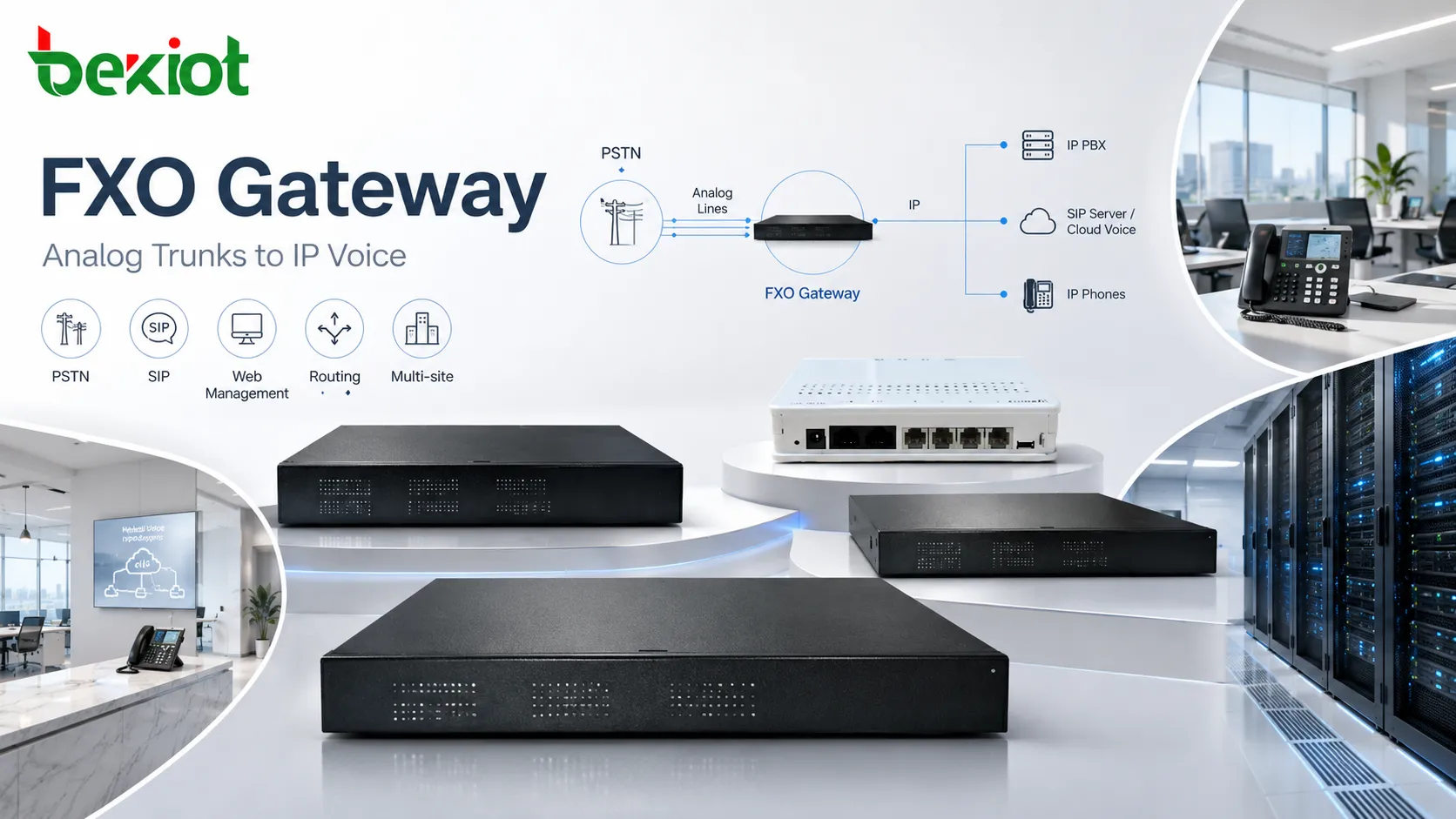
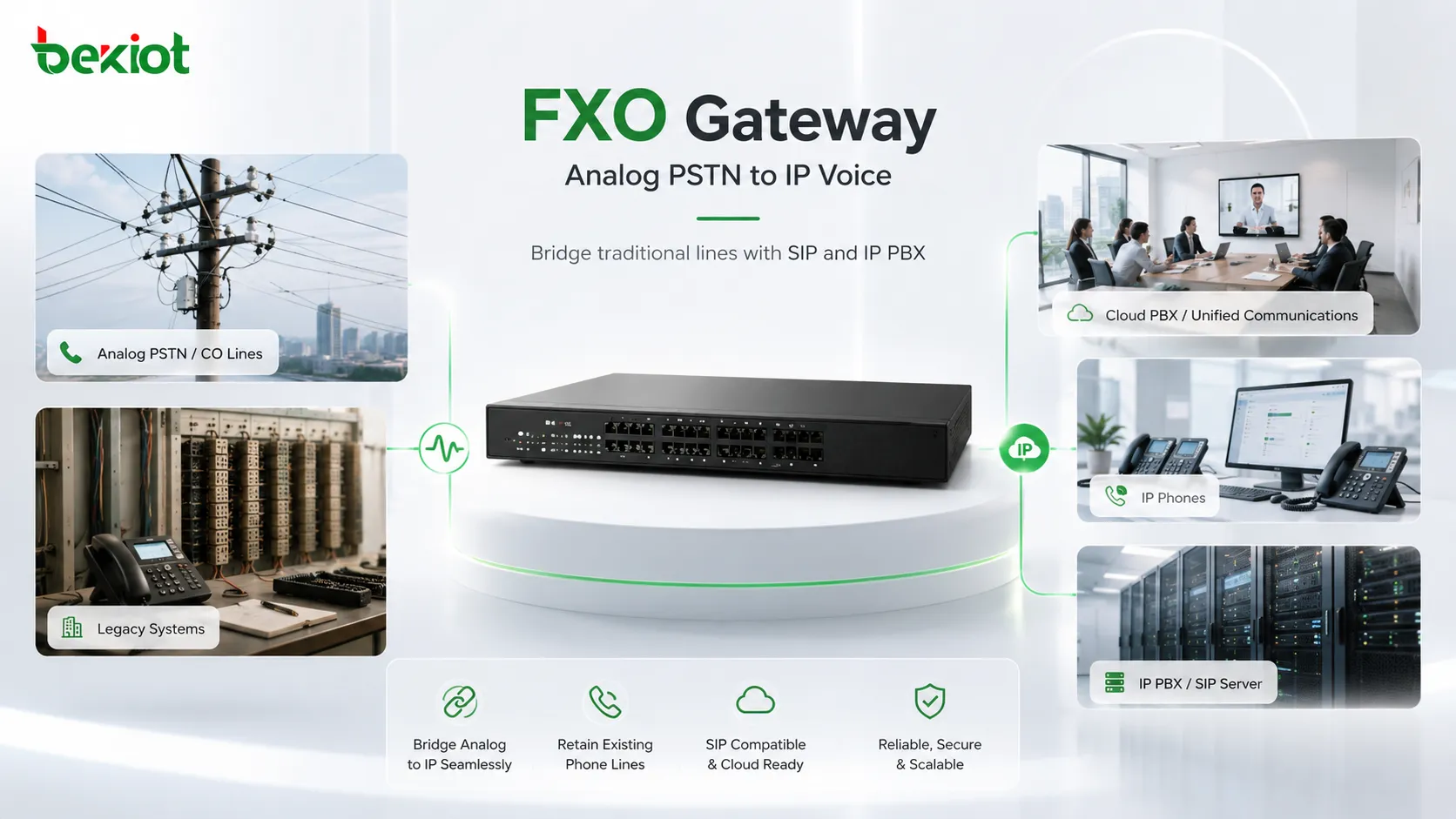
An FXO gateway is a voice gateway used to connect analog PSTN lines, CO lines, or legacy PBX trunk ports to an IP PBX, SIP server, cloud PBX, or unified communications platform. It allows an IP-based phone system to make and receive calls through traditional analog telephone lines.
This makes it useful in real migration projects. Many businesses want to use IP phones, SIP routing, call recording, IVR, remote management, or a cloud PBX, but they still need to keep analog outside lines for local numbers, backup calling, emergency access, or gradual carrier transition.
The device works as a bridge between two worlds. On one side, it understands analog line behavior such as ringing voltage, caller ID, off-hook status, tone detection, and disconnect signals. On the other side, it communicates with the IP voice system through SIP signaling and RTP media.
An analog trunk gateway bridges PSTN lines with an IP-based voice platform.
Why this bridge still matters
Many organizations have already moved most internal voice communication to IP, but analog lines have not disappeared. Some sites keep them for existing public numbers. Others use them because SIP trunks are not available, carrier migration is delayed, or local regulations and emergency calling policies require a physical PSTN path.
Analog lines are also common in branch offices, small businesses, hotels, clinics, warehouses, utility stations, industrial plants, and remote facilities. In these places, replacing everything at once may be unnecessary or risky. A gateway allows the site to keep local PSTN access while still using IP phones and modern call-control features.
The value is not only migration convenience. It also adds resilience. If the main SIP trunk, WAN link, or hosted PBX connection fails, local analog lines can still provide limited but important calling capability, especially for emergency numbers, security desks, maintenance teams, and site-critical communication.
Basic working path
The gateway sits between the analog line and the IP voice network. The line side connects to PSTN service or an analog trunk from a legacy PBX. The network side connects to Ethernet and communicates with the IP PBX, SIP server, softswitch, or cloud voice platform.
For an incoming call, the PSTN sends ringing voltage to the analog port. The gateway detects the ring, reads caller ID if the carrier provides it, and sends a SIP INVITE to the configured IP destination. That destination may be a receptionist extension, ring group, IVR, call queue, dispatch console, or auto attendant.
After the call is answered on the IP side, the device converts analog audio into RTP packets and sends voice traffic across the network. During the call, it may handle echo cancellation, gain adjustment, jitter buffering, tone detection, and media conversion.
For an outgoing call, the process runs in the opposite direction. A user dials an external number from an IP phone or softphone. The IP PBX sends the call to the gateway according to the dial plan. The gateway selects an available analog line, seizes the line, sends the dialed digits, and connects the voice path to the PSTN.
Call Direction
What Happens
Key Check
Incoming PSTN call
The analog line rings, the gateway detects the call, and the IP PBX receives a SIP call.
Caller ID timing, ring detection, inbound routing, and disconnect supervision.
Outgoing IP call
The IP PBX routes the call to the gateway, which seizes an analog line and dials out.
Dial plan, digit format, line availability, tone plan, and call progress detection.
Active conversation
Analog audio is converted to RTP media and bridged to the IP endpoint.
Codec, echo cancellation, gain, jitter, packet loss, and QoS.
Call release
The gateway detects hang-up signals and clears both the analog and SIP call legs.
FXO and FXS are related analog telephony interfaces, but they solve opposite connection problems. Choosing the wrong port type is one of the most common mistakes in analog VoIP projects.
An FXO port behaves like a telephone toward the line side. It expects to receive battery, dial tone, ringing voltage, caller ID, and disconnect signals from the PSTN or a PBX analog port. An FXS port behaves like the line provider. It supplies battery, dial tone, and ringing to an analog phone, fax machine, intercom, or speakerphone.
A simple way to remember the difference is this: FXO receives line service, while FXS provides line service. If the goal is to bring analog outside lines into an IP system, FXO is required. If the goal is to connect analog phones or fax machines to an IP system, FXS is required.
Item
FXO Interface
FXS Interface
Main role
Connects analog PSTN or PBX lines to IP telephony.
Connects analog endpoints to IP telephony.
Port behavior
Acts like a telephone toward the line side.
Acts like a line provider toward the analog endpoint.
Typical connection
PSTN line, CO line, analog PBX trunk.
Analog phone, fax machine, intercom, speakerphone.
Common purpose
PSTN access, analog trunk retention, local backup routes.
Reuse analog devices on an IP PBX or SIP platform.
Core capabilities to check
The exact feature set depends on the vendor and model, but a business-grade analog trunk gateway should provide more than basic call conversion. Reliable deployment depends on signaling control, voice processing, routing flexibility, management tools, and local line adaptation.
Analog trunk access
The main function is to connect physical analog lines to an IP-based phone system. This gives the organization local inbound numbers, outbound PSTN access, and a fallback route when the primary IP trunk or WAN service is unavailable.
SIP interoperability
The device should support the registration or peer trunk mode required by the IP PBX, SIP server, or cloud platform. Codec negotiation, DTMF mode, NAT traversal, authentication, keepalive behavior, and SIP header handling should also match the voice platform.
Routing and digit handling
Administrators may need to define which calls use which analog lines. Local calls, emergency calls, branch calls, business-hour routes, and backup routes can be handled differently. Digit manipulation, prefix insertion, stripping rules, number normalization, and caller ID settings are often part of this design.
Voice processing
Analog lines can introduce echo, noise, level mismatch, or inconsistent audio because of impedance differences and line conditions. DSP-based echo cancellation, gain adjustment, jitter handling, tone detection, and silence control help improve call quality.
Caller ID recognition
Caller ID delivery varies by country and carrier. Some lines send caller ID before the first ring, while others send it between rings or use different signaling formats. A stable deployment should allow regional caller ID settings and timing parameters to be adjusted.
Disconnect supervision
Failed call release is one of the most common analog integration problems. A good gateway should support multiple release detection methods, including CPC, polarity reversal, battery drop, busy tone detection, silence timeout, and timer-based release.
Fax handling
Some sites still need fax over analog lines. Depending on the model, the gateway may support fax passthrough, codec locking, jitter tuning, or T.38 on the IP side. Fax reliability depends on the full path, including the PSTN line, network quality, gateway settings, and remote fax endpoint.
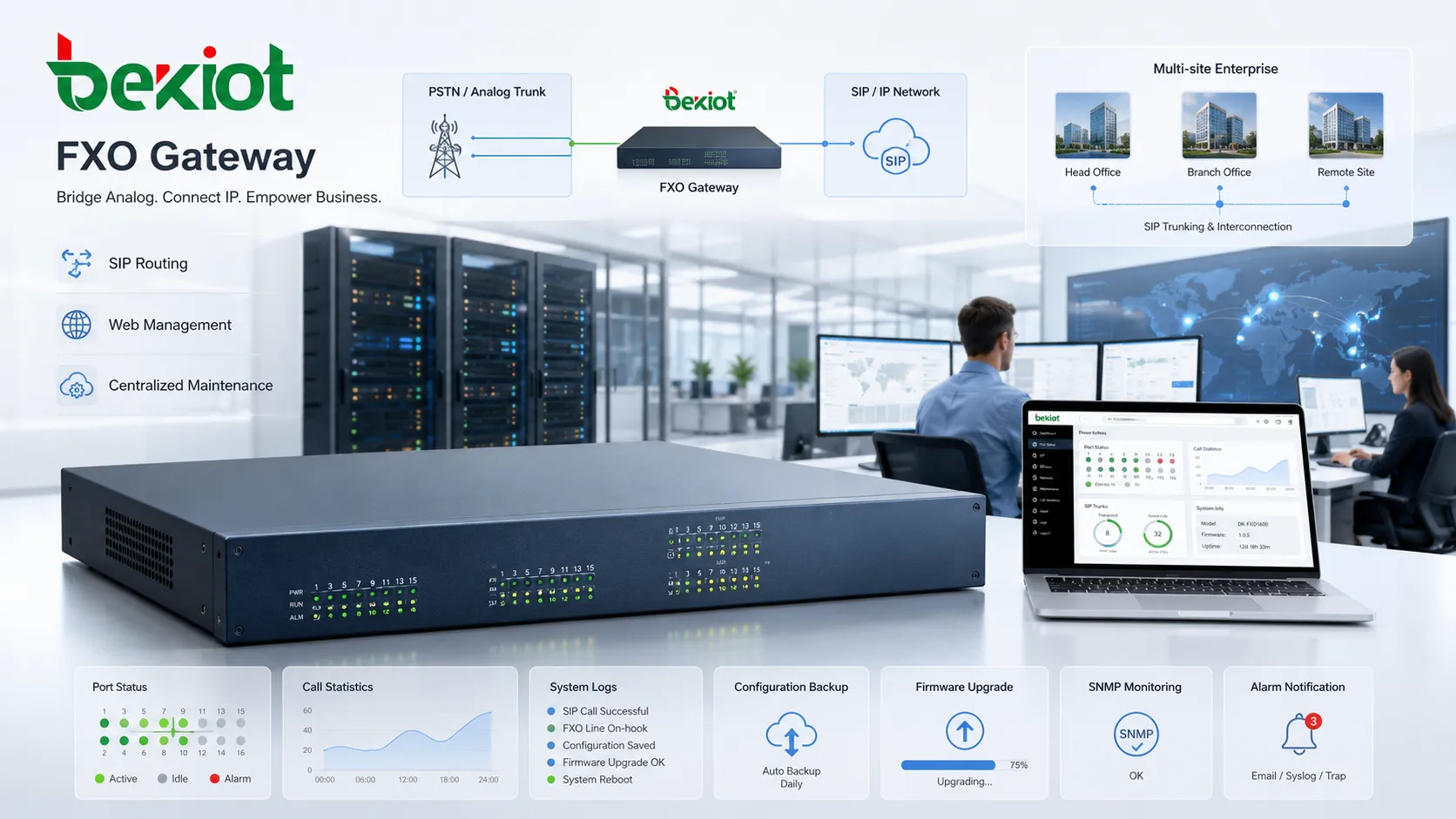
Management and monitoring
Business deployments usually need web management, configuration backup, firmware upgrade, syslog, SNMP, port status, call statistics, and alarm reporting. These tools are especially important for multi-site systems and long-term maintenance.
A business voice gateway combines analog trunk access, SIP interoperability, routing control, signal handling, and centralized management.
Typical deployment scenarios
The device is most useful when analog line access must be retained while the voice platform moves toward IP. It is not always the final destination of a voice network, but it is often the most practical bridge during migration, backup design, or legacy interconnection.
Phased migration to IP telephony
When a business replaces a traditional PBX with an IP PBX, existing outside lines may still need to remain active for a period of time. A gateway allows the new system to use those lines while users move to SIP phones and IP-based call control.
Branch office local access
Remote offices may need local calling, local number presentation, or independent PSTN access. Analog lines can be connected locally while the branch remains tied to a central IP PBX or hosted voice system.
Backup calling routes
Some organizations keep analog lines even after SIP trunks become the primary service. If internet access, SIP trunking, or cloud PBX registration fails, local lines can still carry essential calls.
Legacy PBX interconnection
During upgrades, a new IP system may need to communicate with an existing PBX. Analog trunk or extension interfaces can be used as a temporary or long-term bridge between platforms.
Hospitality, retail, and small business sites
Hotels, shops, clinics, and small offices may keep analog lines because of existing numbers, local service availability, or simple operating requirements. The gateway lets these sites add IP phones, IVR, recording, and remote administration without removing every analog dependency at once.
Industrial and utility facilities
Factories, substations, tunnels, utility stations, remote pump sites, and security facilities may rely on analog lines for resilience, local carrier access, alarm connection, or dispatch integration. Connecting those lines to an IP voice or command platform can improve manageability while preserving local access.
Selection checklist
Choosing the right model is not only about port count. The design should match the analog carrier environment, SIP platform, expected call volume, backup strategy, fax needs, security requirements, and maintenance model.
Port capacity: Match the number of analog lines that may be active at the same time, and reserve capacity for growth where needed.
SIP mode: Confirm registration, peer trunking, authentication, DTMF, codec, NAT, and keepalive behavior with the IP PBX or cloud PBX.
Regional line settings: Check ring cadence, impedance, tone plan, caller ID format, line voltage, and disconnect method.
Call release: Test CPC, polarity reversal, busy tone detection, battery drop, silence timeout, and release timers with the actual carrier line.
Fax support: Verify fax passthrough, T.38, codec control, and jitter behavior under real network conditions.
Management tools: Review web access, password control, firmware maintenance, logs, monitoring, backup, and remote troubleshooting.
Survivability: Define which calls use local PSTN lines when SIP trunks, WAN links, or hosted services fail.
Selection Point
What to Verify
Why It Matters
Port count
Number of analog lines and expected concurrent calls.
Prevents blocked calls and under-sized deployment.
Carrier behavior
Caller ID, tone plan, impedance, line voltage, and disconnect method.
Improves inbound routing, call progress, and release accuracy.
SIP platform
Registration mode, routing, codec, DTMF, authentication, and NAT.
Ensures compatibility with IP PBX, SIP server, or cloud PBX.
Backup routing
Emergency numbers, local fallback, and recovery behavior.
Keeps essential calling available during service failures.
Operations
Logs, monitoring, configuration backup, firmware, and alerting.
Simplifies troubleshooting and long-term maintenance.
Installation details that affect stability
A stable deployment depends on both analog telephony settings and IP network design. Many problems appear only after the system is connected to real carrier lines, so field testing is more important than a clean lab configuration.
Line signaling
Analog lines may use loop start or ground start signaling. The gateway and the connected line must support the same method. A mismatch can cause seizure conflicts, glare, failed outbound calls, or unreliable line status detection.
Caller ID timing
Caller ID behavior is not the same everywhere. Some carriers deliver it before the first ring, while others deliver it after the first ring. If caller ID is missing or unstable, ring delay and detection parameters may need adjustment.
Tone plan
Busy tone, dial tone, reorder tone, and ringback tone differ by region. Incorrect tone settings may cause failed call progress detection or delayed call release. For international or multi-carrier sites, local tone verification is important.
Codec and QoS
On the IP side, quality depends on codec selection, packet timing, jitter, packet loss, and network QoS. G.711 is often preferred for PSTN interworking because it preserves voice quality well, while compressed codecs may be used where bandwidth is limited.
Power and network resilience
If analog lines are used as backup routes, the gateway itself should also be protected. UPS power, reliable Ethernet switching, VLAN planning, secure routing, and clear failover rules help keep the backup path usable during interruptions.
Benefits and limits
The main benefit is flexibility. A business can keep analog numbers, local PSTN service, emergency fallback, or legacy PBX links while adopting IP phones, SIP servers, cloud platforms, call recording, IVR, and unified communications features.
It also protects existing investment. Instead of replacing every line and system at once, the organization can migrate in stages, test IP voice gradually, and reduce disruption during carrier or PBX transition.
The limitation is that analog trunks are not as scalable or feature-rich as SIP trunks or digital circuits. They usually offer limited channel capacity, less predictable signaling, fewer service features, and more regional variation. Large systems may be better served by SIP trunking, PRI, or other scalable interconnection methods.
For this reason, the device should be viewed as a practical bridge rather than a universal replacement for modern IP trunking. It is most valuable when analog access is still required, migration must be gradual, or local backup calling is part of the communication design.
Common mistakes and better fixes
Mistake
Typical Problem
Better Fix
Confusing FXO and FXS ports
The analog phone or line is connected to the wrong interface.
Use FXO for outside lines and FXS for analog endpoints.
Selecting only by port count
The device may not match SIP, tone, caller ID, fax, or management needs.
Review line behavior, PBX compatibility, call volume, and maintenance tools.
Ignoring disconnect supervision
Calls may stay connected after one side hangs up, leaving lines occupied.
Test CPC, polarity reversal, busy tone, battery drop, and release timers.
Assuming caller ID always works
Inbound routing and call display may fail because carrier timing differs.
Adjust ring delay, regional format, and caller ID detection parameters.
Using backup lines without backup power
The PSTN route may be unavailable during a site power or network failure.
Protect the gateway, switch, and routing path with UPS and clear failover rules.
Expecting analog lines to behave like SIP trunks
Capacity, signaling, and service features may be limited.
Use analog routes where they make sense and migrate high-volume traffic to SIP trunks.
How to judge whether the design is suitable
A suitable design begins with the real purpose. If the goal is to keep several local PSTN lines during a migration, the port count and dial plan matter most. If the goal is emergency fallback, backup power and failover routing become critical. If the goal is legacy PBX interconnection, signaling behavior and call routing must be tested carefully.
The second check is carrier-line behavior. Caller ID format, ring cadence, impedance, dial tone, busy tone, polarity reversal, and disconnect signals should be tested on the actual line, not only assumed from a datasheet.
The third check is IP-side reliability. SIP registration, trunk mode, codec choice, NAT traversal, QoS, firewall rules, and PBX routing should be verified before production use. A gateway may work well on the analog side but still fail if the SIP side is not designed correctly.
The final check is operations. Administrators should be able to see port status, export logs, back up configuration, upgrade firmware, monitor alarms, and troubleshoot stuck calls. Without these tools, small analog issues can become difficult to diagnose across multiple sites.
Final view
An FXO gateway is a practical bridge between analog telephone lines and modern IP communication systems. It converts analog line signaling and voice into SIP-based call sessions, allowing IP PBX systems, SIP servers, cloud PBX platforms, and unified communications systems to use traditional PSTN lines.
For businesses that still depend on analog outside lines, local PSTN backup, emergency calling routes, or legacy PBX interconnection, it remains a useful and cost-effective solution. The best results come from selecting the right port density, matching local line parameters, testing caller ID and disconnect supervision, securing the SIP side, and integrating the gateway carefully with the broader voice network.
FAQ
Is an FXO gateway the same as a VoIP gateway?
It is a type of VoIP gateway. The term specifically refers to a gateway that connects analog PSTN lines or analog PBX trunk ports to an IP-based voice system.
Can it connect directly to an analog phone?
Not in the normal way. An analog phone requires an FXS interface because it needs dial tone, battery, and ringing from the line side. An FXO port is designed to connect to a line-providing interface.
What is the difference between FXO and FXS?
FXO receives line service from the PSTN or PBX, while FXS provides line service to analog devices. In simple terms, FXO connects to outside lines, and FXS connects to analog phones or fax devices.
How many ports are needed?
The number of ports should match the number of analog lines that need to be active at the same time. If a site has four analog PSTN lines and all four may be used simultaneously, a 4-port model is required.
Can it be used with a cloud PBX?
Yes. Many models can register to or communicate with a cloud PBX using SIP. This allows local analog lines to be used as call routes for a hosted voice system if the platform supports the integration method.
Can it replace a SIP trunk?
It can provide PSTN access for an IP PBX, but it does not fully replace SIP trunking in larger systems. SIP trunks are usually more scalable and feature-rich, while analog gateways are better for line retention, backup calling, or phased migration.
Why do call disconnect problems happen?
Disconnect problems usually occur because analog line supervision varies by carrier and region. If the gateway’s release detection settings do not match the actual line behavior, calls may stay connected after one side hangs up.
When should this type of device be selected?
It is useful when analog lines already exist, SIP trunks are unavailable, local PSTN backup is required, or a business wants to migrate from legacy telephony to VoIP in stages.