Industrial paging systems explained for factories, utilities, transport sites and campuses, covering live and scheduled paging, zone routing, emergency override, intercom response, audio distribution, monitoring and deployment checks.
Becke Telcom
In industrial sites, information often needs to reach people who are not sitting in front of computers, not holding mobile phones, and not waiting for messages on a screen. Workers may be beside machines, moving through workshops, inspecting equipment rooms, loading materials, entering tunnels, checking utility stations, or responding to alarms. In these conditions, a voice announcement sent to the right physical area can be faster than calling individuals one by one.
An industrial paging system is built for this kind of environment. It sends live or pre-recorded voice messages to selected zones through speakers, horns, IP terminals, amplifiers, paging controllers, intercom points, or dispatch consoles. More advanced systems also support two-way intercom, emergency priority, alarm linkage, remote operation, device monitoring, and control room integration.
Its value is not only that it can make sound. A well-designed system organizes voice as a managed communication tool for operation, safety, coordination, and response. The key question is whether the right message reaches the right area clearly, quickly, and under the correct priority.
From field demand to audible instruction
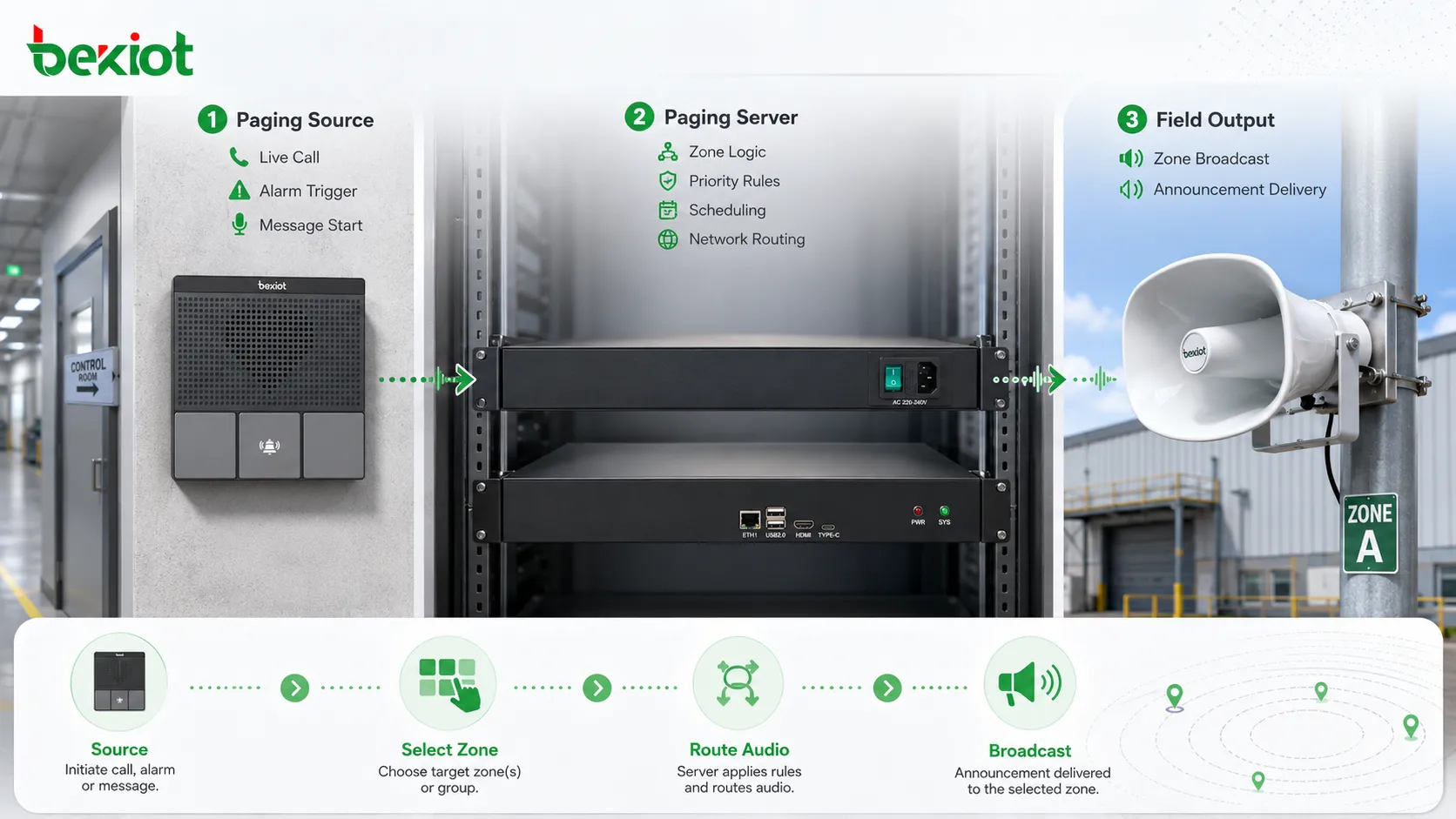
The working logic begins with a communication need. A control room operator may need to call a production area. A maintenance supervisor may need to notify a pump room. A security desk may need to speak to an entrance gate. A fire alarm or emergency button may need to trigger an evacuation message. A routine schedule may need to play a shift-change announcement.
The paging source can be a microphone, SIP phone, dispatch console, software client, web interface, mobile terminal, alarm input, automation platform, or pre-recorded message library. In a live scenario, the operator speaks directly. In an automatic scenario, the system may select a stored audio file or text-to-speech message according to the event type.
After the message is created, the platform checks where it should be delivered. It may need to reach one speaker, one workshop, one building, several outdoor areas, all emergency exits, a whole campus, or only the devices linked to a specific alarm. The system uses paging groups, zones, priority rules, schedules, and permissions to determine the route.
Once the route is determined, audio is transmitted through the appropriate path. In IP-based systems, the audio may move as network packets to IP speakers, network amplifiers, SIP terminals, or paging gateways. In traditional or hybrid systems, the audio may be sent to amplifiers and then to speaker lines. The result is heard through field speakers, horns, wall-mounted paging units, talkback stations, or industrial intercom terminals.
Industrial paging converts live speech, stored messages, or alarm triggers into targeted announcements for selected field zones.
The architecture behind the broadcast path
A typical architecture contains five layers. The first layer is the user or event source, such as an operator, dispatcher, security desk, maintenance team, scheduled task, or alarm system. The second layer is the control platform, which manages routing, priority, users, zones, message files, logs, and integration rules.
The third layer is the transmission network. In modern projects, this is often an IP network that connects paging servers, switches, network amplifiers, SIP devices, IP speakers, gateways, and control consoles. In existing facilities, analog audio lines, speaker circuits, or amplifier zones may still be used. Many projects combine new IP equipment with legacy speaker infrastructure.
The fourth layer is the field output layer. It includes ceiling speakers, horn speakers, wall speakers, explosion-proof speakers, IP speakers, industrial intercom stations, paging adapters, amplifiers, and local audio devices. These devices determine how the announcement is actually heard in the field.
The fifth layer is monitoring and feedback. A mature system should not simply send audio and assume success. It should show device status, amplifier health, network connectivity, zone availability, broadcast records, fault alarms, and operation logs where supported.
In projects that combine paging and field intercom, the architecture may also include call stations, help points, wall-mounted intercom terminals, control room consoles, and event pop-up interfaces. Becke Telcom industrial paging and intercom solutions can be used as a reference example for this integrated direction, where broadcast, intercom, emergency call, and dispatch response are handled as connected communication functions rather than isolated devices.
Zone selection is one of the most important mechanisms. Industrial sites are rarely suitable for one full-site broadcast rule. A loading dock message should not disturb the office area. A maintenance instruction for one production line should not interrupt another line. An emergency warning near a hazardous area may need to reach surrounding zones, but not necessarily the entire facility.
Zones can be created according to physical layout, operational function, safety level, or response responsibility. A factory may use zones such as workshop one, workshop two, warehouse, outdoor yard, power room, control room corridor, and main gate. A transport site may use platform zones, tunnel sections, ticket halls, staff rooms, and parking areas.
The system may support single-zone paging, multi-zone paging, all-zone paging, emergency-zone paging, and temporary group paging. Single-zone paging is used for local instructions. Multi-zone paging is used when related areas need the same message. All-zone paging is usually reserved for major announcements or emergency events.
Good zone design prevents message fatigue. If people hear too many irrelevant announcements, they may stop paying attention. Targeted zone paging keeps routine communication local and preserves attention for urgent broadcasts. Zone names should also match real site language, such as “North Loading Dock,” “Line 3 Assembly,” “Pump Room B,” or “Gatehouse Entrance.”
Live paging and scheduled playback
Industrial paging systems usually support both live paging and scheduled playback. Live paging is used when information changes in real time. An operator speaks into a microphone, chooses a zone, and delivers an immediate instruction. This is useful for temporary hazards, maintenance coordination, production changes, visitor guidance, security response, and unexpected events.
Scheduled playback is used for routine messages. A factory may play shift-change notices, safety reminders, lunch break announcements, or start-of-work prompts. A campus may play class bells or public service reminders. A transport facility may play regular passenger guidance. Scheduled playback reduces manual workload and improves consistency.
The important point is coordination. A scheduled announcement should not block a live emergency page. Background music should not cover a safety instruction. A routine reminder should not override a control room call. The platform should define which audio source has priority and what happens when two audio tasks occur at the same time.
Message libraries can also improve operation. Approved audio files can be stored for repeated use, such as evacuation instructions, weather warnings, equipment shutdown notices, visitor guidance, and test announcements. This avoids wording mistakes and keeps important messages consistent.
Priority control and emergency override
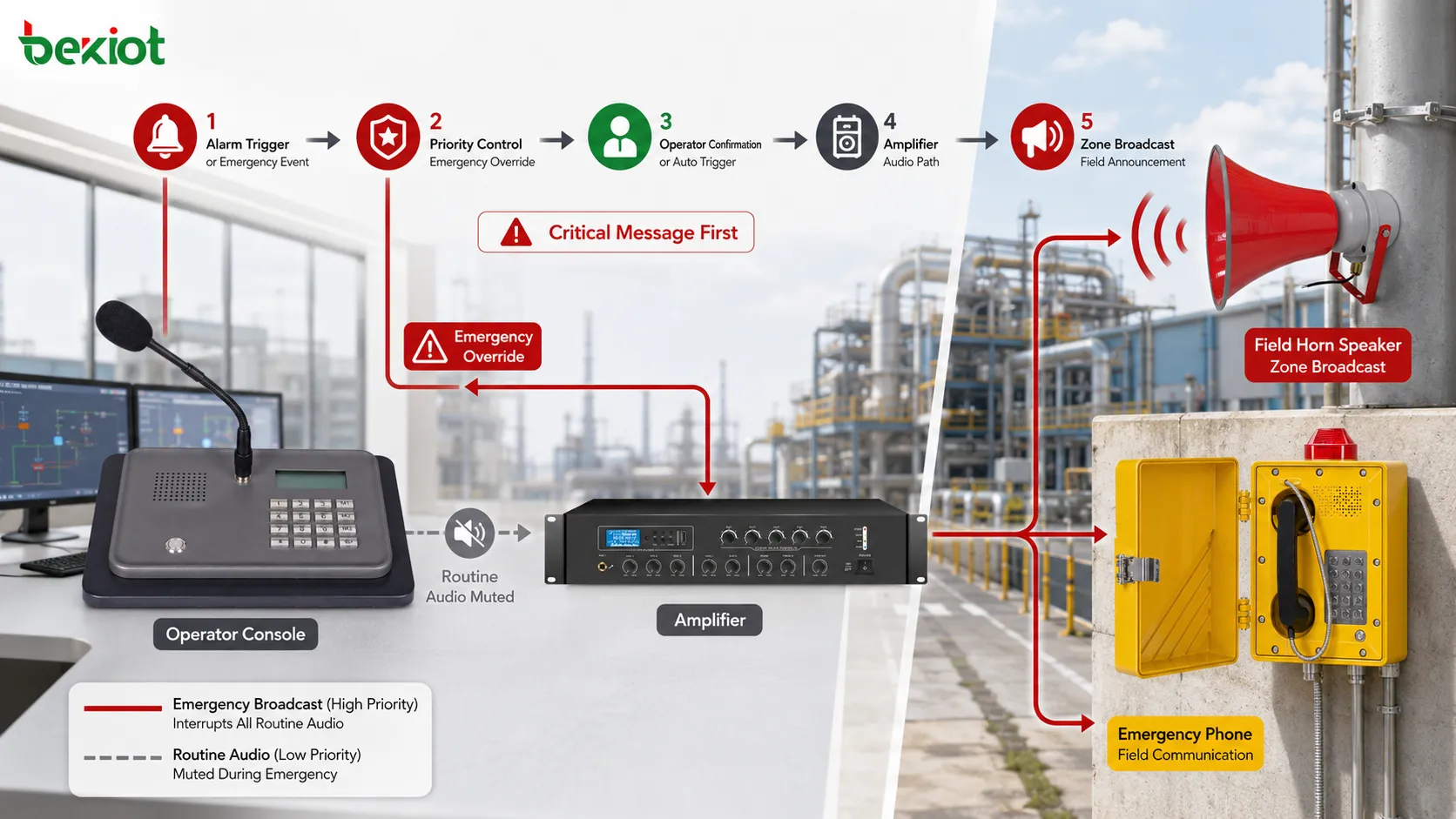
Priority control gives the system operational discipline. Not every message should have the same right to occupy the audio path. Emergency alarms, safety announcements, evacuation instructions, and control room commands should have higher priority than background music, routine reminders, or low-level service notices.
Priority rules define what happens during conflict. If an emergency broadcast starts while music is playing, the music should stop or mute. If two operators page the same zone, the higher-priority user may take control. If a scheduled message is running and a live operator speaks, the scheduled message may pause. If a fire alarm triggers a voice message, lower-priority audio should not interfere.
Emergency override allows critical announcements to take control of the audio system immediately. It may be triggered by a fire alarm, emergency button, gas detection event, security incident, or equipment hazard. The system can broadcast a warning to the selected area or the whole site according to the response plan.
Alarm linkage can be manual or automatic. In a manual workflow, an operator receives an alarm, verifies the situation, and starts a live or stored announcement. In an automatic workflow, the alarm input directly triggers a prepared message. Many sites use a mixed method: automatic warning for high-risk events and operator confirmation for lower-risk events.
Testing is necessary. The system should be tested with simultaneous events, such as scheduled audio plus live paging, background music plus alarm trigger, and local page plus emergency page. Field listening is also required because a screen showing “broadcast sent” does not prove that the message was clearly heard.
Emergency override allows urgent warnings to interrupt routine audio and reach the required zones immediately.
Intercom makes the system more useful
Traditional paging is usually one-way: the operator speaks and the audience listens. Industrial environments often need more than that. A worker may need to reply, confirm a condition, request assistance, or explain what is happening at the field point. This is where paging and intercom begin to overlap.
Two-way intercom allows the field and control room to communicate directly. A help point can call the operator. A gate terminal can speak with security staff. A maintenance point can contact engineering. A control room can call back to a field device after an alarm.
The combination is especially valuable during incidents. A sensor alarm may trigger a warning, but the operator may still need field confirmation. A public help point may request assistance, and the operator may then broadcast instructions nearby. A maintenance worker may call from a machine area, and the control room may page another team to respond.
Industrial intercom functions may include auto-answer, push-to-talk, full-duplex conversation, call queue, emergency call, hotline dialing, group call, call recording, relay control, video linkage, or location display. The exact feature set depends on system architecture and endpoint type.
Audio distribution methods
Industrial paging can use different audio distribution methods. Some systems use analog amplifier circuits. Some use IP speakers. Some use SIP paging. Some use multicast audio. Some use hybrid gateways that connect IP control with analog speaker lines. The correct method depends on existing infrastructure, group size, network design, reliability requirement, and future expansion.
Distribution Method
How It Works
Suitable Use
Key Concern
Analog amplifier line
Amplifier sends audio to passive speaker circuits
Fixed zones, existing PA wiring, large speaker loops
Speaker load, cable quality, zone wiring, amplifier capacity
IP speaker or network amplifier
Audio travels through the IP network to smart endpoints
A paging system does not work successfully unless the message can be understood. Industrial areas often include machinery noise, airflow, vehicles, echo, alarms, tools, pumps, motors, and outdoor sound. If audio design is poor, the system may technically broadcast but fail to communicate.
Clarity begins at the source. Operators should use suitable microphones, speak at a proper distance, avoid shouting, and wait until the paging channel is open. Pre-recorded messages should be recorded clearly, at consistent levels, and without unnecessary background noise.
Speaker selection and placement are equally important. A horn speaker may be suitable for noisy outdoor or industrial areas. A ceiling speaker may be better for offices or corridors. A wall speaker may fit warehouses, service halls, or public areas. Direction, height, coverage angle, and sound pressure level should match the listening environment.
The system may also need volume zones. A workshop may require higher volume than an office. A hospital corridor may need moderate volume. A tunnel or station platform may require careful echo control. For very noisy environments, paging may need to work with flashing lights, local displays, sirens, or intercom confirmation.
Centralized control with distributed reach
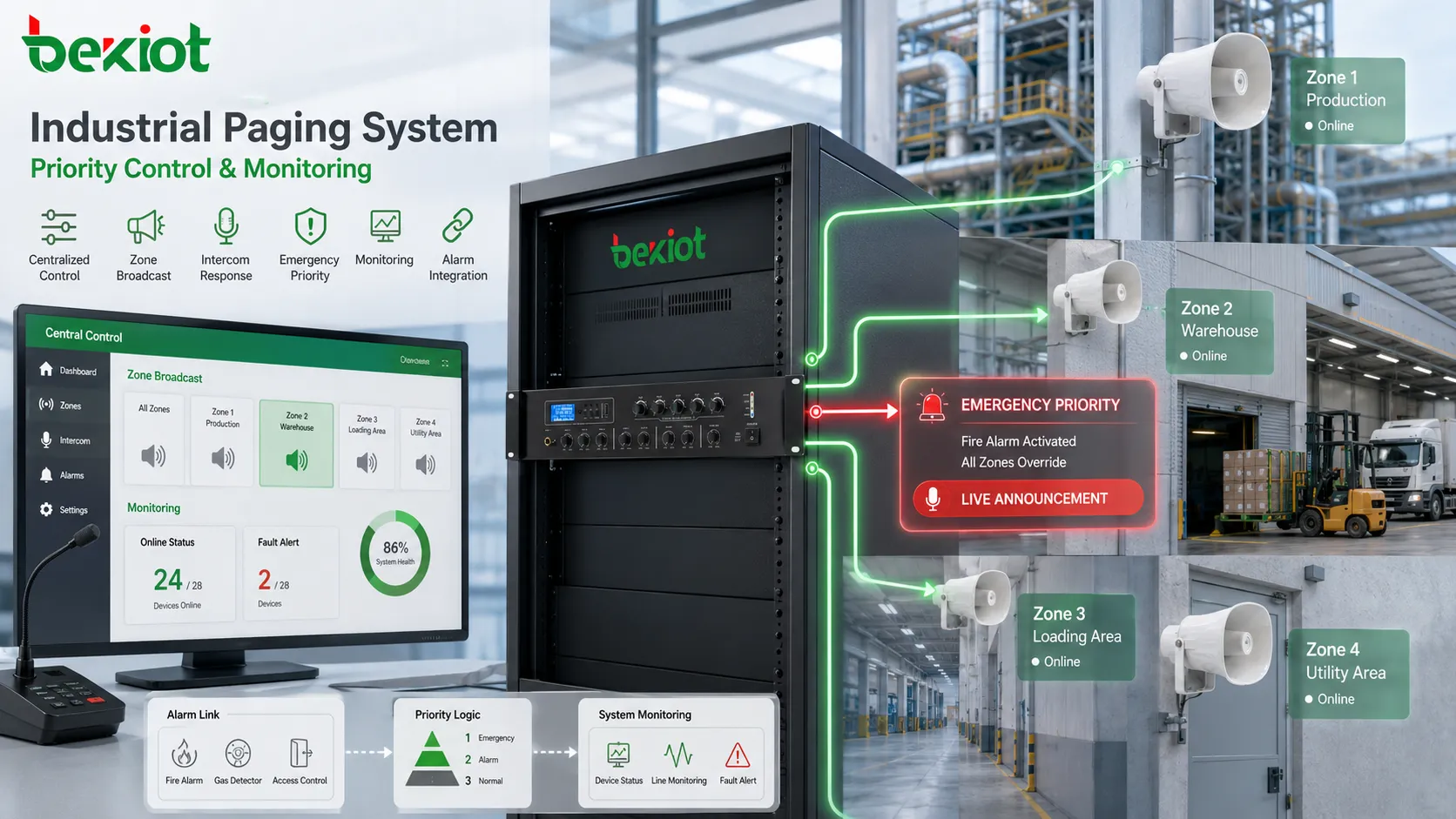
One special feature of an industrial paging system is the ability to control many distributed audio points from a central position. A control room, security office, dispatch desk, or facility management center can speak to local zones, remote buildings, outdoor areas, branch sites, or emergency points without sending staff physically to each location.
Centralized control reduces communication delay. When an event occurs, the operator does not need to call multiple people and hope the message spreads correctly. The system can deliver the instruction directly to the affected zone. This is useful in large plants, tunnels, campuses, stations, logistics parks, and utility networks.
Distributed reach also supports consistency. The same approved emergency message can be played across several areas. The same shift reminder can be delivered to multiple workshops. The same safety notice can be issued across a campus.
Central control should still allow local fallback where needed. If a central connection fails, a local operator may still need to page a building or area. Strong systems consider both centralized authority and local survivability.
Integration with field response
Industrial paging becomes more powerful when it is connected to response actions. A broadcast may be followed by a field call. An emergency button may trigger both a call and an announcement. A security event may open a camera view and prepare a zone page. A maintenance alarm may notify a workshop and create an operator log.
This response-oriented design turns paging into part of a workflow. The operator can see an event, page the affected area, speak with field staff, record the action, and track what happened. This is very different from a simple amplifier that only plays audio.
Becke Telcom industrial paging and intercom solutions can be mentioned as an example of this integrated direction: industrial broadcast, field intercom, control room calling, and emergency response can be organized into one communication structure according to project needs. The key point is the deployment idea—paging should support action, not only sound output.
In real projects, response integration may involve dispatch consoles, video monitoring, alarm inputs, door control, device status, event pop-ups, audio recording, and maintenance logs. Each integration should be tied to a real operational purpose. Integration without workflow only makes the system more complex.
Special features include centralized control, zone broadcast, intercom response, emergency priority, monitoring, and alarm integration.
Monitoring and fault awareness
A paging system must be ready before it is needed. If a speaker line is broken, an amplifier is offline, an IP speaker loses network connection, or a zone is muted, the failure may remain hidden until an important broadcast fails. Monitoring and fault awareness reduce this risk.
Depending on architecture, the system may monitor endpoint online status, amplifier faults, speaker line condition, network reachability, power state, call status, broadcast logs, and alarm trigger records. IP-based systems usually provide more device-level visibility than simple analog systems, although analog line monitoring can also be implemented in certain designs.
Fault visibility is especially important for emergency paging. Maintenance teams need alarms, logs, dashboards, or inspection reports to confirm that the system is healthy. A silent failure in a rarely used zone can become serious during an incident.
Monitoring should be supported by routine testing. A device may show online but still have poor audio output because of a damaged speaker, blocked grille, wrong volume, or local acoustic problem. Technical status and actual listening tests should be combined.
Where industrial paging is used
Factories and production sites
Factories use industrial paging for shift notices, production instructions, safety warnings, maintenance dispatch, emergency alerts, quality reminders, logistics coordination, and visitor guidance. Workers may be distributed across workshops, assembly lines, warehouses, utility rooms, control rooms, and outdoor yards.
Zone planning is important. One line may need a message that should not disturb another line. A safety warning may need to reach all production areas. A maintenance call may need to reach only engineering staff. In noisy areas, horn speakers, repeated messages, and visual indicators may be required.
Energy, utilities, and remote stations
Energy and utility sites include substations, power plants, water treatment facilities, pumping stations, heating systems, pipelines, renewable energy sites, and remote equipment rooms. Paging supports safety, maintenance, inspection, switching operations, access control, and emergency handling.
Remote sites may have fewer staff on site. Paging and intercom functions can support remote supervision, where a central operator communicates with a field point or broadcasts to a local area. Power backup, network redundancy, weather protection, surge protection, grounding, and device monitoring should be considered.
Transportation and public infrastructure
Railway stations, metro systems, tunnels, airports, ports, bus terminals, parking facilities, highway service areas, and logistics hubs use paging for passenger guidance, platform changes, evacuation instructions, staff dispatch, security notices, and operational updates.
Tunnels and underground passages have special requirements. Mobile signals may be limited, distances may be long, and emergency response may depend on clear audio guidance. Paging zones should follow tunnel sections, emergency exits, equipment rooms, cross passages, and control points.
Warehouses and logistics parks
Warehouses and logistics parks use paging for loading dock coordination, vehicle dispatch, security notices, emergency alerts, equipment warnings, and shift communication. Large spaces, high racks, moving forklifts, conveyor systems, outdoor yards, gates, and parking areas all affect design.
Zone design should follow workflow. Dock areas, sorting areas, storage zones, office areas, security gates, and parking yards may need separate groups. Integration with intercom can be useful at gates and service points, where drivers or visitors need to contact the control desk.
Campuses, hospitals, and commercial facilities
Campuses, hospitals, commercial buildings, office parks, hotels, and public facilities use paging for service guidance, emergency notices, staff coordination, visitor management, security response, and routine announcements. These environments often include both public areas and restricted areas, so zone control and permission management are important.
Hospitals require careful paging design because excessive announcements can disturb patients, but urgent staff coordination may still be necessary. Campuses may need building-level, floor-level, outdoor-area, and all-campus groups. Commercial facilities need clear messages without excessive noise in customer-facing spaces.
Planning rules before deployment
Before deployment, the project team should define the purpose of the system. Is it mainly for routine announcements, emergency communication, production coordination, public guidance, intercom response, or a combination of these? Different purposes require different priorities, zones, devices, and integration methods.
The next step is to map physical areas. The system should follow buildings, floors, workshops, corridors, gates, yards, platforms, machine rooms, public halls, and emergency routes. Zone planning should involve both technical engineers and site operators because operators understand how people move and where messages are needed.
Device selection should match the environment. Indoor quiet areas may use ceiling speakers or wall speakers. Noisy industrial areas may need horn speakers. Outdoor or harsh environments may need weather-resistant or rugged devices. Field response points may need intercom terminals. Existing speaker lines may require amplifiers or gateways.
Network and power planning should be completed before installation. IP paging requires suitable VLANs, multicast or unicast decisions, QoS, switch capacity, firewall rules, and management access. Emergency paging may require backup power, protected circuits, or local fallback. Analog speaker systems require amplifier capacity, cable calculation, and line testing.
Commissioning and verification
Commissioning should test more than device power-on. Each source, zone, endpoint, amplifier, speaker, intercom point, alarm trigger, and priority rule should be verified. The system should be tested from the operator interface and from the field listening position.
Zone accuracy is a key test item. When the operator pages Zone A, only Zone A should receive the message unless the design says otherwise. When all-zone paging is activated, every required area should be checked. Wrong-zone playback can disturb operations, while missed-zone playback can create safety gaps.
Audio intelligibility should be tested during realistic conditions. If a factory line is normally noisy, test the page while equipment is running. If a station is crowded during peak hours, test the system under similar acoustic conditions where possible. A quiet commissioning test may not reveal real problems.
Priority behavior should be verified with conflict scenarios. Emergency broadcast should override routine messages. Live paging should behave according to policy. Scheduled playback should pause or stop as configured. Alarm-triggered messages should reach the correct zones.
Intercom functions should also be tested. Calls from field points should reach the correct operator. Location information should be accurate. Audio should be clear in both directions. If video, access, or alarm linkage is included, those workflows should be checked end to end.
Common mistakes and better fixes
Mistake
Typical Result
Better Fix
Using one large broadcast zone
People hear too many irrelevant announcements
Design zones according to real areas, risks, and workflows
Ignoring acoustic conditions
The system plays audio but people cannot understand it
Test speaker type, direction, echo, noise, and volume in the field
Underestimating IP network design
Multicast, SIP, or RTP audio fails across VLANs or firewalls
Plan routing, QoS, IGMP, firewall rules, and endpoint reachability
Forgetting emergency behavior
Routine audio may block safety communication
Configure priority, override, alarm linkage, backup power, and testing
No long-term maintenance plan
Hidden device faults remain until an important message fails
Use monitoring, logs, inspection, and periodic field playback tests
How to judge whether it works well
A well-designed industrial paging system should deliver the right message to the right area at the right time. The first standard is zone accuracy. Operators should be able to select areas easily, and the field output should match the selection. Wrong or missed zones reduce trust in the system.
The second standard is intelligibility. People should understand the message under normal site conditions. This requires proper source audio, speaker selection, placement, volume, acoustic tuning, and message discipline. Loud but unclear audio is not successful paging.
The third standard is priority behavior. Critical messages should override routine audio. Emergency alarms should reach required zones. Operators should understand what happens during conflict. Priority should be tested, not only configured.
The fourth standard is response integration. If the system includes intercom, alarms, video, access, or dispatch functions, these workflows should help operators act faster. Integration is valuable only when it reduces response time or improves decision quality.
The fifth standard is maintainability. Administrators should be able to monitor device status, review logs, test zones, update messages, manage permissions, and locate faults. A system that works only on installation day but becomes difficult to maintain is not a strong industrial communication solution.
Final view
An industrial paging system works by converting live speech, scheduled messages, or alarm triggers into controlled audio delivery across selected zones. It uses sources, routing rules, paging groups, priority levels, transmission networks, amplifiers, speakers, intercom terminals, and monitoring functions to support real-time field communication.
Its special features include zone-based broadcast, emergency override, priority control, live and scheduled paging, intercom response, alarm linkage, centralized control, distributed reach, device monitoring, and flexible integration with industrial workflows. These features make it different from a simple loudspeaker or background audio system.
The value is strongest when the system is designed around real site conditions. Factories, energy sites, tunnels, transport facilities, warehouses, campuses, hospitals, commercial buildings, and public infrastructure all need different zone logic, audio design, device selection, and response procedures. When planning, commissioning, and maintenance are done carefully, an industrial paging and intercom system becomes a practical tool for safety, coordination, and operational continuity.
FAQ
Is an industrial paging system the same as a public address system?
They are related, but not identical. A public address system may focus on general announcements and background audio, while an industrial paging system usually adds zone control, priority, emergency override, intercom integration, alarm linkage, monitoring, and operational response features.
Why is zone planning so important?
Zone planning ensures that each message reaches the correct area without disturbing unrelated spaces. Good zones improve message relevance, reduce noise pollution, and make emergency communication more accurate.
Can the system support two-way communication?
Yes, if intercom terminals or talkback devices are included. Paging handles one-to-many announcements, while intercom allows field users and operators to speak with each other for confirmation, help requests, access control, or emergency response.
What affects the clarity of paging audio?
Audio clarity depends on microphone quality, speaker type, placement, background noise, volume setting, echo, network quality, amplifier performance, and message wording. Field testing under real conditions is essential.
What should be checked during maintenance?
Maintenance should include speaker output, amplifier status, endpoint connectivity, microphone operation, zone accuracy, emergency override, alarm linkage, logs, power supply, cable condition, and actual field audibility.