Jitter buffer explained for VoIP, IP paging, dispatch, intercom and video conferencing, covering packet timing, fixed and adaptive buffering, latency trade-offs, packet loss handling and deployment practices.
Becke Telcom
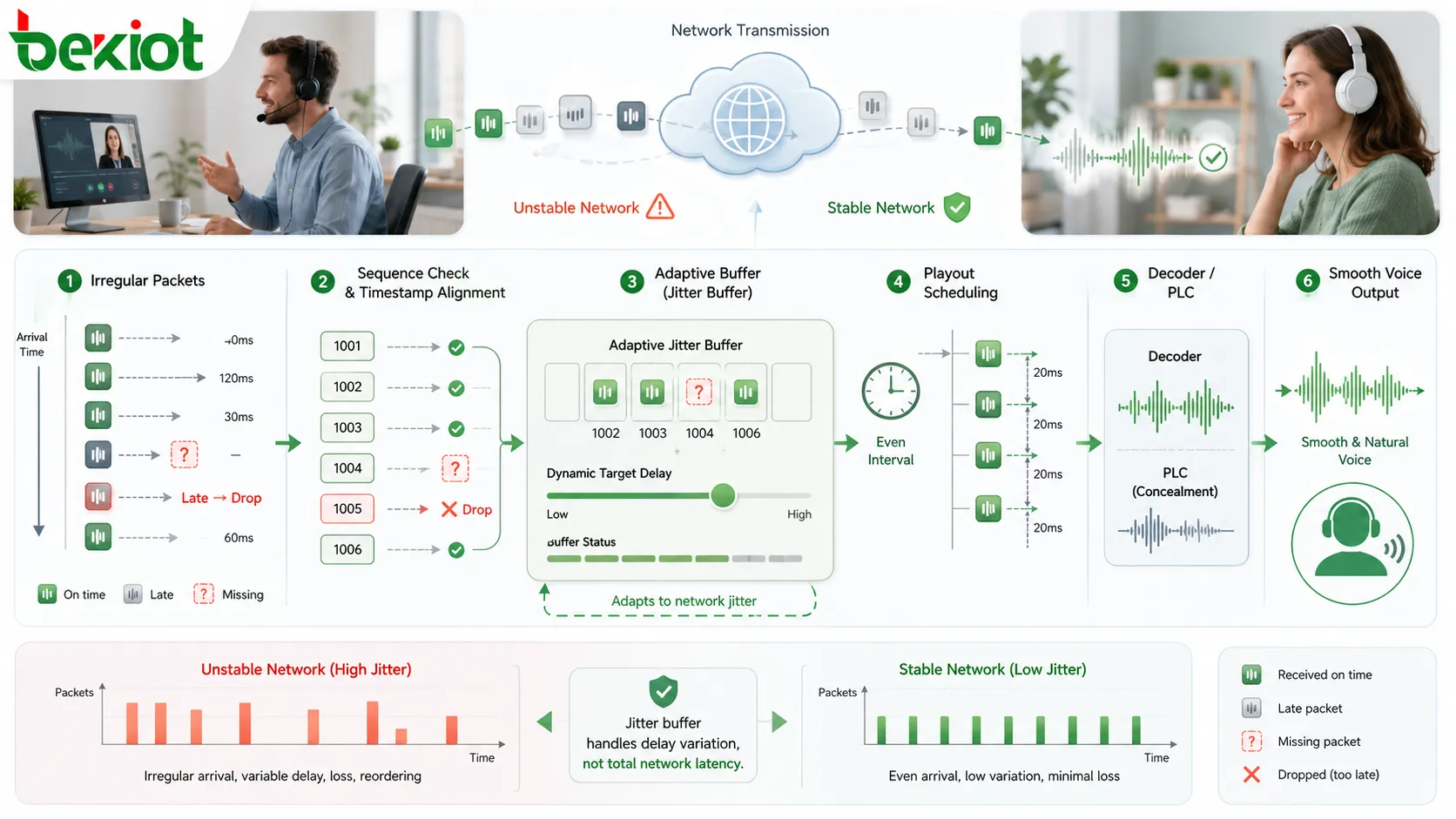
In IP voice, real-time audio is not sent as one continuous sound. A microphone captures speech, the codec encodes it, the system divides it into packets, and the network delivers those packets to the receiving side. The difficulty is that packets do not always arrive at the same rhythm in which they were sent.
Some packets arrive early, some arrive late, some arrive out of order, and some may miss their useful playback time. This timing variation is called jitter. A jitter buffer reduces the audible impact of that variation by temporarily storing incoming packets, arranging them by timing information, and playing them out at a steadier rhythm.
Jitter buffers are used in VoIP calls, IP paging, dispatch systems, intercoms, emergency phones, SIP trunks, video conferencing, wireless voice, and real-time communication platforms. Their purpose is not to make the network faster, but to make imperfect packet arrival less damaging to speech quality.
Why real-time audio needs buffering
Voice communication is sensitive to timing. A file download can wait until all data arrives, but a live conversation cannot wait several seconds for missing packets. If audio packets arrive unevenly, the listener may hear gaps, clipped syllables, robotic sound, clicks, or short silences.
The jitter buffer gives the receiver a short waiting space. If a packet arrives slightly late, the buffer may still be holding enough audio to continue playback. If packets arrive out of order, the buffer may place them back into the correct sequence. If a packet arrives too late, it may be discarded and replaced by packet loss concealment.
The design problem is balance. A larger buffer can absorb more jitter, but it adds delay. A smaller buffer keeps delay low, but it may not protect audio well on unstable networks. A good buffer is therefore tuned to the communication scenario and, in many systems, adapts as network conditions change.
How a jitter buffer works
A jitter buffer usually sits on the receiving side of a real-time audio stream. Packets arrive from the network and enter the buffer before decoding and playback. The system checks sequence number, RTP timestamp, arrival time, expected packet interval, and playout deadline.
The buffer then decides whether each packet should wait, be reordered, be played, be discarded, or be replaced by concealment audio. In a stable network, packets arrive at regular intervals and the buffer can stay small. In an unstable network, it may need to hold more audio briefly to keep playback continuous.
Jitter buffering manages delay variation, not total delay itself. If every packet is delayed by the same amount, that is latency. If packet delay changes from moment to moment, that variation is jitter. The buffer is mainly designed to smooth the variation.
A jitter buffer temporarily stores and reorders incoming audio packets before playing them at a steadier rhythm.
Fixed and adaptive buffers
Fixed jitter buffer
A fixed jitter buffer uses a predefined delay or buffer size. This makes behavior simple and predictable. It can work well in controlled networks, such as a stable local area network with limited congestion and known packet timing.
The weakness is inflexibility. If the fixed buffer is too small, late packets will often miss their playback deadline and cause gaps. If it is too large, every call adds unnecessary delay even when the network is stable. Fixed buffers are more suitable for predictable networks or some one-way audio scenarios where delay is less sensitive.
Adaptive jitter buffer
An adaptive jitter buffer changes its target size according to packet arrival behavior. When the network becomes unstable, it may increase buffering slightly to avoid gaps. When the network becomes stable again, it may reduce buffering to lower delay.
This approach is useful in real-world VoIP, WebRTC, conferencing, mobile voice, dispatch, and intercom systems because networks rarely stay constant. The challenge is that adaptation must be smooth. If the buffer changes too aggressively, users may hear artifacts or unstable delay. If it changes too slowly, audio may break before the system reacts.
Buffer size and delay trade-off
The most important trade-off is buffer size versus delay. A larger buffer gives late packets more time to arrive and can reduce choppy audio. At the same time, every extra millisecond in the buffer adds to end-to-end delay.
In two-way calls, delay affects conversation flow. If delay becomes too high, people may talk over each other or pause awkwardly. Dispatch communication, emergency phones, intercom calls, and contact center conversations need relatively fast back-and-forth interaction.
In one-way audio, such as IP paging or public address announcements, slightly more buffering may be acceptable because the listener does not need to respond instantly. Even then, emergency announcements should not be delayed excessively. The best design uses the smallest buffer that can handle normal jitter while preserving acceptable response time.
Packet reordering and late packet handling
Packets may arrive out of order because of routing changes, queuing, wireless retransmission, or intermediate processing. The jitter buffer uses sequence numbers and timestamps to put packets back into playback order when they arrive before the deadline.
Reordering is useful only within a limited time window. If a delayed packet arrives after its audio position has already been played, it cannot be inserted without disrupting playback. At that point, the packet is functionally lost even if it eventually reached the receiver.
Late packet handling is therefore a key part of buffer behavior. A packet that is only slightly late may still be playable. A packet that is too late may be discarded, while the system uses packet loss concealment, silence insertion, comfort noise, or codec-specific recovery to reduce the audible damage.
Packet loss concealment and codecs
A jitter buffer often works with packet loss concealment, commonly called PLC. When an expected packet is missing or late, PLC tries to hide the gap by generating replacement audio based on previous speech, repeating a suitable waveform segment, inserting comfort noise, or using codec-specific concealment.
PLC cannot recover the original missing speech. It only makes short gaps less noticeable. The jitter buffer helps decide when PLC should be used. If it waits too long, delay increases. If it gives up too quickly, concealment may be used unnecessarily.
Codec and packetization settings also influence buffer behavior. A 10 ms packet contains less speech than a 20 ms or 30 ms packet. Longer packet intervals reduce overhead, but losing one packet removes a larger slice of audio. Codec choice should consider latency, bandwidth, packet loss tolerance, processing capacity, and the communication scenario.
RTP timing and quality monitoring
In many VoIP and real-time media systems, RTP provides sequence and timestamp information. These fields help the receiver understand packet order and intended media timing. The jitter buffer depends on this information to schedule playback correctly.
Jitter measurement is useful for troubleshooting. RTCP reports and extended reports may show packet loss, delay, jitter, late packets, discarded packets, and other quality indicators. These metrics help administrators identify whether choppy audio is caused by network timing, congestion, wireless conditions, routing, or endpoint behavior.
Jitter should still be interpreted with context. A short spike may be hidden by the buffer. Constant high jitter may cause delay growth or packet drops. Low jitter does not guarantee perfect audio if there is packet loss, echo, codec mismatch, bad microphone input, or distorted source audio.
Audio quality value
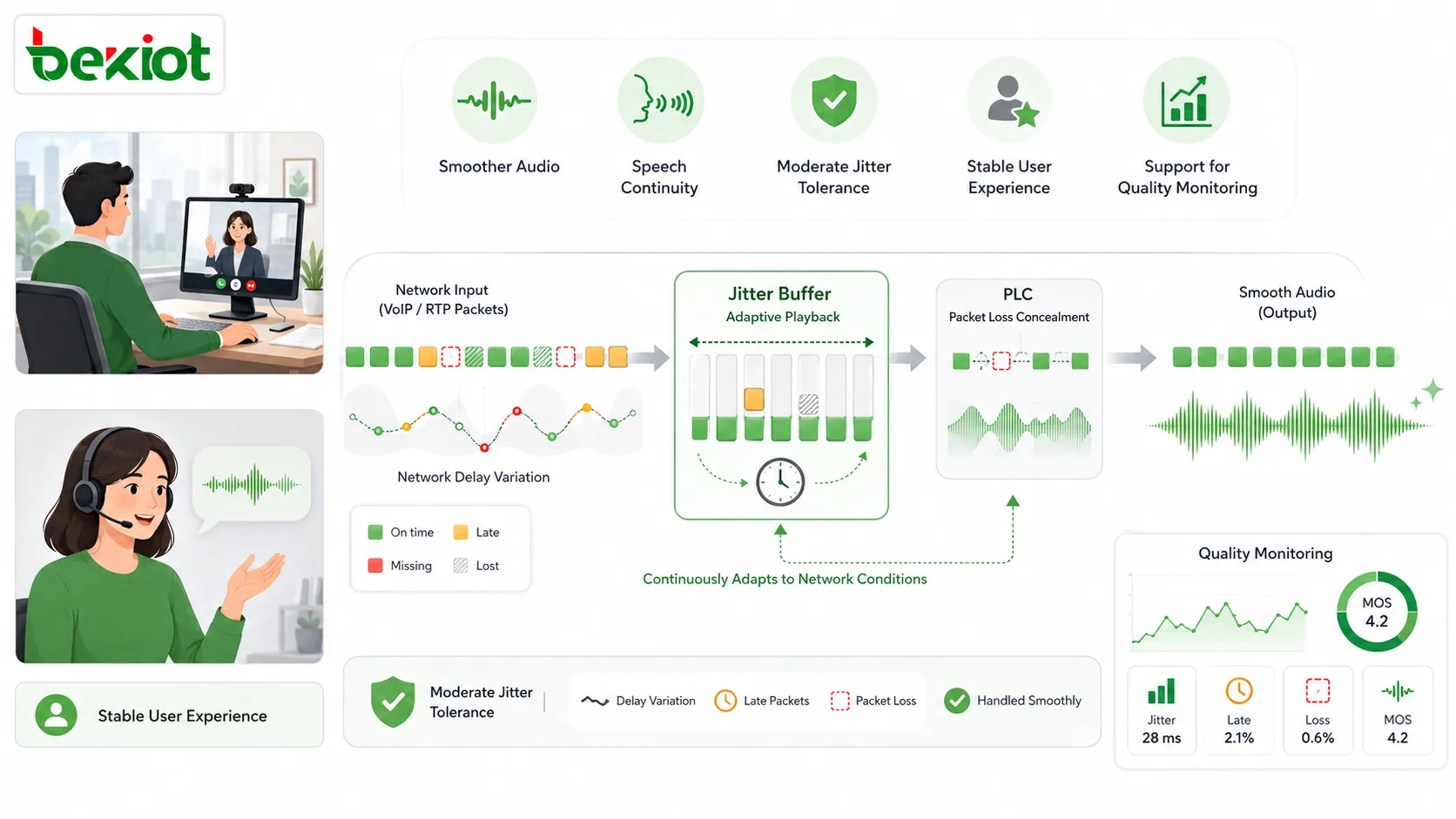
The practical value of a jitter buffer is smoother audio. By absorbing packet timing variation, it reduces broken words, uneven speech, short gaps, and unstable playback. This makes calls, intercom conversations, conferences, and dispatch audio easier to understand.
It also gives the system tolerance against moderate network variation. Real networks may experience traffic bursts, Wi-Fi contention, WAN congestion, routing changes, and endpoint timing differences. The jitter buffer gives the receiver a small margin before these variations become audible.
When buffer behavior is monitored, it also supports maintenance. Administrators can see whether the system is compensating for network instability and whether certain branches, trunks, Wi-Fi zones, or gateways repeatedly experience high jitter.
Jitter buffers improve real-time audio by reducing timing gaps, smoothing playback, and supporting concealment when packets arrive late or are missing.
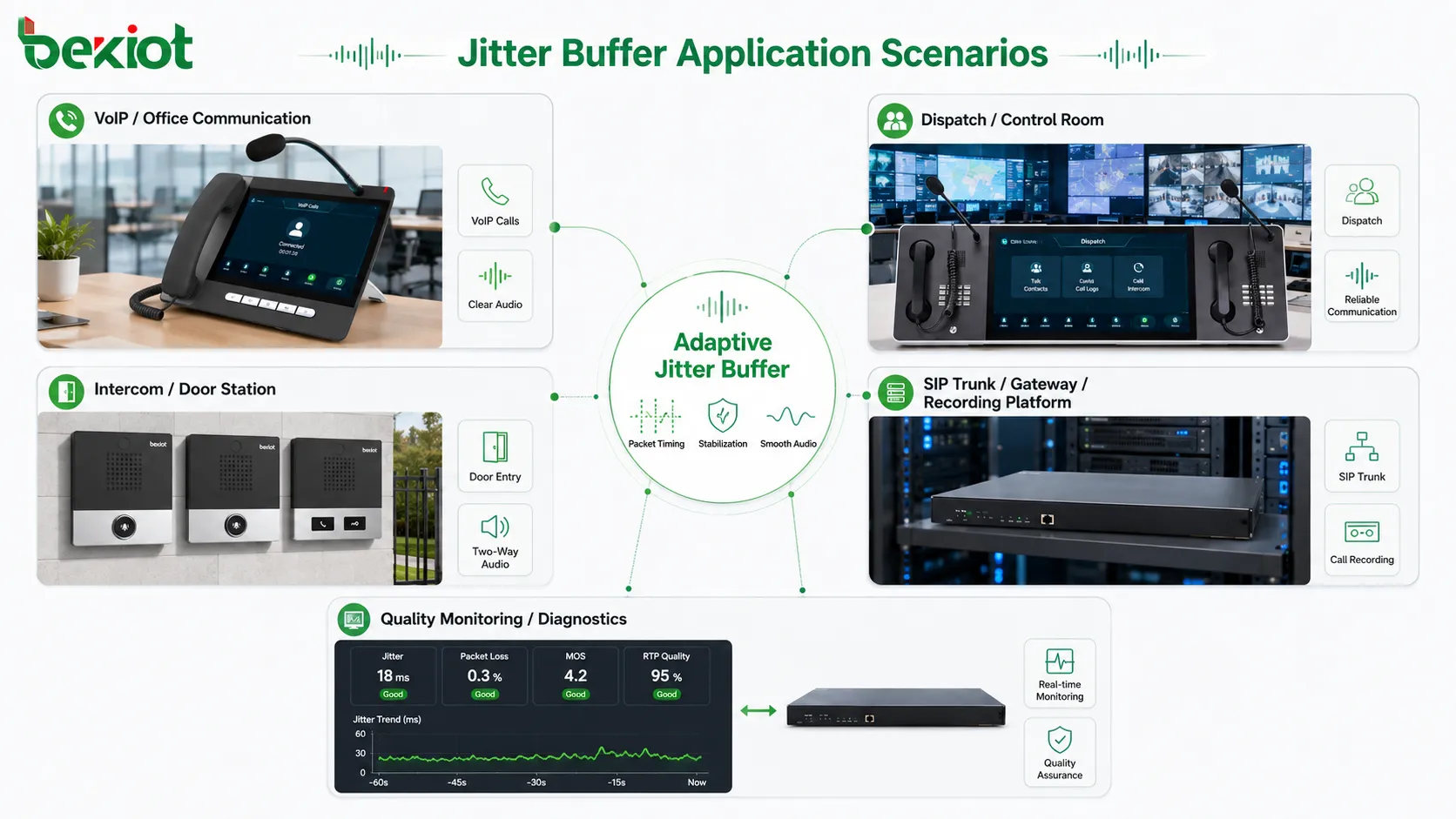
Where jitter buffers are used
VoIP phone systems
SIP phones, softphones, IP PBX systems, SIP trunks, and voice gateways rely on packetized audio. A jitter buffer helps reduce complaints such as broken voice, robotic sound, missing words, and unstable audio, especially in branch networks, remote work, VPN voice paths, Wi-Fi phones, and public internet connections.
Good network design is still necessary. VLAN separation, QoS, stable switching, routing, and bandwidth planning reduce jitter before it reaches endpoints. The jitter buffer improves resilience, but it is not a replacement for proper network engineering.
IP paging and public address
IP paging systems deliver announcements to speakers, amplifiers, paging adapters, and broadcast zones over packet networks. A jitter buffer in the receiving endpoint can keep announcements smooth when packet arrival is not perfectly regular.
Paging often allows slightly more buffering than two-way calls, but emergency alerts still need timely delivery. In multi-zone paging, inconsistent buffer behavior between nearby speakers may create echo or staggered announcements, so endpoint settings and network paths should be tested together.
Dispatch and emergency systems
Dispatch and emergency communication need both clarity and fast response. A dispatcher may speak with a field worker, gate station, emergency phone, intercom terminal, maintenance team, or control room. If jitter breaks the speech, the operator may miss important details.
The buffer should preserve intelligibility without adding excessive delay. Emergency phones, help points, and remote dispatch endpoints should be tested under realistic network conditions before acceptance.
Intercom and access communication
IP intercoms connect door stations, gate terminals, help points, elevators, parking entrances, service desks, and security rooms. These systems often use two-way audio and sometimes video. A jitter buffer helps keep the voice path stable when packet arrival varies.
Latency matters in access communication. If the buffer is too large, users may talk over each other or wait unnecessarily. Adaptive buffering and suitable codec settings help maintain both clarity and responsiveness.
Video conferencing and mobile voice
Video conferencing depends heavily on audio quality. Participants may join from office LAN, home Wi-Fi, mobile data, hotel networks, or public internet. Audio jitter buffers work with echo cancellation, noise suppression, gain control, PLC, bandwidth adaptation, and codec control to maintain a usable meeting experience.
Wireless and mobile networks often create more jitter than wired networks. Wi-Fi interference, roaming, signal change, channel contention, and cellular scheduling can all affect packet timing. Adaptive buffering is especially useful here, but it cannot fully compensate for weak coverage or poor wireless design.
SIP trunks, gateways, and recording
SIP trunks and media gateways connect different voice networks. A call may pass between an enterprise PBX and a carrier, between analog and IP systems, or between radio and VoIP networks. Gateways often use jitter buffering to stabilize incoming RTP streams before forwarding or converting audio.
Recording and monitoring systems also depend on correct packet timing. If RTP packets arrive with jitter, the recorder may need to reorder and align them before storage and playback. Quality metadata such as jitter, packet loss, codec, endpoint, and call path can help explain unclear recordings.
Jitter buffers are used in VoIP, IP paging, dispatch systems, intercoms, video conferencing, SIP trunks, gateways, and recording platforms.
Common symptoms and causes
Symptom
Possible Cause
Better Check
Choppy audio
Buffer too small, high jitter, packet loss, or unstable wireless path
Check jitter, late packets, discarded packets, packet loss, and endpoint settings
Audio is smooth but conversation feels slow
Buffer too large or adaptive buffer does not shrink after network recovery
Review buffer limits, latency, codec settings, and call path delay
Robotic or synthetic sound
Frequent packet loss concealment caused by missing or late packets
Check packet loss, wireless stability, WAN congestion, and PLC behavior
Staggered paging between nearby speakers
Different buffer sizes, network paths, endpoint settings, or multicast behavior
Test endpoint consistency, zone layout, network delay, and synchronization design
Quality issues only on external calls
SIP trunk, carrier path, gateway, SBC, or WAN jitter problem
Compare internal and trunk calls, and review RTCP or gateway quality reports
Configuration considerations
Jitter buffer configuration should begin with the application type. Two-way voice requires lower delay than one-way paging. Emergency dispatch needs both clarity and quick response. Video conferencing needs natural interaction. Recording systems need accurate timing.
Administrators should consider minimum buffer, maximum buffer, adaptive mode, codec, packetization interval, endpoint capacity, network type, and expected jitter range. Some devices expose these settings directly, while others manage them automatically.
A very small buffer may look good for latency but fail during network congestion. A very large buffer may hide jitter but make conversation uncomfortable. The correct setting is usually a balance, and any change should be tested on the real call path.
Network design still matters
A jitter buffer improves audio resilience, but it cannot replace network design. If bandwidth is insufficient, packet loss is severe, or latency is extremely high, no buffer can fully restore natural real-time communication.
QoS is important because voice packets should not wait behind large file transfers, backups, video uploads, or non-real-time traffic. Voice VLANs, stable switching, appropriate routing, controlled broadcast traffic, and good wireless planning all help reduce jitter before the buffer must compensate.
For WAN, VPN, Wi-Fi, and internet paths, administrators should monitor jitter, packet loss, and latency regularly. The best design combines network quality with jitter buffer intelligence: the network reduces the problem, and the buffer handles the remaining variation.
Limitations of jitter buffers
A jitter buffer can absorb timing variation only within a limited range. If packets arrive too late, they are unusable. If packets are lost completely, the buffer cannot recover the original speech. If jitter remains high for a long time, the buffer may either increase delay or allow more packet drops.
It also cannot fix bad source audio. A poor microphone, distorted speaker, clipped input, codec mismatch, echo, or wrong gain setting will not be solved by buffering. Jitter buffers work on packet timing, not every voice quality problem.
Different products may handle jitter differently. Two phones, gateways, softphones, speakers, or recorders may respond differently to the same network condition. This is why interoperability testing and field testing are important in critical systems.
Best practices for deployment
First, understand the actual network path. Calls inside a LAN, across branches, through VPNs, over Wi-Fi, through SIP trunks, or through public internet may experience different jitter behavior. Buffer policy should match those paths.
Second, use adaptive jitter buffering where network conditions are variable. It usually offers a better balance between smoothness and delay than a fixed value in real deployments.
Third, verify QoS and quality monitoring. Marking voice packets is not enough if switches, routers, firewalls, or WAN devices ignore or rewrite the markings. Jitter, packet loss, delay, late packets, discarded packets, and call quality reports should be reviewed together.
Finally, test with real endpoints and real traffic. A clean lab call does not prove performance across branches, trunks, wireless links, dispatch gateways, busy-hour traffic, paging events, or failover scenarios.
How to evaluate buffer design
A good jitter buffer should preserve speech continuity while keeping delay low enough for the application. Users should hear clear audio without frequent missing words, and they should not experience excessive conversational delay.
The buffer should also recover when conditions improve. If it grows during a jitter spike but never reduces delay afterward, later communication may feel slow even when the network is stable again.
Observability matters. Administrators should be able to diagnose whether jitter, packet loss, late packets, discarded packets, codec behavior, or endpoint settings are contributing to audio problems.
The final evaluation point is scenario fit. A setting that works for video meetings may not suit dispatch intercom. A strategy suitable for IP paging may not be right for SIP trunk calls. The buffer should match the communication purpose.
Final view
A jitter buffer is a real-time audio mechanism that temporarily stores incoming packets and controls playback timing to reduce the audible impact of network jitter. It is used because packet networks do not always deliver voice packets at perfectly regular intervals.
Its main functions include packet storage, reordering, playout scheduling, fixed or adaptive buffering, late-packet handling, packet loss concealment support, codec timing coordination, RTP timing use, delay control, and quality monitoring.
Jitter buffers are widely used in VoIP phones, IP paging, public address, dispatch systems, emergency phones, intercoms, video conferencing, wireless voice, SIP trunks, gateways, recording systems, and monitoring platforms. The strongest design combines proper buffer behavior with QoS, codec planning, network engineering, monitoring, and field testing.
FAQ
What is a jitter buffer?
A jitter buffer is a temporary storage mechanism used in real-time audio systems. It holds incoming packets briefly, reorders them if needed, and plays them at a steadier rhythm to reduce packet delay variation.
Does a jitter buffer remove jitter completely?
No. It does not remove jitter from the network. It absorbs and manages a certain amount of packet timing variation before playback. If jitter is excessive, audio quality may still suffer.
What is the difference between fixed and adaptive jitter buffer?
A fixed jitter buffer uses a set delay, while an adaptive jitter buffer changes its size according to network conditions. Adaptive buffers are usually better for variable networks.
Can a jitter buffer cause delay?
Yes. A jitter buffer intentionally adds a small delay so late packets have time to arrive. If the buffer is too large, conversation may feel slow.
Where are jitter buffers commonly used?
They are used in VoIP calls, IP paging, intercoms, dispatch systems, emergency phones, video conferencing, wireless voice, SIP trunks, media gateways, recording systems, and other real-time IP audio applications.