How Does IP Paging Work in Modern Communication Systems?
IP paging explained for network-based announcements and audio notification, covering SIP paging, multicast delivery, IP speakers, paging adapters, PBX integration, zone control, hybrid upgrades and deployment planning.
Becke Telcom
IP paging is a paging and broadcast method that uses an IP network to deliver live voice announcements, scheduled audio, alert tones, and emergency notifications to speakers, paging adapters, intercom stations, desk phones, or other network-connected audio endpoints. Instead of depending only on traditional analog paging loops and centralized amplifier wiring, an IP paging system moves audio transport and control onto Ethernet and IP infrastructure.
This does not mean every IP paging system is built the same way. Some systems are based on SIP and work like endpoints inside a VoIP platform. Some use multicast audio to send one stream to many devices at the same time. Others combine IP speakers with adapters that connect older analog amplifiers and horn speakers to a modern network. In practical engineering terms, IP paging is best understood as a network-based paging architecture, not a single fixed product type.
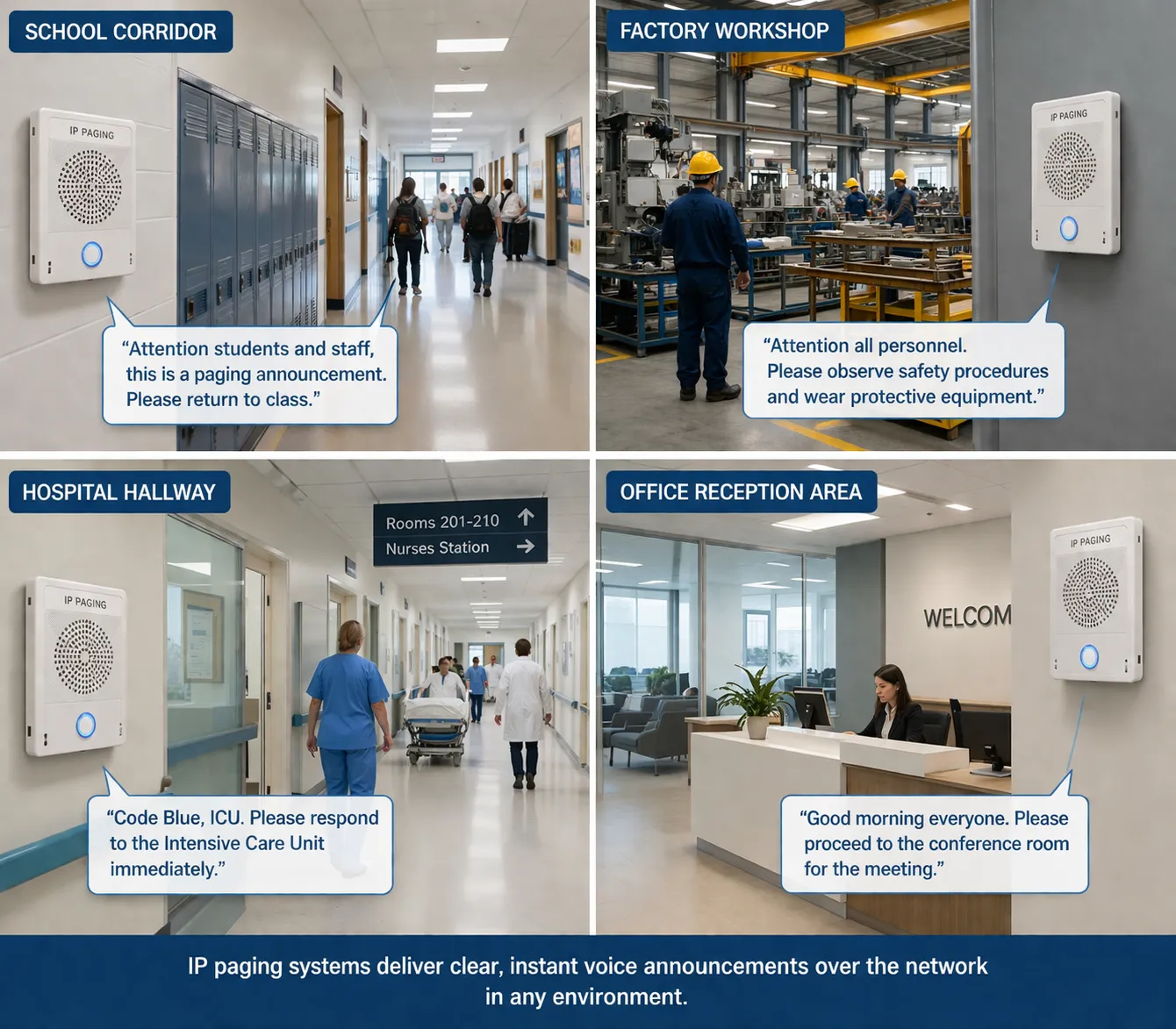
The reason it matters is simple: voice notification is still important in real operating environments. Offices use paging for staff announcements. Schools use it for bell schedules and emergency messages. Hospitals use it for staff notification and area paging. Factories, warehouses, transport sites, public buildings, and industrial facilities use it when messages need to reach people quickly across wide physical areas.
Once paging moves onto an IP network, it becomes easier to integrate with PBX platforms, intercom terminals, alarm systems, schedulers, management software, and remote administration tools. That is the practical value of IP paging: it turns one-way audio announcements into a manageable part of the broader communications infrastructure.
IP paging moves announcements and audio notification onto the IP network, where phones, speakers, adapters, and control platforms can work together.
What IP Paging Means
At a basic level, IP paging uses packet-based networking to distribute paging audio and related control signals. A page can be started from an IP phone, soft client, paging console, web interface, dispatch platform, or automated notification system. The audio is then delivered across the LAN, WAN, or managed enterprise network to one or more authorized endpoints.
In older analog paging systems, announcements were commonly sent through dedicated wiring, local amplifiers, and zone selectors. Those systems can still work well, especially in simple buildings, but IP paging changes the operating model. The network becomes the transport path, and each endpoint can be addressed, managed, grouped, and monitored more easily.
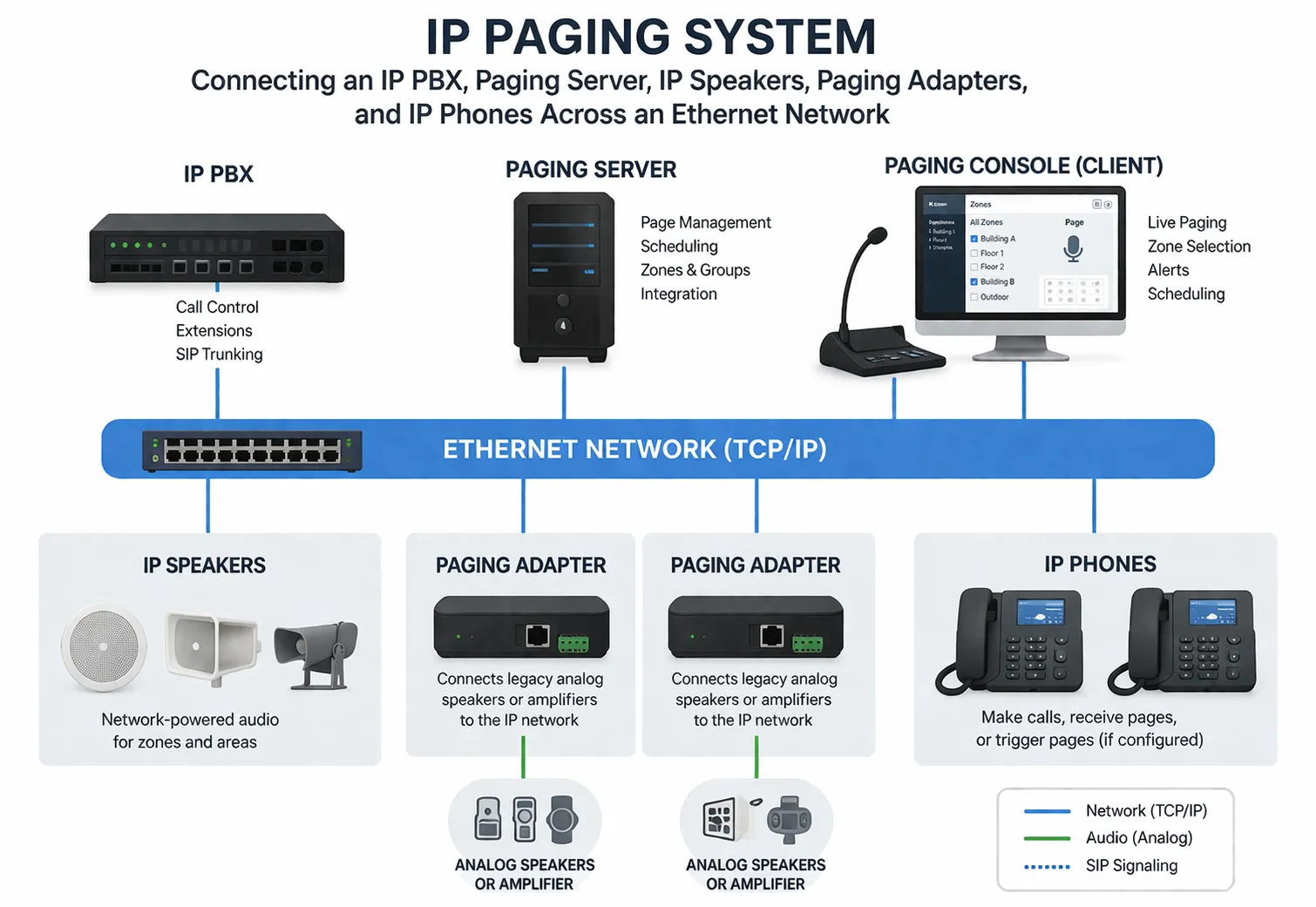
In a modern deployment, IP paging may include IP speakers, SIP paging adapters, IP phones, intercom terminals, paging servers, PBX platforms, multicast-capable endpoints, and hybrid devices that connect new network functions with existing analog audio infrastructure.
How The System Works
Most IP paging systems follow the same broad sequence. A user or application starts a paging event, the system identifies the target zone or endpoint group, an audio path is established, and the selected speakers, phones, or adapters play the announcement or tone.
In SIP-based paging, the process usually begins like a VoIP session. A phone, console, or application sends a SIP request to a paging endpoint, paging group, or paging server. Session parameters are negotiated, the audio path is created, and the page is transmitted to the destination devices. This approach is useful when paging needs to connect tightly with an IP PBX, extension plan, authentication model, or call-control workflow.
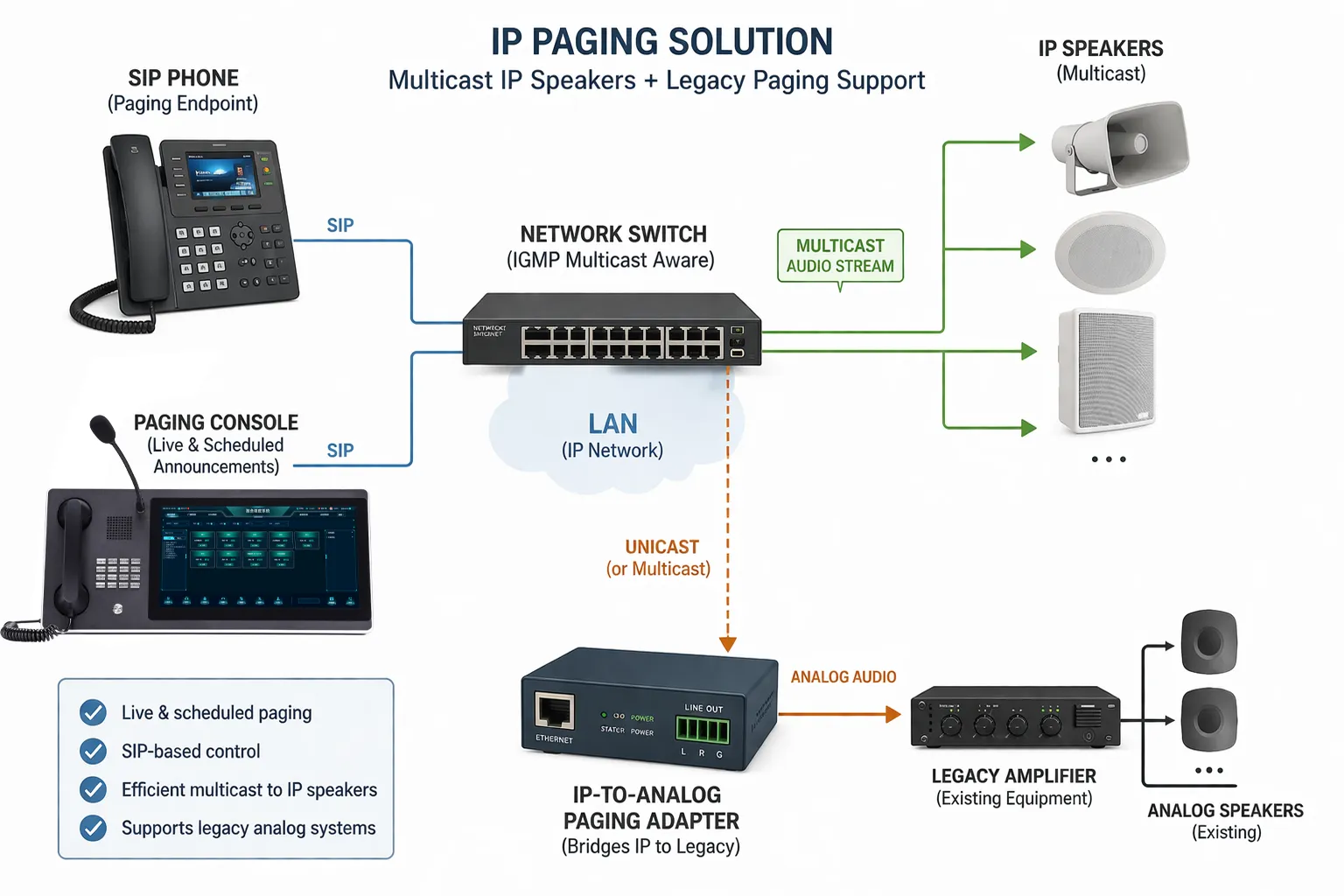
In multicast paging, the source sends one audio stream to a multicast address that multiple endpoints are configured to monitor. This can be efficient when many speakers or phones need to receive the same live message at once, because the source does not need to create a separate unicast stream for every device.
Some deployments combine both methods. SIP may handle setup, authorization, and PBX integration, while multicast carries broad audio distribution. In other cases, a paging adapter converts SIP or multicast audio into analog output for legacy amplifiers, horn speakers, or overhead speaker lines.
How Audio Is Delivered
Audio delivery depends on the design of the system and the size of the paging area. A small office may use SIP paging to a few phones or speakers. A school, factory, or transport facility may use multicast for large paging zones. A retrofit project may send IP audio into an adapter that drives existing analog amplifiers and ceiling speakers.
A user, phone, console, or application initiates a page.
The system identifies the destination zone, group, or endpoint.
Audio is delivered using SIP, multicast, or a hybrid method.
Selected speakers, phones, or adapters play the message.
Priority rules may interrupt lower-priority audio during urgent events.
From an engineering perspective, successful IP paging depends on more than audio transport. It also depends on network quality, VLAN design, QoS policy, endpoint registration, PoE capacity, zone logic, acoustic coverage, and clear rules for who can page which areas.
Many IP paging deployments combine SIP control, multicast distribution, and adapters that preserve investment in analog paging equipment.
Which Devices Work Together
An IP paging system is usually made from several device types. The exact mix depends on whether the project is a new deployment, a retrofit upgrade, a single-building system, or a multi-site communication environment.
IP speakers
IP speakers are self-contained network endpoints that receive and play audio over the network. Many models support SIP registration, multicast listening, alert tones, scheduled announcements, and web-based configuration. Because the amplifier and control electronics are built into the speaker, deployment can be more distributed than in a fully analog system.
Paging adapters
A paging adapter is useful when a site already has analog amplifiers, ceiling speakers, horn speakers, or overhead paging circuits. The adapter receives audio from the IP side and passes it to the analog side. This allows organizations to modernize paging control without replacing every existing speaker at once.
PBX or paging server
In many installations, the IP PBX or a dedicated paging server provides the call-control and management layer. It may authenticate devices, assign paging groups, apply permissions, map zone numbers, and integrate paging with telephony or notification workflows.
Switching and power layer
Because many IP speakers and terminals use PoE, the LAN switch layer becomes part of the paging design. Power budget, uplink resilience, VLAN segmentation, multicast handling, and QoS settings all affect final performance.
Which Features Matter Most
The most important IP paging features are the ones that improve daily operation and emergency response. A system may look simple at the endpoint level, but the real value comes from routing, zoning, integration, and management.
Network audio distribution
The defining feature of IP paging is that the network becomes the delivery path. This reduces dependence on isolated paging cabling and makes it easier to extend announcements to new rooms, buildings, or campuses where network access already exists.
Zone and group paging
Logical zones allow announcements to be sent only to relevant areas. A receptionist may page an office area, a supervisor may page a production zone, and an emergency operator may page all zones at once. This is one of the most practical advantages of moving paging onto a managed platform.
SIP platform integration
In SIP-based environments, paging can become part of the enterprise voice system. Users can page from desk phones, soft clients, or communication consoles without needing a separate standalone paging device for every routine use.
Multicast audio efficiency
Where supported, multicast can improve efficiency for large paging groups because a single stream can reach many endpoints. This is especially useful for zone-wide announcements, bell schedules, or large-area notifications inside a controlled LAN environment.
Priority and emergency control
Many IP paging systems support priority rules so emergency alerts, lockdown notices, evacuation messages, or critical operational broadcasts can override background music or lower-priority announcements.
Scheduled and automated audio
Some systems support bell schedules, prerecorded announcements, shift-change tones, timed reminders, and event-driven messages from external applications. This is useful in schools, factories, warehouses, hospitals, and transport sites where routine notifications happen every day.
Where Paging Is Used
IP paging is used across many sectors because one-to-many voice communication remains useful even in highly digital environments. The system may support routine announcements, operational coordination, emergency alerts, public messages, and building-wide notifications.
Offices and campuses
In office buildings and corporate campuses, IP paging is used for front-desk announcements, staff locating, building-wide notices, and emergency instructions. Integration with the corporate PBX makes everyday paging easier for reception or facilities teams.
Schools and universities
Educational campuses often use IP paging for class-change tones, general announcements, zone paging, and emergency communication. The ability to target one building, one floor, or the whole campus is especially valuable.
Hospitals and healthcare sites
Healthcare facilities need fast internal communication across reception, wards, corridors, waiting areas, and support departments. IP paging can support staff notification, routine public announcements, and urgent operational messaging inside an IT-managed network model.
Factories and warehouses
Industrial facilities use paging for production coordination, shift-change messages, safety alerts, dispatch support, and operational announcements across noisy or wide-area environments. Rugged speakers, horns, and intercom endpoints may be needed where the site is harsher than a normal office.
Public and transport sites
Stations, terminals, car parks, municipal buildings, retail spaces, hotels, and public service locations use IP paging for customer announcements, restricted-area notices, operations coordination, and emergency messaging.
IP paging is used across education, healthcare, industry, offices, and public facilities wherever fast one-to-many voice communication is needed.
How Analog Systems Compare
Traditional analog paging systems are still effective in many sites, especially where the architecture is simple and already in place. IP paging does not automatically replace every analog system. It offers a different operating model.
Analog paging is usually local, amplifier-centered, and straightforward. IP paging is network-centered, easier to integrate with software platforms, and usually more flexible for zoning, remote management, and multi-building expansion.
In practice, many organizations choose hybrid designs. They keep analog speaker infrastructure where it still works well, then add IP paging adapters, SIP endpoints, and network control layers to gain better management and integration. This approach is often more realistic than treating analog and IP paging as opposite choices.
Item
Analog Paging
IP Paging
Transport path
Dedicated audio wiring and amplifier circuits.
Ethernet, IP network, SIP, multicast, or hybrid routing.
Expansion model
Often tied to amplifier capacity and cabling routes.
Can expand through network endpoints and logical zones.
Management
Usually local and hardware-centered.
Often supports web, server, or PBX-based management.
Best fit
Simple local paging or legacy systems that still work well.
Integrated, multi-zone, multi-building, or software-managed environments.
What Deployment Must Check
Even a good IP paging platform can perform poorly if deployment details are ignored. Before rollout, the system should be checked from both a network and acoustic perspective.
Power strategy: verify PoE class, switch power budget, and backup power requirements.
Zone planning: define which users can page which areas and which messages have priority.
Acoustic coverage: match speaker type, output level, and placement to the real environment.
Interoperability: confirm SIP behavior and integration with the PBX, server, or paging platform.
Resilience: consider failover, local survivability, and what happens during network outages.
For retrofit projects, one more question matters: how much of the existing analog infrastructure should be kept? In many buildings, the practical answer is not to replace everything, but to preserve what still works and modernize the control layer.
How Hybrid Upgrades Help
Hybrid upgrade planning is one of the most realistic uses of IP paging. Many buildings already have working analog speakers, amplifiers, or horn circuits. Replacing all of them can be expensive and disruptive. IP paging adapters allow those analog assets to remain useful while adding network control and better integration.
This method is valuable when a site wants better zoning, remote management, PBX integration, or emergency notification control, but does not want to remove every speaker during the first phase. It also allows gradual modernization across buildings, floors, or departments.
Final Engineering View
IP paging is a network-based approach to voice announcement and notification. It uses IP infrastructure to deliver live or automated audio to speakers, adapters, phones, and intercom devices, often with SIP, multicast, PoE, and software-based management working together in the background.
Its value is not limited to cleaner cabling or newer hardware. The larger benefit is that paging becomes easier to zone, expand, integrate, and manage as part of a broader communication environment. For organizations that need fast one-to-many voice communication, IP paging provides a flexible architecture for routine announcements, alerts, and emergency notification.
Common Buyer Questions
How should paging zones be named?
Zone names should match real operational language, such as “Warehouse A,” “North Corridor,” “Main Lobby,” or “All Emergency Areas,” so users can select areas quickly under pressure.
What affects paging audio clarity?
Speaker placement, ambient noise, amplifier power, codec choice, network jitter, microphone quality, acoustic reflections, and message volume all affect whether people can understand the announcement.
When should multicast be avoided?
Multicast may be unsuitable if the network does not support it properly, if paging crosses unmanaged WAN links, or if IT teams cannot control multicast routing and filtering reliably.
What should be tested before handover?
Test live paging, scheduled tones, emergency priority, zone selection, multicast behavior, adapter output, speaker coverage, PBX integration, power backup, and administrator access.
How can false paging be controlled?
Use role-based permissions, paging access codes, extension restrictions, audit logs, priority rules, and clear operating procedures so only authorized users can page sensitive zones.