Page scheduling explained for public address, IP paging, dispatch and emergency systems, covering timed broadcasts, zone rules, message libraries, priority control, logs and maintenance.
Becke Telcom
In paging, public address, dispatch, and emergency communication systems, many announcements do not need to be spoken manually every time. A factory may need shift reminders, a school may need class bells, a transport station may need routine passenger guidance, and a warehouse may need repeated loading instructions during operating hours.
Page scheduling turns these repeatable communication tasks into planned, automatic, and manageable broadcast actions. It does not replace live paging or emergency override. Instead, it works beside operator paging, alarm-triggered announcements, zone broadcast, and dispatch communication so routine messages can play at the right time and in the right area.
A good scheduling design reduces manual workload, prevents missed notices, keeps wording consistent, and helps the communication system follow the real rhythm of the site. It is more than a timer; it is a broadcast rule that combines message content, time, zone, priority, permission, and playback records.
From manual reminders to planned communication
In many facilities, repeated announcements are part of daily operation. Staff may need reminders before shift changes, visitors may need closing notices, students may need class signals, passengers may need boarding guidance, and workers may need safety prompts. If every message depends on a person remembering the time, the result can be inconsistent.
Page scheduling solves this by allowing administrators to define when a message should play, where it should play, how often it should repeat, which audio source should be used, and what priority it should have. The system then executes the broadcast automatically according to the rule.
This is why scheduled paging is common in factories, schools, hospitals, warehouses, transport hubs, commercial buildings, campuses, and public facilities. The more regular the workflow, the more useful scheduling becomes.
How a scheduled page is created
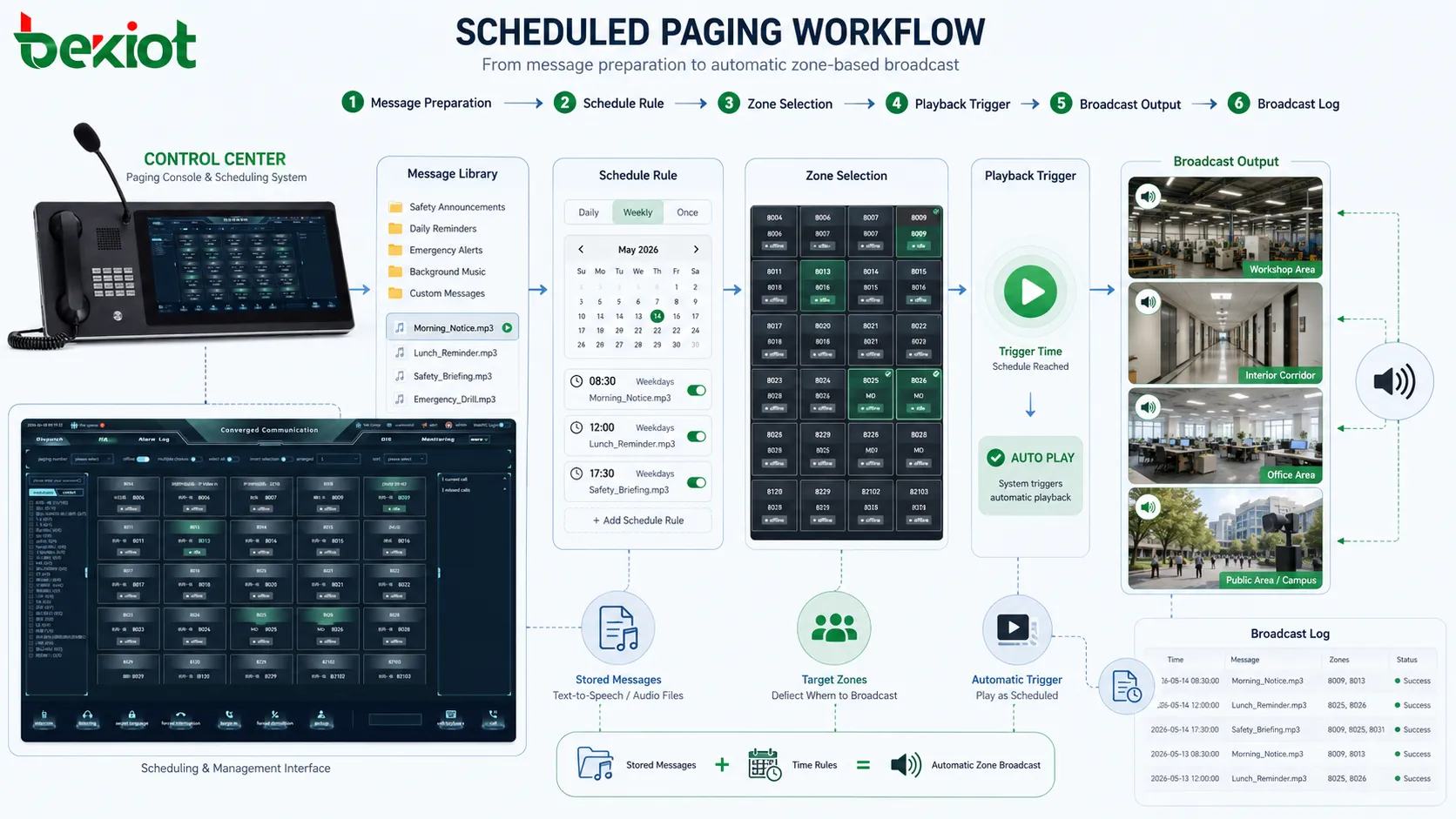
A scheduled page usually begins with message preparation. The message may be a pre-recorded audio file, text-to-speech announcement, chime, bell signal, warning tone, combined audio sequence, or stored voice prompt. The selected content should match the purpose of the schedule.
The next step is destination selection. A scheduled announcement may go to one speaker, one floor, one workshop, one building, several paging zones, outdoor areas, parking areas, service counters, production lines, or all areas. Because scheduled messages repeat over time, the destination must be chosen carefully.
After the message and destination are selected, the time rule is configured. This may be a single time, daily rule, weekly rule, monthly rule, shift-based schedule, holiday exception, seasonal schedule, or event-based trigger. Some systems support several time periods in one rule, such as morning, noon, evening, and night announcements.
When the trigger time arrives, the system checks whether the rule is active, whether the destination is available, and whether a higher-priority event is occurring. If conditions are met, the audio is sent to the selected zones. After playback, the system should create a log showing schedule name, message name, time, zone, playback result, and interruption status.
Page scheduling converts stored messages and time rules into automatic zone-based broadcast actions.
Message libraries keep content consistent
Page scheduling depends on reusable message content. A message library stores approved audio such as safety reminders, shift notices, visitor guidance, class bells, closing announcements, cleaning notices, equipment prompts, drill messages, or service instructions.
This improves consistency. The same announcement can play with the same wording, tone, language, and audio quality every time. This is important for safety instructions, public guidance, customer service, and procedures that should not change from one operator to another.
Message libraries also simplify maintenance. If a factory changes a shift reminder or a campus changes a bell sequence, administrators can update the message or rule centrally. If text-to-speech is used, pronunciation, language support, clarity, and public-use suitability should be checked before deployment.
Naming matters. Labels such as “Audio 01” or “Message B” become confusing after months of operation. Better names include purpose, area, language, and version, such as “Warehouse Shift Start Reminder,” “Campus Evening Closing Notice,” or “Platform Safety Reminder English.”
Zone-based scheduling avoids disturbance
A scheduled announcement should not always go everywhere. A workshop notice should not disturb the office building. A class bell should not play in unrelated administrative areas. A warehouse loading reminder should not interrupt public waiting rooms. Zone-based scheduling makes automatic broadcast more precise.
Zones may be defined by physical layout, department, function, public area, safety area, or operational responsibility. A facility may use zones such as lobby, production line, warehouse, parking area, outdoor gate, service counter, meeting area, platform, ward, classroom block, or equipment room.
Targeted scheduling reduces message fatigue. If people hear too many irrelevant announcements, they begin to ignore the system. Over time, even important messages may lose attention. Keeping routine messages local helps preserve attention for urgent announcements.
Zone accuracy should be tested before schedules are released. If the wrong speaker is included in a recurring rule, the mistake will repeat automatically. Commissioning should confirm both target-zone coverage and wrong-zone exclusion.
Time rules should match real workflow
Page scheduling often starts with fixed clock points, but practical systems need more flexible time logic. A basic rule may play at 08:00 every day. A more useful rule may play only on weekdays, skip holidays, follow shift calendars, repeat during a time window, or change during special periods.
Daily schedules support opening notices, closing reminders, shift messages, safety prompts, cleaning prompts, and equipment inspection reminders. Weekly or monthly schedules may support maintenance notices, inspection calls, public service messages, or periodic test broadcasts.
Shift-based scheduling is important in industrial sites. A factory may have day shift, night shift, rotating shift, weekend shift, and holiday operation. Each may need different start, break, meal, handover, and safety messages. The schedule should follow the real production rhythm instead of a generic office timetable.
Time synchronization is also important. If the paging server time is wrong, scheduled messages may play early, late, or on the wrong day. Multi-building or multi-site systems should use reliable time synchronization so that schedules remain consistent.
Priority handling protects urgent messages
Scheduled paging must not block urgent communication. Live operator paging, emergency override, fire alarm announcements, security warnings, and control room instructions may be more important than routine scheduled playback.
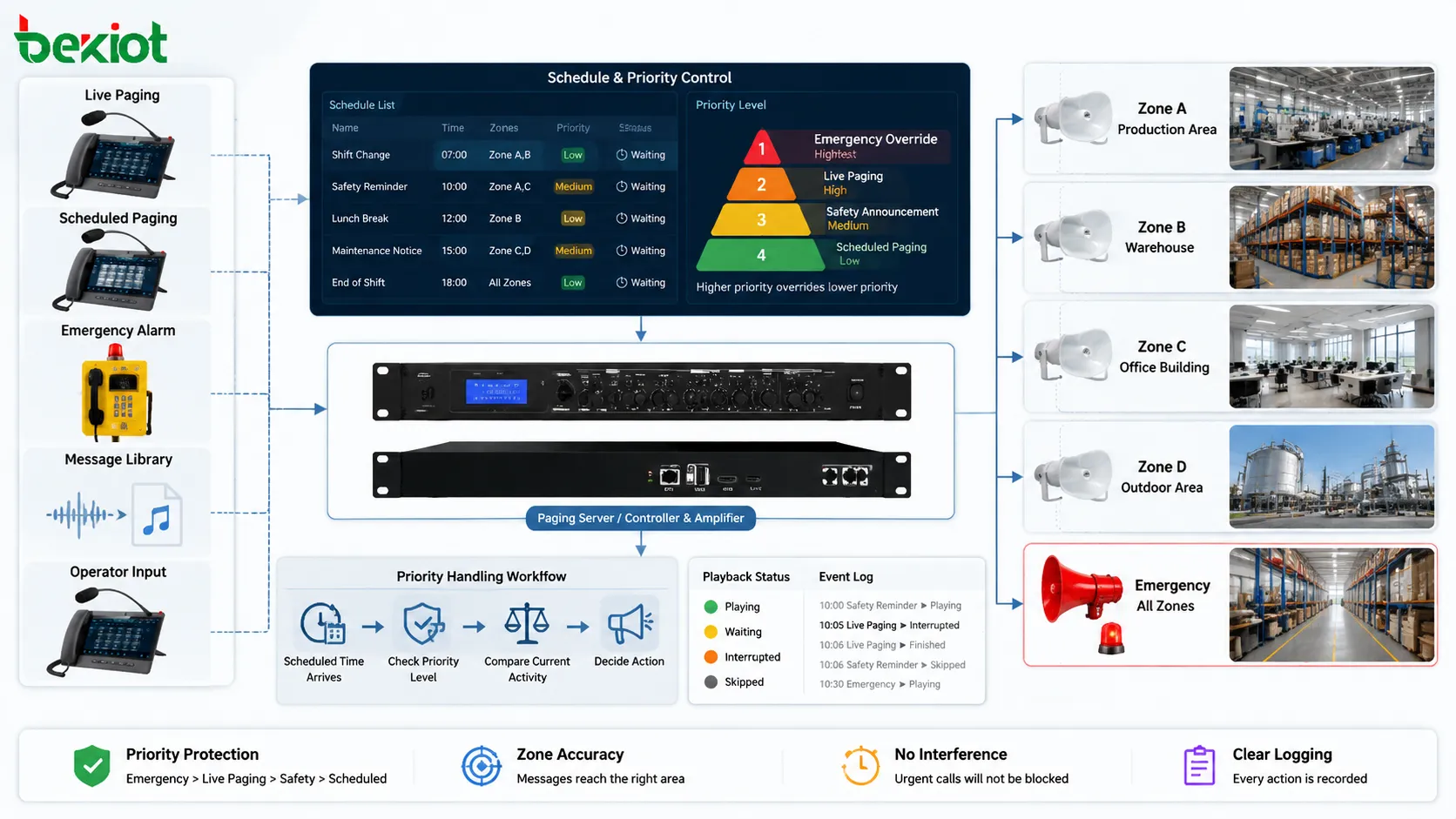
Each scheduled message should have a defined priority. Routine reminders may use low priority. Safety prompts may use medium priority. Drill messages may use higher priority. True emergency override should normally take the highest priority.
If background music is playing, a scheduled safety reminder may fade or stop the music. If the scheduled reminder is playing and an emergency broadcast begins, the emergency message should override it. If a live operator pages the same zone at higher priority, the scheduled message may be paused, skipped, or canceled.
These rules should be predictable and logged. If a scheduled message is skipped because an emergency announcement was active, the log should show that reason. If a message is interrupted, the log should show whether it resumed.
Zone control and priority handling allow scheduled pages to run automatically without blocking urgent announcements.
Automation should still be managed
Recurring automation reduces manual workload. Operators do not need to watch the clock for every routine reminder. This is useful in control rooms, reception desks, schools, warehouses, hospitals, transport stations, commercial buildings, and factories where repeated announcements happen every day.
Automation also reduces missed notices. A busy operator may forget a routine message during a shift handover or incident. A scheduled rule does not forget as long as the system is active and healthy.
However, automation should not become blind operation. Each schedule should have a purpose, owner, start date, review date, and, where needed, an end date. Temporary schedules for events, construction work, drills, or seasonal operation should be removed after they are no longer needed.
The goal is to automate routine communication while keeping operators in control of exceptions, urgent messages, and real-time instructions.
Live paging and schedules must coexist
Page scheduling is strongest when it works smoothly with live paging. Scheduled messages handle predictable communication, while live paging handles changing conditions. A system that relies only on automation may respond poorly to unexpected events. A system that relies only on live operation may miss routine messages.
Operators should be able to see whether a scheduled message is playing, which zone it affects, and whether it can be paused or overridden. If a live announcement is needed, the operator should not be blocked by a low-priority scheduled task.
The system should also prevent accidental conflict. If an operator starts a live page seconds before a scheduled message, the platform should decide whether to delay, interrupt, or skip the schedule according to known rules.
In emergency systems, live paging and emergency override must have clear authority over routine schedules. A lunch reminder should never interfere with an evacuation message, and background music should never delay a fire alarm broadcast.
Event-based scheduling adds intelligence
Some scheduled paging is triggered by events instead of fixed time. A message may play when a door opens, a sensor triggers, a vehicle arrives, a production line changes state, a visitor presses a button, or an alarm enters a specific status.
Event-based paging is useful when fixed time is not enough. A loading dock announcement may depend on vehicle arrival. A station announcement may depend on platform status. A factory notice may depend on machine operation. A building message may depend on access control events.
Event rules should be filtered carefully. If every minor event triggers a broadcast, the site becomes noisy. The system should consider event importance, location, frequency, and response need. Some events may only notify an operator, while others may justify automatic paging.
Logs should show the trigger source. If a message played because of a sensor, access event, or alarm, the record should show that relationship for later review.
Where page scheduling is used
Industrial operation
Industrial facilities use page scheduling for shift changes, production reminders, safety prompts, maintenance notices, cleaning schedules, inspection calls, work permit reminders, and emergency drills. These messages support routine order across workshops, warehouses, utility rooms, control areas, and outdoor yards.
Industrial scheduling should follow real shifts. A 24-hour site may need different schedules for day shift, night shift, weekends, and holidays. A production line that runs only during certain periods should not receive messages outside its active window.
Transport and public facilities
Transport stations and public facilities use scheduled paging for passenger guidance, platform reminders, safety notices, closing announcements, queue management, parking instructions, service updates, and public order messages.
These environments need clear wording, proper frequency, and sometimes multilingual message sequences. Scheduled messages should reduce confusion without creating constant background noise.
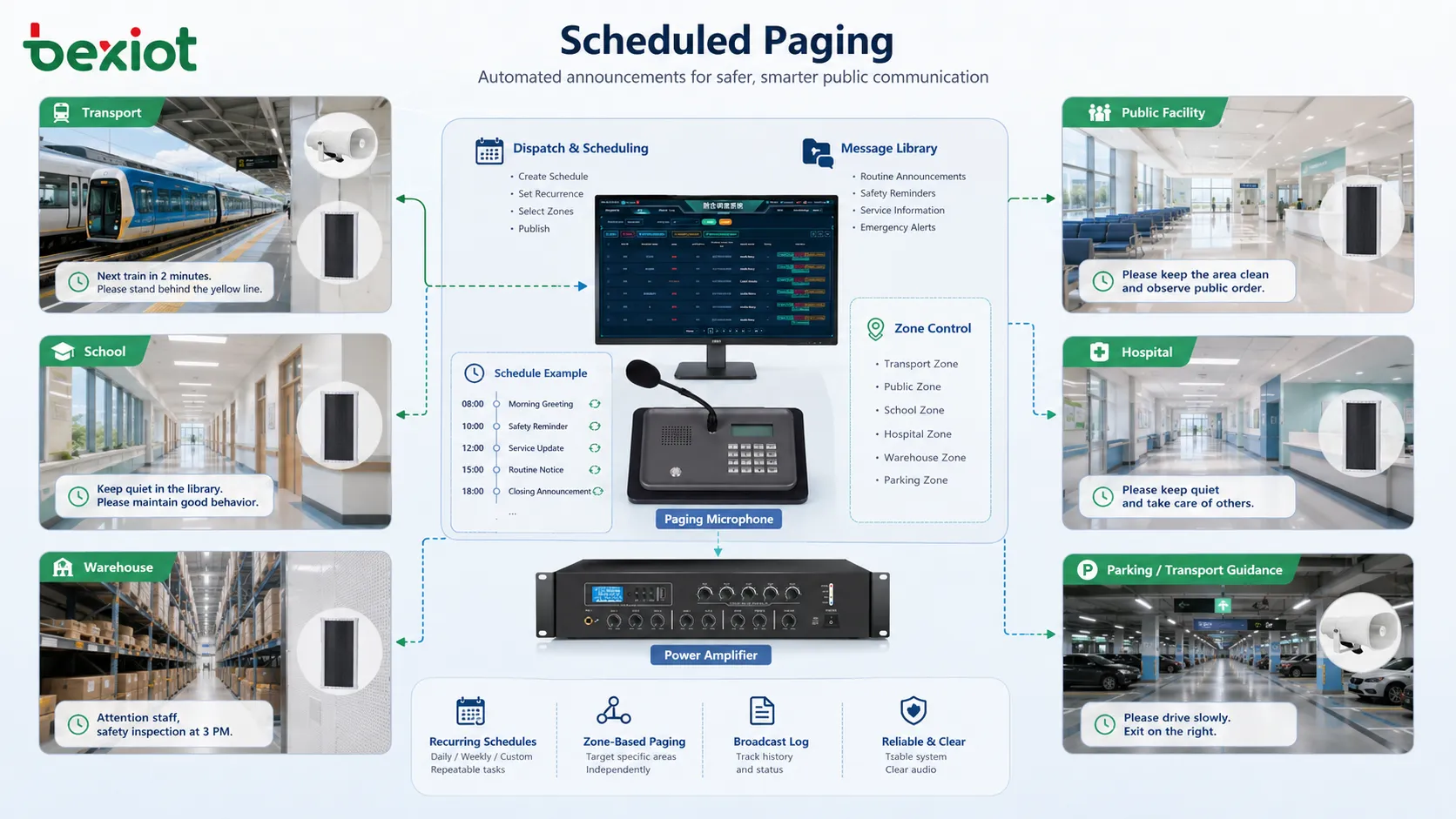
Page scheduling is used in factories, schools, hospitals, transport sites, warehouses, and public facilities to manage repeatable announcements.
Schools, campuses, and healthcare facilities
Schools and campuses use page scheduling for bells, class period signals, safety reminders, event notices, dormitory announcements, library closing notices, and emergency drill messages. Rules may vary by weekday, exam period, holiday, and special event.
Healthcare facilities use scheduled paging more carefully. Hospitals may need staff reminders, visitor guidance, facility notices, and emergency drills, but they also need quiet patient environments. Routine schedules should be zone-based, and quiet hours should be respected while emergency paging remains active.
Commercial buildings and warehouses
Commercial buildings use page scheduling for opening notices, closing reminders, visitor guidance, parking instructions, event announcements, safety messages, and background audio control. In customer-facing spaces, message quality and frequency affect the service atmosphere.
Warehouses use scheduled paging for loading reminders, shift notices, safety prompts, equipment checks, truck queue guidance, and zone coordination. Schedules should match actual dispatch windows, movement patterns, and work cycles.
Security and permission control
Page scheduling can affect many people repeatedly, so permission control is necessary. Not every user should be allowed to create, modify, delete, or activate scheduled announcements. A wrong schedule can disturb operations or interfere with emergency communication.
User roles may include administrator, dispatcher, facility manager, security supervisor, department operator, and viewer. Administrators may configure system rules. Department users may manage local schedules. Ordinary users may only view schedules or start approved messages.
Approval workflow may be useful in larger facilities. A user may create a new scheduled message, but a supervisor approves it before activation. This helps prevent wrong zones, excessive repetition, unapproved wording, or unsuitable public announcements.
Permission control should also apply to message libraries. Approved audio files should be protected from unauthorized replacement. Version control helps administrators identify which message is active and which older message has been retired.
Monitoring, logs, and playback confirmation
Scheduling is useful only if playback actually happens. A rule may be correct, but a speaker may be offline, an amplifier may fail, a network path may be blocked, or a higher-priority event may interrupt the message.
A basic log should show schedule name, playback time, selected message, destination zone, duration, status, and result. A more advanced system may also show endpoint status, interruption reason, priority conflict, device fault, or playback confirmation.
Logs help explain missed or unexpected announcements. If a user says a notice did not play, the log can show whether the system triggered it. If a message disturbed the wrong area, the log can show which zone was selected. If emergency override interrupted the schedule, the log should show the priority conflict.
Monitoring should include system health. Server time, schedule engine status, storage space, message file availability, endpoint connectivity, and device health should be checked so silent scheduling failure does not become an operational problem.
Common mistakes and better fixes
Mistake
Typical Result
Better Fix
No schedule owner
Old messages continue after the process has changed
Assign each schedule to a responsible department or person
Using broad zones for routine messages
Unrelated areas hear repeated announcements
Use targeted zones and reserve all-zone schedules for site-wide messages
Overlapping schedules
Messages interrupt each other or create confusion
Review time conflicts and define priority before release
Poor message quality
The schedule is correct but the announcement is unclear or annoying
Check wording, audio level, length, pronunciation, and playback clarity
No field test
Software shows success but listeners cannot hear the message clearly
Verify actual speaker output in the target zones during commissioning
How to evaluate page scheduling design
A good page scheduling design should match the site’s real operating rhythm. The system should play the right message at the right time, in the right zone, with the right priority, and with understandable audio.
The design should be easy to manage. Administrators should be able to create schedules, modify time rules, assign messages, select zones, set priorities, pause temporary schedules, review logs, and remove outdated rules.
Exception handling is also important. Holidays, maintenance shutdowns, special events, emergency situations, and temporary operations should not require risky manual workarounds. Flexible enable and disable rules make scheduling safer.
Priority behavior should be predictable. Routine schedules should never block emergency communication, and live operator paging should be able to override or pause low-priority schedules when necessary.
Finally, schedules should remain maintainable. A review process should check whether rules are still useful, whether zones are still correct, whether message files are current, and whether logs show recurring faults.
Final view
Page scheduling is the planned automation of paging or broadcast messages according to time, zone, priority, event, and operational rules. It is used for shift reminders, class bells, safety prompts, public guidance, facility notices, loading instructions, inspection reminders, and scheduled service messages.
Its main characteristics include automatic playback, zone-based delivery, recurring schedules, message library management, priority handling, flexible calendars, event-based triggers, permission control, logs, monitoring, and coexistence with live paging and emergency override.
The strongest design reduces manual workload without creating noise, supports routine communication without blocking urgent messages, and remains aligned with the real rhythm of the site. When planned carefully, page scheduling becomes an important tool for operational order, public guidance, safety reminders, and communication consistency.
FAQ
Is page scheduling the same as live paging?
No. Live paging is spoken or activated manually in real time, while page scheduling plays planned messages automatically according to time, zone, or event rules. They should work together in the same communication system.
What types of messages are suitable for scheduling?
Shift reminders, class bells, opening and closing notices, safety prompts, public guidance, cleaning notices, inspection reminders, maintenance notices, warehouse loading prompts, and routine facility announcements are common examples.
Can scheduled paging be interrupted by emergency messages?
Yes, if priority rules are configured correctly. Emergency broadcasts, alarm-triggered messages, or high-priority live paging should be able to interrupt, pause, or override routine scheduled messages.
Why is zone control important for page scheduling?
Zone control ensures that scheduled messages play only where they are needed. This reduces unnecessary disturbance, improves message relevance, and prevents routine announcements from becoming background noise.
What should be checked during maintenance?
Maintenance should check schedule accuracy, message files, zone assignments, priority behavior, system time, playback logs, device status, speaker output, endpoint connectivity, and whether old or temporary schedules should be removed.