Paging groups explained for public address, dispatch and emergency systems, covering zone broadcast, permissions, priority, scheduled paging, alarm linkage, monitoring, scalability and maintenance.
Becke Telcom
In a paging, public address, dispatch, or emergency communication system, the real challenge is not simply playing audio. The important task is making sure the right message reaches the right people, in the right area, at the right moment, without disturbing unrelated zones or blocking urgent instructions.
Paging groups solve this routing problem. They organize speakers, paging terminals, intercom points, IP phones, amplifiers, departments, zones, and response roles into manageable communication targets. Instead of selecting devices one by one or broadcasting every message everywhere, operators can choose a defined group and let the system deliver the announcement according to the group configuration.
A good paging group design improves speed, accuracy, permission control, emergency response, maintenance visibility, and long-term scalability. It turns paging from a simple sound output function into a structured communication tool for complex facilities.
From single broadcast to organized paging
In a small site, one microphone and one speaker area may be enough. The operator speaks, and everyone hears the same message. This simple approach becomes inefficient when the site expands into several buildings, floors, workshops, public areas, quiet rooms, outdoor yards, or response teams.
If every message is sent everywhere, people hear many announcements that do not concern them. Over time, paging becomes background noise. If operators must manually select many individual speakers, the process becomes slow and error-prone. Paging groups provide a middle structure between single-device paging and full-site broadcast.
A group may represent a physical area such as one floor, one building, one platform, or one production line. It may also represent a role-based team such as maintenance, security, reception, warehouse dispatch, or emergency response. The group name becomes the user-facing communication target, while the system handles the technical routing behind it.
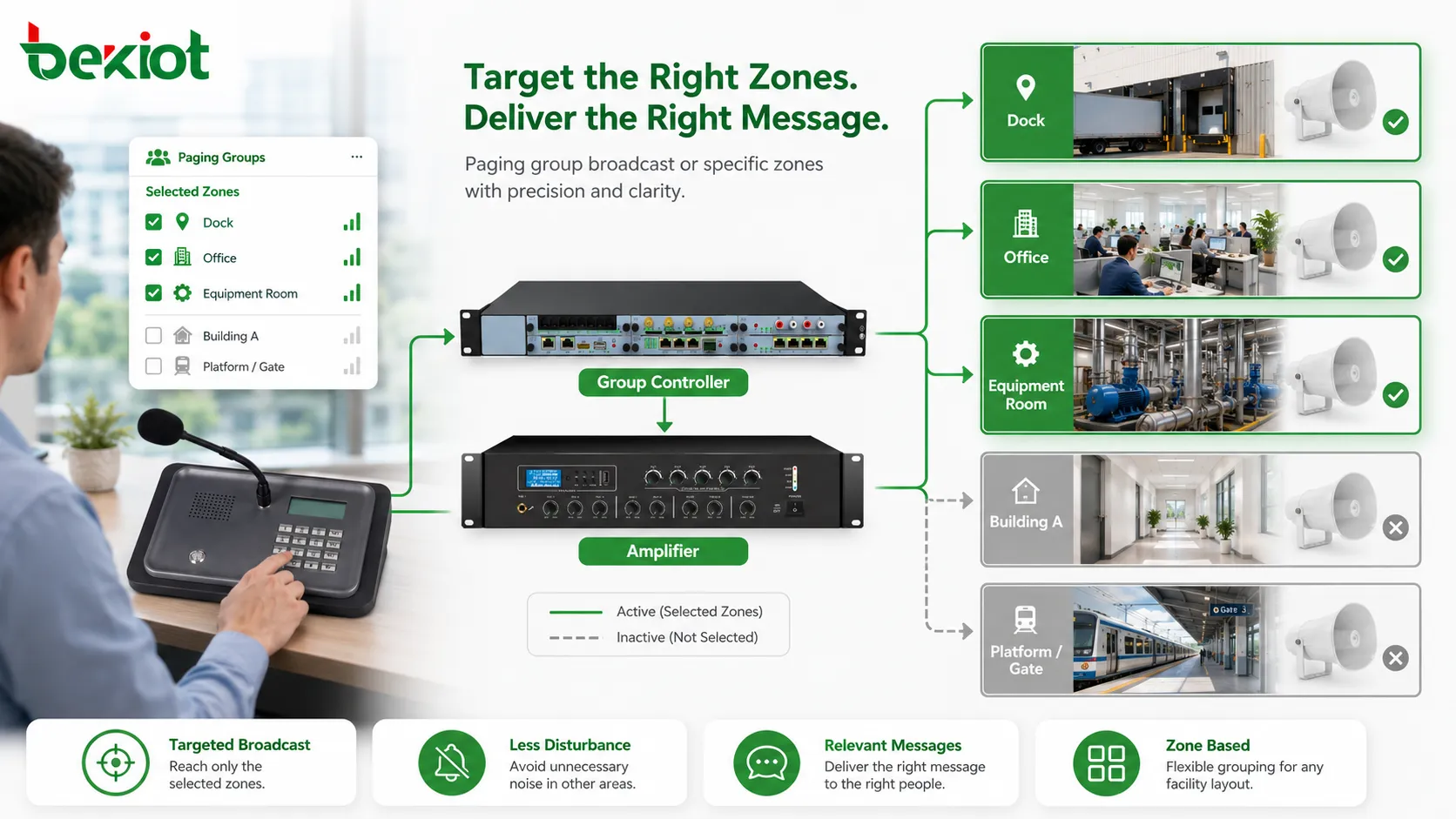
Paging groups allow operators to send announcements to selected zones instead of broadcasting every message across the whole site.
Core functions of paging groups
Targeted zone broadcast
The most direct function is targeted broadcast. A loading dock instruction can be sent only to the dock group. A class reminder can be sent to one teaching building. A maintenance warning can be sent to an equipment room group. A platform update can be sent only to the affected platform.
This improves message relevance and reduces disturbance. Offices, patient areas, classrooms, customer-facing spaces, and quiet zones do not need every operational message. Targeted paging helps people pay attention because most announcements they hear are related to their area or responsibility.
Group calling across endpoint types
A paging group does not have to contain only traditional speakers. In modern systems, group members may include IP speakers, ceiling speakers, horn speakers, wall speakers, SIP phones, intercom terminals, paging adapters, network amplifiers, analog speaker circuits, dispatch consoles, mobile clients, and control room endpoints.
This makes groups useful in hybrid environments. A warehouse group may include horn speakers in loading areas, IP speakers in aisles, an intercom terminal at the gate, and a supervisor phone in the office. Users do not need to understand whether audio is delivered through SIP, IP paging, or analog amplification. They only need to select the correct group.
Permission control
Because a paging group may affect many people, not every user should be allowed to page every group. A receptionist may page the lobby. A warehouse supervisor may page loading zones. A security officer may page gates and public areas. An emergency commander may page all critical zones.
Permissions may be based on user account, extension number, console login, device identity, department role, password, or administrator policy. The goal is simple: users should access the groups they are responsible for, while emergency roles can still reach critical groups quickly.
Priority and emergency override
Routine announcements, scheduled messages, live dispatch instructions, and emergency warnings should not have the same authority. Priority rules decide which audio can interrupt another and which user or group takes control during a conflict.
Emergency override is one of the most important uses. An emergency group may include evacuation zones, exits, corridors, outdoor assembly areas, and control room notification points. When activated, it should override background music, routine reminders, or lower-priority announcements where required.
Dispatch and field response value
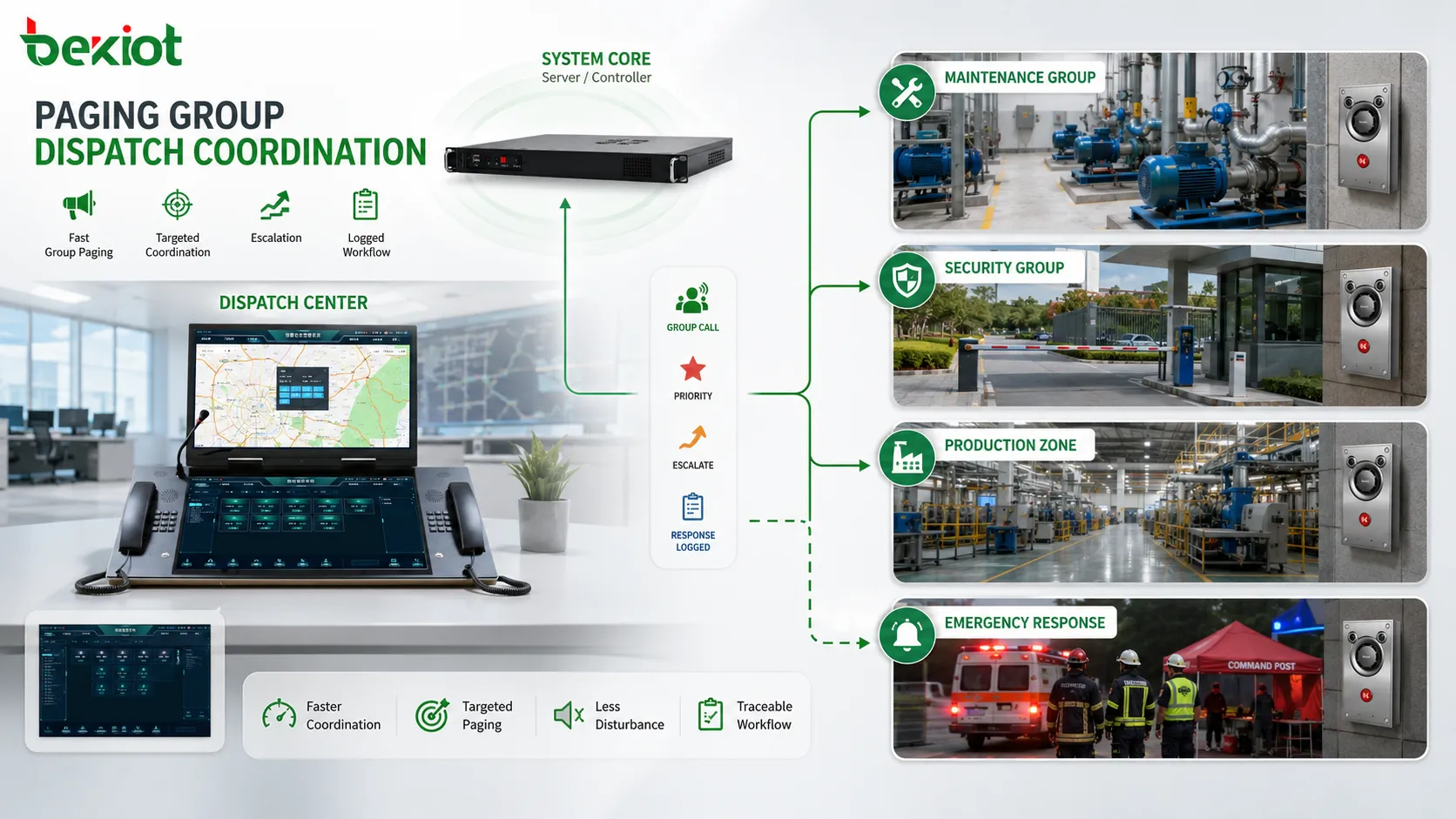
In dispatch systems, paging groups help control rooms reach field teams more quickly. A dispatcher may need to notify maintenance, call a security patrol, guide logistics staff, alert a production area, or send instructions to several response points at once. Group paging reduces the need to call individuals one by one.
For maintenance dispatch, a group may represent equipment rooms, pump stations, production lines, or engineering response points. For security dispatch, groups may represent gates, parking areas, patrol zones, public entrances, or restricted corridors. For production dispatch, groups may support shift coordination, material requests, safety reminders, and line status updates.
Paging groups also support escalation. If an initial page does not produce a response, the operator can move to a broader group or higher-priority group. When the system records this sequence, managers can review how communication developed during an event.
Paging groups help dispatch centers coordinate maintenance areas, security zones, production teams, and emergency response groups.
Scheduled and event-driven paging
Scheduled announcements
Paging groups are useful for scheduled announcements as well as live paging. A schedule can be assigned to one group or several groups according to site workflow. Factories may schedule shift reminders for production groups. Schools may schedule bells for classroom groups. Warehouses may schedule loading reminders for dock groups.
Group-based scheduling reduces repeated manual work and keeps routine messages consistent. However, schedules still need priority control. A routine scheduled message should not interrupt emergency paging. If a group changes because a department moves or a zone is redefined, the related schedule must also be updated.
Alarm linkage
Paging groups can be linked with alarm systems and event triggers. A fire alarm may trigger evacuation paging for a building group. A gas detection alarm may page an affected process area and nearby safety zones. A gate access event may notify the security group. A machine fault may page maintenance staff.
The key is mapping the correct event to the correct group. Event-driven paging should not be overused. Minor events should not trigger unnecessary broadcasts, or people may become tired of announcements. Safety-related groups should have tested priority, clear records, and reliable playback.
Management value in large systems
As a paging system grows, management becomes more difficult. There may be hundreds of speakers, many intercom points, several buildings, multiple operators, scheduled messages, emergency groups, and alarm linkages. Without grouping, the system becomes a long list of devices that is hard to understand and maintain.
Paging groups create a practical management layer. Administrators can organize devices by building, floor, department, function, or risk level. They can assign permissions by group, apply schedules by group, review logs by group, and test zones by group.
Groups also improve documentation. A configuration sheet can show which devices belong to each group, what the group is used for, who can page it, what priority it has, and which schedules or alarms are linked to it. This improves handover between installers, administrators, operators, and maintenance staff.
Operational value by environment
Industrial facilities
In industrial facilities, paging groups support production coordination, safety notices, maintenance dispatch, logistics instructions, and emergency response. Groups may follow production lines, workshops, warehouses, utility rooms, outdoor yards, and control areas.
Transportation sites
In transport environments, groups may follow platforms, ticket halls, tunnels, parking areas, gates, and staff zones. Operators can send passenger guidance, service updates, safety warnings, and emergency instructions to affected areas only.
Healthcare and campuses
In healthcare facilities, group design helps balance urgent communication with quiet operation. Public areas, corridors, wards, emergency entrances, and staff zones may need different paging rules. In campuses, groups may follow classroom buildings, dormitories, sports areas, outdoor fields, and security zones.
Commercial and public buildings
In office parks, hotels, shopping centers, public facilities, and commercial buildings, paging groups support customer service, staff calls, closing reminders, parking guidance, security response, and facility management without making the whole site hear every message.
Safety communication value
Safety communication requires accuracy, speed, and authority. Paging groups support all three. Accuracy comes from sending the message to the correct area. Speed comes from preconfigured groups that operators can select quickly. Authority comes from priority control and emergency override rules.
Emergency groups should be designed according to response procedures, not only building layout. A fire evacuation message may need to play in one building first. A hazardous gas warning may need to reach a process area and nearby exits. A lockdown message may need different wording for public areas and staff areas.
Regular testing is necessary. Emergency groups should be checked for audio coverage, priority behavior, zone accuracy, alarm linkage, and operator access. A group that is rarely used may contain offline speakers, wrong members, outdated names, or changed routes.
Monitoring and maintenance by group
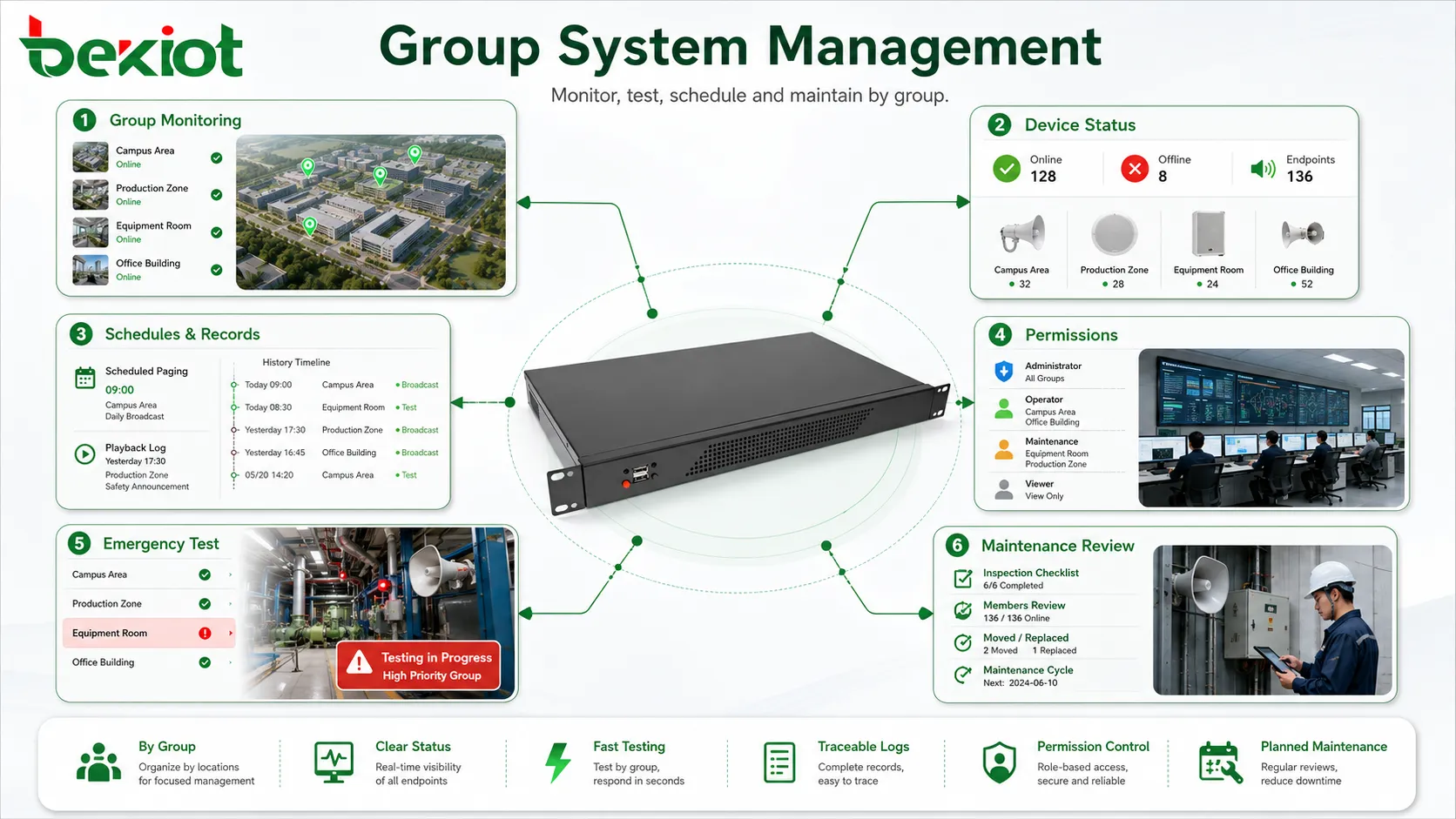
Paging groups make maintenance easier because they provide a logical way to test and monitor the system. Instead of checking every device without structure, maintenance teams can verify a building group, production zone group, emergency group, or outdoor group as a communication area.
Group-level monitoring also helps locate faults. If one speaker is offline, the issue may be local. If several endpoints in one group fail, the problem may be related to a switch, amplifier, cable route, power supply, or zone controller.
Playback logs by group are useful for review. Administrators can see how often a group is used, who pages it, whether scheduled messages play correctly, and whether priority interruptions occur. This supports operational optimization and accountability.
Paging groups support monitoring, permissions, schedules, logs, testing, and maintenance around meaningful communication areas.
Scalability and future expansion
Paging groups make expansion easier. When a new building, floor, workshop, gate, corridor, or outdoor area is added, administrators can create a new group or add devices to an existing group. This is simpler than redesigning the whole paging structure each time the site changes.
Large systems may use hierarchical groups. A floor group may belong to a building group. Several building groups may belong to a campus group. Production line groups may belong to a factory-wide group. This allows operators to page at different scopes: local, regional, or site-wide.
Hierarchical groups must be managed carefully. If a device is added to a small group, it may also become part of a larger group automatically. Documentation and visual management help prevent unexpected broadcasts.
Common mistakes and better fixes
Mistake
Typical Result
Better Fix
Groups are too broad
Every message becomes almost a site-wide broadcast
Create groups that are broad enough to be useful but narrow enough to stay relevant
Too many small groups
Operators select the wrong group or hesitate during operation
Use clear names based on buildings, floors, functions, or response teams
Permissions are ignored
Users may broadcast to the wrong zones or emergency groups
Assign group access by role, department, device, or emergency authority
Group membership is outdated
Announcements reach old locations or miss new areas
Review group members after device moves, department changes, and site expansion
Priority is not tested
Scheduled or routine audio may block urgent instructions
Test simultaneous paging, scheduled playback, and emergency override in real scenarios
How to evaluate a paging group
A well-designed paging group should have a clear purpose. Users should understand who it reaches, why it exists, and when it should be used. If the purpose cannot be explained, the group may be unnecessary or poorly named.
The group should match real physical or operational boundaries. People inside the group should need to hear the same type of message, and areas outside the group should not be disturbed unless the message truly affects them.
The group should also have appropriate permissions and predictable priority behavior. The right users should be able to page it quickly, while unauthorized users should not. Routine paging, scheduled messages, live dispatch, and emergency override should interact correctly.
Finally, the group should be maintainable. Administrators should be able to view members, test output, check device status, review logs, update schedules, and revise permissions. A group that is difficult to manage may become unreliable over time.
Final view
Paging groups provide more than basic audio broadcast. They support targeted zone paging, multi-endpoint communication, permission control, priority handling, emergency override, scheduled announcements, alarm linkage, dispatch coordination, monitoring, recording, scalability, and maintenance.
Their system value lies in accuracy, speed, order, and control. They help operators reach the correct area quickly, reduce unnecessary disturbance, protect urgent messages, simplify daily operation, support safety procedures, and make large communication systems easier to manage.
A strong paging group design should follow real site layout, user responsibility, safety workflow, and maintenance needs. When planned and maintained properly, paging groups become one of the most important foundations of a reliable paging and dispatch communication system.
FAQ
What is the main function of a paging group?
The main function is to send a paging message to a predefined set of speakers, terminals, zones, or users. This allows targeted communication without broadcasting every message to the whole site.
Can one paging group include different types of devices?
Yes. A paging group may include IP speakers, analog speaker zones, SIP phones, intercom terminals, paging adapters, amplifiers, dispatch endpoints, or mobile clients depending on the system architecture.
Why are permissions important for paging groups?
Permissions prevent unauthorized or accidental broadcasts. They ensure users can page only the groups related to their roles, while emergency or supervisory users can access wider or higher-priority groups when needed.
How do paging groups support emergency communication?
Emergency groups can include critical zones, exits, public areas, response teams, and control points. With priority and override rules, they allow urgent messages to interrupt routine audio and reach required areas quickly.
What should be checked during paging group maintenance?
Maintenance should check group membership, device status, zone accuracy, audio coverage, permission settings, priority behavior, schedules, alarm linkage, logs, and whether the group still matches the current site layout and workflow.