Paging number planning explained for public address, intercom and enterprise voice systems, covering zone codes, group paging, emergency access, permissions, expansion and maintenance.
Becke Telcom
In a paging, public address, intercom, or enterprise voice system, users often need a fast way to reach the right announcement area. They may need to call a warehouse zone, page a hospital ward, notify a school building, contact a security group, or activate an emergency broadcast. A paging number plan is the set of dial codes or access numbers that makes these actions simple and repeatable.
The phrase “plan page numbers” can easily be misunderstood. In this article, it does not mean page numbers in a document or website pagination. It refers to planned paging access numbers inside a communication system. These numbers may be SIP paging numbers, PBX feature codes, group numbers, zone numbers, all-call codes, emergency paging numbers, or scheduled announcement targets.
A good plan helps operators act quickly without searching through menus or asking another person which code to use. A poor plan creates the opposite result: wrong-area announcements, overuse of all-call, delayed emergency messages, confusing training, and difficult maintenance. For that reason, paging numbers should be treated as part of the communication architecture, not as a small configuration detail.
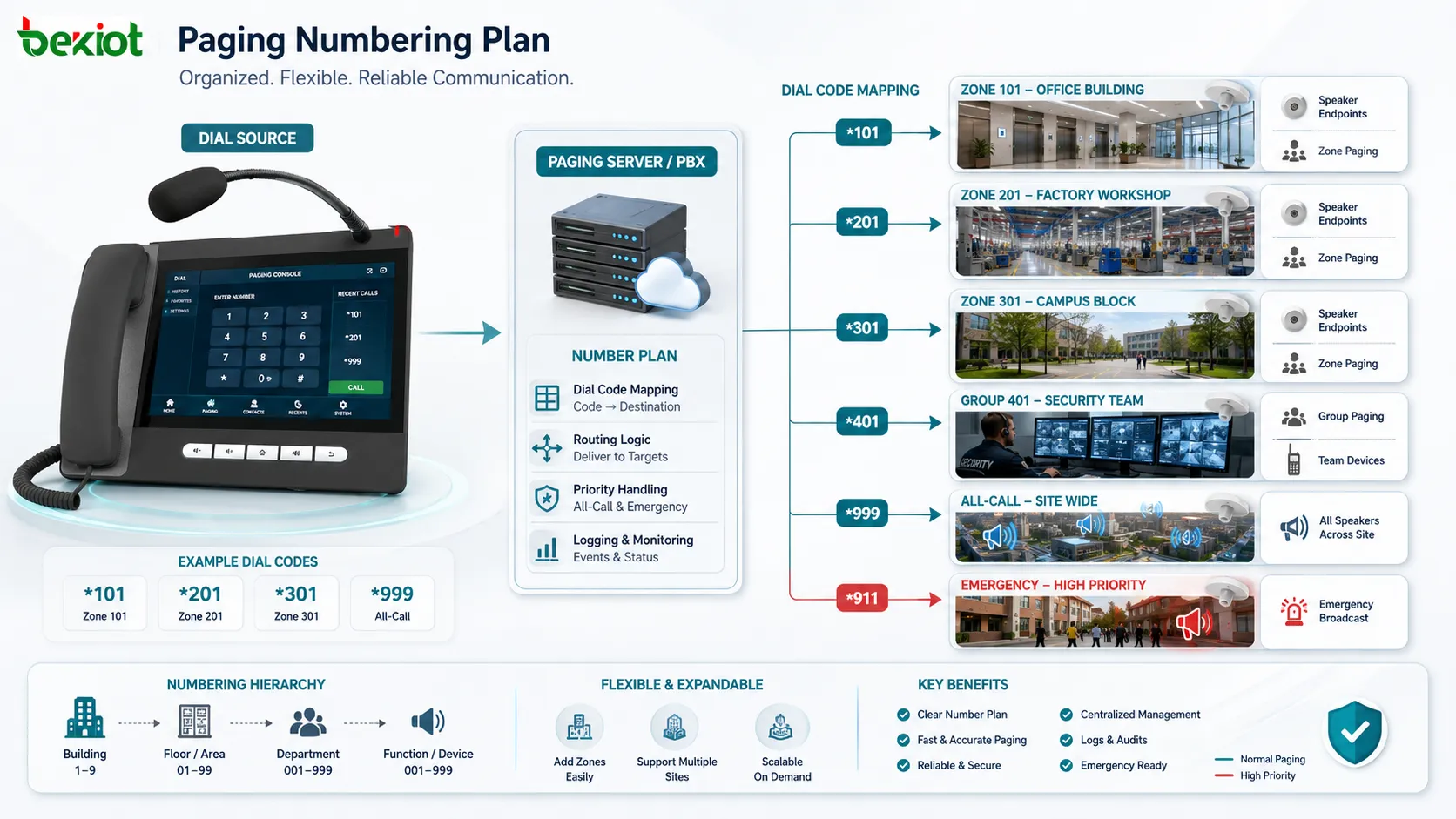
Paging numbers connect user actions with paging zones, groups, all-call functions, emergency broadcasts, and endpoint routes.
What the numbers actually represent
A paging number is a shortcut between a user and a paging action. One code may page the first floor, another may page the warehouse, another may reach the maintenance team, and another may activate all speakers across a site. The number itself is simple, but behind it may be a zone group, a SIP route, a PBX feature, an amplifier channel, a speaker group, or an emergency priority rule.
The most important principle is mapping. Each number should map to a clear target and a clear action. If number 610 means “Warehouse Loading Area,” then users, administrators, and maintenance staff should all understand the same meaning. If the target changes, the documentation and system configuration should change together.
This mapping is useful because paging systems serve real spaces. A factory, campus, hospital, hotel, office building, station, tunnel, warehouse, or industrial park may have many departments and zones. People do not want to think about device IDs or speaker endpoints during operation. They want to know which number sends the message to the right place.
Why numbering affects daily operation
Paging is often used under time pressure. A guard may need to call a gate area. A school office may need to announce a weather notice. A warehouse supervisor may need to call a loading dock. A nurse station may need to contact support staff. In these situations, a short and familiar number is faster than opening a complicated interface.
A logical numbering plan also reduces disturbance. A message for the parking lot should not interrupt office floors. A maintenance notice for one workshop should not reach the whole factory. By giving each area a usable number, the system encourages users to page the smallest effective area instead of relying on all-call.
The value becomes even clearer during emergencies. If authorized staff already know the fire drill code, evacuation code, security alert code, or site-wide emergency number, they can act faster. If those numbers are poorly named, too similar, or hidden in old documents, the system may slow people down when speed matters most.
Plan by site logic, not by random codes
Random numbering may work during a small installation, but it becomes difficult to manage as the site grows. A better approach is to use a structure that matches the way people understand the facility. Numbers can be grouped by building, floor, department, function, emergency level, or device type.
For example, one range may be reserved for building zones, another for operational teams, another for public areas, and another for emergency functions. This makes the plan easier to remember and easier to expand. When a new floor, warehouse section, or service group is added, engineers can place it into the existing logic instead of inventing an unrelated code.
The plan should also avoid numbers that are too similar for important functions. Routine paging and emergency paging should not look almost identical. All-call codes should be memorable for authorized users, but protected from accidental use. Good numbering is not only neat; it reduces real operating risk.
Connect zones, groups, and functions clearly
Paging targets usually fall into three categories: physical zones, staff groups, and system functions. A physical zone may be a floor, corridor, workshop, parking area, lobby, ward, classroom building, tunnel section, platform, or outdoor yard. A staff group may be maintenance, security, housekeeping, logistics, engineering, drivers, or emergency response. A system function may be all-call, emergency override, scheduled broadcast, or recorded message playback.
These categories should not be mixed casually. If “Maintenance” is used as a label, the plan should make clear whether it means the maintenance workshop location or the maintenance team. If “Warehouse” is used, it should show whether the number pages the warehouse area, warehouse office, or warehouse staff group.
Clear naming helps both users and technicians. Operators think in terms of places and responsibilities. Maintenance staff think in terms of routes, endpoint lists, permissions, and logs. A good paging number plan connects these two views so the system is usable in operation and traceable during maintenance.
Routine paging and emergency paging need different rules
Routine paging is used for daily communication: visitor guidance, service calls, shift notices, loading instructions, housekeeping reminders, meeting notices, or local announcements. These numbers should be easy for the relevant staff to use and limited to the areas they actually manage.
Emergency paging is different. It may override background music, ignore local volume reduction, activate predefined emergency zones, start recording, notify supervisors, or take priority over normal announcements. A fire evacuation number, lockdown number, hazardous area warning number, or medical emergency code should be separated from routine paging numbers.
Permission control is essential. Not every user should be able to trigger all-call or emergency broadcast. Local users may only page local areas. Security staff may have broader access. Emergency commanders or dispatch centers may have priority rights. These rules should be reflected in both configuration and training.
Where paging number plans are used
Office buildings and commercial facilities
In office buildings, hotels, shopping centers, and commercial complexes, numbers can be assigned to lobbies, parking areas, service counters, floors, meeting areas, back-office rooms, loading entrances, and emergency zones. Facility staff can send local notices without disturbing the whole building.
This improves comfort as well as efficiency. A parking notice can go to the parking area. A visitor message can go to reception. A fire drill message can use the emergency all-call path. The numbering plan helps users choose the right scope.
Factories and industrial sites
Industrial environments often include production lines, workshops, control rooms, warehouses, loading docks, utility areas, outdoor yards, maintenance teams, and safety zones. Paging numbers can be planned by area, production line, department, or response function.
In noisy and distributed environments, short paging codes help supervisors contact the correct team quickly. For example, one number may reach the warehouse, another may page the maintenance group, another may call the outdoor yard, and another may activate plant-wide emergency paging.
Schools and campuses
Schools and campuses use paging numbers for classrooms, offices, dormitories, canteens, sports fields, libraries, security posts, and emergency announcements. A planned structure helps administrators send routine messages to selected areas instead of interrupting the entire campus.
Emergency functions should be designed with extra care. Lockdown, evacuation, fire drill, and weather warning announcements may need different coverage, priority, and permission settings. Staff training should focus on the few numbers each role really needs.
Hospitals and healthcare facilities
Hospitals need more controlled paging because different areas have different sensitivity. Public waiting areas, nurse stations, wards, pharmacies, laboratories, operating support areas, and emergency departments should not always receive the same announcements.
A structured number plan allows routine messages to reach the right department while emergency messages remain available for wider coverage. Permission control is especially important because healthcare communication must balance speed, accuracy, and patient comfort.
Warehouses and logistics centers
Warehouses and logistics centers may use paging numbers for loading docks, picking areas, packing lines, storage zones, vehicle gates, dispatch offices, driver waiting areas, and maintenance teams. Supervisors can reach specific areas without walking across the site or calling people one by one.
Group numbers are useful when the target is a role rather than a place. A forklift team, driver group, or maintenance group may move around the facility. A role-based paging number helps announcements reach the people responsible for the task.
Transportation and public venues
Stations, airports, tunnels, ports, parking facilities, stadiums, and exhibition centers need paging numbers for public areas, platforms, gates, service counters, control rooms, staff-only zones, and emergency areas. The plan supports both public guidance and internal coordination.
In large public venues, wrong paging can confuse visitors or crowds. A clear number structure helps operators select the correct area quickly and supports emergency workflows when zone-specific or site-wide announcements are required.
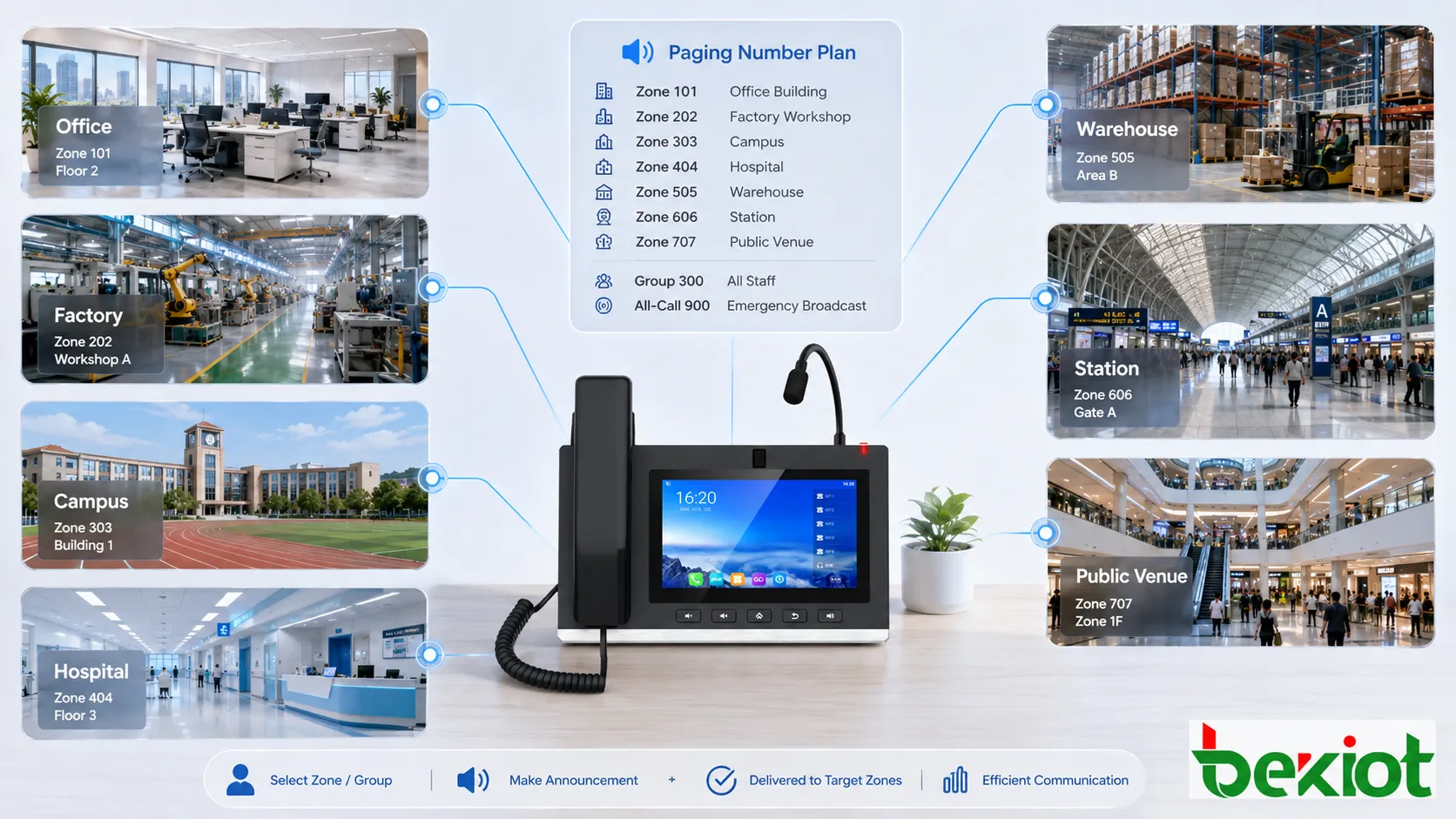
Paging number plans are used across offices, factories, campuses, hospitals, warehouses, transport sites, and public venues.
Design principles that work in real sites
Use names people recognize
Technical labels such as “Zone 17” or “Group 08” may be clear to engineers, but they are not always clear to operators. A label such as “Warehouse Loading Dock” or “Building B Third Floor” is easier to use during real operation.
The same names should appear in the PBX, paging server, dispatch console, floor plan, maintenance record, quick reference sheet, and training material. Consistent naming reduces misunderstanding.
Separate number ranges
Number ranges should have meaning. A facility may use one range for buildings, one for departments, one for outdoor zones, and one for emergency functions. This structure makes the plan easier to remember and easier to audit.
Emergency and all-call numbers should be separated from routine numbers. If these codes are too close to daily-use codes, accidental activation becomes more likely. Separation also makes training easier.
Keep the list short where possible
A system can support many paging numbers, but users do not need to remember every possible code. Too many numbers can reduce usability. The plan should include the zones and groups that people actually need in daily operation.
For complex sites, role-based quick lists are more useful than one huge master list. Receptionists, guards, warehouse supervisors, school administrators, and emergency managers may each need a different subset of numbers.
Control access by role
Permission should follow responsibility. Local staff may page their own areas. Facility managers may page broader building zones. Security teams may use emergency and all-call codes. System administrators may manage configuration, but they do not necessarily need to make every announcement.
Access rules should be reviewed when staff roles change. Old permissions can create safety and operation risks, especially if former users still have access to emergency or site-wide paging functions.
Reserve space for growth
Facilities change over time. Departments move, new buildings open, warehouses expand, outdoor areas are added, and emergency zones are revised. A good number plan leaves room for future zones, groups, and functions.
Without reserved ranges, the system may need awkward exceptions later. These exceptions make training harder and increase maintenance risk. Planning for expansion is easier than renumbering a live paging system.
Configuration should match the operation process
A paging number is not only a code in the PBX or paging server. It should match the way the announcement is used. The configuration should define the target zone, endpoint list, audio route, priority level, allowed users, recording need, schedule relationship, and emergency role if applicable.
For manual paging, the user should know when to dial the number and what area will hear the message. For scheduled paging, the system should point to the correct group or zone every time. For emergency paging, the number should activate the correct priority and coverage without requiring extra manual steps.
After configuration changes, related numbers should be tested. Adding speakers, renaming zones, changing SIP routes, adjusting permissions, or modifying amplifier groups can all affect paging behavior. A number plan is only reliable when the configuration and the site remain aligned.
Maintenance keeps the plan reliable
Every paging number should be documented. The record should show the number, name, target, endpoint list, permission, priority, related system route, emergency role, and last test date. This documentation helps operators use the system and helps engineers troubleshoot it.
Logs should also be reviewed. They can show which numbers are used frequently, which attempts fail, and whether users are repeatedly dialing the wrong code. Failed attempts may indicate outdated documentation, insufficient training, permission issues, or route errors.
The plan should be updated after site changes. If a department moves, a building is renamed, speakers are removed, or zones are merged, the paging numbers should be checked. Outdated numbers can create long-term risk because users may believe an announcement was delivered when the target no longer exists.
Common problems and fixes
Problem
Typical Impact
Better Approach
Too many similar numbers
Users dial the wrong code, especially under pressure
Separate routine, group, all-call, and emergency number ranges
Unclear zone and group names
Operators do not know whether a code means a place or a team
Use names that clearly show location-based zones and role-based groups
All-call used too often
Unrelated areas are disturbed and site-wide messages lose authority
Improve zone codes, quick reference lists, and user training
Old numbers remain active
Announcements may be sent to outdated or wrong targets
Audit the plan after site changes and retire unused codes carefully
No permission control
Unauthorized users may trigger broad or emergency paging
Assign paging rights by role, department, and emergency responsibility
How to evaluate the plan
A good paging number plan should be clear. Users should understand what each number does, and administrators should be able to explain the structure without relying on one person’s memory. If the plan only makes sense to the installer, it is not ready for long-term operation.
It should also be accurate. Each number must reach the intended target, use the correct priority, and follow the correct permission rule. Zone numbers, group numbers, all-call numbers, emergency numbers, and scheduled paging targets should be tested regularly.
Usability is another standard. Numbers should be short enough for daily use, logical enough to remember, and documented enough for occasional users. A technically complete plan can still fail if operators hesitate or need to search too long.
Scalability matters as well. New buildings, floors, departments, and emergency functions should be added without breaking the existing logic. The plan should grow with the site instead of forcing a full renumbering whenever the facility changes.
Finally, the plan should support control. Important numbers should have permission rules, emergency numbers should be traceable, and routine users should only access the functions they need. This keeps paging communication efficient without making it unsafe.
Final view
Paging numbers are planned access codes that activate specific zones, groups, all-call functions, emergency broadcasts, scheduled announcements, or other paging actions. They turn a simple dial action into a controlled communication process.
The best plans are built around real site logic. They use recognizable names, separated number ranges, role-based permissions, documented mappings, routine testing, and regular updates after site changes. They also distinguish routine paging from emergency paging instead of treating every announcement the same way.
When planned carefully, paging numbers improve communication speed, reduce wrong-area announcements, support training, simplify maintenance, and strengthen emergency readiness. They are not just codes in a system menu; they are part of how a facility communicates every day.
FAQ
What are paging numbers in a paging system?
Paging numbers are dial codes or access numbers used to activate specific paging zones, staff groups, all-call functions, emergency broadcasts, or scheduled announcement targets.
Are paging numbers the same as document page numbers?
No. In this context, they refer to communication system access numbers, not printed page numbers or website pagination.
Can one number page multiple speakers?
Yes. One paging number can be mapped to a group or zone that includes multiple speakers, IP phones, intercom terminals, amplifiers, or other paging endpoints.
Why should emergency paging numbers be separated?
Emergency numbers usually need higher priority, stricter permission, wider coverage, and clearer training. Separating them from routine numbers reduces accidental activation and improves response speed.
How often should a paging number plan be reviewed?
It should be reviewed after site changes, system updates, permission changes, emergency procedure revisions, and routine maintenance checks. Critical paging numbers should be tested regularly according to site procedures.