System upgrade management explained for business-critical IT, communication and industrial platforms, covering impact review, inventory, compatibility, backup, testing, rollback, maintenance windows and post-upgrade monitoring.
Becke Telcom
A system upgrade should never begin with the upgrade package itself. It should begin with a simple operational question: what must remain stable while the change is taking place? A new version may bring security patches, better performance, new functions, or longer support life, but it can also introduce compatibility issues, configuration changes, service interruption, and recovery pressure.
Good upgrade management is therefore not about clicking “update” at the right time. It is about controlling change in a way that protects services, users, data, integrations, and business continuity. For communication platforms, databases, industrial systems, monitoring tools, customer portals, and internal operation systems, this control is often more important than the software package itself.
A practical upgrade process should answer four questions before deployment: why is the change needed, what may be affected, how can the result be verified, and how can the system recover if something goes wrong?
Start from the reason for change
The first rule is to confirm why the upgrade is needed. Some upgrades are urgent because they fix security vulnerabilities, serious bugs, compliance issues, or end-of-support risks. Some are planned because they improve performance, add features, support new hardware, or align with future architecture. Others may be optional and should wait until the organization has enough testing time.
Without a clear reason, upgrade decisions easily become reactive. A team may upgrade only because a new version is available, because a vendor recommends it, or because another department has already done it. This can create unnecessary risk. A stable system should not be changed casually unless the benefit is clear enough to justify the disruption.
The upgrade purpose should be written in practical terms, such as “fix authentication vulnerability,” “support new database version,” “improve call processing capacity,” “replace unsupported operating system,” or “enable integration with a new platform.” Clear purpose helps define test scope and acceptance criteria later.
When the reason is clear, the project team can also decide urgency. A critical security upgrade may need a shorter approval cycle. A feature upgrade may be scheduled during a low-risk maintenance window. A major architecture upgrade may require staged deployment.
Check business impact before technical action
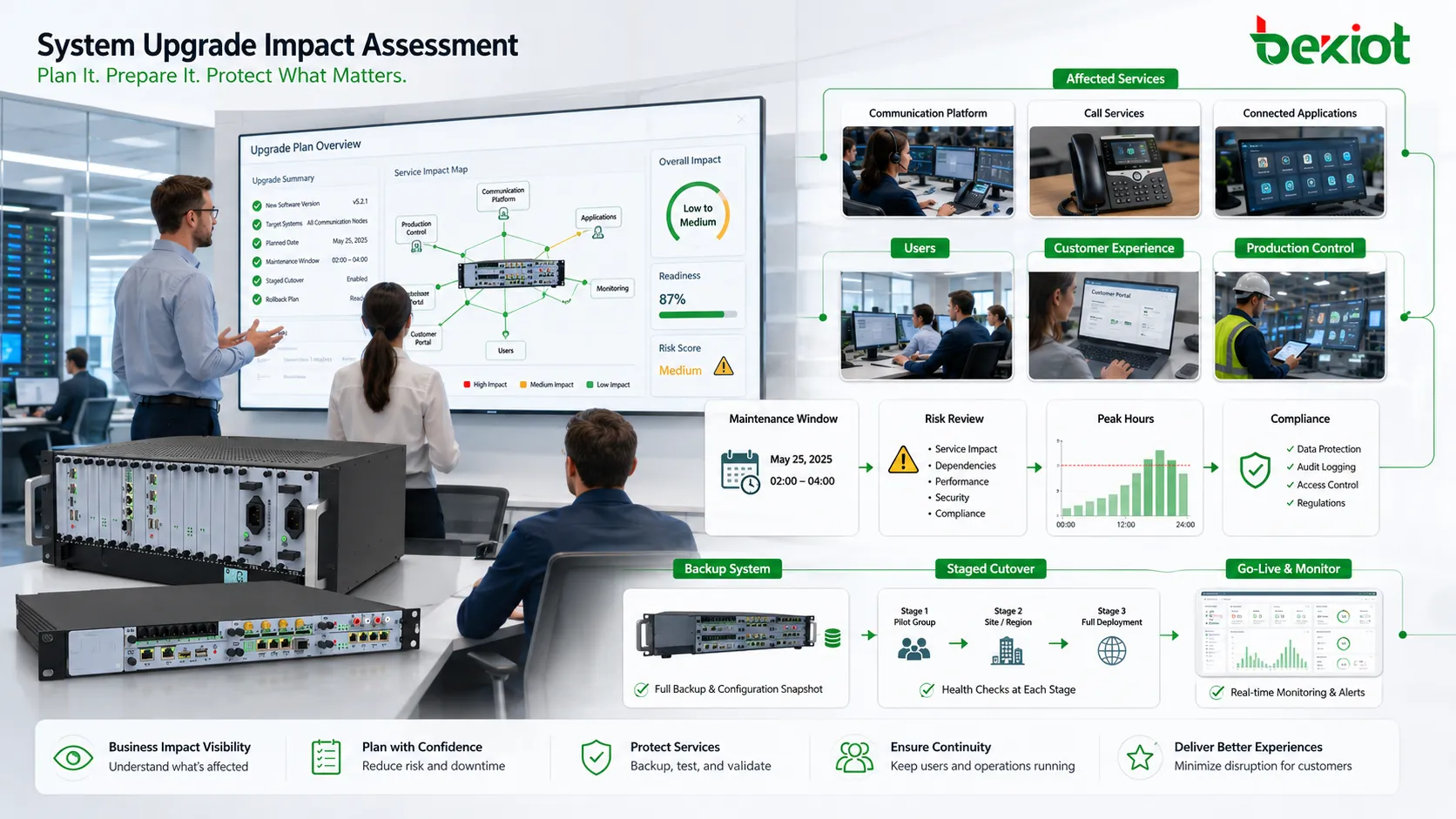
Every upgrade affects more than the technical system. It may affect users, service windows, connected applications, reporting, access permissions, devices, customer experience, production workflow, or support teams. Before any technical action is taken, the team should identify which business processes depend on the system.
This is especially important for systems that run continuously, such as communication platforms, databases, industrial systems, customer portals, payment systems, monitoring platforms, and internal operation tools. Even a short interruption may cause missed calls, failed transactions, delayed production, incomplete records, or user complaints.
Business impact review should include peak usage periods, critical user groups, external customers, internal departments, service-level commitments, and legal or compliance requirements. If the system supports emergency response, production control, security monitoring, or public service, the upgrade plan should be stricter than for ordinary office tools.
The result of this review should guide scheduling. Some upgrades can happen during normal maintenance hours. Some need night or weekend windows. Some require temporary backup systems, user notifications, staged cutover, or extra vendor support.
Before upgrading, teams should identify affected services, users, applications, and operational risks.
Build an accurate inventory first
A system cannot be upgraded safely if the team does not know what is connected to it. Inventory should include servers, operating systems, databases, middleware, applications, endpoints, network devices, storage, licenses, certificates, APIs, third-party integrations, backup tools, monitoring systems, and user access methods.
This inventory helps expose hidden dependencies. A reporting tool may depend on a database version. A legacy client may not support a new protocol. A device may fail after firmware changes. A security system may use an outdated API. If these dependencies are discovered only after deployment, rollback pressure increases.
Configuration inventory is equally important. System parameters, routing rules, user permissions, integration keys, scheduled jobs, service accounts, firewall rules, certificates, and custom scripts should be recorded before the upgrade. Many upgrade failures are not caused by the new version itself, but by missing or overwritten configuration details.
For large environments, the inventory should also identify version differences between sites or nodes. One branch may be running a different patch level. One server may have a custom module. One device model may need a special firmware path. These differences affect upgrade sequencing and test design.
Confirm compatibility instead of assuming it
Compatibility is one of the most common upgrade risks. A new system version may require a newer database, a different runtime library, an updated browser, a changed driver, a revised API, or a modified authentication method. If connected systems are not compatible, the upgrade may succeed technically but fail operationally.
Compatibility checks should cover hardware, operating system, database, application version, protocol, interface, browser, mobile client, endpoint device, driver, plug-in, certificate, and third-party service. The team should not rely only on general release notes. Actual project conditions must be compared with vendor requirements and local configuration.
Backward compatibility also matters. If old clients, devices, or integrations must continue working after the upgrade, this should be tested directly. Some systems support mixed-version operation for a limited period, while others require all components to be upgraded together.
When compatibility is uncertain, a pilot environment should be used. The team can test representative devices, user roles, data flows, and interface calls before touching production. This reduces the chance of discovering major conflicts during the maintenance window.
Upgrade Area
Key Rule
Reason for Review
Application version
Check release notes and dependency changes
Prevents function loss and interface conflicts
Database
Verify schema, driver, and migration requirements
Protects data access and transaction stability
Operating system
Confirm runtime, service, and security policy support
Avoids service startup and permission problems
Network and security
Review firewall, certificate, DNS, and access rules
Prevents connection failure after cutover
Endpoints and clients
Test representative user devices and versions
Reduces field compatibility complaints
Protect data before changing the environment
Data protection is a non-negotiable rule. Before an upgrade, the team should confirm backup availability, backup integrity, restore method, storage location, retention policy, and recovery time. A backup that has never been tested is only an assumption, not a recovery plan.
For databases and application platforms, backup should be taken at the correct point. If data continues changing during the upgrade, the team must decide whether to stop writes, use transaction logs, take a snapshot, or prepare replication-based recovery. The method depends on system architecture and acceptable downtime.
Configuration backup should not be ignored. Application settings, service files, routing tables, scheduled tasks, user roles, certificates, keys, and custom templates may be just as important as business data. After an upgrade failure, rebuilding these manually can take longer than restoring the software package.
Data migration scripts should also be reviewed carefully. Some upgrades change schema, indexes, encoding, field length, or data structure. These changes may be difficult to reverse. The team should know whether migration is reversible, whether rollback requires restoring the full backup, and how long recovery may take.
Use a realistic test environment
Testing is valuable only when the test environment resembles production in the areas that matter. A small empty test system may confirm that the installer runs, but it may not reveal performance issues, data migration problems, integration failures, permission conflicts, or device compatibility issues.
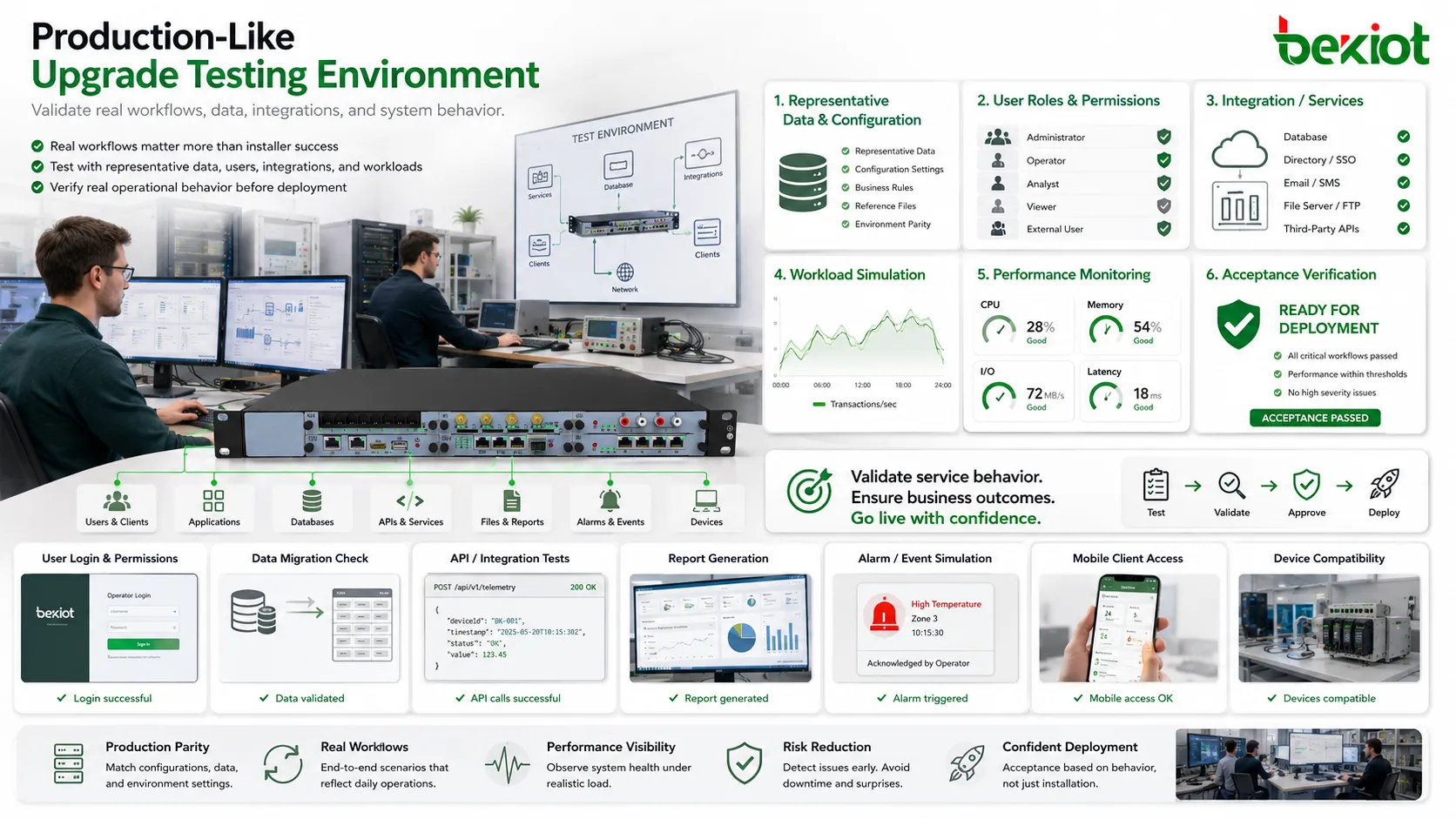
The test environment should include representative data, user roles, connected services, configuration settings, interface calls, and typical workloads. It does not always need to be a perfect copy of production, but it should include enough reality to expose the main risks.
Test cases should follow real workflows. Users should log in, create records, run reports, make transactions, trigger alarms, call APIs, generate files, access mobile clients, or use connected devices depending on the system type. Technical startup success is not the same as service readiness.
Performance testing may also be needed. A new version may run correctly with one user but slow down under real load. Database migration, cache behavior, memory use, CPU load, disk I/O, network latency, and background jobs should be observed where relevant.
A useful test environment should reflect real workflows, data, integrations, and user behavior.
Prepare rollback before deployment
A system upgrade should not proceed unless rollback has been considered. Rollback is the process of returning the system to the previous working state if the upgrade fails or causes unacceptable problems. It is not enough to say “we will restore backup if needed.” The team must know exactly how rollback will happen.
A rollback plan should define who makes the rollback decision, what conditions trigger rollback, which files or databases must be restored, how long recovery will take, what data may be lost, and how users will be notified. The plan should also define whether rollback is possible after data migration or whether only forward repair is realistic.
Some upgrades are easy to reverse. Others change database structure, encryption methods, firmware versions, or configuration formats in ways that make rollback difficult. These cases require extra caution. The team may need staged deployment, blue-green architecture, backup nodes, or parallel operation to reduce risk.
Rollback should be tested where possible. A plan that has never been tried may fail during an emergency. Even a partial rollback rehearsal can reveal missing permissions, slow restore speed, incomplete backups, or unclear responsibilities.
Control the maintenance window
The maintenance window is the planned time period during which the upgrade is performed. It should be selected according to user impact, system load, staff availability, vendor support, backup completion, and rollback time. A common mistake is choosing a window that is long enough for the upgrade but not long enough for troubleshooting or rollback.
The window should include preparation, final backup, upgrade execution, verification, possible repair, rollback decision time, rollback execution, and user communication. If the upgrade itself needs one hour but rollback needs three hours, the maintenance window must reflect that reality.
Change freezing may be necessary before the upgrade. Other teams should avoid making unrelated configuration changes, network changes, database changes, or access policy changes during the same period. When multiple changes happen together, troubleshooting becomes much harder.
Support availability matters. Key technical staff, application owners, network engineers, database administrators, security teams, and vendor support should be reachable during the window. An upgrade should not be scheduled when the only person who understands a critical dependency is unavailable.
Communicate before and after the change
User communication prevents confusion. Before the upgrade, affected users should know the expected time, service impact, temporary limitations, contact method, and what they should avoid doing during the maintenance window. For public-facing systems, customer communication may also be required.
The message should be specific but not overloaded with technical detail. Users need to know whether the system will be unavailable, whether data entry should stop, whether mobile clients should be updated, whether passwords or login methods will change, and when service is expected to resume.
After the upgrade, users should receive confirmation that the system is available again. If functions have changed, release notes or short usage guidance may be needed. If issues remain, the team should explain known limitations and expected resolution steps.
Good communication reduces unnecessary support tickets. Many post-upgrade complaints are caused not by technical failure but by users being surprised by interface changes, login prompts, expired sessions, or temporary performance changes.
Verify the result with acceptance checks
An upgrade is not complete when the installer finishes. It is complete only when the system has passed acceptance checks. These checks should be defined before the upgrade begins so that the team knows what “successful” means.
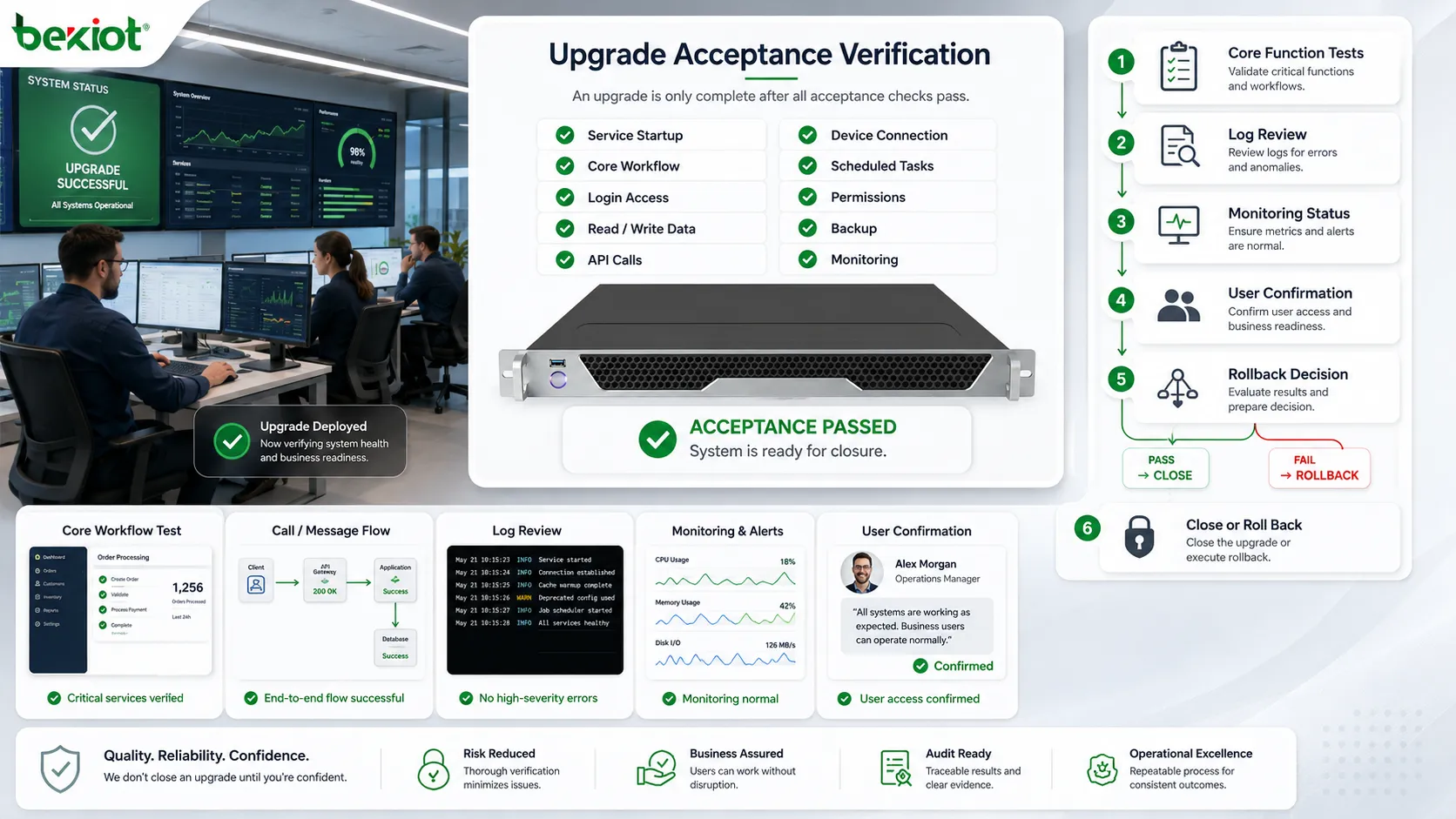
Acceptance checks may include service startup, login, core workflow execution, data reading and writing, report generation, interface calls, device connection, scheduled task execution, permission verification, backup operation, monitoring status, and user confirmation. The exact list depends on the system function.
Core functions should be tested first. If the system supports business transactions, test transactions. If it supports communication, test call paths or message flows. If it supports monitoring, test alarm reception and dashboard updates. If it supports database service, test application access and query behavior.
Acceptance should also include log review. Error logs, warning messages, failed jobs, authentication errors, database migration messages, and integration failures may reveal problems before users notice them. A clean screen does not always mean a clean upgrade.
Post-upgrade verification should confirm core workflows, integrations, logs, monitoring, and user access before closure.
Monitor the system after release
The first hours and days after an upgrade are important. Some problems appear only under real traffic, scheduled jobs, peak usage, or specific user behavior. Post-upgrade monitoring should be more active than normal operation, especially for critical systems.
Monitoring should include CPU, memory, disk, database performance, network traffic, service status, error logs, user sessions, transaction success rate, API response, queue length, and storage growth where relevant. The team should also monitor user feedback channels because some issues are visible to users before they appear in dashboards.
Performance baselines are useful. If the team knows normal response time, resource usage, and error rate before the upgrade, it can compare the new version more objectively. Without baselines, teams may argue whether a slowdown is new or historical.
Post-upgrade monitoring should have a defined duration. For small systems, several hours may be enough. For critical systems, monitoring may continue for days or through one full business cycle. The upgrade should not be closed until the system proves stable under normal operating conditions.
Document what changed
Documentation is part of the upgrade, not an optional administrative task. The team should record what version was installed, what configuration changed, what backup was taken, what issues appeared, how they were resolved, who approved the change, and whether any follow-up work remains.
Version records are especially important. Future troubleshooting depends on knowing which system version, database version, firmware version, driver version, or patch level is currently running. Without documentation, later teams may waste time rediscovering the environment.
Known issues should be written down. If one function requires later adjustment, if one integration needs vendor confirmation, or if one user group needs retraining, these items should not be left in informal chat messages. They should become part of the upgrade record.
Good documentation also improves the next upgrade. Teams can review what went well, what took longer than expected, what risks were missed, and what steps should be improved. Each upgrade should make the organization better prepared for the next one.
Common mistakes and better fixes
Mistake
Typical Result
Better Fix
Upgrading only because a new version exists
Unnecessary risk without clear business value
Define the upgrade reason, urgency, and expected benefit first
Testing only installation success
The system starts but real workflows fail
Test user roles, data flows, integrations, devices, reports, and core operations
No tested rollback plan
Recovery becomes unclear when the upgrade fails
Define rollback triggers, restore method, decision owner, time requirement, and data risk
Short maintenance window
There is no time left for troubleshooting or rollback
Include preparation, upgrade, verification, repair, rollback decision, and communication time
No post-upgrade monitoring
Problems appear later under real traffic or scheduled jobs
Monitor performance, logs, services, user feedback, and business workflows after release
How to judge upgrade readiness
A system is ready for upgrade only when the reason for change is clear, the affected business processes are known, and the technical dependencies have been mapped. The team should understand which users, applications, devices, data flows, and integrations may be affected.
Backup and rollback readiness should be treated as a gate. If backup cannot be restored, rollback is unclear, or data migration cannot be reversed, the upgrade risk is much higher. In critical systems, recovery confidence should be confirmed before production deployment.
Testing should prove more than startup success. Representative data, real workflows, user roles, integrations, endpoint devices, permission rules, and performance behavior should be verified. The test result should be linked to acceptance criteria, not only to the installer log.
Operational readiness is also required. Maintenance window, communication plan, support staff, vendor contact, monitoring plan, and documentation process should be prepared. A technically correct upgrade can still fail if the operational process is weak.
The final decision should be based on controlled risk. If the upgrade benefit is clear, compatibility is verified, data is protected, rollback is prepared, and users are informed, the upgrade can proceed with confidence.
Final view
The most important rule for a system upgrade is controlled change. A successful upgrade protects data, verifies compatibility, limits downtime, prepares rollback, communicates with users, and confirms service behavior after release. The upgrade package itself is only one part of the process.
For business-critical environments, the safest approach is to treat upgrading as a full operational workflow: assess impact, build inventory, test realistically, schedule carefully, execute with clear responsibility, verify results, monitor after release, and document what changed.
When these rules are followed, upgrades become a method for improving systems rather than a source of avoidable disruption. The goal is not only to reach a newer version, but to keep the service stable while the system changes.
FAQ
Should every system be upgraded as soon as a new version is released?
No. Urgent security fixes may require fast action, but feature upgrades or major version changes should be evaluated first. Compatibility, business impact, testing readiness, and rollback options should be reviewed before deployment.
What is the most important preparation before upgrading?
The most important preparation is confirming recoverability. This includes tested backups, configuration records, rollback procedures, and clear decision rules. Without recovery confidence, even a simple upgrade can become risky.
Why do upgrades fail even after testing?
Testing may miss real production conditions such as high traffic, unusual data, legacy clients, third-party integrations, scheduled jobs, permission differences, or network restrictions. A test environment should reflect the most important production dependencies.
How long should post-upgrade monitoring continue?
It depends on system importance and usage cycle. A small internal tool may need only short monitoring, while a critical service may need monitoring through peak hours, scheduled tasks, and one complete business cycle.
What should be included in an upgrade record?
The record should include old and new versions, upgrade time, responsible staff, backup details, changed configuration, test results, issues found, rollback status, user notification, and any follow-up actions required.