Real-time paging explained for factories, transport hubs, hospitals, campuses and public facilities, covering live voice broadcast, zone selection, priority control, emergency override, system integration and maintenance.
Becke Telcom
In a factory, a warning may need to reach a production area immediately. In a transport station, passengers may need updated guidance within seconds. In a hospital, staff may need to coordinate quickly across departments. In a warehouse, a loading team may need instructions without stopping work to check a screen or phone.
Real-time paging is designed for these situations. It turns live voice instructions, alerts, and operational notices into immediate area-based communication that can reach people through speakers, intercom points, dispatch consoles, IP paging terminals, or network-connected audio devices.
Its value is not only volume. A strong real-time paging system delivers the right message to the right zone at the right moment, while keeping priority, audio clarity, access control, monitoring, and emergency behavior under control.
When immediate voice delivery is needed
Many work environments cannot rely only on email, mobile messages, desktop notifications, or scheduled announcements. These channels are useful, but they depend on people looking at a screen, carrying a device, opening an application, or checking a message in time. Paging works differently. It pushes voice directly into the physical area where people are working, waiting, moving, or responding.
The core feature is immediacy. When an operator speaks into a microphone, selects a zone, presses a paging key, or triggers a live announcement from a console, the message can be delivered at once to the selected area. This makes real-time paging suitable for safety warnings, operational instructions, temporary route changes, visitor guidance, service reminders, security notices, and emergency coordination.
Unlike background music or routine scheduled broadcast, live paging is driven by what is happening now. A gate change, machine stop, fire drill, missing person notice, queue adjustment, maintenance warning, security incident, weather alert, or service request may all require a message that was not prepared hours earlier.
This is why paging remains important even in digital workplaces. Screens and mobile systems carry detailed information, but voice broadcast can reach a wider group faster, especially when people are not sitting at desks or are not part of an internal messaging group.
How live paging reaches the audience
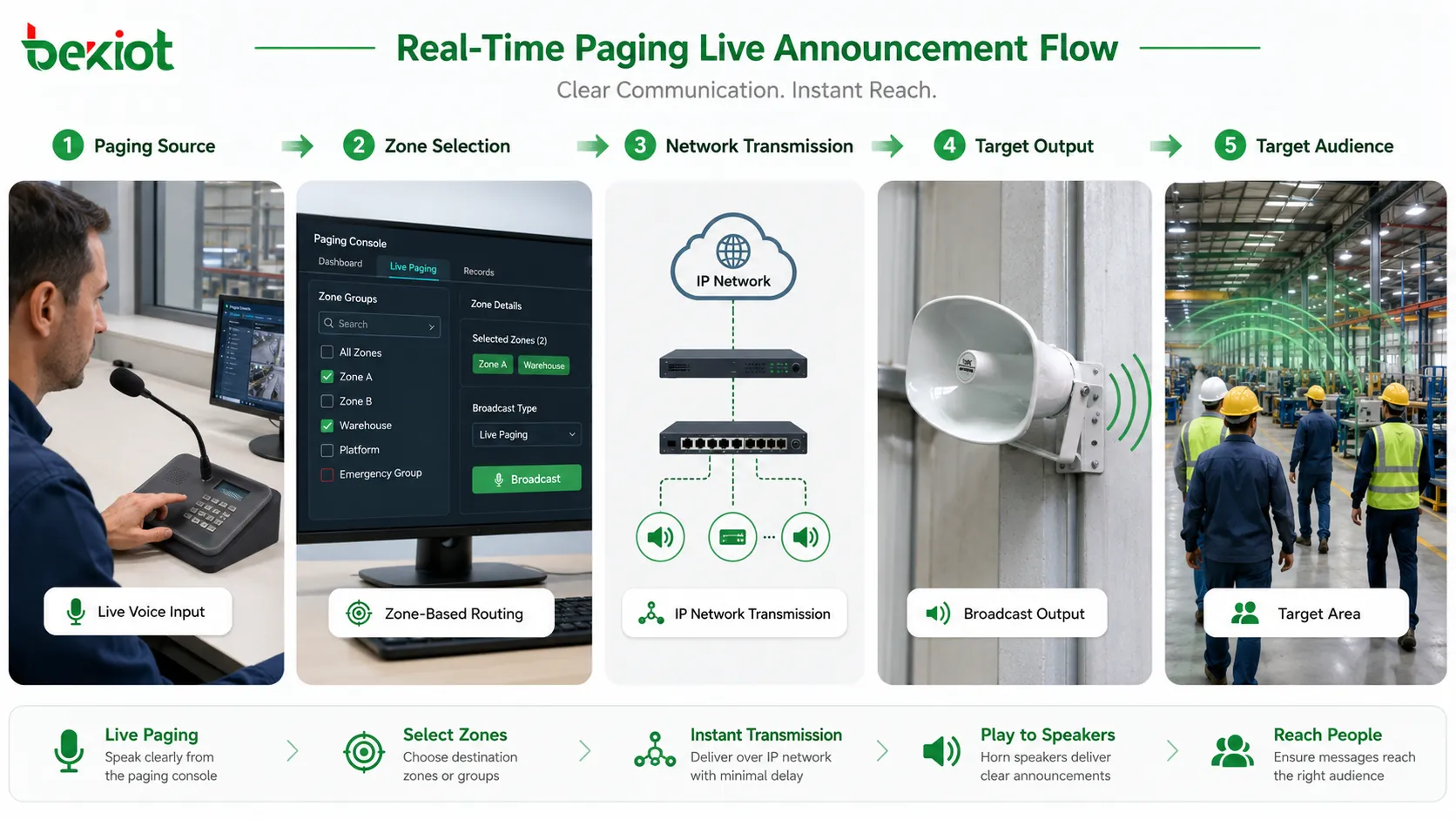
The working process begins with a paging source. This may be a microphone, dispatch console, IP phone, SIP terminal, intercom station, software client, mobile app, web interface, control panel, or automation trigger. The source converts the operator’s voice or selected message into an audio stream or paging request.
The system then decides where the message should go. The destination may be one speaker, one paging zone, several zones, a whole building, a floor, a workshop, a platform, a warehouse area, a campus section, an outdoor yard, or an emergency group. Zone selection is important because most announcements should not be sent everywhere.
After destination selection, the platform routes audio through the paging server, network, amplifier, speaker line, IP speaker, intercom endpoint, or broadcast controller. In IP-based systems, audio may travel over Ethernet or wireless networks. In traditional systems, line-level or amplified audio may be distributed through speaker circuits. Many modern deployments combine both.
The message is then played in the target area. In a well-designed system, it should arrive quickly, remain intelligible, and avoid unnecessary delay. The listener does not need to answer a call or open an app; the instruction is heard directly where action is required.
Real-time paging delivers live voice from an operator or system trigger to selected zones with minimal delay.
Instant broadcast is the core capability
Instant broadcast allows supervisors, reception staff, security teams, dispatchers, maintenance managers, and service coordinators to speak directly to one or many areas without making individual calls. One operator speaks once, and the message reaches all selected listening points at the same time.
This is useful when the message is short, action-oriented, and time-sensitive. Examples include clearing a loading lane, calling a maintenance team to a pump room, announcing a platform change, sending security staff to an entrance, or asking one production line to stop operation and wait for inspection.
Instant broadcast also reduces dependence on personal devices. Not every worker, visitor, passenger, patient, contractor, student, or temporary staff member carries a company phone or radio. Paging reaches the physical environment rather than a private contact list, which gives it an advantage in shared and public spaces.
Zone selection makes paging precise
A useful paging system should not treat the whole site as one listening area. Zone selection allows operators to target the right place without disturbing unrelated spaces. A warehouse notice should not interrupt an office. A hospital ward message should not play in every department. A maintenance warning for one production line should not stop the whole plant.
Zones can be designed by building, floor, room, department, outdoor area, gate, platform, workshop, equipment zone, parking area, service desk, or emergency route. Good zone planning makes paging more useful because people hear messages that are relevant to their area.
Targeted paging also reduces noise fatigue. If every announcement is sent everywhere, people may begin to ignore the system. Over-broadcasting weakens attention and makes important messages less effective. Keeping routine messages local preserves site-wide paging for major notices and emergencies.
Some systems support multi-zone and dynamic group paging. An operator may select all entrances, all warehouses, all platforms, or all outdoor yards. Temporary groups may be created by shift, emergency role, event type, or service responsibility when the physical site has changing workflows.
Priority control prevents conflict
In busy environments, several paging events may happen at the same time. A receptionist may make a service announcement, a security desk may send a warning, a scheduled message may be playing, and an emergency trigger may activate. If the system does not manage priority, audio may overlap or interrupt incorrectly.
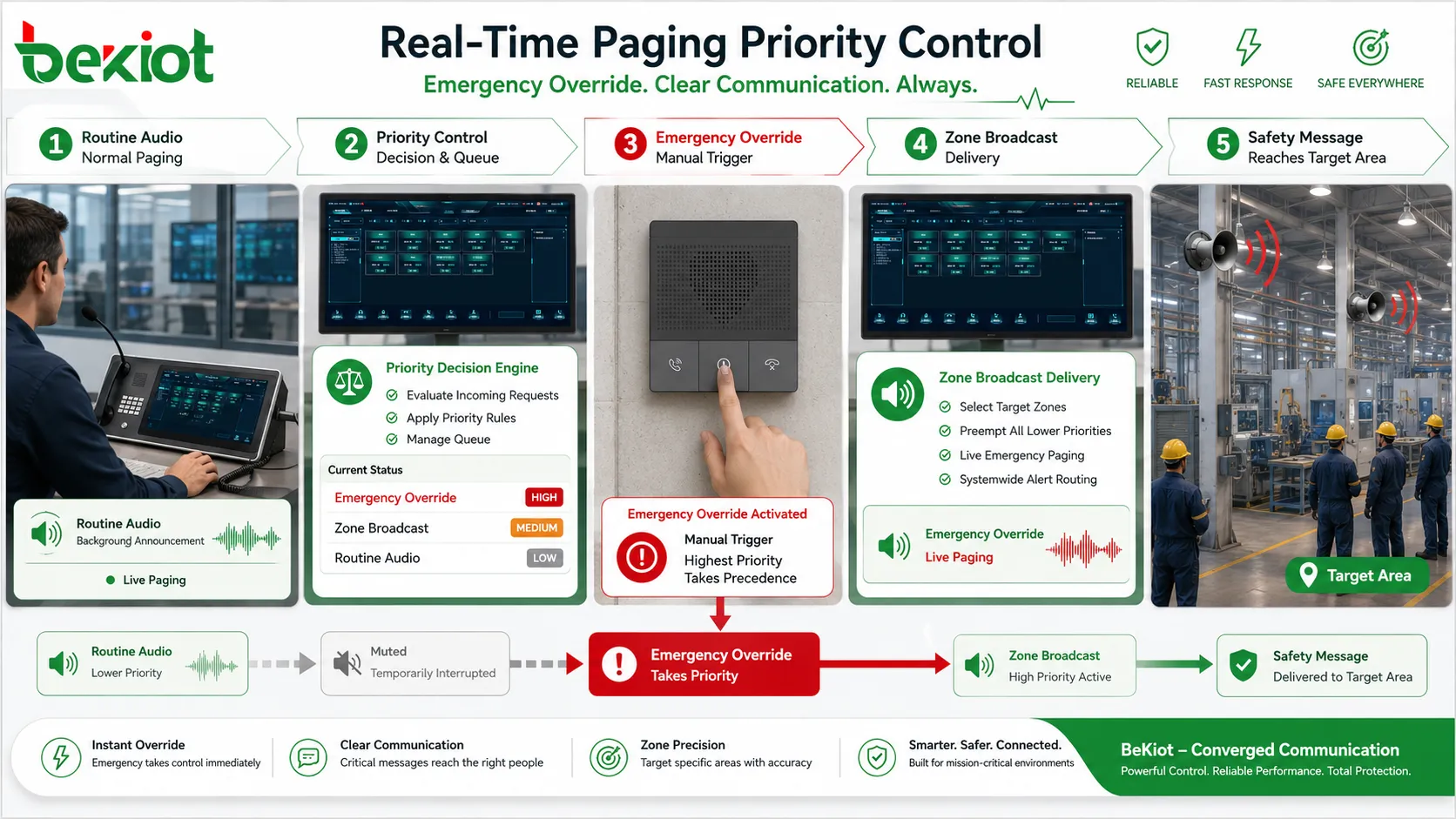
Priority control defines which message should be heard first. Emergency broadcast may take the highest priority. Fire alarm integration may override background music and ordinary paging. Security announcements may override routine service notices. Scheduled messages may have lower priority than live operator instructions.
This feature matters because not all messages are equal. A lunch reminder should not block an evacuation announcement. A parking notice should not cover a safety warning. Priority control ensures that urgent communication receives the audio path, attention, and system resources it needs.
Priority design should be clear before deployment. The system should define which sources have higher priority, whether lower-priority audio is paused or stopped, whether interrupted messages resume, and how conflicts are logged. During emergency operation, staff should not need to manually silence every other audio source.
Emergency override gives paging a safety role
Emergency override allows critical warnings to take control of the audio system immediately, even if other content is playing. This may include fire evacuation messages, severe weather warnings, hazardous gas alerts, security threats, equipment danger notices, or public safety instructions.
The purpose is not only loudness. It is authority. When an emergency message begins, the system should make it clear that the current instruction is more important than ordinary announcements. Background music, routine paging, scheduled advertisements, and low-priority notices should be interrupted or muted.
Emergency override may be activated manually by an authorized operator or automatically by a connected alarm system. A fire alarm, emergency button, access control event, environmental sensor, or security system may trigger a specific paging message depending on the site design.
This capability must be tested carefully. The emergency message must reach the intended zones, play clearly, override lower-priority audio, and stop or reset according to procedure. A system that looks correct on the control screen but fails in the field is not reliable.
Priority control and emergency override ensure that urgent messages take precedence over routine audio.
Live control supports flexible response
Pre-recorded messages are useful for standard situations, but not every event follows a prepared script. Live operator control allows staff to respond to conditions as they happen. A dispatcher can guide people away from a blocked corridor. A station operator can explain a temporary platform change. A warehouse supervisor can coordinate a loading delay.
Live control gives paging a human layer. The operator can adjust wording, tone, timing, and destination according to the real situation. This flexibility is valuable because many operational events are too specific or too fast-changing for fixed audio files.
The control interface should be simple. Operators should be able to select zones, confirm status, speak, and end the page without navigating through confusing menus. In critical environments, role-based permission is also necessary. A general user may page only a local area, while supervisors or emergency staff may control the whole site.
Training affects performance. Operators should know how to choose zones, how long to speak, how to repeat important information, and when to use a prepared message instead of live speech. Good operating habits make the technology more effective.
Live and pre-recorded messages can work together
Real-time paging is not limited to live voice. Many systems combine live paging with stored announcements, text-to-speech, scheduled playback, and alarm-triggered messages. This creates a balance between speed, consistency, and flexibility.
Pre-recorded messages are useful for evacuation instructions, shift reminders, safety notices, public guidance, visitor announcements, closing reminders, school bells, station alerts, and routine operational messages. They reduce wording mistakes and ensure that important instructions are delivered in an approved form.
Live paging is better when the situation changes. A pre-recorded alarm may instruct people to evacuate, while a live operator provides additional route guidance. A scheduled station notice may give standard service information, while live paging explains a sudden delay.
The strongest systems allow operators to choose the proper message type according to the event. A small facility may need only live paging and a few stored messages, while a transport hub or industrial complex may need multi-layer message management.
Integration extends paging beyond manual speech
Real-time paging becomes more powerful when connected with other systems. Alarm integration can trigger announcements automatically. Access control integration can support door or visitor guidance. Fire alarm integration can activate evacuation zones. Video monitoring can help operators verify the situation before broadcasting. Building management systems can trigger environmental warnings.
Integration turns paging from a manual speaking tool into part of a wider response workflow. When an alarm appears, the system can notify the right area immediately. When a sensor detects danger, paging can broadcast a warning without waiting for a manual call chain. When a security desk receives an event, the operator can combine camera verification and voice instruction.
Integration must be designed carefully. Not every alarm should trigger a broadcast. False alarms, low-priority warnings, maintenance tests, or repeated technical events can create unnecessary noise. The system should classify events and decide which ones justify automatic announcement.
Fail-safe behavior should also be defined. If the management platform fails, can manual paging still work? If the network is partially down, are local emergency zones still reachable? If an alarm trigger is cleared, does the announcement stop automatically or require operator confirmation?
Feature Area
What It Enables
Operational Advantage
Live paging
Operator speaks directly to selected zones
Supports immediate response to changing conditions
Zone broadcast
Messages are sent to specific areas or groups
Reduces disturbance and improves message relevance
Priority control
Urgent messages override lower-priority audio
Protects critical communication during conflicts
Alarm integration
Events can trigger automatic announcements
Shortens response time and improves safety coordination
Status monitoring
Devices, zones, links, and playback states can be checked
Improves maintenance and reduces hidden failures
Network-based delivery expands coverage
Traditional paging often depended on fixed amplifier lines and local audio wiring. These systems can still work well, but large or distributed sites may need more flexible coverage. Network-based paging allows audio to travel through IP networks, making it easier to reach multiple buildings, remote areas, branch sites, campuses, stations, and outdoor points.
IP-based delivery can connect paging servers, SIP devices, IP speakers, network amplifiers, dispatch consoles, software clients, and management platforms. A new zone may be added through network configuration and device installation rather than rebuilding a large analog audio path.
Network-based paging also supports remote operation. An authorized operator may page a branch location from a central office. A security center may broadcast to multiple buildings. A facility manager may manage announcements across a campus.
The network must be designed for the role. Delay, packet loss, multicast configuration, VLAN design, quality of service, firewall rules, and bandwidth planning can all affect paging performance. Operational or emergency paging should not be treated as ordinary background traffic.
Audio clarity determines real effectiveness
Paging is useful only when people understand the message. Loud sound is not the same as clear sound. A message may be loud enough but still difficult to understand because of echo, background noise, poor speaker placement, wrong volume balance, low-quality microphones, compression problems, or overlapping announcements.
Clarity begins with the source. A good microphone, proper speaking distance, noise control, and clear operator speech all improve intelligibility. If the source audio is distorted, the system cannot fully repair it later.
Speaker placement is equally important. Speakers should cover the intended area evenly without creating excessive echo or dead zones. In large halls, tunnels, factories, stations, warehouses, and outdoor yards, acoustic conditions may require multiple speakers, directional placement, suitable power levels, and zone tuning.
Volume should match the environment. An office corridor does not need the same sound level as a machine hall. A quiet hospital area requires different handling from a transport platform. For noisy industrial environments, paging may need to work with visual indicators, flashing lights, local displays, or repeated messages.
Two-way interaction adds confirmation
Some paging systems are one-way only: the operator speaks and the audience listens. This is suitable for many announcements, but some situations require feedback. A field team may need to confirm that a message was received. A guard may need to answer after being paged. A technician may need to report status after hearing an instruction.
Two-way interaction can be supported through intercom endpoints, talkback speakers, SIP terminals, dispatch consoles, or local call buttons. The operator can page an area and then receive a response from a field point. This turns paging from broadcast-only communication into a coordination tool.
Confirmation is useful in maintenance, security, emergency response, and industrial operation. A control room can call a workshop area, announce an instruction, and receive a reply. A security center can page a gate and confirm staff presence.
This feature should be planned carefully because open microphones and talkback channels can create privacy, noise, or feedback issues. The system should define who can initiate talkback, which areas support response, whether conversations are recorded, and how audio conflicts are handled.
Status monitoring prevents hidden failure
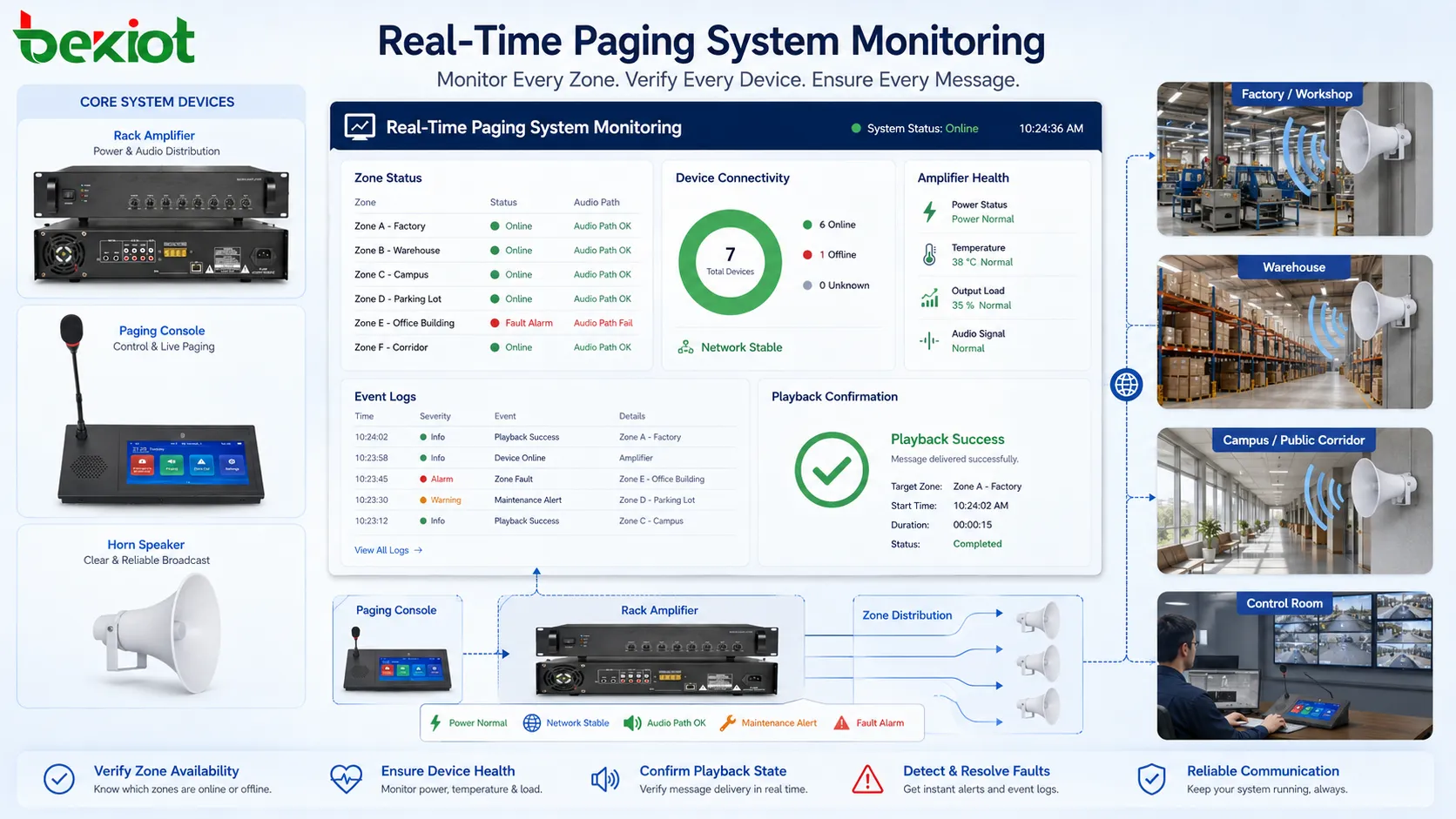
A paging system may look ready until the moment it is needed. A speaker may be disconnected, an amplifier may be offline, an IP endpoint may lose network registration, a cable may be damaged, a zone may be muted, or a power supply may fail. Without monitoring, these problems may remain hidden.
Status monitoring helps operators and maintenance teams see whether devices, zones, links, amplifiers, speakers, controllers, and servers are working. The system may report online status, fault alarms, power state, connection state, audio path condition, or playback status depending on design.
Monitoring is especially important for distributed sites. A campus, factory, station, tunnel, or public facility may have many endpoints spread across wide areas. Central status visibility helps maintenance teams prioritize faults and confirm recovery after repair.
For emergency use, monitoring should be paired with routine field testing. A status screen is helpful, but actual playback tests confirm that the field output works. Strong maintenance combines automated monitoring with scheduled functional verification.
Logs and records support management
Paging is also an operational record. Managers may need to know who made an announcement, when it happened, which zones received it, whether it was live or pre-recorded, and whether it was interrupted by another event.
Recording and logs are useful for incident review, service quality, safety management, training, and dispute handling. After an evacuation drill, a team can review whether the correct message was used and whether the timing matched procedure. After a complaint, a facility manager can check whether a service announcement was made.
Logs also help improve design. If one zone receives frequent urgent pages, the workflow may need adjustment. If certain announcements are often repeated, a pre-recorded message may be more efficient. If operators frequently page the wrong zone, the interface or zone naming may need improvement.
Recording and logging should follow privacy and policy rules. Organizations should define which announcements are recorded, how long records are stored, who can access them, and how they are protected.
Remote and multi-site operation
Real-time paging becomes more powerful when operators can manage multiple areas from one place. A central security office may broadcast to different buildings. A transport operation center may page several stations. A school district may send messages to multiple campuses. A logistics company may coordinate warehouses from a regional office.
Remote operation reduces the need for local staff to handle every announcement. It also supports consistent communication across sites. If a weather warning, safety drill, system outage, or service notice affects several locations, the central team can issue coordinated messages.
Multi-site paging requires careful permission design. A local operator may control one building, while a central supervisor may control all sites. Emergency staff may have higher priority than ordinary users.
Network reliability also matters. A remote design should consider backup paths, local fallback, survivability, and manual override. If the central connection fails, local staff may still need to page their own site.
Scheduling and real-time control can coexist
Although real-time paging focuses on immediate communication, it often works beside scheduled announcements. Many sites need routine messages at fixed times, such as shift changes, class bells, closing reminders, safety tips, visitor notices, station updates, cleaning reminders, or background music changes.
The important point is that scheduled audio should not weaken live control. If an operator needs to speak, the system should allow live paging to interrupt, pause, or override scheduled content according to priority rules. Routine automation should serve operation, not block it.
Scheduling supports consistency, while real-time control handles exceptions. A delivery delay, safety incident, equipment fault, visitor issue, security event, or weather change may require immediate human instruction. The strongest systems combine scheduled reliability with live flexibility.
Where real-time paging is used
Industrial sites
Industrial environments use paging for production coordination, safety reminders, maintenance dispatch, emergency alerts, visitor control, logistics instructions, and shift communication. Workers may be spread across workshops, warehouses, outdoor yards, utility rooms, machine areas, and control stations.
A live announcement can tell workers to pause a process, wait for inspection, prepare materials, clear a route, or report to a location. In noisy areas, paging may need to work with radios, intercoms, flashing lights, and local indicators so the instruction is actually understood.
Transport and public facilities
Airports, railway stations, metro platforms, bus terminals, ports, tunnels, parking facilities, and highway service areas use paging for passenger information, platform changes, boarding notices, delay explanations, emergency instructions, lost item announcements, and crowd management.
These environments require clear audio and careful zone design. Announcements should be understandable to people who are distracted, unfamiliar with the site, carrying luggage, or moving through a crowd.
Healthcare, education, and commercial spaces
Healthcare environments use paging for staff coordination, emergency response, visitor guidance, department notices, and facility operations. Messages must be targeted and controlled so that patient areas are not disturbed unnecessarily while urgent instructions still reach the right staff.
Schools and campuses use paging for class changes, campus notices, emergency drills, security warnings, event coordination, and daily schedules. Commercial spaces use it for service calls, visitor announcements, emergency guidance, parking notices, staff coordination, and background audio override.
Real-time paging supports fast voice coordination across industrial, transport, healthcare, education, commercial, and public environments.
Security and paging authority
A paging system can affect many people at once, so access control is important. Unauthorized paging can cause confusion, disturb operations, spread incorrect information, or create safety risk. The system should define who can page which zones and at what priority.
User roles may include local operator, department user, security staff, facility manager, emergency commander, system administrator, and maintenance engineer. A receptionist may page a lobby area, while an emergency commander may page the whole facility. A maintenance engineer may test a zone but not issue public announcements.
Authentication matters when paging can be performed from software clients, IP phones, mobile apps, or web interfaces. User accounts, passwords, device registration, network access control, and audit logs help prevent misuse. Physical microphone stations should also be protected where public access is possible.
Access control should not make emergency use too difficult. Authorized staff must be able to broadcast quickly during urgent events. The best design combines normal restrictions with clear emergency permissions and simple operating procedures.
Design mistakes that weaken performance
Mistake
Typical Result
Better Fix
Poor zone planning
Messages disturb wrong areas or operators choose incorrect zones
Use real building, floor, gate, department, route, and process names
Treating paging as only an audio device issue
Microphone, network, server, amplifier, power, or procedure problems are missed
Evaluate the full path from source to speaker output
Too many routine announcements
People stop paying attention to important messages
Control frequency and use priority rules for urgent communication
Ignoring acoustics
The system is connected but speech is unclear in the field
Test echo, noise, speaker direction, coverage, and volume in real areas
No maintenance plan
Speakers, amplifiers, endpoints, microphones, cables, or power supplies fail unnoticed
Combine monitoring, inspections, logs, and routine playback tests
How to evaluate feature strength
A strong real-time paging system should be evaluated by practical performance rather than feature names alone. The first question is whether it can deliver the message quickly to the correct area. If zone selection is slow, unclear, or unreliable, the system will not serve real-time communication well.
The second question is whether people can understand the message. Audio intelligibility, speaker coverage, volume balance, and noise handling should be tested in the actual environment. A system that is loud but unclear does not meet its purpose.
The third question is whether urgent messages receive priority. Emergency override, conflict handling, and priority rules should be tested. It should be clear what happens when a scheduled message, live announcement, background audio, and emergency trigger occur at the same time.
The fourth question is whether the system is manageable. Administrators should be able to configure zones, users, priorities, schedules, logs, device status, and integrations. Operators should be able to use the system without complex steps. Maintenance staff should be able to identify faults quickly.
The final question is whether the system fits the site’s real workflow. A factory, hospital, transport hub, school, commercial building, and warehouse do not use paging in the same way. The feature set should support the actual communication path, not a generic list of capabilities.
Final view
Real-time paging delivers immediate voice communication to selected physical areas. Its strongest features include live broadcast, zone selection, priority control, emergency override, alarm integration, remote operation, status monitoring, recording, scheduled-message coordination, and clear audio delivery.
It is valuable where people must be reached quickly without depending on individual devices. Industrial sites, transport facilities, hospitals, campuses, commercial buildings, warehouses, public facilities, and emergency response environments all benefit from fast, targeted, and manageable voice announcements.
The real strength comes from design quality. Zones must match the site, priority must protect urgent messages, audio must be understandable, permissions must be controlled, and devices must be monitored. When these conditions are met, paging becomes more than a loudspeaker function. It becomes an active tool for coordination, safety, and daily operations.
FAQ
Is real-time paging the same as public address broadcasting?
They are related, but not always the same. Public address broadcasting can include scheduled messages, background music, and general announcements. Real-time paging focuses on immediate voice delivery from an operator or system trigger to selected zones.
Why is zone selection important?
Zone selection prevents unnecessary disturbance and improves message relevance. It allows operators to send announcements only to the areas that need them instead of broadcasting every message to the whole site.
Can real-time paging be used for emergency communication?
Yes, if the system is designed, tested, and maintained for that purpose. Emergency use usually requires priority control, override capability, reliable power, clear audio coverage, proper procedures, and regular functional testing.
What affects paging audio clarity the most?
Audio clarity depends on microphone quality, operator speaking habits, speaker placement, background noise, volume settings, acoustic conditions, cable or network quality, and system tuning. Loudness alone does not guarantee intelligibility.
Should paging systems be monitored?
Yes. Monitoring helps detect offline devices, amplifier faults, network issues, zone failures, and playback problems before a critical announcement is needed. Functional testing should also be included in maintenance routines.