Paging queue explained for IP paging, public address, dispatch and emergency systems, covering priority sorting, zone conflict control, emergency override, scheduled messages, retries, logs and deployment design.
Becke Telcom
In a paging, public address, dispatch, intercom, or emergency communication system, several broadcast requests may appear at nearly the same time. A live operator may start a zone announcement, a scheduled reminder may be ready to play, an alarm may trigger an emergency message, and another operator may try to page the same area.
If these requests are not controlled, audio may overlap, routine notices may block urgent instructions, important messages may be delayed, and operators may lose confidence in the system. A paging queue solves this problem by organizing paging tasks before and during playback.
The queue decides which message plays first, which message waits, which message is interrupted, which message is skipped, and which message should be retried or logged. In complex systems, it is the control layer that keeps broadcast communication orderly, predictable, and reviewable.
From direct paging to queued control
In a very small system, paging can be direct. One microphone sends audio to one speaker zone, and no queue may be needed. Once the system includes multiple operators, paging groups, scheduled messages, alarm triggers, background music, intercom-linked events, and emergency rules, direct paging is no longer enough.
A paging queue provides a decision layer. When a request enters the system, the platform checks whether the zone is free, whether another message is already playing, whether the new request has higher priority, whether the source has permission, whether the destination devices are online, and whether any conflict rule applies.
This makes system behavior easier to understand. A routine announcement may wait because an emergency message is active. A scheduled message may be skipped because it expired. A live page may fail because the target zone is unavailable. With queue records, these results can be reviewed instead of guessed.
How a paging request enters the queue
A paging request can come from an operator console, SIP phone, microphone station, web platform, mobile client, intercom terminal, dispatch desk, schedule engine, alarm input, access control event, sensor platform, or emergency button.
The request usually includes the paging source, target zone or group, audio type, priority level, requested start time, message duration, user identity, and optional event association. A live page may carry a microphone stream. A scheduled task may use a stored file. An alarm request may use a predefined emergency message.
Before the task is accepted, the system checks validity. The user or source must have permission to page the selected group. The target zone must exist. The message file must be available. The source device may need to be registered, and the zone may need to be free from higher-priority locking.
If the request is valid and the target is available, the queue may send it directly to playback. If it is valid but cannot play yet, it stays in waiting status. If it is invalid, the system rejects it and generates a log. Waiting and rejection should be clearly separated because they mean different things.
Priority and time decide playback order
Time is the simplest ordering factor. If tasks have the same priority and no resource conflict, the first request may play first. This first-in-first-out behavior is easy to understand, but it is not enough for dispatch, public address, and emergency systems.
Priority is the more important rule. Emergency warnings, evacuation instructions, fire alarm broadcasts, security alerts, and command messages should outrank routine reminders, background music, and low-level service announcements. A high-priority request may move ahead of lower-priority tasks or interrupt them during playback.
Source authority may also be considered. A control room commander may outrank a local operator. A fire alarm trigger may outrank a schedule engine. A security dispatch console may outrank a general reception desk in security zones. These rules prevent low-authority sources from blocking critical communication.
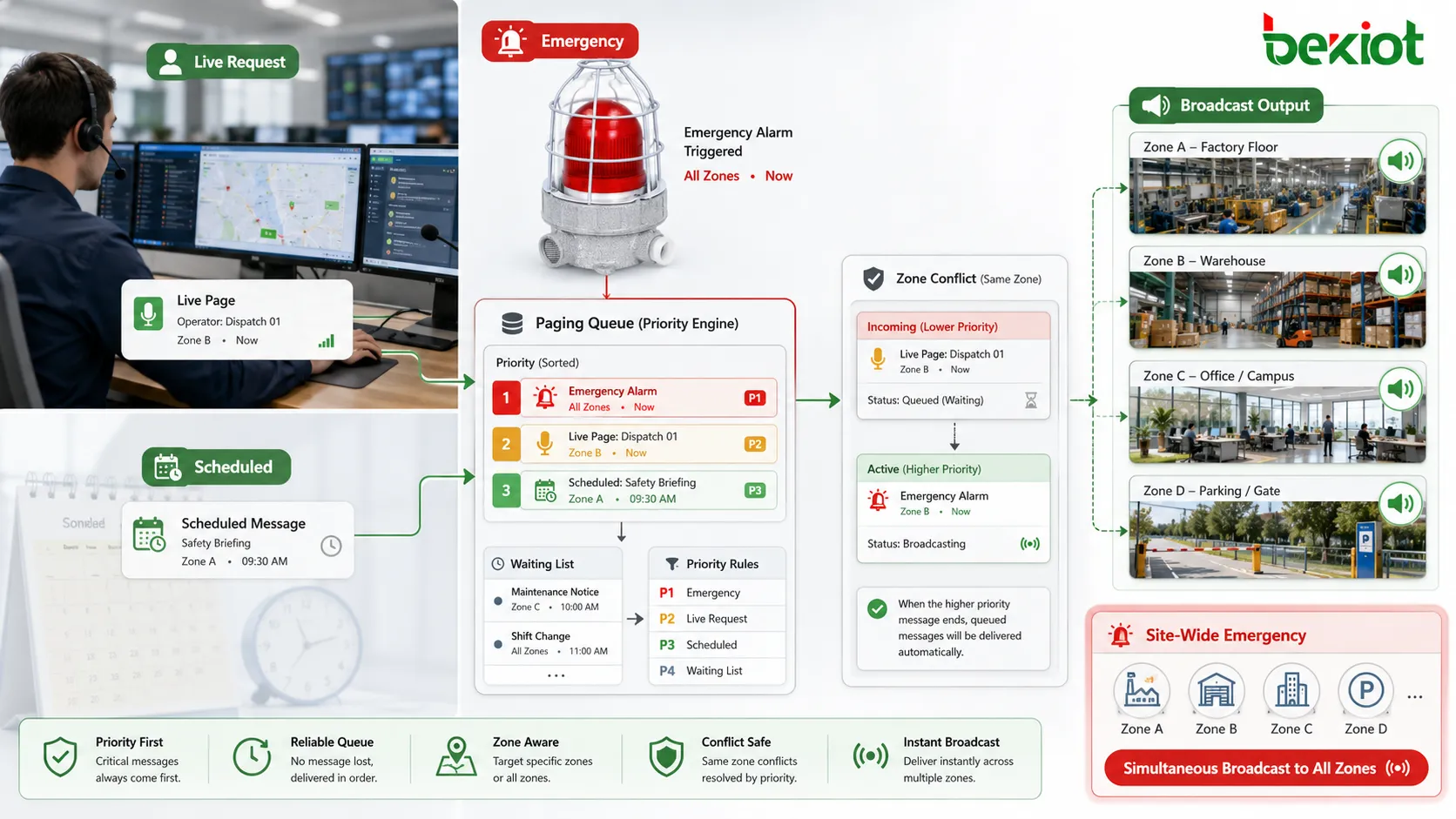
Destination conflict matters as well. Two messages targeting different zones may play at the same time if resources allow it. Two messages targeting the same zone cannot both be understood clearly, so the queue must decide which one gets the zone. A site-wide emergency message may lock multiple zones and force local tasks to wait, pause, or cancel.
A paging queue sorts live paging, scheduled messages, and alarm-triggered broadcasts according to priority, timing, and zone conflict rules.
Queue status shows system behavior
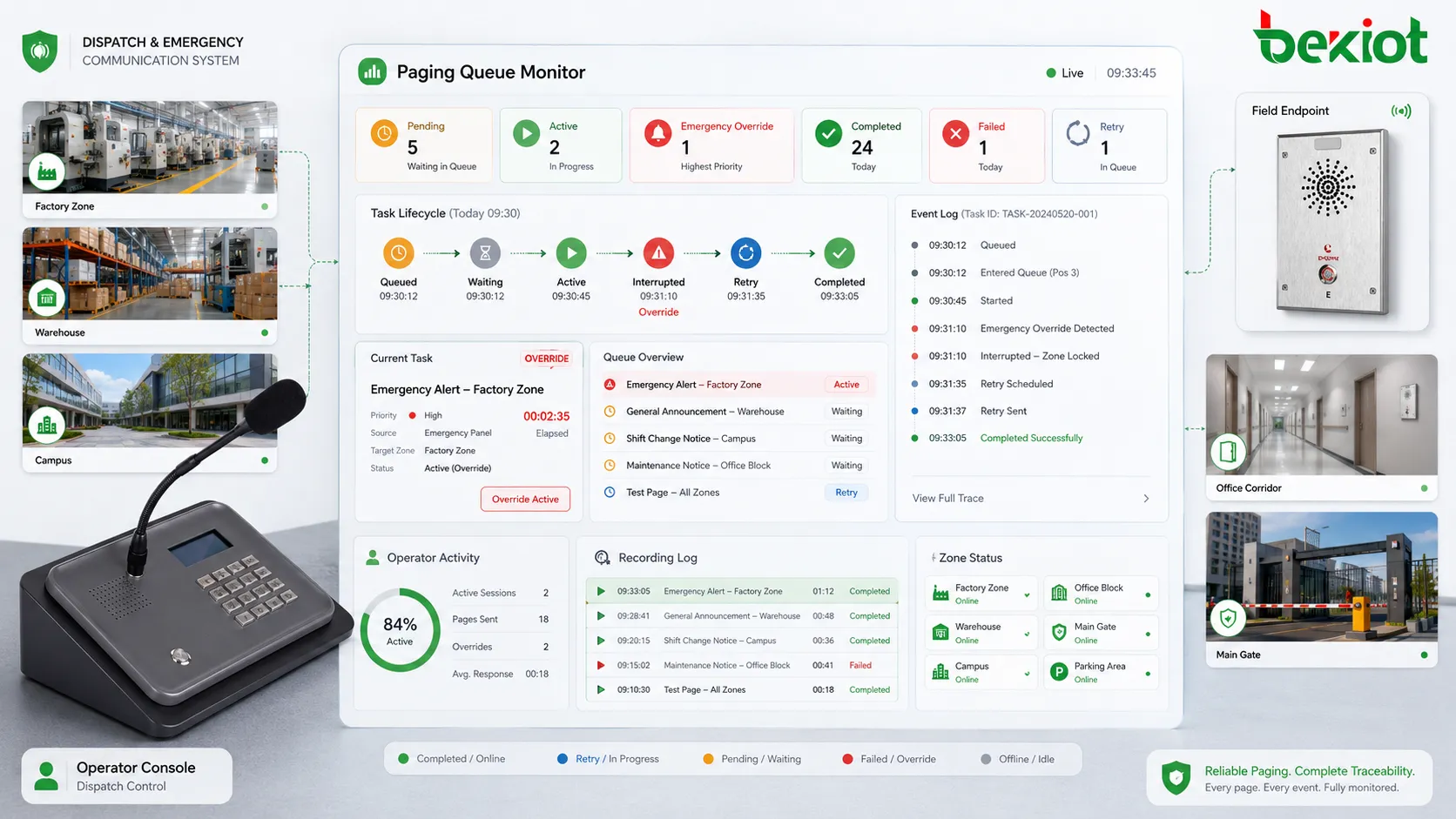
A paging queue should not be an invisible process. Operators and administrators need to see whether a message is pending, ready, playing, paused, interrupted, completed, failed, retried, canceled, skipped, or expired.
Visible status reduces uncertainty. If a scheduled message is waiting behind an emergency broadcast, the operator can see why. If a live page fails because the destination zone is unavailable, the operator can choose another action. If a task is delayed by a higher-priority page, the queue can show that conflict.
Queue records also support troubleshooting. If a user reports that an announcement did not play, the log can show whether the request entered the system, whether it was accepted, whether it waited, whether it was interrupted, whether devices were offline, or whether the task expired.
Main uses of a paging queue
Preventing audio conflicts
The most direct use is preventing audio overlap. Without queue control, two audio tasks may try to play in the same zone at the same time. Listeners may hear overlapping speech, distorted sound, or confusing instructions.
The queue controls access to each zone or audio resource. If a routine announcement is playing and a higher-priority emergency message arrives, the routine message can be interrupted. If a lower-priority message arrives while a critical message is active, it can wait, expire, or be skipped according to policy.
Emergency override
Emergency override is a critical queue function. When an emergency request enters the system, it should not wait behind routine tasks. The queue recognizes the emergency priority and moves the task to the front or immediately takes control of the required zones.
Emergency behavior may include stopping background music, interrupting scheduled playback, pausing low-priority paging, locking selected zones, playing warning tones, and blocking unauthorized messages until the emergency state is cleared.
The behavior should be predictable. Operators should know whether interrupted messages will resume, be canceled, or need manual restart. In safety-related deployments, this should be tested during drills.
Scheduled message management
Scheduled announcements also need queue control. Shift reminders, class bells, safety prompts, visitor notices, cleaning reminders, closing announcements, and service messages may all enter the system at planned times.
If the target zone is free, the message can play. If the zone is busy, the queue decides whether to delay, skip, pause, cancel, or expire the task. This prevents routine automation from interrupting more important communication.
Expiration is important. A bell, transport notice, or loading dock instruction may lose meaning if it plays too late. Queue rules should prevent outdated messages from appearing after their operational value has passed.
Multi-operator dispatch
In dispatch systems, several users may have paging authority. A security desk, maintenance center, reception desk, control room, emergency commander, and local supervisor may all initiate announcements.
When operators page different zones, simultaneous playback may be allowed. When they page the same zone, the queue uses priority, authority, timing, or zone-lock rules. This makes multi-user operation more predictable and reduces repeated button pressing.
The queue log should show who initiated each task, which zone was selected, what priority was used, and what happened. This supports communication accountability and dispute review.
Zone locking and resource control
Zone locking protects important messages. When a high-priority page is active in a zone, the system may lock that zone so lower-priority tasks cannot enter. This prevents interference during evacuation, emergency command, or safety announcements.
Resource control is also part of queue design. Some systems have limited amplifier channels, audio streams, network bandwidth, SIP sessions, or processing capacity. The queue prevents the system from starting more simultaneous tasks than it can handle.
Retry and failure handling
Paging tasks may fail because a device is offline, a network path is blocked, a speaker zone is unavailable, an audio file is missing, a SIP endpoint does not answer, or a higher-priority event interrupts playback.
The queue can apply retry, failure logging, operator notification, or escalation according to priority. A failed routine reminder may only need a log. A failed emergency broadcast may need immediate alarm and maintenance response.
Retry rules should be controlled. Continuous retry can create noise, load, or repeated partial playback. Retry count, interval, expiration, and escalation should be defined clearly.
Traceability and listener experience
Paging queues support traceability because every task has a lifecycle. The system can record when the request entered the queue, when it started, whether it waited, whether it was interrupted, when it ended, and what result occurred.
In dispatch and emergency systems, these records help incident review. They can show whether an emergency message properly preempted lower-priority audio, whether a zone was locked, whether a scheduled message was skipped, and whether a failed task was retried.
Queue control also protects listener attention. If too many announcements play too closely together, people may become irritated or stop paying attention. By spacing messages, delaying low-priority tasks, suppressing repeated notices, and preventing overlap, the queue makes paging clearer and more credible.
Industrial sites use paging queues to manage announcements from control rooms, supervisors, maintenance teams, scheduled shift reminders, alarm systems, and emergency triggers. A queue can ensure that a safety warning overrides a routine reminder and that two supervisors do not page the same production line at the same time.
Queue design should reflect process importance. Safety-related pages should have higher priority than routine notices. Production dispatch may outrank background music. Maintenance reminders may need expiration times because they lose value if delayed too long.
Emergency command
Emergency command systems depend on queue priority. During an incident, alarms, live operator messages, scheduled playback, field calls, and public address instructions may occur together. The queue ensures that emergency messages are processed first.
For evacuation, the queue can give the evacuation message highest priority, lock affected zones, interrupt ordinary announcements, and record the communication timeline for later review.
Public address and transport systems
Transport hubs and public address systems handle scheduled passenger notices, live operator updates, platform changes, service reminders, security messages, and emergency alerts. The queue determines message order and prevents overlapping announcements that passengers cannot understand.
Airports, metro systems, bus terminals, ports, parking facilities, and tunnels may also need zone-based playback. Some messages can play in separate areas at the same time, while others compete for shared resources. Queue control keeps public communication intelligible.
Campuses, hospitals, and commercial buildings
Campuses use queues for class bells, safety drills, live announcements, emergency alerts, event notices, and building-specific messages. Hospitals need careful queue design because routine messages should not disturb sensitive areas or block urgent communication.
Commercial buildings use queues to manage opening notices, closing announcements, parking guidance, customer service messages, security alerts, and facility broadcasts. In these settings, the queue should balance urgency with listener comfort.
Key characteristics of a strong queue
A strong paging queue should have clear priority logic. Emergency messages, high-risk alarms, and command instructions should be processed ahead of routine messages. The priority model should match site procedures and be easy for operators to understand.
Zone awareness is also necessary. A task affecting one zone should not unnecessarily block unrelated zones. If two messages target different zones and system resources allow it, they may run at the same time. If they target the same zone, the queue should resolve the conflict.
Visibility and failure handling are equally important. Operators should see pending, active, interrupted, completed, failed, and canceled tasks. Important failures should not disappear silently. The system should log the issue, notify users where needed, and apply retry or escalation rules.
Finally, queue behavior should be configurable. A factory, hospital, campus, transport station, and emergency command center do not share the same communication priorities. The queue should support rules that reflect real operation.
Common mistakes and better fixes
Mistake
Typical Result
Better Fix
Treating all paging tasks equally
Routine messages may delay urgent communication
Define priority levels according to risk, source authority, and response procedure
Using only first-in-first-out rules
Arrival order overrides message importance
Consider priority, source authority, zone conflict, expiration, and event type
Hiding queue status
Operators repeat requests or assume the system failed
Show waiting, playing, interrupted, failed, completed, and expired task states
No expiration rules
Outdated messages may play after they are no longer useful
Set validity periods for time-sensitive scheduled or operational messages
Poor queue logging
Administrators cannot explain skipped, delayed, interrupted, or failed playback
Log source, user, group, priority, timing, conflict, retry, result, and related event
How to evaluate queue effectiveness
An effective paging queue should make system behavior predictable. Operators should understand which messages play immediately, which messages wait, which messages can interrupt others, and which messages expire.
The queue should protect urgent communication. Emergency announcements should not wait behind routine tasks. Safety messages should override low-priority audio. The queue should support the emergency procedure rather than only process tasks in order.
It should also reduce audio conflict. Listeners should not hear overlapping announcements in the same zone. Scheduled messages, live paging, alarm broadcasts, and background audio should be sequenced or prioritized so that each message remains understandable.
Useful records are also required. Logs should show request time, source, user, target group, priority, status, start time, end time, interruption reason, failure cause, retry count, completion result, and related alarm or dispatch event.
Most importantly, the queue should fit the site’s real operation. A transport station, industrial plant, hospital, campus, warehouse, and emergency command center all have different communication priorities. The queue is effective only when it supports that operational reality.
Final view
A paging queue is the control mechanism that organizes multiple paging tasks before and during broadcast. It manages live announcements, scheduled messages, emergency triggers, retries, intercom-linked pages, and zone-based audio requests according to priority, timing, source authority, destination conflict, resource availability, and task status.
Its main value is preventing audio conflict, protecting emergency override, managing scheduled messages, supporting multi-operator dispatch, controlling zone access, handling failures, preserving event traceability, and improving listener experience.
Paging queues are especially valuable in industrial production, emergency command, public address, transport facilities, hospitals, campuses, commercial buildings, and large facility management systems. When designed with clear priority, zone awareness, visibility, failure handling, and reliable logs, they become a key foundation for safe and predictable paging communication.
FAQ
Is a paging queue the same as a paging group?
No. A paging group defines who or which zones receive a message. A paging queue controls the order, priority, status, and conflict handling of paging tasks before or during playback.
Why does a paging system need a queue?
A queue is needed when multiple paging requests may occur at the same time. It prevents audio overlap, protects emergency messages, manages scheduled playback, and helps operators understand task status.
Can emergency messages jump ahead in the queue?
Yes, if priority rules are configured correctly. Emergency messages can move ahead of routine tasks, interrupt lower-priority audio, or lock selected zones until the emergency broadcast is complete.
What happens to delayed scheduled messages?
It depends on configuration. A delayed message may wait, play later, be skipped, expire, or be canceled if a higher-priority task occupies the zone. The system should log the reason clearly.
What information should a paging queue log include?
Useful logs include request time, source, user, target group, priority, status, start time, end time, interruption reason, failure cause, retry count, completion result, and related alarm or dispatch event.