Push-To-Talk explained for field teams, dispatch centers and enterprise communication systems, covering PTT operation, talk groups, PoC, devices, priority, coverage and deployment planning.
Becke Telcom
Push-To-Talk, often shortened to PTT, is a voice communication method built around a simple action: press a button to speak, release it to listen. It is familiar from two-way radios, walkie-talkies, rugged handheld terminals, dispatch devices, mobile PTT apps, and Push-To-Talk over Cellular systems.
PTT is not designed to replace every phone call. Its value appears when people need fast, short, group-oriented communication. A security guard reporting an incident, a warehouse supervisor coordinating loading, a driver asking for instructions, or a maintenance worker contacting the control room may need to speak immediately without dialing, ringing, or waiting for a private call to connect.
How Push-To-Talk works
Press to transmit, release to listen
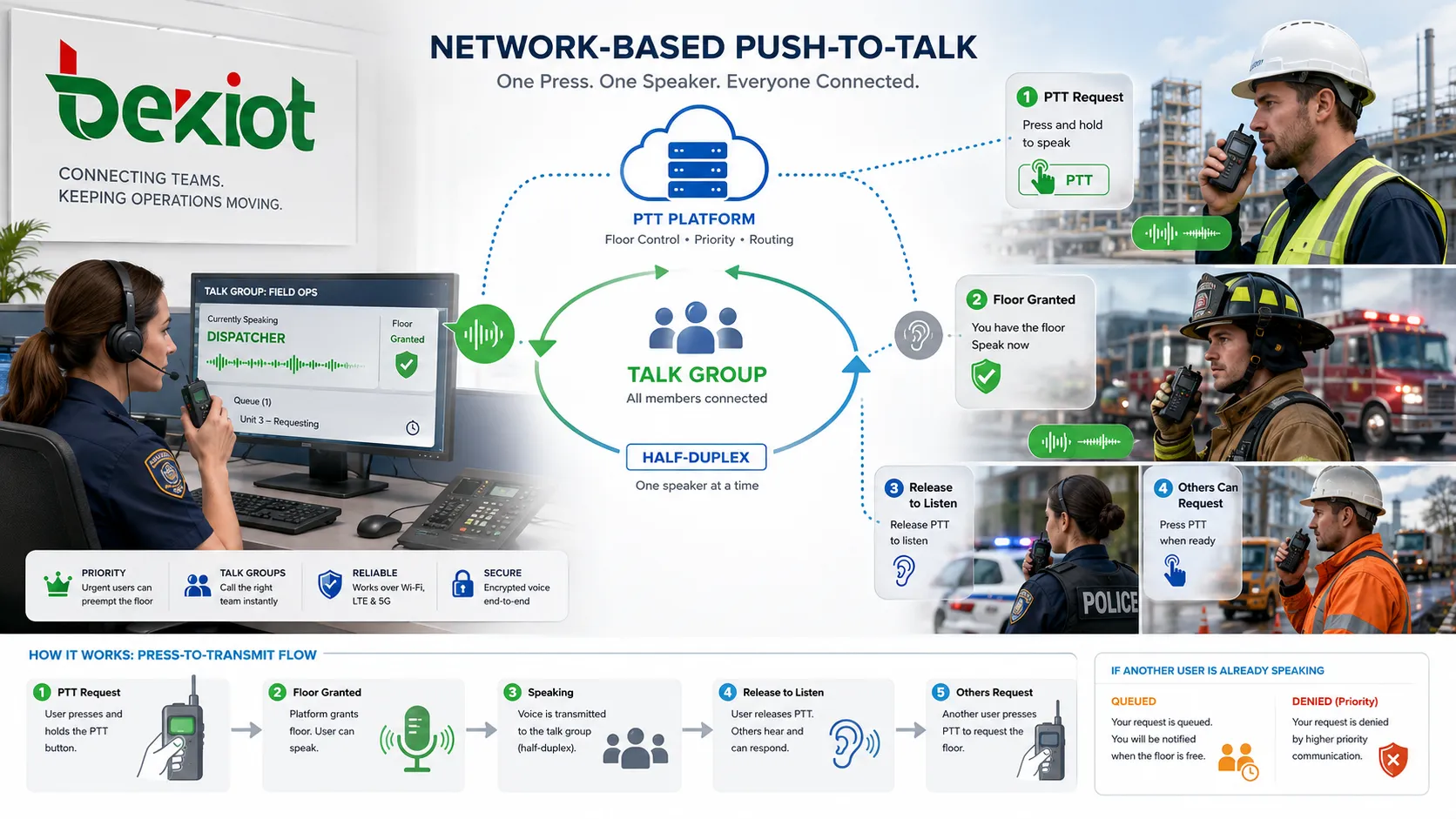
The basic working principle is press-to-transmit. When the user presses the PTT key, the terminal changes from listening mode to transmitting mode. The microphone captures the voice, and the system sends the audio through a radio channel, cellular network, IP network, or dispatch platform.
When the user releases the key, the terminal stops transmitting and returns to listening mode. This makes the operation simple in field environments. Users do not need to search contacts or operate complex menus every time they need to send a short message.
Half-duplex communication
Most PTT systems use half-duplex communication. This means users can talk with each other, but not at the same time. One person speaks while the others listen. After the speaker releases the button, another user can respond.
This controlled speaking order is one reason PTT works well in group operations. It reduces open-microphone noise and prevents continuous overlap. In noisy or urgent environments, short turn-based speech is often clearer than an open group call.
Talk groups and floor control
PTT is usually organized around talk groups. A talk group may represent a security team, maintenance team, vehicle fleet, warehouse zone, construction section, emergency group, or command channel. When one member speaks, authorized members in the group hear the same message.
In network-based PTT systems, floor control decides who has the right to speak at a given moment. If the channel is free and the user has permission, the system grants the floor. If another user is already speaking, the request may be denied, queued, or handled according to priority.
The main reason is speed. Ordinary calls require selecting a contact, dialing, waiting for ringback, and waiting for the other side to answer. PTT reduces this process to one button press, which is valuable when communication must support movement, coordination, safety, or field response.
Another reason is shared awareness. In a phone call, only two people hear the information. In a PTT group, the whole team can receive the same message at the same time. This reduces repeated calls and keeps team members aligned during changing conditions.
PTT also supports communication discipline. Because users normally speak one at a time, teams can use short reports, call signs, acknowledgement words, priority phrases, and emergency procedures. This makes communication more structured than casual group voice chat.
Core system components
PTT terminals
PTT terminals are the devices used by field users. They may include two-way radios, PoC handheld terminals, rugged smartphones, PTT apps, vehicle terminals, dispatch microphones, desktop clients, or wearable devices. The terminal should match the user’s work environment.
For noisy sites, loud audio, headset support, noise reduction, and a strong physical PTT key may matter. For outdoor or industrial use, waterproof, dustproof, impact-resistant, and glove-friendly design may be needed. Device usability directly affects system performance.
Group and user management
Administrators must define who belongs to each group, who can speak, who can listen, who has priority, and which users can communicate across departments or sites. Poor group design can create too much traffic or prevent the right people from hearing important messages.
Groups should follow real operating responsibility. Security patrol, maintenance, transport dispatch, warehouse operation, emergency response, management, and temporary event teams may need different permissions. Clear group planning makes the system easier to use and maintain.
Dispatch platform
Professional PTT systems often include a dispatch platform. A dispatcher may view users, groups, online status, location, active calls, emergency alerts, communication history, and recording records. The platform may support group calls, private calls, priority calls, emergency calls, and map-based coordination.
This gives supervisors more control than a simple shared channel. In public safety, industrial, logistics, and facility environments, dispatch visibility helps the control room understand where users are, what group is active, and how an incident is developing.
Network and interoperability layer
PTT needs a bearer network. Traditional systems may use dedicated radio channels. Modern PoC or IP-based systems may use cellular networks, Wi-Fi, private LTE/5G, enterprise IP networks, satellite links, or hybrid paths. Coverage and delay strongly affect user experience.
Some projects also need interoperability. A PTT platform may connect with radio systems, SIP phones, dispatch consoles, public address systems, emergency call points, or command platforms through gateways. This helps organizations keep existing systems while adding wider-area or IP-based PTT capability.
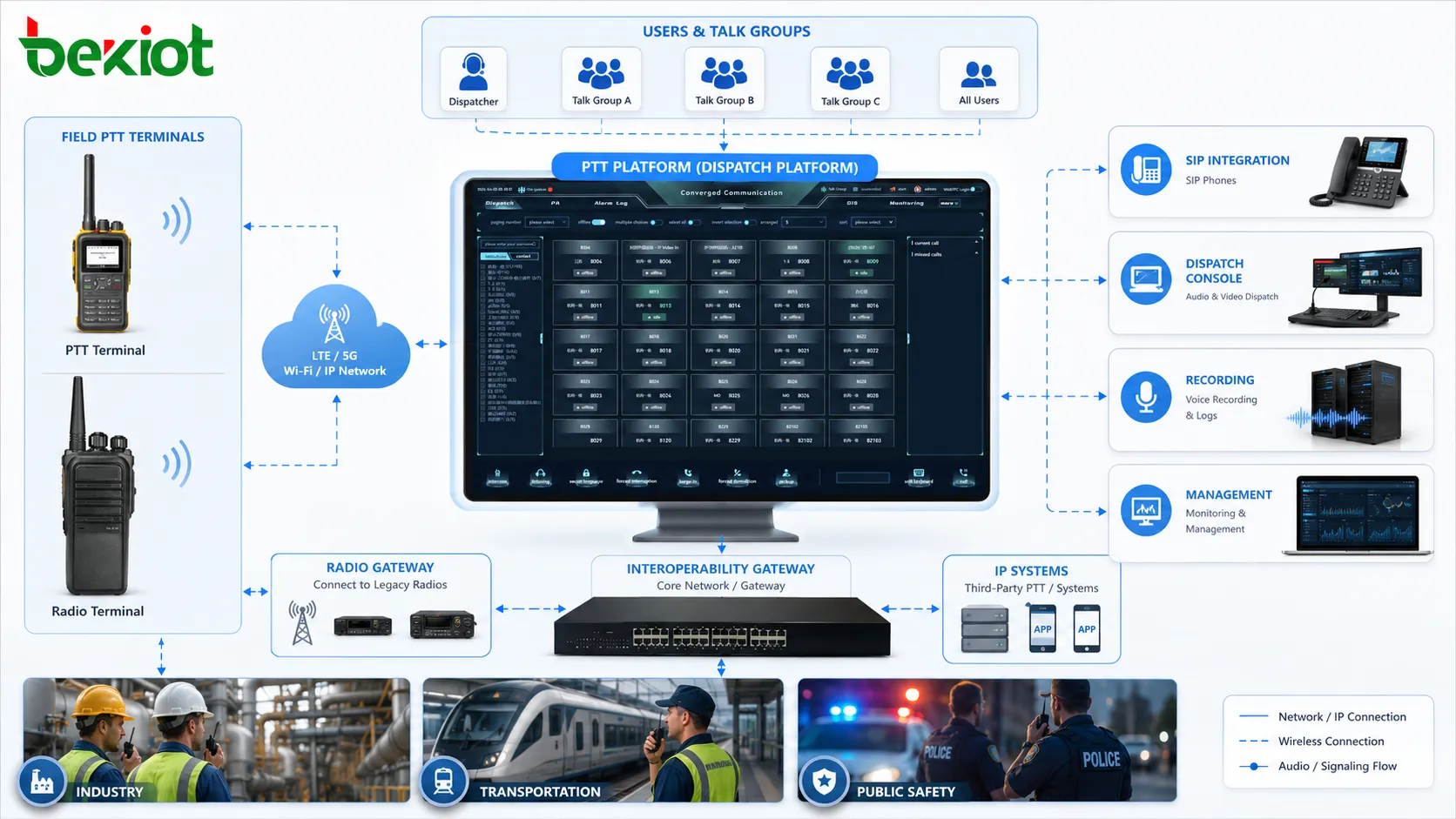
A PTT system may include terminals, talk groups, dispatch software, bearer networks, gateways, recording, and management tools.
Common communication modes
One-to-one PTT
One-to-one PTT allows one user to speak directly with another user. It is useful when the message is not suitable for the whole group. A dispatcher may contact one driver, or a supervisor may confirm a detail with one technician.
This mode keeps unnecessary traffic away from group channels. It is suitable for short private coordination, but it should not replace group communication when the whole team needs shared awareness.
Group PTT
Group PTT is the most typical mode. One user presses the button and speaks to all authorized members of a selected group. It is used for instructions, alerts, status reports, task coordination, and routine updates.
The value is efficiency. One message reaches everyone who needs it. In fast-moving environments, this reduces repeated communication and helps teams act on the same information.
Emergency PTT
Emergency PTT allows a user to send an urgent alert or priority voice transmission. It may be triggered by a dedicated emergency button, long press, software key, or dispatch rule. The system may notify a dispatcher, raise priority, show location, start recording, or open an emergency group.
This mode is useful for lone workers, security patrols, field maintenance, transport staff, and emergency response teams. It gives users a fast way to request help when normal communication steps are too slow.
Application scenarios
Public safety and security
PTT is widely used by security guards, patrol teams, emergency responders, traffic officers, event security staff, and control room operators. These teams need immediate communication that can reach one person, one group, or the dispatcher quickly.
In these scenarios, PTT supports incident reporting, backup requests, patrol confirmation, movement coordination, and command instructions. Emergency priority and location reporting can further improve response when supported by the platform.
Industrial plants and field maintenance
Industrial sites use PTT for workshop coordination, equipment maintenance, safety patrol, utility inspection, loading area control, and emergency handling. Workers may be spread across noisy, hazardous, or large environments where ordinary phone calls are inefficient.
Rugged terminals, loud audio, headset support, and reliable coverage are important in these environments. The system should allow technicians, supervisors, and control rooms to exchange short operational messages without delay.
Transportation and logistics
Transportation and logistics teams use PTT for driver dispatch, fleet coordination, warehouse operation, port movement, station management, parking control, and delivery service. These workflows depend on fast instructions and frequent status updates.
Wide-area PoC systems are useful when teams move across large regions. Dispatchers can reach drivers or field teams without making individual phone calls, while group channels keep related users aware of route changes, loading instructions, delays, and safety notices.
Construction, energy, and outdoor sites
Construction projects and energy facilities often include outdoor work, temporary zones, moving equipment, changing site layouts, and safety risks. PTT provides a practical voice method for supervisors, vehicle drivers, crane teams, safety officers, electricians, and maintenance workers.
Device selection should follow the working environment. A large physical button, strong speaker output, durable housing, vehicle accessories, and clear group structure can improve usability in demanding field conditions.
Facility management, retail, and events
Campuses, hospitals, hotels, shopping centers, stadiums, exhibition halls, office parks, and public buildings use PTT for security patrol, cleaning coordination, maintenance dispatch, parking support, visitor service, queue management, and event operation.
Staff can request help, report customer needs, coordinate service teams, and respond to incidents without leaving their position. Lightweight mobile PTT apps may be suitable where dedicated radio terminals are unnecessary.
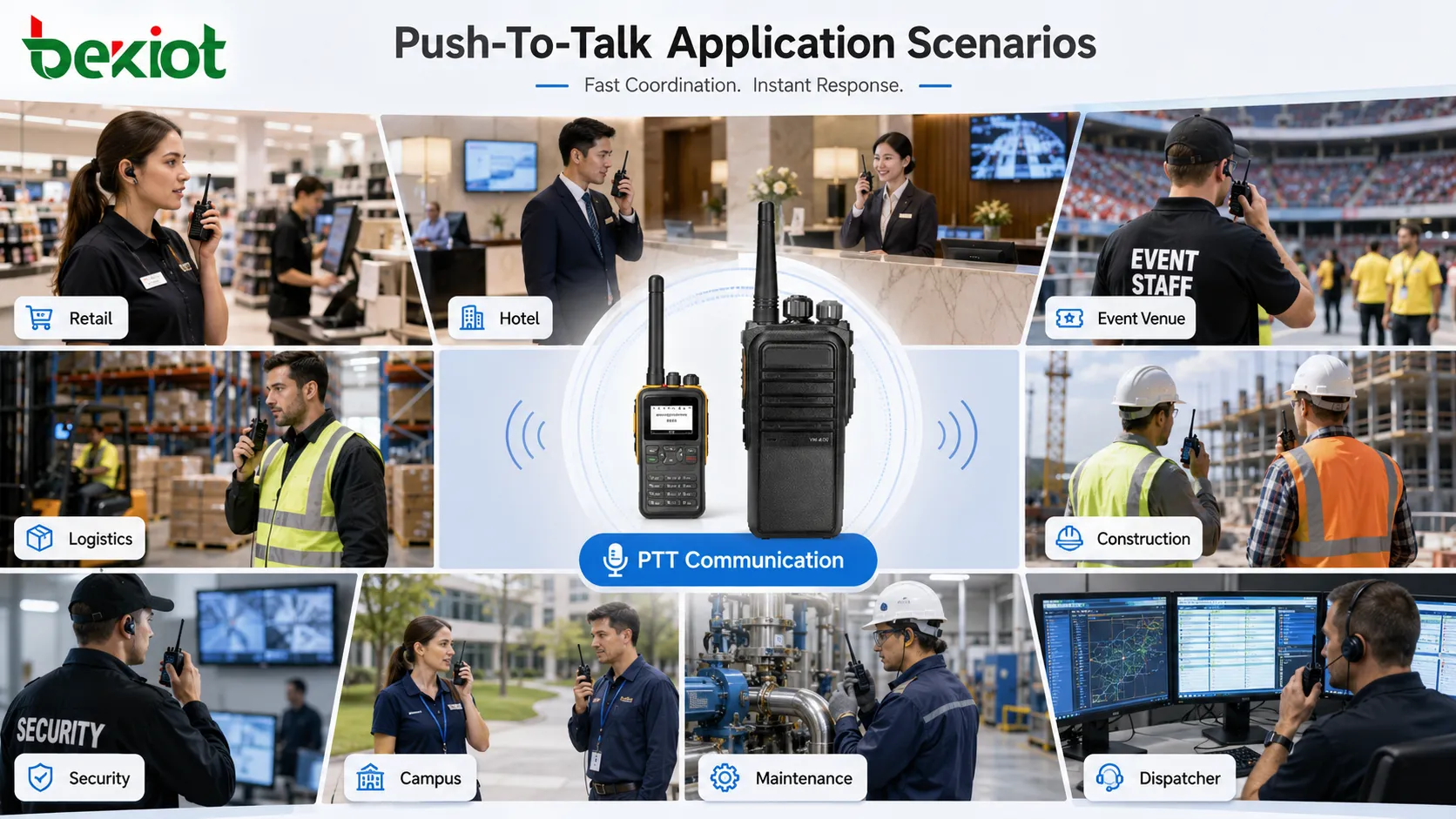
Push-To-Talk is used in security, industrial maintenance, logistics, construction, energy, campuses, hospitality, and service operations.
PTT compared with ordinary phone calls
Comparison Point
Push-To-Talk
Ordinary Phone Call
Connection method
Press one button and speak to a predefined user or group
Select contact, dial, ring, and wait for answer
Communication style
Short, operational, usually half-duplex
Longer conversation, usually full-duplex
Group awareness
One message can reach all group members
Usually one-to-one unless using conference calling
Best use
Dispatch, coordination, alerts, field reports, emergency support
One speaker at a time, suitable for command-style communication
Natural conversation, less suitable for large operational groups
Deployment considerations
Coverage and network reliability
PTT performance depends on coverage. Radio systems need reliable radio coverage. PoC and IP-based PTT systems need stable cellular, Wi-Fi, private LTE/5G, or enterprise network coverage. Weak signal areas may cause delayed transmission, failed floor requests, or missing audio.
Coverage testing should follow real user routes. Basements, tunnels, stairwells, warehouses, outdoor yards, gates, vehicles, and remote stations may behave differently from office areas. The system should be tested where users actually work.
Talk group planning
Talk groups should be planned according to real workflows. Too few groups cause unrelated users to hear too much traffic. Too many groups make communication confusing. The plan should reflect departments, locations, shifts, roles, emergency procedures, and dispatch needs.
Group names should be simple and recognizable. Users should know which group to use for routine work, urgent support, emergency response, and cross-team coordination.
Priority and permission rules
A professional PTT system should define user roles. Dispatchers, supervisors, emergency users, field staff, temporary workers, and visitors may need different permissions. Some users may speak in certain groups, listen only in others, or have higher priority.
Priority should match responsibility. If too many users have override rights, the channel becomes disruptive. If no one has priority, urgent command messages may be blocked by routine traffic.
Audio, accessories, and device fit
Audio quality affects whether users trust the system. Field users may work near machinery, traffic, crowds, wind, or moving vehicles. Terminals may need strong speakers, noise reduction, remote speaker microphones, headsets, vehicle kits, or glove-friendly buttons.
Device selection should not be based only on price. A smartphone app may be suitable for light service teams. A rugged terminal may be better for industrial maintenance. A vehicle-mounted device may be needed for drivers or mobile patrol teams.
Common problems and better fixes
Problem
Typical Impact
Better Fix
Channel congestion
Important messages are delayed or buried under routine chatter
Improve group design, train users, and separate routine and emergency channels
Unclear speaking rules
Users interrupt, hold the button too long, or miss acknowledgements
Define call signs, short message format, acknowledgement rules, and emergency words
Poor coverage in critical areas
Users lose communication in basements, tunnels, yards, or moving vehicles
Perform field coverage tests and add repeaters, access points, private network planning, or backup methods
Wrong device selection
Devices are inconvenient, not rugged enough, or unsuitable for user behavior
Select terminals and accessories according to environment, task, and user workflow
No management policy
Groups, recordings, permissions, and emergency rules become inconsistent
Create group plans, recording rules, permission reviews, and routine maintenance procedures
How to evaluate a PTT system
A good PTT system should start communication quickly. Evaluation should include the time from pressing the button to speaking, floor-control response, and how promptly group members receive the message.
Audio should remain understandable in real working conditions. Testing should include noise, movement, vehicles, indoor and outdoor areas, different terminals, and different accessories. Clear speech is more important than loud volume alone.
Group management should be easy to maintain. Administrators should be able to add users, adjust groups, assign priority, remove temporary members, and update permissions without creating confusion.
Coverage and reliability should be tested together. Network stability, device durability, battery life, server availability, dispatch platform reliability, and backup communication methods all affect the final user experience.
For professional projects, dispatch and record value should also be reviewed. Location display, emergency alerts, logs, recordings, communication history, and management reports can turn PTT from a simple voice tool into an operational coordination platform.
Final view
Push-To-Talk is a press-to-transmit voice communication method designed for fast, simple, and group-oriented coordination. It allows users to press a button to speak and release it to listen, usually in a half-duplex mode where one user talks while others receive.
PTT is most useful when teams need short operational messages, shared awareness, controlled speaking order, priority communication, and fast field response. It is widely used in security, public safety, industrial maintenance, logistics, construction, energy, facility management, campuses, hospitality, retail, and event service.
A reliable PTT deployment is not only about choosing terminals. It also requires clear talk group planning, strong coverage, suitable devices, audio testing, priority rules, user training, recording policy, dispatch management, and long-term maintenance. When these elements are handled well, PTT becomes a practical communication layer for field teams and command centers.
FAQ
What does Push-To-Talk mean?
Push-To-Talk means pressing a button to transmit voice and releasing it to listen. It is commonly used in two-way radios, PoC systems, dispatch platforms, and field communication devices.
Is PTT the same as a phone call?
No. A phone call is usually full-duplex and one-to-one, while PTT is usually half-duplex and often group-based. PTT is better for fast operational coordination, while phone calls are better for longer private conversations.
What is Push-To-Talk over Cellular?
Push-To-Talk over Cellular, often called PoC, provides PTT-style communication over cellular, Wi-Fi, or IP networks. It can extend PTT communication beyond traditional local radio coverage.
Why do PTT systems use talk groups?
Talk groups allow one user to speak to multiple authorized members at once. This improves team awareness and reduces the need to call each person separately.
Where is PTT most useful?
PTT is most useful in field operations, security patrol, industrial maintenance, logistics fleets, construction sites, transport services, public safety, facility management, and any environment that needs fast team voice coordination.